
【2025年版】コンテンツクリエイターにおすすめのAIツール12選
2025年最新版、コンテンツクリエイターにおすすめのAIツール12選を徹底解説します。動画制作、ライティング、グラフィックデザイン、音声編集など、各分野で最高のパフォーマンスを発揮するツールを厳選。AIを活用してワークフローを劇的に効率化し、クリエイティブな生産性を最大化する方法をご紹介します。制作の質とスピードを向上させたいクリエイター必見の完全ガイドです。
Veo3 AI · 5 min read · Dec 10, 2025
AI業界は混沌としていますが、適切なツールを選べば、手作業の多いワークフローをクリエイティブな原動力へと変えることができます。本ガイドでは、情報過多な状況を整理し、現在利用可能なコンテンツクリエイター向けの最高のAIツールを厳選してご紹介します。単なる機能リストにとどまらず、実践的なインサイト、実際の使用例、そして各ツールの限界についても正直に解説します。
テンポの速いショート動画を制作するYouTuber、プロモーションビデオを開発するマーケター、ソーシャルメディアキャンペーンを企画する中小企業経営者など、あらゆる方にとっての解決策がここにあります。このリストは、高品質なコンテンツのアイデア出し、脚本作成、デザイン、公開をこれまで以上に迅速に行えるよう設計されています。ライティング、動画、オーディオ、デザインといった主要機能別にツールを整理していますので、皆様の具体的なクリエイティブニーズに合わせた、最適なAI支援テックスタックの構築にお役立てください。
各項目には、プラットフォームへの直接リンク、視覚的に確認できるスクリーンショット、そしてメリット、デメリット、価格の明確な内訳を掲載しています。生成機能だけでなく、音声や動画を効率的にテキスト化する2025年のトップAI文字起こしソフトウェアのような専門的なAIツールを活用することで、ワークフローを効率化することも可能です。私たちの目標は、皆様のコンテンツ制作プロセスを真に向上させるプラットフォームを戦略的に選択できるよう、包括的なリソースリストを提供することです。
1. Veo3 AI
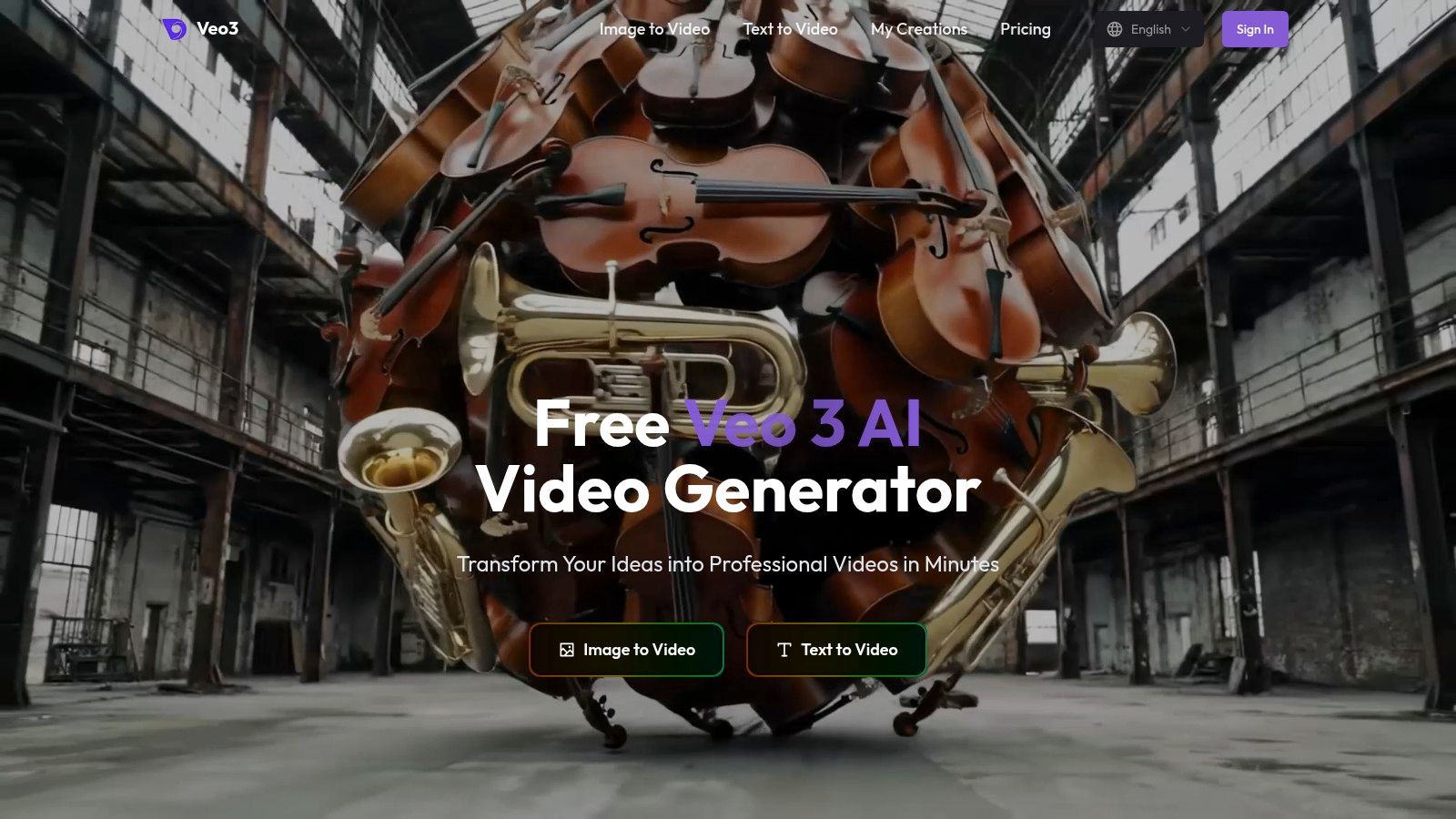
Veo3 AIは、複数の最先端モデルを単一のシームレスなプラットフォームに統合することで、AI動画生成分野における強力なツールとしての地位を確立しています。Sora 2、Veo3、Seedanceといった個別のツールを使い分ける必要はなく、クリエイターは一元化されたアクセス権を得ることができ、シンプルなテキストプロンプトや静止画から動画制作ワークフロー全体を効率化できます。このオールインワンのアプローチこそが最大の強みであり、効率と品質を重視するコンテンツクリエイターにとって最高のAIツールの一つとなっています。
このプラットフォームは、スピードとアクセシビリティを重視して設計されています。ユーザーは高精細で映画のような動画クリップを数分で生成できるため、広告コンセプトの迅速なプロトタイピング、魅力的なソーシャルメディア向けショート動画の作成、教育コンテンツ用ビジュアル教材の開発に最適です。直感的なインターフェースにより、動画編集ソフトウェアにありがちな習得の難しさが解消されており、マーケター、教育者、インフルエンサーにとって非常に魅力的なツールとなっています。
主な機能と使用例
- マルチモデル統合: Veo3 AIの際立った特徴は、主要な生成モデルのライブラリへのアクセスです。これにより、プラットフォームを離れることなく、さまざまなエンジンを試してプロジェクトに最適なビジュアルスタイルを見つけることができます。
- 柔軟な入出力: テキストによる説明または既存の画像から動画を生成できます。解像度やエクスポート形式も指定できるため、最終的なアセットの品質と互換性を管理できます。
- 完全な商用利用権: プロフェッショナルにとっての重要な利点は、クリエイターが生成されたコンテンツの完全な所有権を保持できることです。この明確なポリシーにより、無制限の個人的または商用利用が可能となり、収益化において重要な要素となります。
私たちの見解
Veo3 AIは、高品質な動画制作の民主化に優れています。ウェブサイトでは無料アクセスが強調されていますが、クリエイターは価格ページを確認し、潜在的な利用制限を把握しておくべきです。目立つ推薦文(テスティモニアル)がない点は小さな欠点ですが、プラットフォームの強力なマルチモデルエンジンとシンプルなユーザーエクスペリエンスにより、洗練された動画コンテンツを素早く制作する必要がある人にとって不可欠なツールとなっています。その機能を実際に確認するには、veo3ai.ioでのAI動画作成について詳しく学ぶことができます。
| 機能 | 詳細 |
|---|---|
| 最適な用途 | ソーシャルメディアのショート動画、マーケティングプロトタイプ、教育コンテンツ、インディーズアーティスト |
| 入力タイプ | Text-to-Video、Image-to-Video |
| 主な利点 | Sora 2、Veo3、Seedanceモデルに1つのインターフェースでアクセス可能 |
| コンテンツの権利 | 個人および商用利用の完全な所有権 |
| 価格 | 無料で開始可能(詳細なティア情報は公式サイトを確認) |
| ウェブサイト | https://veo3ai.io |
2. OpenAI — ChatGPT
フラッグシップ対話型AIとして、ChatGPTはコンテンツクリエイターにとって不可欠な汎用ツールです。動画スクリプトのアイデア出しやブログ記事の構成から、ソーシャルメディアのコピー作成、さらにはチャットインターフェース内でのDALL-E 3画像の直接生成まで、コンテンツのライフサイクル全体で優れた能力を発揮します。その強みは、多用途性とGPT-4ファミリーのようなOpenAIの最先端モデルへのアクセスにあります。
単一目的のツールとは異なり、ChatGPTは中心的なハブとして機能します。クリエイターは、SEO分析や動画脚本作成などの専門タスクのためにカスタムGPTの広大なエコシステムを活用し、効果的にパーソナライズされたツールキットを作成できます。マルチステップのタスクを処理する能力や、直感的な音声・画面共有モード(有料プラン)により、インタラクティブなコンテンツ開発の強力なパートナーとなります。その使用法を習得することは、現代の**コンテンツ作成のベストプラクティス**の核心部分です。
主な機能とユースケース
- 最適な用途: あらゆる種類のコンテンツのアイデア出し、ドラフト作成、リサーチ全般。
- 主な機能: 最新のOpenAIモデルへのアクセス、カスタムGPT、エージェントワークフロー、ボイスモード、DALL-E 3統合。
- 価格: 制限付きの無料ティアを提供。有料プランは個人の場合**Plus(月額20ドル)**から始まり、セキュリティと管理機能が強化されたTeamおよびEnterpriseプランへと拡張されます。
| メリット | デメリット |
|---|---|
| カスタムGPTと統合機能の広範なエコシステム | 高度な機能は新規ユーザーには複雑な場合がある |
| エンタープライズグレードのプライバシーとセキュリティオプション | 有料ティアは多くの特化型ツールより高価 |
ウェブサイト: https://openai.com/chatgpt/pricing/
3. Adobe Firefly (Adobe Creative Cloud/Express内)
Adobeのエコシステムに深く関わっているクリエイターにとって、Fireflyは既存のワークフローを拡張するために設計されたネイティブな生成AIエンジンです。PhotoshopやAdobe Expressのような主要アプリ内で直接、商用利用可能な画像、ベクター、エフェクトを作成することに優れています。その核心的な強みはシームレスな統合にあり、ユーザーは主要なデザイン環境を離れることなく、Text to Image(テキストから画像生成)やGenerative Fill(生成塗りつぶし)などの生成AI機能を適用できます。
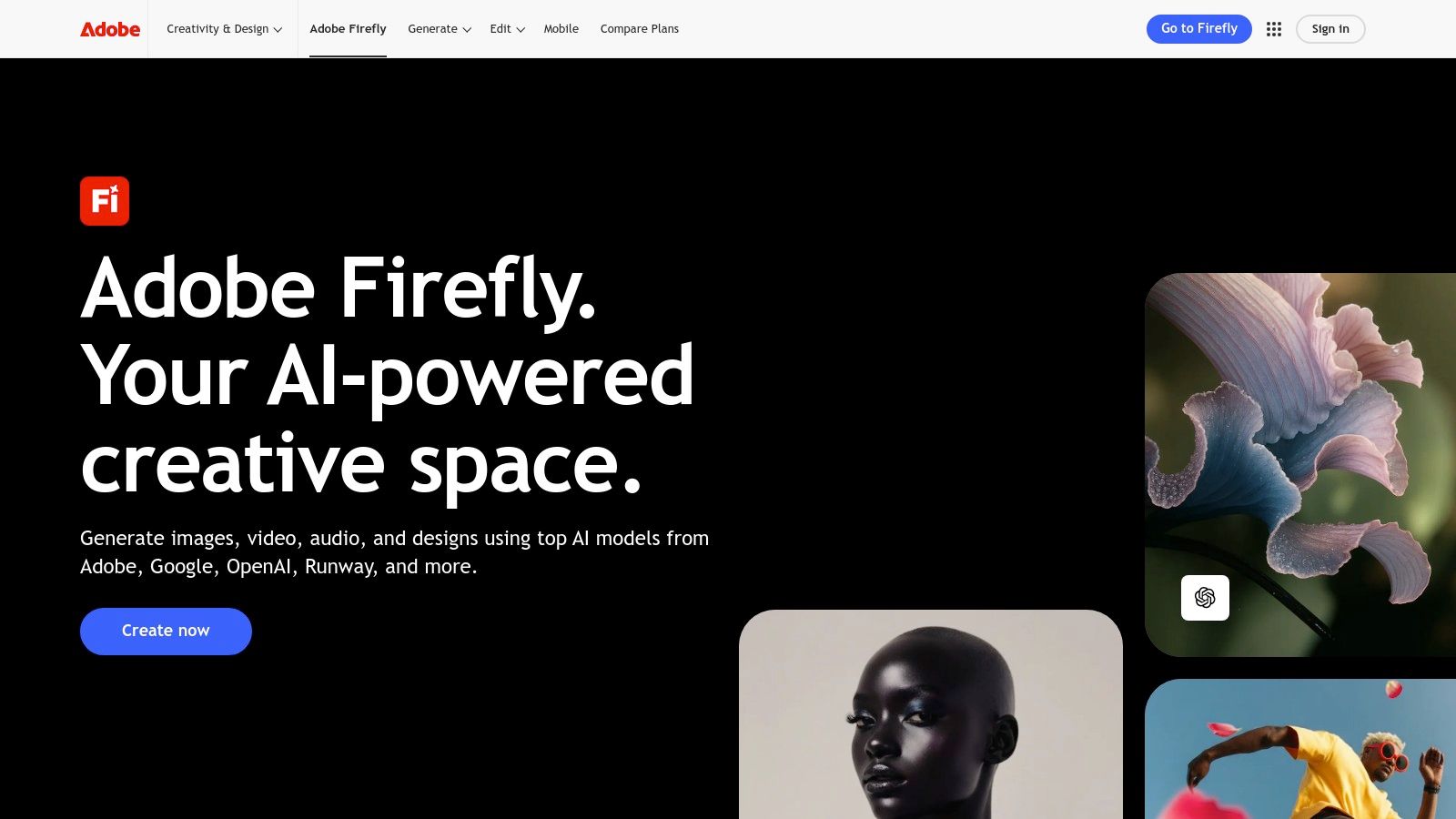
スタンドアロンの画像生成ツールとは異なり、FireflyはAdobe Stockとパブリックドメインのコンテンツでトレーニングされており、これは商用利用とブランドの安全性において重要な差別化要因となっています。これにより、明確な使用権を持つアセットを作成する必要があるクリエイターにとって、コンテンツクリエイター向けの最高のAIツールの一つとなっています。このシステムは生成クレジットモデルで動作し、アクションごとに設定された数のクレジットを消費します。これにより柔軟性はありますが、異なるCreative Cloudプラン間では価格体系が複雑になる場合があります。
主な機能とユースケース
- 推奨ユーザー: すでにAdobe Creative Cloudを使用しているグラフィックデザイナー、フォトグラファー、マーケター。
- 主な機能: PhotoshopおよびExpressとの緊密な統合、Generative Fill/Expand、Text to Image、ベクター生成、ブランドセーフなモデルトレーニング。
- 価格: 毎月の生成クレジットが付与される無料プランが利用可能です。Creative Cloudプランは月額$9.99(フォトプランの場合)から始まり、プランによって毎月のクレジット数が異なります。
| メリット | デメリット |
|---|---|
| Adobe Creative Cloudとの緊密な統合と使い慣れたUI | 画像/動画間でのクレジット計算がわかりにくい場合がある |
| 明確な商用利用の方針とブランドの安全性への注力 | 一部の高度な動画機能はまだベータ版として展開中 |
ウェブサイト: https://www.adobe.com/products/firefly
4. Canva — Magic Studio
Canvaは、Magic Studioによって、シンプルなデザインツールから包括的なAI搭載クリエイションスイートへと変貌を遂げました。ソーシャルメディア向けのビジュアルアセットを大量かつ迅速に作成する必要があるソロクリエイターや小規模チームにとって、理想的なプラットフォームです。このプラットフォームは、テキストプロンプトからのデザイン全体の生成から、コピーライティング、画像作成、さらには動画編集に至るまで、ワークフロー全体にAIを統合しており、すべてを単一の使いやすいインターフェース内で行えます。
単一の機能に特化した専門ツールとは異なり、CanvaのMagic Studioはスピードと統合を重視しています。クリエイターは、Magic Writeでソーシャルメディアの投稿を下書きし、そのためのカスタム画像を生成し、Magic Switchで複数のプラットフォーム向けにサイズ変更し、組み込みのコンテンツプランナーを使って直接投稿スケジュールを設定できます。このアイデアから公開までシームレスなワークフローにより、チャネル間での効率性とブランドの一貫性を優先するコンテンツクリエイター向けの最高のAIツールの一つとなっています。
主な機能とユースケース
- 推奨用途: ブランド化されたソーシャルメディア用画像、プレゼンテーション、ショート動画の迅速な作成。
- 主な機能: AI搭載テンプレート向けのMagic Design、コピー生成用のMagic Write、テキストからの画像・動画生成ツール、ブランドキット、および組み込みのコンテンツスケジューラー。
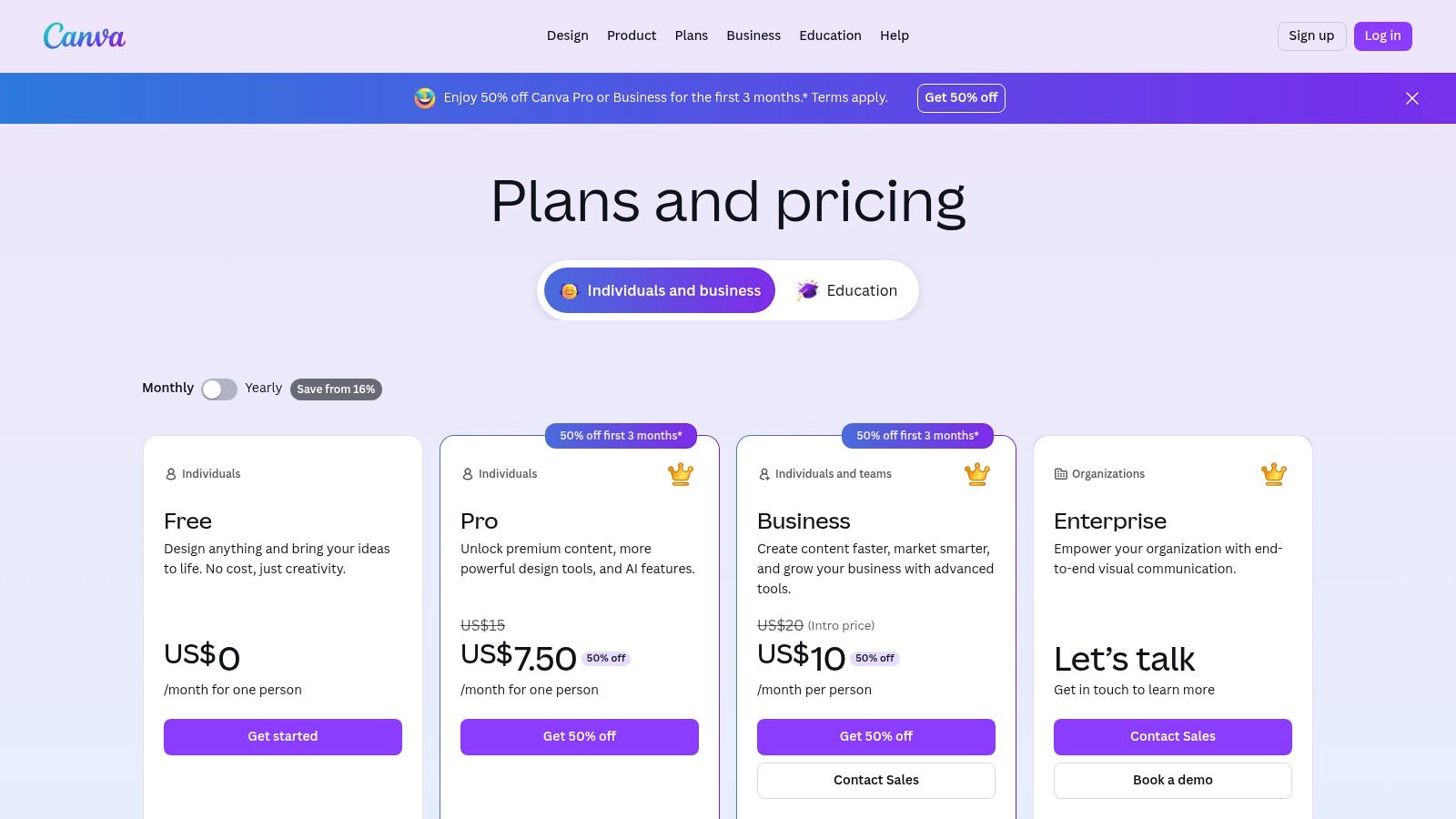
- 価格: 充実した無料プランが利用可能です。有料プランには、1名用の**Canva Pro(月額$14.99)と、最初の5名まで利用可能なCanva for Teams(月額$29.99)**があり、より高いAIクレジット上限や高度なコラボレーション機能が提供されます。
| メリット | デメリット |
|---|---|
| 学習コストが非常に低く、アイデアからアセット作成までのワークフローが高速 | パワーユーザーは、よりきめ細かいクリエイティブな制御が可能なAdobeを好む場合がある |
| ソーシャルメディア主体のコンテンツ制作においてコストパフォーマンスが良い | AIの制限やクレジットはプランやプロモーションによって異なる |
ウェブサイト: https://www.canva.com/pricing/
5. Runway
Runwayは、高品質なビジュアル出力を必要とする映像制作者、マーケター、クリエイターをターゲットとした、プロフェッショナルグレードのAIビデオスイートとしての地位を確立しています。その中核となる強みは、Gen-3やGen-4ファミリーのような高度なテキスト・トゥ・ビデオ(テキスト動画生成)およびイメージ・トゥ・ビデオ(画像動画生成)モデルにあり、これらは優れたプロンプト再現性と映画のような動きを提供します。そのため、視覚的に美しい短編映画、製品広告、芸術的なビデオクリップの制作に注力するコンテンツクリエイターにとって、最高のAIツールの一つとなっています。
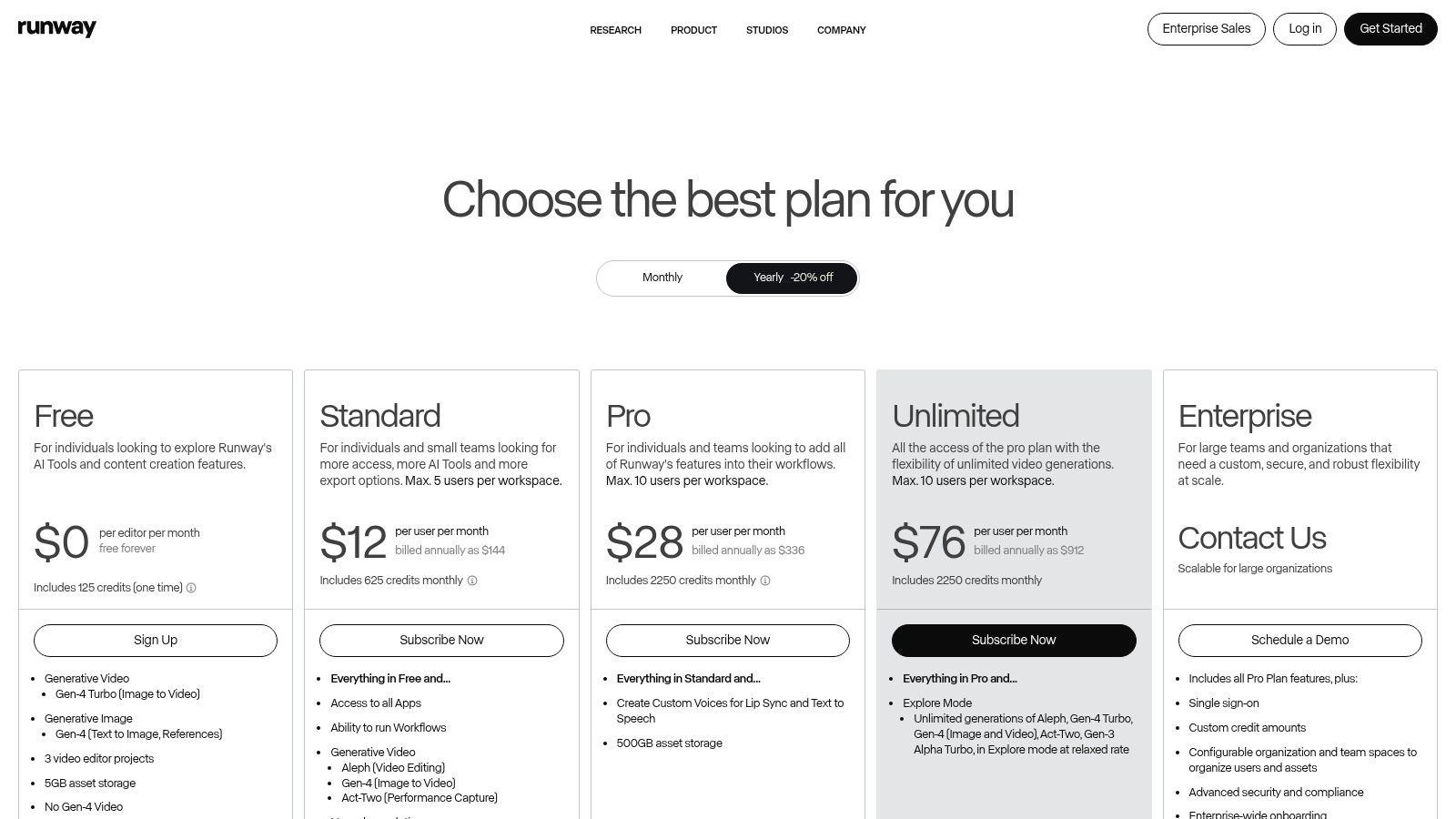
単純なツールとは異なり、Runwayはキーフレームワークフロー、モーションブラシ、カメラコントロールなどの機能を備えたきめ細かい制御を提供し、WebおよびiOSアプリから利用可能です。これにより、AI動画生成に対してより演出的なアプローチが可能になります。このプラットフォームは迅速な研究開発(R&D)に取り組んでいるため、ユーザーは最先端のモデルに早期アクセスできることが多く、クリエイティブAIの最前線を走り続けたいプロフェッショナルにとって定番のツールとなっています。
主な機能とユースケース
- 推奨用途: 映画のようなショート動画、高品質なBロール、芸術的なビジュアル実験の作成。
- 主な機能: Gen-3/Gen-4動画モデル、テキスト動画生成、画像動画生成、インペインティング、高度なカメラコントロール、キーフレーム設定、APIアクセス。
- 価格: 制限付きの無料プランから開始可能。有料プランはStandardの月額$12/ユーザー(年払い)から始まり、クレジット許容量や機能に応じて価格が上がります。
| メリット | デメリット |
|---|---|
| 高忠実度な動きと高いプロンプト再現性 | 長尺や高品質なクリップではクレジットがすぐに消費される可能性がある |
| 活発な研究開発と頻繁なモデルのアップグレード | 機能の利用可否はモデルやバージョンによって異なる |
ウェブサイト: https://runwayml.com/pricing
6. Descript
Descriptは、メディアをテキストドキュメントのように扱うことで、音声や動画の編集に革命をもたらします。複雑なタイムラインと格闘する代わりに、クリエイターは自動生成された文字起こし(トランスクリプト)を編集するだけで、収録データを編集できます。このテキスト優先のアプローチにより、フィラーワード(「えー」「あー」など)の削除、セクションの並べ替え、コンテンツのブラッシュアップが驚くほど高速になり、ポッドキャストや会話中心の動画に注力するコンテンツクリエイターにとって最高のAIツールの一つとなっています。
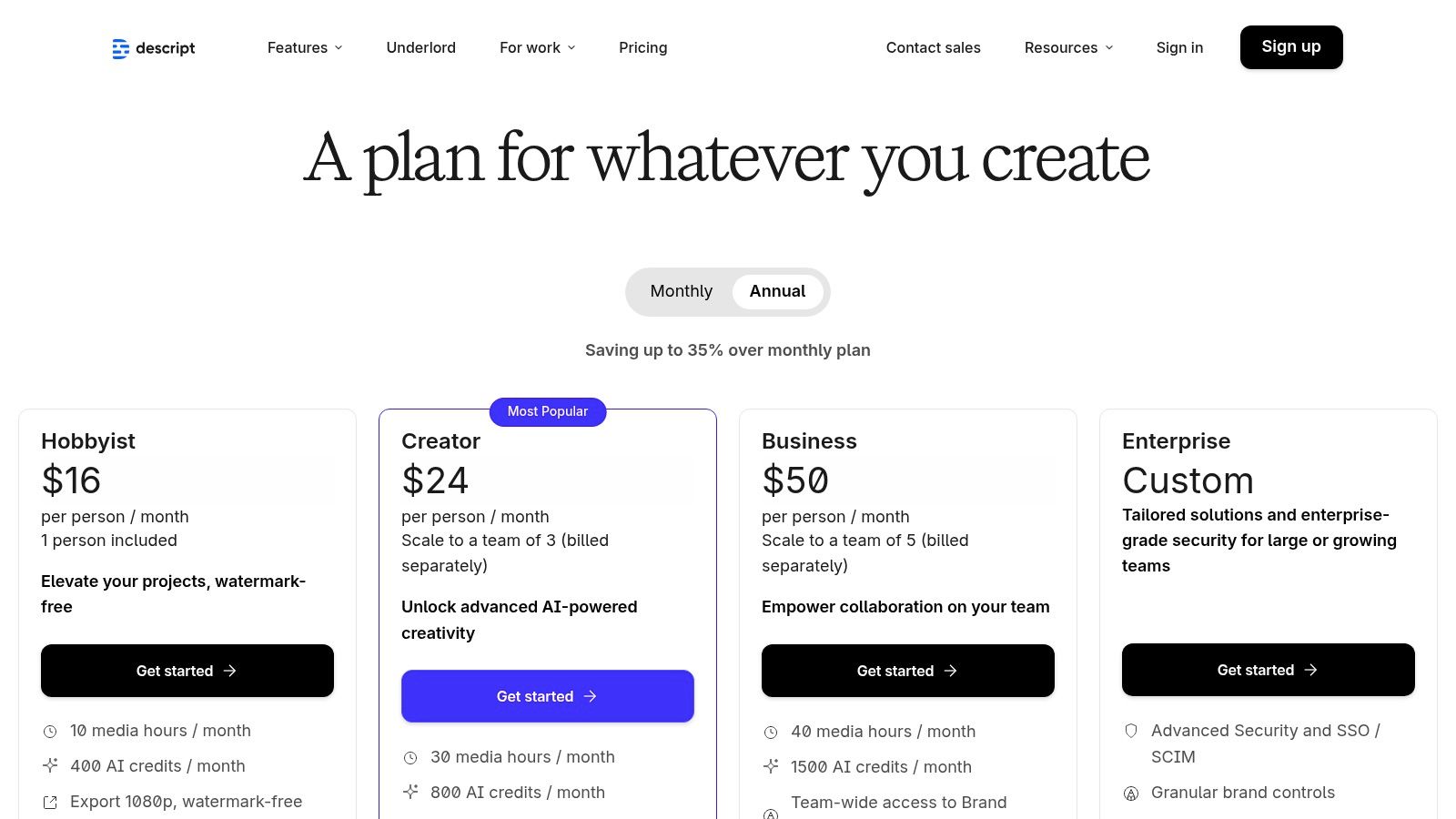
Descriptを際立たせているのは、統合されたAI機能スイートです。このプラットフォームは、再録音することなくミスを修正したり新しいセリフを追加したりするために声をクローンできる「Overdub」や、ワンクリックで音質をプロフェッショナルな基準まで高める「Studio Sound」を提供しています。これらの強力なツールは、AIによる吹き替えやコラボレーションワークフローと組み合わさることで、ポストプロダクションのプロセスを効率化し、さまざまなフォーマットや言語でコンテンツを再利用したいクリエイターにとって不可欠な資産となります。
主な機能とユースケース
- 推奨ユーザー: 高速なテキストベースの編集ワークフローを必要とするポッドキャスター、動画クリエイター、教育関係者。
- 主な機能: テキストベースの動画・音声編集、Overdubによる音声クローニング、Studio Soundによる音声強化、フィラーワード(言い淀み)の削除、AI吹き替えおよび翻訳。
- 価格: 基本機能を備えた無料プランが利用可能です。有料プランはCreatorプランの月額$12(年払い)から始まり、文字起こし時間の追加や高度な機能を備えたProおよびEnterpriseティアへとスケールします。
| メリット | デメリット |
|---|---|
| 音声と動画フォーマットを行き来するクリエイターに最適 | プラン変更により従来の制限が異なる場合があるため、切り替え前に確認が必要 |
| 高速なテキストベースの編集と、価格に対して豊富なツールセット | 重いプロジェクトには強力なハードウェアとネットワーク接続が必要になる場合がある |
ウェブサイト: https://www.descript.com/pricing
7. Notion — with Notion AI
Notionは、コネクテッドワークスペースから、コンテンツ作成と管理のための強力なAIネイティブプラットフォームへと進化しました。クリエイターにとっては、リサーチ、構成、執筆、プロジェクト整理をすべて行える統一された環境であり、AIアシスタントがワークフローに直接組み込まれています。AIは会議メモの要約、シンプルなプロンプトからの構成案作成、ドキュメント内での文章のリライトが可能で、コンテキストと整理整頓を重視するコンテンツクリエイターにとって最高のAIツールの一つです。
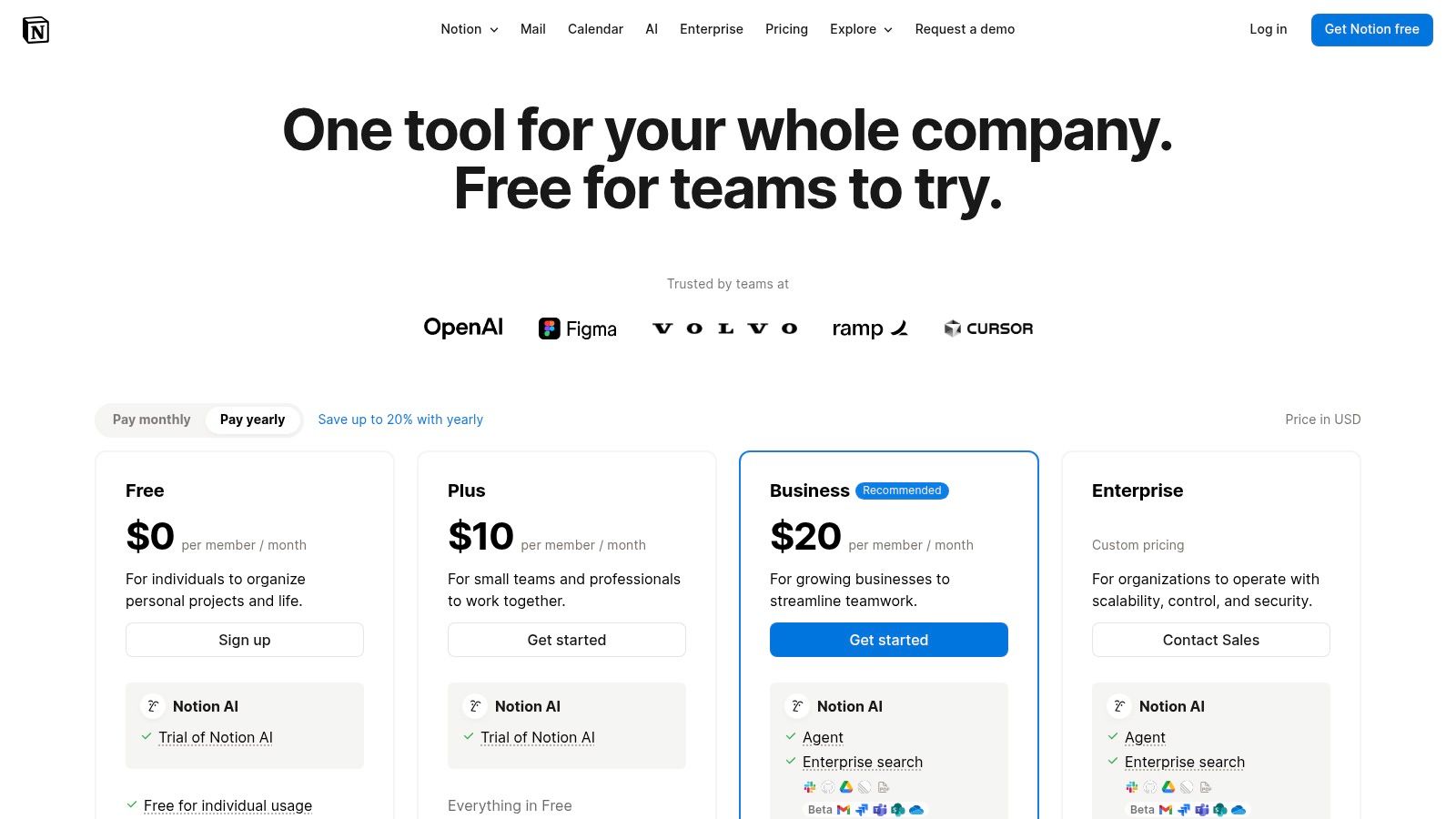
単独のライティングツールとは異なり、Notion AIの主な利点は、既存のワークスペース内のコンテンツに基づいて提案や検索を行える能力にあります。つまり、プロジェクト概要、過去のブログ記事、チームのWikiから情報を引き出し、文脈に沿った新しい素材を生成できます。チームにとっては、これが「信頼できる唯一の情報源(Single Source of Truth)」となり、コラボレーションを効率化し、公開されるすべてのコンテンツでブランドの一貫性を確保できます。
主な機能とユースケース
- 推奨ユーザー: コンテンツの計画、執筆、ナレッジ管理のためのオールインワンワークスペースを必要とするチームや個人のクリエイター。
- 主な機能: 文脈を理解するAIライティングアシスタント、ワークスペース内のAIエンタープライズ検索、AIによる会議メモの要約、統合されたプロジェクトおよびドキュメント管理。
- 価格: FreeおよびPlusプランでは、AI機能の限定トライアルが提供されています。完全なNotion AI機能は、Businessプラン(1ユーザーあたり月額$18、年払い)およびEnterpriseプランに含まれています。
| メリット | デメリット |
|---|---|
| 文脈を理解したAIを活用し、コンテンツの執筆、整理、公開を一か所で行える | Free/Plusプランの新規ユーザーがAIをフル活用するには上位ティアへのアップグレードが必要 |
| 中小企業やチーム向けの分かりやすいシートごとの価格設定 | 一部の高度なAI機能はBusiness/Enterpriseティアに限定されている |
ウェブサイトを見る: https://www.notion.so/pricing
8. Midjourney
高品質で芸術的、かつスタイリッシュなビジュアルを重視するクリエイターにとって、Midjourneyは業界をリードするAI画像生成プラットフォームです。美的に優れた画像を生成する能力に定評があり、コンセプトアート、ユニークなYouTubeサムネイル、特徴的なブランドビジュアルの作成に好んで利用されています。このプラットフォームのワークフローは主にDiscord上で動作し、ユーザーがプロンプトやテクニックを共有する活気あるコミュニティが形成されています。
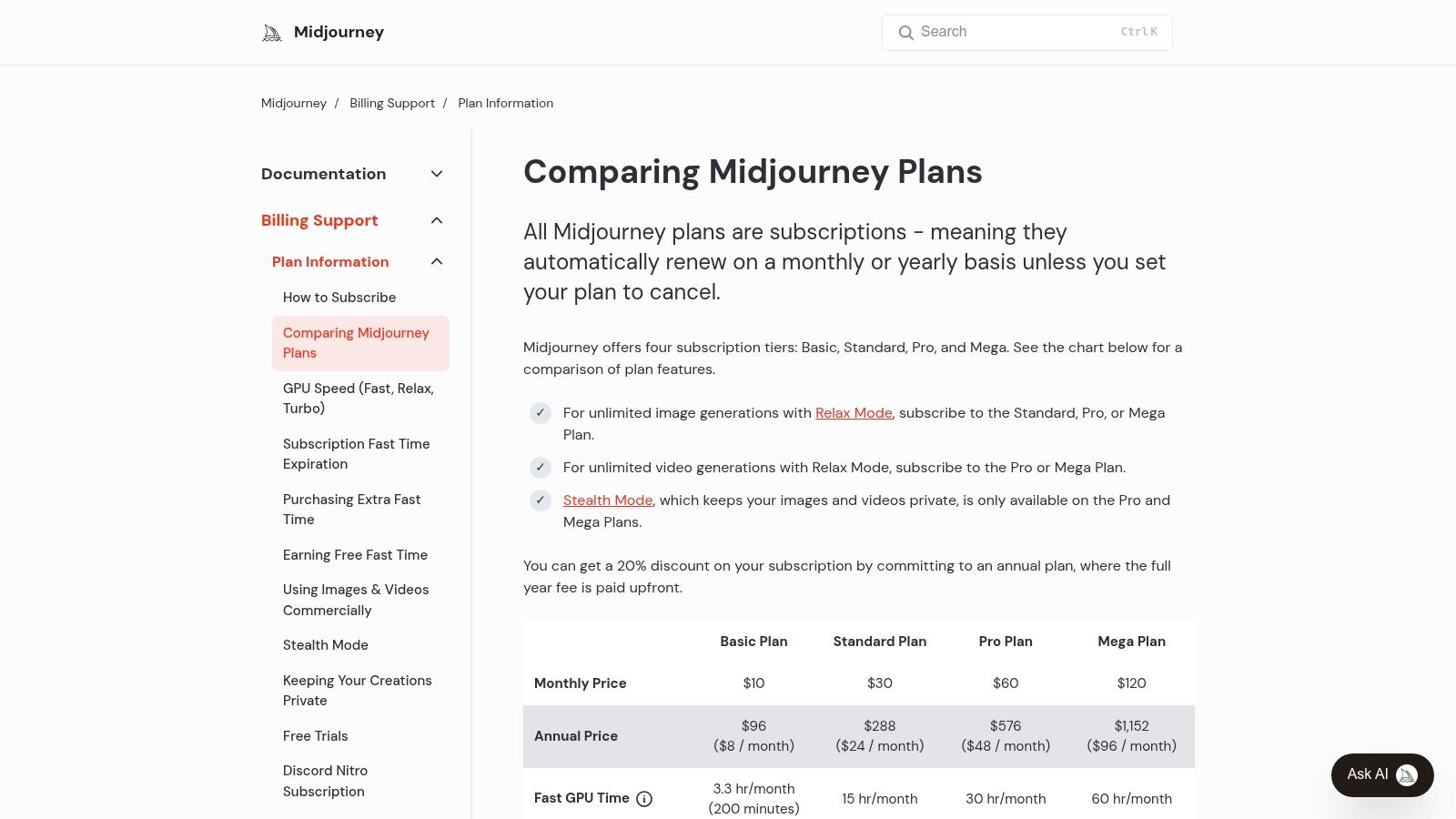
より一般的なツールとは異なり、Midjourneyの強みは、その独自の芸術的スタイルとモデルの洗練度にあります。クリエイターは、高度なパラメータとコミュニティで検証されたプロンプトを活用することで、特定のビジュアルアイデンティティを実現できます。そのビジュアル生成へのアプローチは、概念を融合させて一貫した芸術的ビジョンを作り出すことに優れているため、**AIスタイル転送(Style Transfer)の理解**においても重要な要素となります。このため、何よりもビジュアル品質を優先するコンテンツクリエイターにとって、最高のAIツールの1つとなっています。
主な機能とユースケース
- 最適: ハイエンドで芸術的なビジュアル、サムネイル、コンセプトアートの生成。
- 主な機能: 高度な美的コントロール、高解像度出力、コミュニティ主導のプロンプトライブラリ、無制限に低速生成ができる「Relax Mode」。
- 価格: 無料枠なし。有料プランはBasic Planの月額$10(年払いの場合は月額$8)から始まり、より多くの「Fast GPU time」やステルス画像生成(非公開生成)が可能なProおよびMegaプランへとスケールアップします。
| メリット | デメリット |
|---|---|
| 優れた美的品質と芸術的な出力 | Discordベースのワークフローは初心者には直感的でない場合がある |
| プロンプトのインスピレーションやサポートを得られる強力なコミュニティ | 「Fast Hours」には制限があり、すぐに消費されてしまう可能性がある |
ウェブサイトを見る: https://docs.midjourney.com/docs/plans
9. Synthesia
企業研修、製品解説、ハウツーガイドに注力するクリエイターにとって、Synthesiaは強力なAI動画生成プラットフォームを提供します。テキストのスクリプトをAIアバターが登場する洗練された動画に変換するため、カメラ、マイク、出演者を用意する必要がありません。このプラットフォームはプロ品質のコンテンツを効率的に制作できるよう設計されており、教育やビジネスの現場におけるコンテンツクリエイターにとって最高のAIツールの1つとなっています。
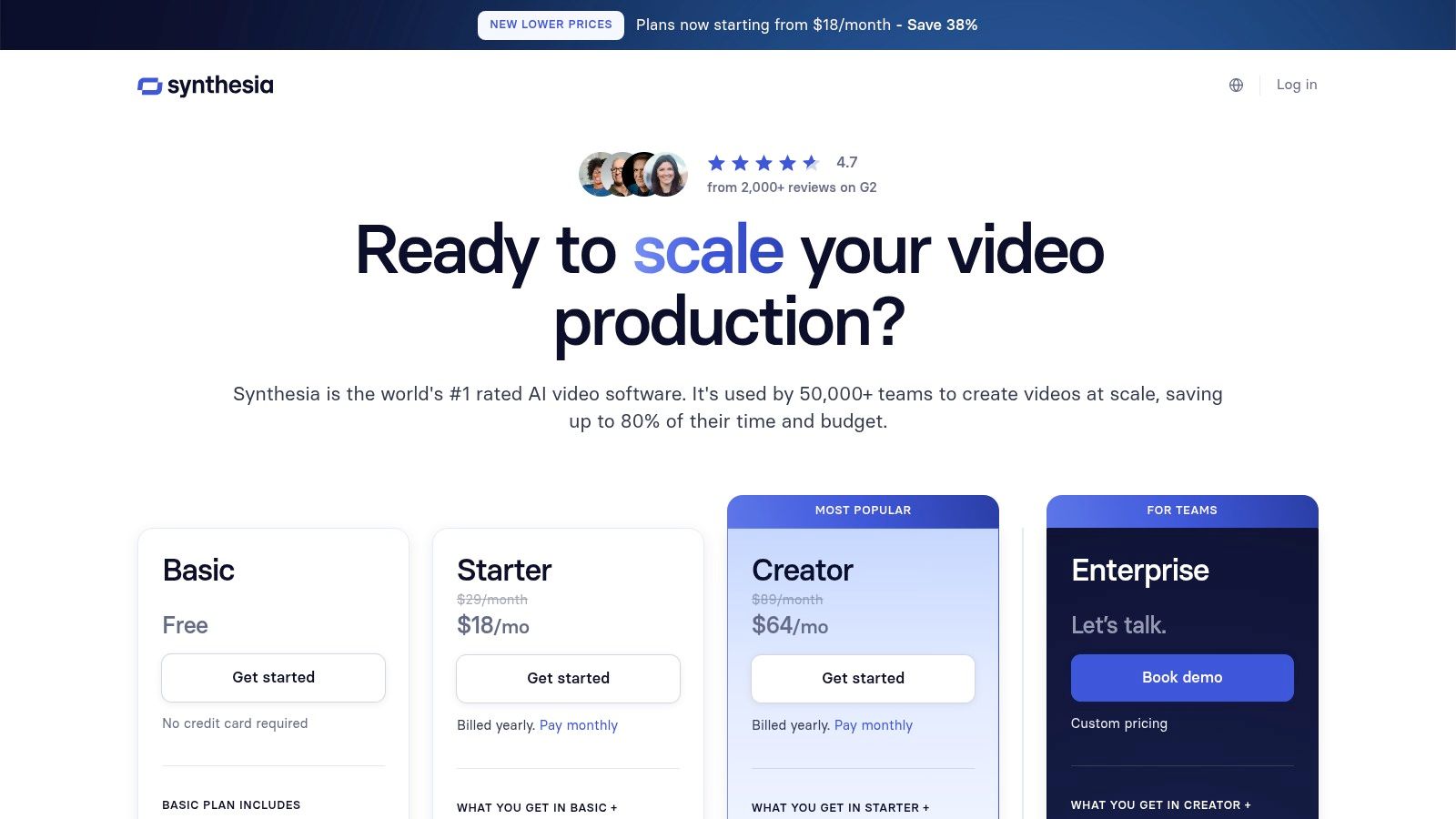
Synthesiaの最大の強みは、動画制作を迅速にスケールできる能力にあります。ユーザーは、豊富なストックアバターのライブラリから選択するか、一貫したブランディングのためにカスタムデジタルツインを作成することができます。140以上の言語とアクセントに対応しているため、グローバルな視聴者向けにコンテンツをローカライズすることが容易であり、これは一般的な動画ツールとは一線を画す機能です。そのため、複数の市場にわたってブランドの一貫性を維持する必要があるチームにとって、理想的なソリューションとなります。
主な機能とユースケース
- 最適: スケーラブルなトレーニング動画、企業広報、製品マーケティングの解説動画の作成。
- 主な機能: 160種類以上のストックAIアバター、カスタムアバター作成、140言語以上対応のテキスト動画変換、ブランドアセット管理、APIアクセス。
- 価格: Creatorプランは月額$22から(年払い)で、月間10分の動画作成が可能。Teamプランは月額$67で30分、大規模なニーズ向けにカスタムEnterpriseプランも利用可能です。
| メリット | デメリット |
|---|---|
| 実写動画制作と比較して時間とコストを大幅に削減 | アバターの自然さは向上中だが、人間の俳優を完全には再現できない場合がある |
| コラボレーション機能とブランド管理機能により、チーム全体での拡張性が高い | スタータープランの分数制限やクレジット制限が制約になる場合がある |
ウェブサイトを見る: https://www.synthesia.io/pricing
10. ElevenLabs
高品質で人間のようなナレーションを必要とするコンテンツクリエイターにとって、ElevenLabsはAI生成オーディオの業界をリードするプラットフォームです。ロボットのようなテキスト読み上げをはるかに超え、YouTubeのナレーション、ポッドキャスト、広告、さらにはクリエイティブプロジェクトのキャラクターの対話に適した、ニュアンス豊かで感情表現のある音声を提供します。その核心的な強みは、微妙な抑揚やトーンを捉えた驚くほどリアルなオーディオを生成する能力にあり、人間の話し手とほとんど区別がつきません。
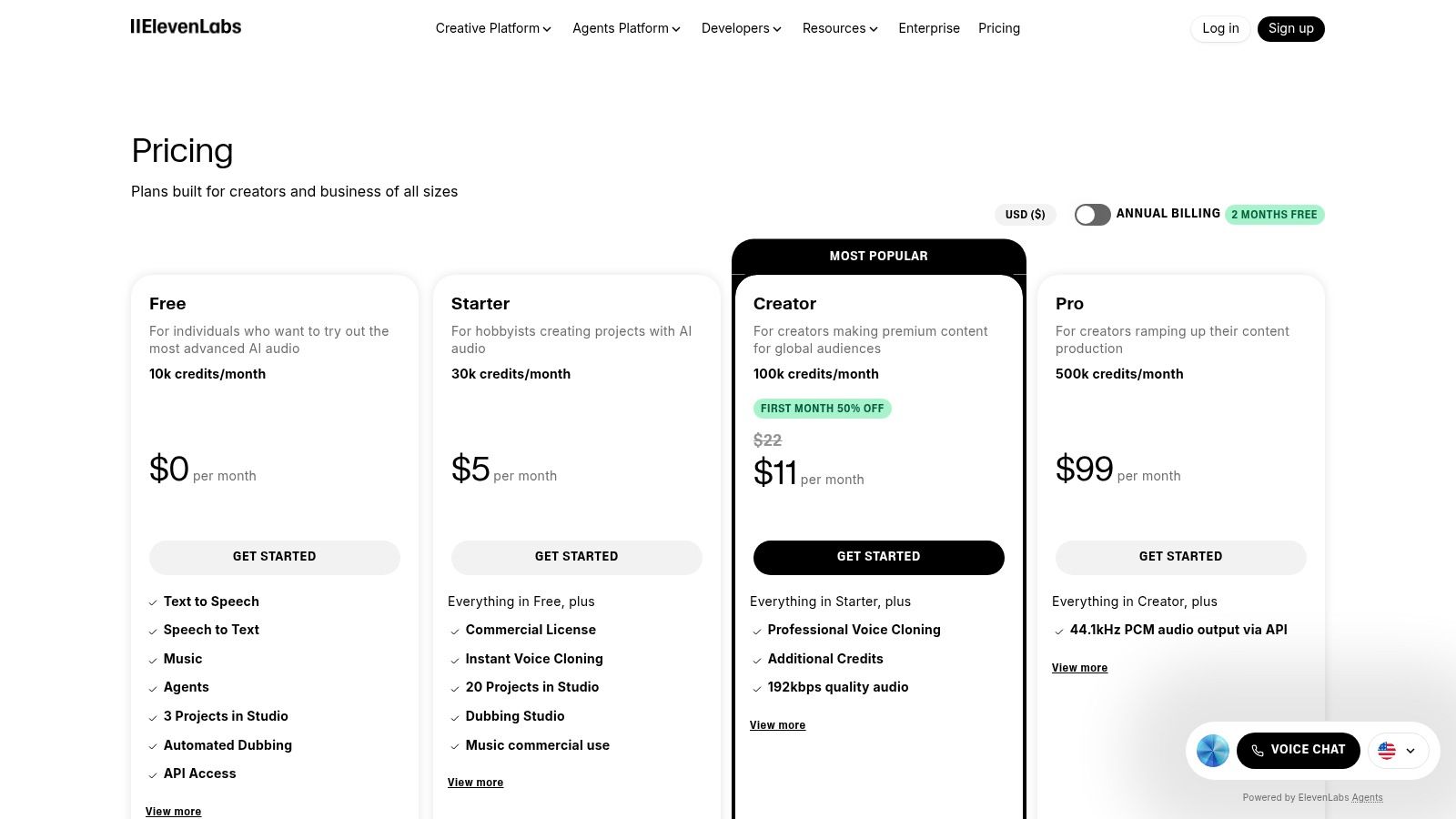
多くのテキスト読み上げツールとは異なり、ElevenLabsはプロ仕様のボイスクローニングなどの高度な機能を提供しており、クリエイターは新しいセリフを録音することなく、自分の声でオーディオを生成できます。また、多言語吹き替えもサポートしており、元の話し手の声の特徴を維持しながら、グローバルな視聴者向けにコンテンツを自動的に翻訳・音声化します。その堅牢なAPIにより、カスタム音声ソリューションを制作ワークフローに統合したり、音声エージェントを構築したりしようとしているコンテンツクリエイターにとって最高のAIツールの一つとなっています。
主な機能とユースケース
- 最適: 動画、ポッドキャスト、オーディオブック、広告向けのリアルなナレーション作成。
- 主な機能: 超リアルなテキスト読み上げ、プロ仕様のボイスクローニング、多言語吹き替え、Speech-to-Speech(音声変換)、開発者向けAPI。
- 価格: 月間10,000文字までの無料枠あり。有料プランはCreatorプランが月額$22から始まり、文字数やプロ仕様のクローニングなどの高度な機能に応じてスケールアップします。
| メリット | デメリット |
|---|---|
| 業界最高水準の音声品質とリアリズム | クレジット制のため、超過を避けるために慎重な管理が必要 |
| 強力なボイスクローニングと吹き替え機能 | エージェントにAPIを使用する場合、別途LLMコストが発生する可能性がある |
ウェブサイトを見る: https://elevenlabs.io/pricing
11. Luma AI — Dream Machine
短く非常にリアルなビデオクリップの生成に注力するクリエイターにとって、Luma AIのDream Machineは強力で利用しやすい選択肢です。ソーシャルメディア広告、コンセプトの絵コンテ、目を引くビジュアルに最適な、高忠実度で映画のようなショートフォームコンテンツの制作に優れています。その強みは、基盤となるRayモデルの品質にあり、シンプルなテキストや画像のプロンプトから、印象的なフォトリアリズムと滑らかな動きを実現します。
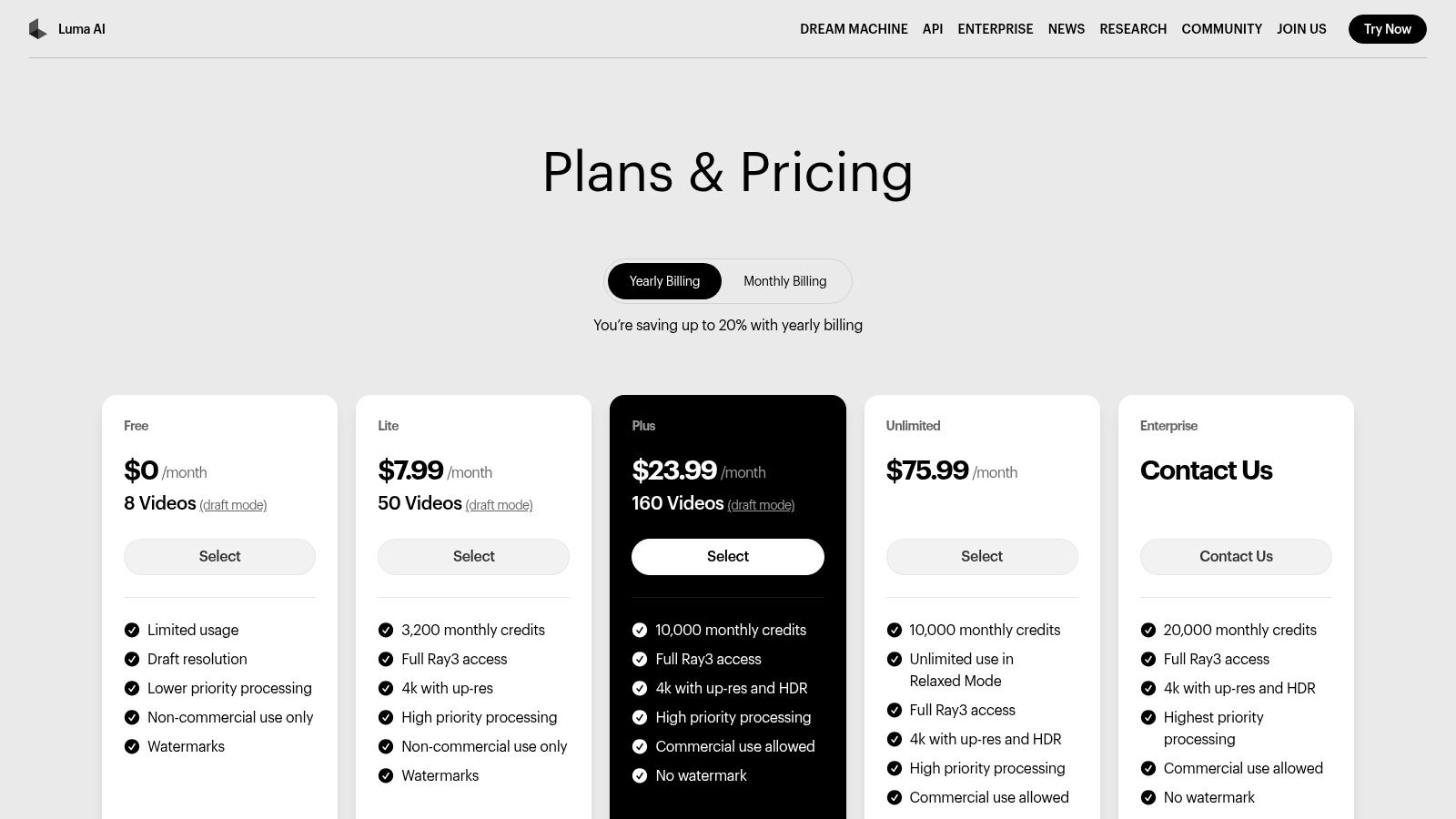
長尺のナラティブビデオに焦点を当てたプラットフォームとは異なり、Dream Machineは短いセグメントでのスピードとインパクトに最適化されています。このプラットフォームの透明性の高いクレジットベースのシステムにより、クリエイターは動画生成ごとのコストを明確に把握でき、上位プランでは優先処理や動画アップスケーリングなどの機能へのアクセスが提供されます。これにより、複雑な編集スイートなしで高品質なBロールやダイナミックな広告クリエイティブを迅速に制作する必要があるコンテンツクリエイターにとって、最高のAIツールの一つとなっています。
主な機能とユースケース
- 最適用途: 短尺動画広告、ソーシャルメディア向けクリップ、シネマティックなコンセプトの視覚化。
- 主な機能: 高品質な動画生成のためのRay2/Ray3モデル、ドラフトモードと高品質モードの切り替え、優先処理ティア、透明性の高いクリップごとのクレジットシステム。
- 価格: 無料ティアでは月間30回の生成が可能です。有料プランは、400回の生成が可能な**Standard(月額29.99ドル)**から始まり、より多くのクレジットと高速処理を提供するProおよびPremierプランへとスケールします。
| メリット | デメリット |
|---|---|
| 短いクリップにおける競争力のあるフォトリアリズムとスピード | 動画の長さ制限(通常は最大約10秒) |
| 透明性の高い価格設定と明確な商用利用ポリシー | 頻繁に使用するとクレジットがすぐに消費される可能性がある |
ウェブサイト: https://lumalabs.ai/pricing
12. G2 — AIライティングアシスタントカテゴリ
単一のツールではなく、G2のAIライティングアシスタントカテゴリは、デューデリジェンス(適正評価)を行うクリエイターにとって不可欠なリサーチハブです。このソフトウェアマーケットプレイスは、ユーザーレビュー、ランキング、機能比較を集約しており、導入を決める前にGrammarly、Writesonic、Jasperなどのツールを吟味することができます。これにより、クリエイターはマーケティングの謳い文句の先を見据え、同様の規模やニーズを持つビジネスの実際のシナリオでツールがどのように機能するかを確認できます。
G2は、代替案のリストアップやツールの評判を確認する上で非常に貴重です。企業規模、価格モデル、満足度スコアなどの詳細なフィルターを活用することで、クリエイターは特定のワークフローや予算に合ったコンテンツクリエイター向けの最高のAIツールをすぐに見つけることができます。このステップは、十分な情報に基づいた投資を行い、選択したソフトウェアがコンテンツの課題を真に解決することを保証するために重要です。
主な機能とユースケース
- 最適用途: 実際のユーザーレビューに基づいたAIライティングツールのリサーチ、比較、検証。
- 主な機能: クラウドソーシングによるユーザーレビュー、最新のメリット/デメリットの要約、満足度スコア、企業規模や価格によるフィルタリング、ベンダーのトライアルへの直接リンク。
- 価格: 閲覧およびリサーチ利用は無料。
| メリット | デメリット |
|---|---|
| 実際のユーザーによるクラウドソーシングされた評価がデューデリジェンスを支援 | ランキングは変動する可能性があるため、レビューの鮮度を確認する必要がある |
| 公式ベンダーページやトライアルオプションへのリンクが容易 | 一部のリストはスポンサーを強調している場合があるため、常にベンダーサイトで確認が必要 |
ウェブサイト: https://www.g2.com/categories/ai-writing-assistant
コンテンツクリエイター向けAIツール トップ12 — 比較
| 製品 | 主な機能 | 品質と速度 (★) | 価値と価格 (💰) | ターゲット層 (👥) | 独自の強み (✨) |
|---|---|---|---|---|---|
| Veo3 AI 🏆 | テキスト→動画 & 画像→動画、マルチモデルエンジン (Veo3/Seedance/Hailuo)、エクスポート/解像度設定 | ★★★★ · 高速レンダリング | 💰 開始無料 (制限あり) | 👥 マーケター、クリエイター、教育関係者、中小企業 | ✨ オールインワンのマルチモデルUI、コンテンツの完全所有権 |
| OpenAI — ChatGPT | 汎用AIアシスタント、カスタムGPT & エージェントワークフロー、マルチモーダル | ★★★★ · 多用途、スケーラブル | 💰 フリーミアム → Pro/Businessプラン | 👥 チーム、企業、パワーユーザー | ✨ カスタムGPT、エージェント自動化、ガバナンス |
| Adobe Firefly | テキストから画像/動画/音声生成、Photoshop & Expressと統合、API | ★★★★ · 洗練、ブランドセーフ | 💰 Creative Cloud経由で支払い + クレジット | 👥 クリエイティブプロフェッショナル、Adobeユーザー | ✨ CCとの緊密な統合、明確な商用利用方針 |
| Canva — Magic Studio | AIデザイン + 画像/動画ツール、テンプレート、スケジューラー、ブランドキット | ★★★ · 高速、初心者向け | 💰 フリーミアム、手頃な有料プラン | 👥 ソロクリエイター、小規模チーム | ✨ テンプレート + ソーシャルスケジューラー + ブランドキット |
| Runway | プロ仕様のテキスト/画像→動画、キーフレーム、アップスケーリング、API | ★★★★ · 高忠実度なモーション | 💰 クレジット制の処理 | 👥 映像制作者、ビデオのプロ、スタジオ | ✨ 頻繁なモデル更新 (Gen‑4/4.5)、強力なモーション忠実度 |
| Descript | テキストベースの音声/動画エディター、Overdub、フィラー除去、吹き替え | ★★★★ · 高速編集 & コラボレーション | 💰 有料プラン、メディア分数/クレジット | 👥 ポッドキャスター、編集者、クリエイター | ✨ Overdubボイスクローニング、テキストベースの動画ワークフロー |
| Notion (Notion AI) | ドキュメント、メモ、会議要約、検索のためのワークスペースAI | ★★★ · コンテキストに応じた支援 | 💰 シート単位、Business/Enterprise向けAI | 👥 チーム、ナレッジワーカー | ✨ ワークスペースのコンテンツに基づくAI |
| Midjourney | 画像生成重視 (Discord)、拡大中の動画機能 | ★★★★ · 優れた美的品質 | 💰 サブスクリプションプラン (Fast Hours) | 👥 アーティスト、デザイナー、コンセプトチーム | ✨ コミュニティで検証されたスタイル & プロンプトライブラリ |
| Synthesia | スクリプト→アバター動画、140以上の言語、ブランド管理 | ★★★ · 効率的な解説動画 | 💰 分数制限付きの有料プラン | 👥 L&D、マーケティング、トレーニングチーム | ✨ 大規模なアバターライブラリ、多言語吹き替え |
| ElevenLabs | 高品質TTS、ボイスクローニング、Speech-to-Speech、API | ★★★★ · 自然で表現力豊かな音声 | 💰 有料クレジット & APIプラン | 👥 ナレーター、ポッドキャスター、スタジオ | ✨ 業界をリードするボイスクローニング & 吹き替え |
| Luma AI — Dream Machine | 短尺のフォトリアル動画 (Rayモデル)、高解像度化 & HDRオプション | ★★★★ · フォトリアルな短尺クリップ | 💰 クリップごとのクレジット、明確な価格設定 | 👥 広告主、ソーシャルクリエイター | ✨ 競争力のあるフォトリアリズム、透明性の高いクレジット制 |
| G2 — AI Writing Assistants | マーケットプレイス:レビュー、ランキング、フィルター、カテゴリページ | 変動あり ★ · ユーザーによる評価 | 💰 利用無料 (リサーチ) | 👥 バイヤー、調達担当、リサーチャー | ✨ クラウドソーシングによるレビュー & ショートリストツール |
クリエイティブスタックに適したAIツールの選び方
AIの広大な世界を歩き回るのは大変に感じるかもしれませんが、これらの強力なアシスタントをワークフローに統合することは、もはや未来的な概念ではありません。それは競争力を維持し、効率を高めるための実用的な必需品です。これまで見てきたように、コンテンツクリエイター向けの最高のAIツールとは、人間の創意工夫に取って代わるものではありません。むしろ、それらは強力な副操縦士(コパイロット)として機能し、退屈なタスクを自動化し、新しいアイデアを刺激し、最終的にはあなただけが提供できる高度な戦略や独自のストーリーテリングに集中できるようにします。
ChatGPTの多才なテキスト生成から、ElevenLabsの特化した音声クローニング、そしてCanvaのMagic Studioの統合デザインスイートに至るまで、それぞれのツールには明確な目的があります。重要な点は、誰にとっても「最高」と言える単一のツールは存在しないということです。理想的なソリューションは、特定のニッチ、ワークフロー、そしてクリエイティブな目標に完全に依存します。
自分に最適なAIツールキットの選び方
自分だけのAIスタックを構築するには、戦略的なアプローチが必要です。サブスクリプションを契約する前に、ツールが自分のニーズに合っているか確認するために、以下の要素を考慮してください。
- 主なコンテンツ形式: あなたは動画中心のクリエイターですか、ブロガーですか、ポッドキャスターですか、それともグラフィックデザイナーですか?自分の核となる媒体で優れた能力を発揮するツールを優先しましょう。例えば、YouTuberであれば、専業のライターよりもRunwayやDescriptから即座に価値を得られるでしょう。
- ワークフローの統合: 新しいツールは既存のプロセスにどれだけうまく適合しますか?Adobe FireflyとCreative Cloudアプリのシームレスな連携や、プロジェクト管理ハブ内でのNotion AIの配置など、既に使用しているソフトウェアとの統合を提供するプラットフォームを探してください。これにより、摩擦が最小限に抑えられ、学習曲線が緩やかになります。
- 予算と拡張性: まずは無料トライアルやフリーミアムプランでツールの機能をテストしましょう。価格帯を評価し、有料プランで提供される機能が、時間の節約や出力品質の向上など、特定のユースケースに対して明確な投資対効果(ROI)をもたらすかどうかを検討してください。
- 使いやすさとコントロールのバランス: Midjourneyのようなプラットフォームは信じられないほどのパワーを提供しますが、学習のハードルは高くなります。逆に、Canvaのようなツールはアクセシビリティを重視して設計されています。細部まで細かくコントロールする必要があるのか、それとも優れた結果を素早く出せるユーザーフレンドリーなインターフェースを好むのかを決めましょう。
実装に向けた具体的な次のステップ
AIを活用する最も効果的な方法は、小さく始めて実験することです。現在のコンテンツ制作プロセスにおける課題(ペインポイント)を1つか2つ選んでください。それは初稿の執筆ですか、ポッドキャスト音声の編集ですか、それともソーシャルメディア用のビデオクリップの生成ですか?
このリストからその課題に直接対処できるツールを選び、その無料版を1週間使い続けることを約束してください。節約できた時間と出力の品質を記録しましょう。この実践的な経験こそが、どのプラットフォームがあなたのクリエイティブな武器として欠かせないものになるかを見極める唯一の確実な方法です。
AIを活用したワークフローを構築する際には、より広いデジタル環境に目を向けておくことも重要です。例えば、どのプラットフォームが勢いを増しているかを理解することは、コンテンツ戦略の参考になります。AIツールキットを補完するために、2025年のソーシャルメディアコンテンツ制作ツールベスト12をチェックするなど、より広範なトレンドを常に把握しておくと有益です。
最終的な目標は、各AIツールが互いに機能を高め合い、初期のコンセプトから最終的な公開に至るまで、シームレスで効率的なパイプラインを構築する相乗的なシステムを作り上げることです。AIによって能力を拡張されたクリエイターの時代が到来し、制作量の増加、イノベーションの加速、そして視聴者とのより深いつながりを実現する、かつてない機会がもたらされています。
動画制作プロセスを劇的にパワーアップさせる準備はできていますか?Veo3 AIは、複数のAIモデルの力を1つの直感的なプラットフォームに統合し、シンプルなアイデアを数分で完全に制作された動画へと変えることを可能にします。複数のツールを使い分けるのはやめて、あなたのコンテンツにふさわしいスピードとシンプルさで制作を始めましょう。今すぐVeo3 AIにアクセスしてください。
Related Articles
Continue with more blog posts in the same locale.

Veo 3 ウォーターマーク完全ガイド:2026年にウォーターマークなしのAI動画を手に入れる方法
Veo 3の透かしについて理解し、公式有料プランとAPIアクセスを通じて透かしなし動画を取得する方法を学びましょう。2026年のプロクリエイター向け完全ガイド。
Read article
Veo 3 長尺動画生成:2026年に高度なAI動画を作成する方法
2026年にVeo 3で長編動画を生成する。シーンチェーン、一貫性テクニック、YouTubeなどで長尺AIビデオを作成するための実践的なワークフローを学ぶ。
Read article
Veo 3 アニメーションガイド:2026年に驚異的なAIアニメーションを作成する方法
2026年にVeo 3で素晴らしいアニメーションを作成する方法を学びましょう。この完全ガイドでは、アニメーションスタイル、プロンプトテクニック、AIアニメーション制作の実例を網羅しています。
Read article