
Video aus Bild mit KI erstellen – Ihr Praxisleitfaden
Entdecken Sie, wie Sie mit KI aus einem Bild ein Video generieren. Dieser Leitfaden bietet praktikable Schritte, Tool-Vergleiche und Profi-Tipps für fesselnde, animierte Inhalte.
Veo3 AI · 15 min read · Nov 18, 2025
Ein statisches Bild in ein dynamisches Video zu verwandeln, war früher die Domäne von Motion-Graphics-Profis. Das ist vorbei. Die Grundidee ist simpel: Sie geben einem KI-Videotool Ihr Bild, beschreiben mit einem Textprompt, wie es sich bewegen soll, und das Modell animiert die Szene für Sie. Dieser einfache Prozess kann ein flaches Motiv in einen kurzen, fesselnden Clip verwandeln – und eröffnet ganz neue kreative Möglichkeiten.
Die neue Ära KI-gestützter Motion Graphics
Wir sind an einem Punkt, an dem ein einzelnes Bild nicht das Ende, sondern der Anfang einer Geschichte ist. Aus einem Foto ein Video zu erzeugen, ist ein gewaltiger Wandel und gibt uns eine starke Methode, Bilder zum Leben zu erwecken. Es geht nicht darum, einen Filter oder einen einfachen Wackeleffekt über ein Foto zu legen. Es geht darum, einer KI beizubringen, intelligent völlig neue Bewegungen zu erzeugen, die aussehen und sich anfühlen, als hätten sie schon immer dazugehört.
Diese Technologie ist ein großer Gewinn für Marketer, Künstler und Creator, die früher teure Software und jahrelange Übung brauchten. Um den Einfluss wirklich zu verstehen, hilft es, sich anzusehen, was Motion-Graphics-Design umfasst – und wie KI heute viele dieser Kernaufgaben automatisiert. Statt stundenlang Keyframes zu setzen, steuern Sie die Animation nun mit natürlicher Sprache.
Diese Infografik zeigt den gesamten Prozess auf sehr anschauliche Weise.
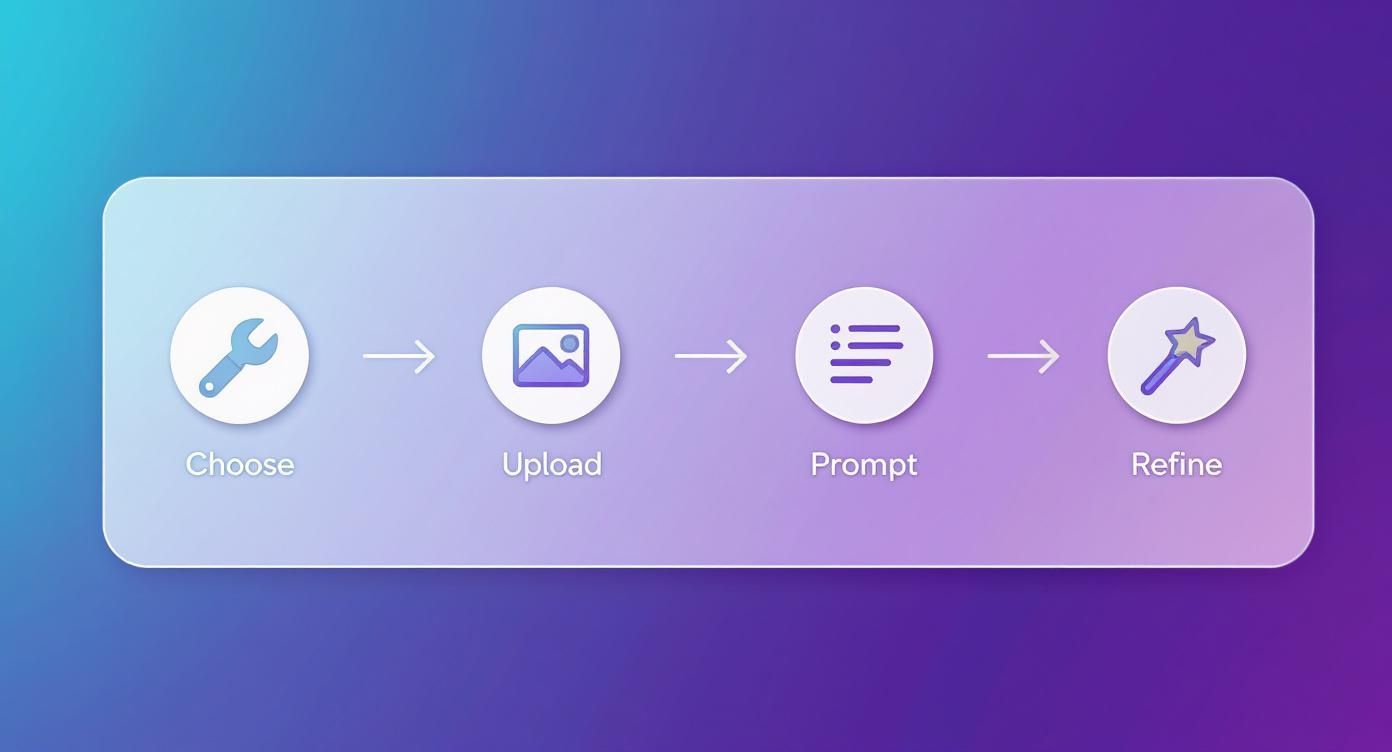
Wie Sie sehen, läuft alles auf wenige Schlüsselphasen hinaus – und macht eine früher hochgradig technische Fähigkeit für nahezu alle zugänglich.
Als schnelle Merkhilfe für den gesamten Ablauf finden Sie hier eine einfache Tabelle, die den Workflow von Anfang bis Ende aufschlüsselt.
Ihr Image-to-Video-Workflow auf einen Blick
| Stage | Key Action | Objective |
|---|---|---|
| 1. Preparation | Wählen Sie ein hochwertiges Quellbild. | Starten Sie mit einer klaren, gut definierten visuellen Grundlage. |
| 2. Ideation | Überlegen Sie Bewegung und Story. | Definieren Sie, was das Video ausdrücken oder zeigen soll. |
| 3. Platform & Model | Wählen Sie einen KI-Videogenerator (z. B. Veo, Seedance). | Wählen Sie das Tool, das Stil und Komplexität am besten trifft. |
| 4. Prompting | Schreiben Sie einen klaren, beschreibenden Prompt. | Weisen Sie die KI zu Bewegungen, Kamerawinkeln und Stimmung an. |
| 5. Generation | Bild hochladen und Prompt ausführen. | Lassen Sie die KI einen ersten Videoentwurf erzeugen. |
| 6. Refinement | Ergebnis prüfen und Prompt iterieren. | Feinschliff, bis das Resultat Ihrer Vision entspricht. |
| 7. Export | Auflösung, Format und Export wählen. | Finales Video für den Einsatz (Social, Web etc.) vorbereiten. |
Diese Tabelle gibt einen Überblick auf hoher Ebene, doch im Verlauf des Guides tauchen wir in jede Phase tiefer ein.
Die Technologie hinter dem Zauber
Der Weg zu diesen beeindruckenden Tools war rasant. Der Fortschritt basiert auf Jahrzehnten Forschung und begann mit der Einführung von Generative Adversarial Networks (GANs) im Jahr 2014. GANs gaben KI erstmals die Fähigkeit, neue, fotorealistische Bilder zu erzeugen.
Ein großer Durchbruch folgte, als OpenAIs DALL‑E zeigte, dass sich extrem detaillierte Bilder allein aus Textprompts generieren lassen. Das war das fehlende Puzzleteil für das Animieren von Standbildern. Diese Entwicklung verdeutlicht, wie verschiedene KI‑Disziplinen zusammengeflossen sind, um die heutige dynamische Videogenerierung möglich zu machen.
Wichtiges Fazit: Die Fähigkeit, aus einem Bild ein Video zu generieren, hat Motion Design demokratisiert. Was früher stundenlange, mühsame Technikarbeit war, gelingt heute in Minuten – mit einer guten Idee und einem präzisen Prompt.
Dieser Wandel befähigt alle, professionell wirkende Visuals zu produzieren. Beispiele:
- Marketer verwandeln statische Produktfotos sofort in auffällige Social‑Ads.
- Künstler erwecken digitale Gemälde zum Leben und fügen Narrativ und Emotion hinzu.
- Lehrkräfte machen aus trockenen Diagrammen simple, einprägsame Erklärvideos.
Das Grundprinzip ist simpel: Ihr Bild liefert das Was, Ihr Prompt erklärt der KI das Wie. Indem Sie einen visuellen Anker mit klaren Anweisungen kombinieren, erschließen Sie ein völlig neues Medium kreativer Ausdrucksformen. In diesem Guide zeigen wir Schritt für Schritt, wie Sie den Prozess meistern – vom Tool‑Pick bis zu Prompts, die Ihre Vision lebendig machen.
Das richtige KI-Tool zur Videogenerierung wählen
Der Einstieg in KI‑Videogenerierung kann sich wie ein schneller, überfüllter Markt anfühlen. Es gibt unzählige Tools – jedes behauptet, das beste zu sein. Der Schlüssel: Es geht nicht darum, das eine beste Tool zu finden, sondern die Stärken eines Tools mit Ihrem Vorhaben zu matchen.
Denken Sie an einen Werkzeugkasten. Für einen kleinen Nagel nimmt man keinen Vorschlaghammer. Einige Generatoren sind ideal für schnelle, spaßige Social‑Clips, andere liefern die feine Kontrolle für cineastische oder professionelle Arbeiten. Am besten ignorieren Sie Marketing‑Lärm und achten auf das, was zählt: Bewegungsqualität, Realismus des Outputs und wie gut das Tool Ihre Anweisungen versteht.
Die Top-KI-Videogeneratoren bewerten
Der Markt bewegt sich ständig, doch einige Namen tauchen immer wieder auf. Plattformen wie Runway und Pika prägen seit Jahren, was möglich ist. Gleichzeitig entsteht eine neue Tool‑Generation: integrierte Plattformen, die mehrere KI‑Modelle in einer Oberfläche bündeln.
Ein Beispiel: Ein Service wie Veo3 AI vereint Modelle wie Veo3, Seedance und Hailuo in einem Interface. Das spart enorm Zeit. Statt drei Tools zu lernen, um drei Stile zu bekommen, experimentieren Sie im selben Dashboard. Für alle, die eine vielseitige All‑in‑one‑Image‑to‑Video‑Lösung suchen, ist dieser Ansatz äußerst praktisch.
Profi-Tipp: Legen Sie sich nicht sofort fest. Fast jede Plattform bietet Free‑Credits oder eine Testphase. Nehmen Sie dasselbe Bild und denselben Prompt und probieren Sie zwei bis drei Generatoren aus. So merken Sie schnell, welches Tool Ihre Vision am besten trifft.
Die letzten Jahre waren ein Game‑Changer. Aus hölzernen, holprigen KI‑Animationen wurden stimmige Clips mit überraschendem Realismus. Runway und Pika gelang es, plausible Bewegungen und lebensechte Mimik zu erzeugen. Dieser Durchbruch führte zu massiver Adoption – von Marketingteams bis zu Filmemachern, die Szenen prototypen.
Das Tool passend zur Aufgabe wählen
Das beste KI‑Tool für ein feines Lächeln in einem Porträt ist selten auch das beste für eine weite Drohnenfahrt über eine Bergkette. Diese einfache Einsicht spart unzählige Stunden Trial‑and‑Error.
Kurzer Leitfaden nach Anwendungsfall:
- Subtile Porträtanimation: Blinzeln, leichte Kopfbewegung oder Haar im Wind – hier zählt Realismus und Feingefühl. Pika hat sich bei Gesichtern einen sehr guten Ruf erarbeitet.
- Cineastische Landschaftsschwenks: Für dramatische Pans oder langsame, stimmungsvolle Zooms braucht es gute Kamerakontrolle. Runway liefert fortgeschrittene Kamerakommandos für Regie‑Feeling.
- Dynamische Objektanimation: Ein Auto durch die Straße fahren lassen oder ein Produkt rotieren? Hier helfen ein gutes Physikverständnis und konsistente Objektverfolgung.
Denken Sie auch an das große Ganze. Prüfen Sie beim Erkunden, wie KI‑Video in Ihre Strategie passt – etwa mit den besten generativen KI-Tools für Marketing.
Feature-Vergleich der KI-Videogeneratoren
Zur Orientierung finden Sie hier eine Vergleichstabelle der beliebtesten Generatoren. So erkennen Sie schnell, wo jedes Tool glänzt, und können dessen Stärken mit Ihren Zielen abgleichen.
| Tool/Modell | Hauptstärke | Am besten geeignet für | Bedienbarkeit |
|---|---|---|---|
| Veo3 AI | Zugriff auf mehrere Modelle (Veo3, Seedance, etc.) | Creator, die Stilvielfalt ohne mehrere Plattformen lernen möchten. | Sehr hoch |
| Runway | Erweiterte Kamera‑ und Regietools. | Cineastische Shots, weite Pans und professionelle Projekte. | Mittel |
| Pika | Hervorragender Realismus bei Gesichtern und Ausdrücken. | Porträts animieren, lebensechte Charakterbewegungen. | Hoch |
| Hailuo | Starke Prompt‑Treue in dynamischen Szenen. | Komplexe Objektanimationen und Actionszenen gemäß Anweisung. | Mittel‑hoch |
Die „besten“ Tools sind letztlich subjektiv. Ein Marketer mit Bedarf an einem schnellen, stilisierten Clip hat andere Anforderungen als ein Filmemacher beim Prototyping.
Denken Sie vom Ziel her und wählen Sie danach das Tool mit den richtigen Features – Kamera‑Kontrolle, Stilvielfalt oder Realismus. So erhöhen Sie die Chance auf das gewünschte Ergebnis deutlich.
So schreiben Sie Prompts, die Ihre Vision animieren
<iframe width="100%" style="aspect-ratio: 16 / 9;" src="https://www.youtube.com/embed/JzcxF137zts" frameborder="0" allow="autoplay; encrypted-media" allowfullscreen></iframe>
Bei der Umwandlung eines Bildes in ein Video trägt Ihr Textprompt die Hauptlast. Denken Sie daran wie an ein Regiebriefing – er sagt der KI nicht nur, was zu tun ist, sondern auch, wie. Ein vager Prompt wie „mach es beweglich“ führt zu generischen, wackeligen Ergebnissen. Ein klarer, spezifischer Prompt hingegen verwandelt ein Standbild in eine überzeugende Mini‑Story.
Dieses Können ist der wichtigste Faktor für starke Ergebnisse. Der Unterschied zwischen holpriger Animation und professionell wirkendem Clip hängt oft an wenigen, gut gewählten Worten. Es ist eine Mischung aus Kunst und Handwerk – hier übernimmt Ihre kreative Vision die Führung.
Lassen Sie uns die Bausteine wirksamer Prompts durchgehen – von den Grundlagen bis zu fortgeschrittenen Techniken für präzise Kontrolle.
Anatomie eines starken Prompts
Gute Prompts vereinen mehrere Kernelemente. Denken Sie an einen Satz mit klarem Subjekt, Verb und reichlich Beschreibung. Das Bild ist Ihr Subjekt, der Prompt liefert Aktion und Stil.
Typische Bestandteile:
- Aktionsverben: Was ist die Hauptbewegung? Wörter wie treibend, herabstürzend, pulsierend oder schimmernd sind präziser als „bewegen“.
- Kamerainstruktionen: Wie soll sich die virtuelle Kamera verhalten? Zum Beispiel langsamer Pan nach links, sanfter Zoom in oder Kranfahrt nach oben.
- Stimmung & Atmosphäre: Welches Gefühl soll entstehen? Adjektive wie gelassen, chaotisch, traumhaft oder energiegeladen setzen den Ton.
- Bewegungsintensität: Wie schnell oder langsam? Zusätze wie subtil, allmählich oder rasch steuern das Tempo.
Die Kombination dieser Elemente gibt der KI reichhaltige, klar interpretierbare Hinweise. Das Ergebnis: deutlich gezieltere, stimmige Videos.
Von simpel zu spezifisch: ein Praxisbeispiel
Nehmen wir ein einzelnes Quellbild – eine einsame Hütte in einem nebligen Wald – und sehen wir, wie verschiedene Prompts zu völlig unterschiedlichen Ergebnissen führen.
Quellbild: Ein rustikales Holzhaus, umgeben von hohen Kiefern, dichter Morgennebel liegt über dem Boden.
-
Vager Prompt: „Animieren Sie die Waldszene.“
- Wahrscheinliches Ergebnis: Ein generischer, leicht wackeliger Effekt. Der Nebel flimmert etwas, die Bäume schwanken eventuell unnatürlich. Animiert, ja – aber ohne Seele.
-
Besserer Prompt: „Langsam treibender Nebel über dem Waldboden, mit sanften Lichtstrahlen, die durch die Bäume fallen.“
- Verbessertes Ergebnis: Jetzt wird es gezielter. Der Fokus liegt auf dem Nebel, zusätzlich kommen Lichtstrahlen dazu – sofort stimmungsvoller und glaubwürdiger.
Expertentipp: „Ihr Prompt ist ein direktes Gespräch mit dem Modell. Je mehr Kontext und Details Sie geben, desto klarer wird das Ergebnis – hier das Video. Spezifität ist Ihr bester Freund.“
- Fortgeschrittener Prompt: „Langsamer, cineastischer Zoom auf die Hüttentür. Morgennebel treibt träge von rechts nach links im Vordergrund. Goldene Sonnenstrahlen durchbrechen subtil das Blätterdach und werfen dynamische Schatten. Ein Hauch Rauch kringelt sanft aus dem Schornstein.“
- Professionelles Ergebnis: Ein komplettes Regiebriefing: Kamerabewegung, Nebelrichtung, Lichtqualität und ein kleines, erzählerisches Detail. Das Video wirkt beabsichtigt, poliert und stimmig.
Lernen, KI‑Videos zu erstellen, heißt: iterieren, Details ergänzen und die Sprache präzisieren.
Mit Negativ-Prompts das Ergebnis verfeinern
Oft ist das, was Sie nicht wollen, genauso wichtig. Negativ‑Prompts sagen der KI, was sie vermeiden soll – und beugen typischen Artefakten vor.
Wenn Sie Flackern, verzerrte Formen im Hintergrund oder unnatürlich „wässrige“ Bewegungen sehen, helfen Negativ‑Prompts häufig.
Häufige Ergänzungen in Negativ‑Prompts:
--no blur, grainy, pixelated: hält das Ergebnis scharf und hochwertig.--no flickering, stuttering: glättet inkonsistente Bewegungen.--no distortion, warping, morphing: verhindert unnatürliches „Verschmelzen“ von Objekten.--no unnatural movement, jerky motion: sorgt für flüssigere, realistischere Animationen.
Die meisten Tools bieten ein eigenes Feld für Negativ‑Prompts. Konsequent eingesetzt, steigt die Qualität spürbar – und Sie sparen Zeit bei Neu‑Renders.
Feinschliff für professionelle Ergebnisse
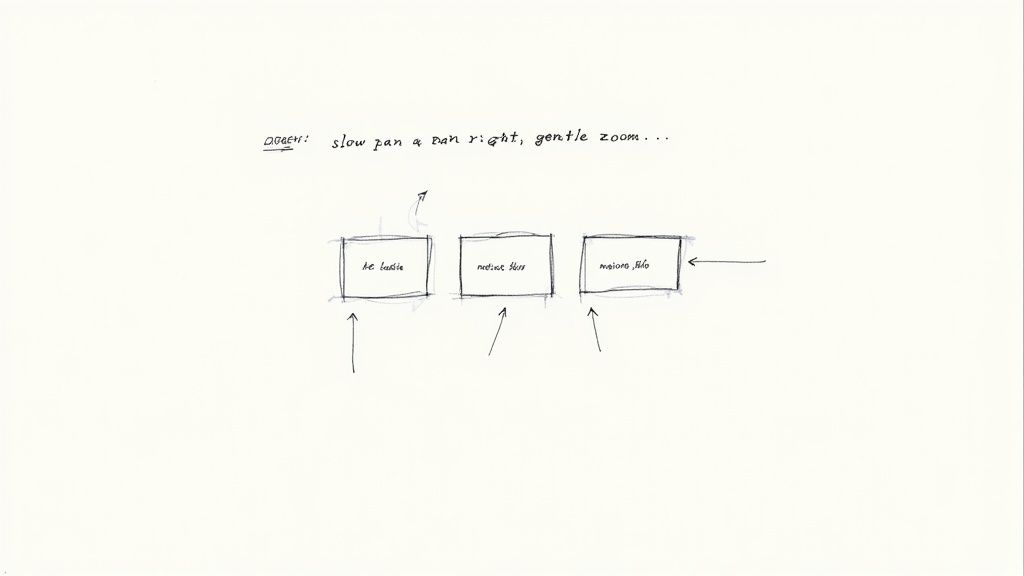
Nachdem die KI den ersten Entwurf erzeugt hat, beginnt Ihre eigentliche Arbeit. Hier verwandeln Sie die Rohanimation in einen polierten, professionellen Clip. Wer die technischen Settings beherrscht, kontrolliert Look & Feel präzise.
Diese Parameter sind der Schlüssel – etwa Seitenverhältnis, Bewegungsstärke und Frames per Second (FPS). So treffen Sie kluge Entscheidungen passend zu Ihrer Vision und dem Zielkanal.
Kernparameter sicher beherrschen
Diese Einstellungen sind die DNA Ihres Videos. Schon kleine Anpassungen verändern den Eindruck – von der Bewegungsflüssigkeit bis zur Dateigröße.
Wichtige Grundlagen:
- Seitenverhältnis: Die Form des Frames. 16:9 ist Standard für YouTube, vertikal 9:16 für Reels oder TikTok. Von Anfang an korrekt wählen, um späteres Zuschneiden zu vermeiden.
- Frames per Second (FPS): Steuert die Bewegungsflüssigkeit. Für den cineastischen Look sind 24 FPS Standard. Für besonders flüssige, schnelle Motive 30 bis 60 FPS.
- Bewegungsstärke: Meist ein Schieberegler. Niedrig ergibt eine sanfte, traumartige Bewegung; hohe Werte liefern energische, dramatische Action.
Wichtiges Fazit: Qualität gegen Renderzeit abwägen. Hohe Auflösung, mehr Frames und komplexe Bewegung kosten Zeit. Für Entwürfe niedrige Settings nutzen – und für die finale Fassung die höhere Qualität investieren.
Diese Kontrolle ist das Resultat jahrzehntelanger KI‑Forschung – von frühen neuronalen Netzen in den 1960/70ern, dem Backprop‑Durchbruch 1989 bis zu GPUs aus der Gaming‑Welt, die die nötige Rechenleistung brachten.
Häufige visuelle Artefakte beheben
Selbst mit gutem Prompt kann KI manchmal „seltsam“ werden – Flackern, Verziehen oder ruckelige Bewegungen sind typisch. So gehen Sie vor:
- Bewegungsstärke anpassen: Wirkt die Bewegung „wässrig“ oder verzogen, ist der Wert meist zu hoch. Schrittweise reduzieren, bis es natürlicher wirkt.
- Prompt überarbeiten: Manchmal stört ein einzelnes Wort. Umschreiben oder Negativ‑Prompt ergänzen (z. B.
--no flickering). - Neuen Seed testen: Viele Tools starten mit einer Seed‑Zahl. Derselbe Prompt mit anderem Seed kann das Problem vermeiden.
Für fortgeschrittene Korrekturen können Sie später Videoeffekte im Editor oder in ausgereifteren KI‑Plattformen hinzufügen.
Das richtige Exportformat wählen
Zum Schluss geht es ums Speichern – und das Format zählt. Es hängt davon ab, wo das Video eingesetzt wird. Am häufigsten: MP4 und GIF.
| Format | Am besten für | Kerneigenschaften |
|---|---|---|
| MP4 | Allgemeiner Einsatz (YouTube, Social, Websites) | Quasi‑Standard: hohe Qualität, Sound‑Support, starke Kompression und breite Kompatibilität. |
| GIF | Kurze Loops (E‑Mails, Memes, Banner) | Leichtgewichtig, loopend, ohne Audio. Ideal für einfache, stille Animationen mit kleiner Datei. |
Die richtige Wahl sorgt für scharfe Darstellung und schnelle Ladezeiten. Für die meisten Projekte ist MP4 der Allrounder. GIF ist das Spezialwerkzeug für eng umrissene Fälle.
Praxisnutzen und rechtliche Leitplanken
Technik sitzt – was nun tun? Und was ist rechtlich zu beachten? Video aus Bild mit KI ist mehr als ein Gimmick: Es ist ein kraftvolles Werkzeug, das smarte Unternehmen und Creator bereits nutzen, um Aufmerksamkeit zu gewinnen.
Ihre Kreativität ist gefragt: Vom belebten Produktshot bis zu dynamischem Social‑Content, der den Scroll stoppt – die Anwendungsmöglichkeiten sind so breit wie Ihre Ideen.
Kreative Anwendungen für Marketing und Creation
Marketing ist der naheliegendste und wirkungsvollste Startpunkt. Ein Produktfoto mit einem Hauch Bewegung ist deutlich anziehender. So lassen sich Features hervorheben, Stimmungen setzen oder einfach die Sichtbarkeit steigern.
Auch fürs Storytelling ist die Technik stark. Aus Eventfotos wird ein kurzer Recap‑Clip. Aus der Schlüsselfolie Ihrer Präsentation ein teilbarer Mini‑Film mit animierten Datenpunkten. Ziel: Vorhandene Visuals neu beleben.
Inspiration gefällig? Beispiele, die sehr gut funktionieren:
- Restaurant‑Gericht animieren: Ein appetitliches Foto mit leicht aufsteigendem Dampf oder sanftem Zoom – unwiderstehlich.
- Infografiken lebendig machen: Diagramme und Callouts subtil animieren. Führt den Blick und macht komplexe Infos verständlicher.
- Lebende Porträts: Für Artists und Fotografen: Ein dezentes Blinzeln oder wehendes Haar gibt Porträts mehr Emotion und Tiefe.
- UGC transformieren: Ein starkes Kundenfoto mit Ihrem Produkt? Machen Sie daraus ein kurzes Dankes‑Video und taggen Sie die Person – Community‑Boost inklusive.
Urheberrecht und kommerzielle Nutzung
Wer besitzt das Ergebnis? Darf es geschäftlich genutzt werden? Rechtlich ist KI‑Content im Fluss, aber es gibt klare Eckpunkte.
Zuerst: Die Nutzungsbedingungen der Plattform sind maßgeblich. Jeder Generator regelt Besitz und Nutzung anders. Manche – etwa Veo3 AI – sind großzügig und gewähren volle Rechte für private und kommerzielle Nutzung. Andere, vor allem Free‑Tiers, haben Einschränkungen.
Wichtige Erinnerung: Nehmen Sie kommerzielle Rechte nie einfach an. Lesen Sie immer die AGB des genutzten Tools. Das erspart späteren Ärger.
Zweiter Punkt: das Quellbild. Sie müssen das Recht zur Nutzung haben. Ein Bild aus der Google‑Suche durch eine KI zu jagen, macht es nicht zu Ihrem Eigentum – das kann trotzdem eine Urheberrechtsverletzung sein.
Best Practices für verantwortungsvolle Erstellung
Bauen Sie von Anfang an einen verantwortungsvollen Workflow auf. So nutzen Sie Ihre Videos rechtssicher.
- Bildrechte prüfen: Nur eigene Bilder, lizensierte Dateien oder gesicherte Public‑Domain‑Quellen verwenden. Stock‑Sites mit klaren Lizenzen sind hilfreich.
- Plattform‑Richtlinien prüfen: Vor Investitionen in ein Tool die Regeln zur kommerziellen Nutzung lesen. Suchen Sie nach klarer, expliziter Rechtevergabe.
- Dokumentation führen: Bei wichtigen Projekten Tool und zum Zeitpunkt gültige AGB notieren. Policies können sich ändern – ein Nachweis hilft.
Mit Kreativität und Rechtsbewusstsein nutzen Sie das Potenzial von KI‑Video voll – und bewegen sich auf sicherem Fundament.
Fragen zu KI-Video? Hier sind die Antworten
Der Einstieg in KI‑Videogenerierung fühlt sich wie Neuland an. Fragen sind normal. Die Technik entwickelt sich rasant – hier kommen die praxisnahen Antworten.
Denken Sie an diesen Abschnitt als Field‑Guide. Wir klären die häufigsten Unklarheiten, damit Sie sicher loslegen können.
Wie lang können diese Videos sein?
Meist sind die Clips kurz – die Top‑Generatoren glänzen bei 3 bis 10 Sekunden.
Warum so kurz? Stichwort zeitliche Kohärenz: Die visuelle Konsistenz von Frame zu Frame über längere Dauer zu halten, ist technisch anspruchsvoll. Das Kurzformat eignet sich perfekt für:
- Instagram Reels oder TikToks.
- Looping‑Hero‑Banner auf Websites.
- Kurze, aufmerksamkeitsstarke Produktshots.
Für längere Stories erzeugen Profis mehrere kurze Clips und fügen sie später im Editor zusammen.
Kann ich eigene Musik oder Voiceover hinzufügen?
In der Regel nicht direkt im KI‑Tool – der Fokus liegt auf den Visuals. Der Ton kommt danach.
Exportieren Sie das MP4 und importieren Sie es in einen Videoeditor – von kostenlos wie CapCut bis professionell wie Adobe Premiere Pro. Dort fügen Sie Musik, SFX oder Sprechertext hinzu – mit mehr kreativer Kontrolle.
Profi-Tipp: Audio auf die Bewegung abstimmen. Langsame, cineastische Fahrten profitieren von atmosphärischem Sound; schnelle Zooms brauchen treibende Beats.
Welche Auflösung ist empfehlenswert?
Die Export‑Auflösung hängt vom Tool ab. Viele Free‑Generatoren limitieren auf 720p. Leistungsfähigere Plattformen bieten auf Paid‑Plänen Full HD (1080p), teils sogar 4K.
Für die meisten digitalen Einsätze – Social, Websites, E‑Mail – ist 1080p der Goldstandard: scharf, professionell und ohne übergroße Dateigrößen. Für GIFs reicht weniger. Für wichtige Marketingvideos lohnt mindestens 1080p.
Brauche ich dafür einen High-End-Computer?
Die gute Nachricht: nein. Die meisten KI‑Tools laufen in der Cloud – Rendering passiert auf deren Servern.
Sie brauchen also keinen High‑End‑Rechner. Ein Browser und eine ordentliche Internetverbindung reichen – selbst Laptop, Tablet oder Smartphone genügen.
Bereit, das Gelernte umzusetzen? Mit Veo3 AI verwandeln Sie ein statisches Bild in wenigen Minuten in ein dynamisches Video – kostenlos. Sie erhalten Zugriff auf mehrere KI‑Modelle in einer einfachen Oberfläche und können jede Idee zum Leben erwecken.
Related Articles
Continue with more blog posts in the same locale.

Veo 3 Wasserzeichen-Leitfaden: Wasserzeichenfreie KI-Videos erstellen 2026
Verstehe Veo 3 Wasserzeichen und erfahre, wie du über offizielle kostenpflichtige Tarife und API-Zugang wasserzeichenfreie Videos erhältst. Vollständiger Leitfaden für professionelle Creator im Jahr 2026.
Read article
Veo 3 Langvideo-Erstellung: Erweiterte KI-Videos erstellen im Jahr 2026
Erstellen Sie mit Veo 3 im Jahr 2026 Langform-Videos. Erlernen Sie Scene-Chaining, Konsistenztechniken und praktische Workflows für die Erstellung erweiterter KI-Videos für YouTube und mehr.
Read article
Veo 3 Animations-Leitfaden: Beeindruckende KI-Animationen in 2026 erstellen
Animationen mit Veo 3 erstellen 2026: Der komplette Leitfaden für KI-Animationen mit Stilen, Prompting-Techniken und echten Beispielen
Read article