- Blog
- Veo 3 vs OpenArt AI Video Generator 2026: Quality, Free Access, and Model Choice
Veo 3 vs OpenArt AI Video Generator 2026: Quality, Free Access, and Model Choice
Compare Veo 3 vs OpenArt AI video generator in 2026: quality, free access, model choice, workflows, and when to use each tool.
Emma Chen · 19 min read · May 4, 2026


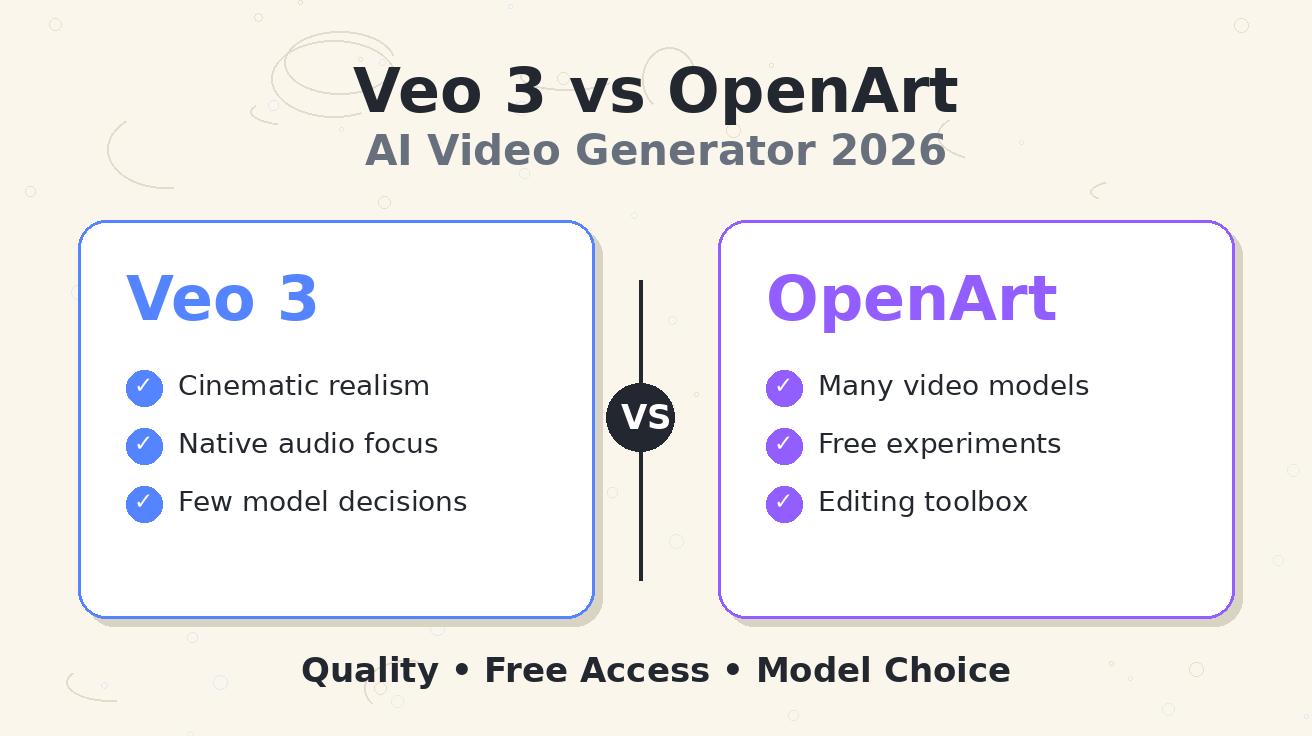
If you are comparing Veo 3 vs OpenArt, the first thing to understand is that you are not comparing two identical products. Veo 3 is a focused video generation model family built for high-quality cinematic output. OpenArt is a creative platform that gives creators access to many image and video models, plus adjacent tools such as image-to-video, text-to-video, restyling, upscaling, lip sync, sound effects, and video editing.
That difference matters. A creator searching for the best OpenArt AI video generator may want one place to test many looks quickly. A marketer searching for OpenArt vs Veo 3 may want to know which tool can produce a final campaign asset with fewer compromises. A developer asking about Veo 3 model choice may be deciding whether to use a cost-efficient Veo variant, a faster Veo variant, or a multi-model platform for prototyping.
The short answer: choose Veo 3 when final output quality, cinematic consistency, prompt control, and audio-aware storytelling matter most. Choose OpenArt when exploration, free experimentation, model variety, and editing flexibility matter more than locking into a single model. The smartest workflow in 2026 is often not “Veo 3 or OpenArt forever.” It is “OpenArt for wide creative exploration, then Veo 3 for the final shot that needs to look polished.”
This guide breaks down quality, free access, model selection, workflow fit, and the exact decision rules I would use before spending credits.
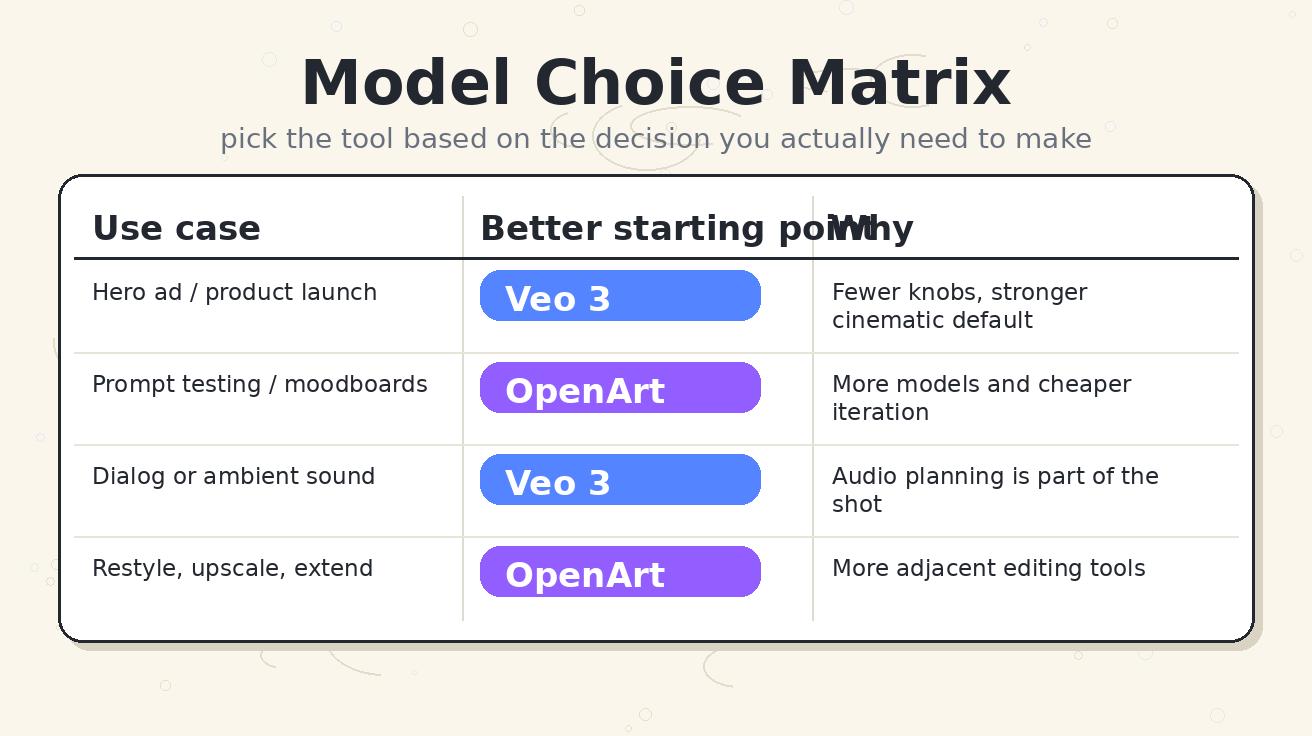
Quick verdict: who should use each tool?
| Need | Better starting point | Why |
|---|---|---|
| Best cinematic final clip | Veo 3 | Stronger default realism, camera language, and scene coherence |
| Many visual experiments | OpenArt | Multiple models and creative tools in one workspace |
| Lowest-friction free testing | OpenArt | Free access is easier for lightweight experimentation, though limits can change |
| Audio-aware video concepts | Veo 3 | Veo-style workflows are better when sound, dialogue, and atmosphere are part of the scene |
| Image-to-video and restyle work | OpenArt | OpenArt has many adjacent transformation tools |
| Product demo, ad, or hero video | Veo 3 | Final quality usually matters more than having many model options |
| Moodboard, storyboard, or style search | OpenArt | Faster to compare directions before committing |
| Developer model choice | Veo 3 family | Veo model variants make cost, speed, and quality easier to plan |
My practical recommendation: if the video is customer-facing, use Veo 3 for the final generation. If the video is part of early ideation, use OpenArt to explore more options before committing to the final model.
What is Veo 3?
Veo 3 is Google’s advanced AI video generation model family. In the current 2026 landscape, creators usually evaluate Veo through three ideas: output quality, access route, and model choice. The model family is designed for short, high-fidelity video clips from text or image inputs, with strong attention to motion, lighting, camera framing, and scene continuity.
For creators, Veo 3 is attractive because it behaves more like a cinematic production tool than a casual animation toy. You can describe the subject, environment, lens, motion, atmosphere, and audio direction, then expect the model to interpret the whole shot as one coherent scene. That does not mean every generation is perfect. It means Veo 3 tends to reward precise creative direction.
For businesses, Veo 3 is attractive because the decision surface is cleaner. You do not need to test twenty unrelated models to discover which one can hold product identity, realistic motion, and believable camera behavior. If the project requires a polished launch clip, a social ad, a trailer-style concept, or a high-quality product video, Veo 3 is usually the more direct path.
For developers, the main question is not only “Can Veo 3 make great video?” It is “Which Veo model should I choose?” Google’s broader Veo model family now includes cost-optimized and speed-focused options, including Veo 3.1 Lite for lower-cost use cases and faster variants for higher-throughput workflows. That makes Veo 3 model choice more strategic: use the premium path when quality is the bottleneck, and use a lighter path when cost per second matters more.
What is OpenArt AI video generator?
OpenArt is an AI creative platform rather than a single video model. Its public pages describe a broad set of video tools: image-to-video, text-to-video, elements-to-video, video-to-video, motion-sync video, lip-sync video, sound effects, video upscaling, character replacement, restyling, extending, and a video editor. It also presents model pages for individual video generators, including model-specific options.
That makes the OpenArt AI video generator useful for creators who want a flexible workspace. Instead of asking one model to solve every problem, you can test different model styles, turn images into motion, restyle a clip, add sound effects, upscale, or use reference elements. OpenArt is closer to a creative lab: many tools, many routes, many experiments.
The tradeoff is decision complexity. A multi-model platform gives you more optionality, but optionality is not the same as final quality. If you are new to AI video, you may spend more time choosing models, interpreting credit costs, comparing outputs, and deciding which result is “good enough.” If you are an experienced creator, that flexibility can be a major advantage. If you are trying to ship one polished asset today, it can become friction.
This is the core OpenArt vs Veo 3 distinction: OpenArt gives you breadth; Veo 3 gives you focus. Breadth is powerful during exploration. Focus is powerful during final production.

Quality comparison: cinematic output vs creative range
The quality question is where most “Veo 3 vs OpenArt” comparisons become confusing. OpenArt can expose several video models, including model pages for specific generators. So the quality you get from OpenArt depends heavily on which model you choose, what input you provide, and whether you are using text-to-video, image-to-video, restyling, or editing tools. Veo 3, by contrast, is a single high-end model family with a clearer quality promise.
Scene realism
Veo 3 has the advantage when realism is the primary goal. It tends to be better suited to shots where the viewer expects natural lighting, believable physical motion, and a consistent camera path. This is especially important for product videos, fashion clips, architecture visualizations, food ads, documentary-style shots, and any scene where a small visual glitch makes the whole asset feel synthetic.
OpenArt can produce strong visuals, especially when you select the right model and provide a strong starting image. But because OpenArt is a platform, its quality ceiling depends on model selection. One model may be better for stylized motion. Another may be better for anime. Another may be better for surreal visuals. That range is useful, but it means OpenArt quality is less predictable unless you already know which model fits your goal.
Motion consistency
AI video quality is not only about pretty frames. It is about how objects move across time. Does the subject remain the same person? Do hands, clothing, and props stay consistent? Does the background behave naturally? Does camera movement feel intentional rather than random?
Veo 3 is usually the safer choice for motion consistency in realistic scenes. It is built for scene-level interpretation, so it often handles camera language better: slow dolly, handheld documentary, locked-off product shot, macro lens, orbit shot, aerial reveal, or close-up with shallow depth of field. You still need to prompt carefully, but the model is more likely to understand the shot as a whole.
OpenArt is stronger when you want to explore motion styles rather than commit to one. If you have a reference image and you want to see several possible animations, OpenArt’s image-to-video and model variety can help you discover directions quickly. The weakness is that every model has its own quirks. A motion that works in one model may not transfer cleanly to another.
Audio and atmosphere
Audio is one of the biggest reasons creators consider Veo 3. Modern video generation is moving beyond silent clips. A finished clip may need ambient sound, footsteps, machine noise, dialogue timing, or a soundscape that matches the visual mood. If audio direction is part of the shot, Veo 3 is the more natural place to plan the final generation.
OpenArt also includes sound-related tools, including sound effects and lip-sync style workflows. That is useful, but the decision depends on whether you want audio to be generated as part of the core cinematic idea or added as a post-production layer. For creator workflows, OpenArt can be excellent for assembling and editing. For a single prompt-to-scene concept where image and sound should feel unified, Veo 3 is easier to reason about.
Style flexibility
OpenArt wins on style flexibility. Because it is built around many tools and models, it is better for trying anime, surreal art, stylized 3D, fantasy, illustration, product mockups, social visuals, and experimental references. If you are not sure what the final video should look like, style range matters more than raw realism.
Veo 3 can also follow style direction, but it is most valuable when you already know the style target and need a high-confidence final result. If you are still asking “Should this be photorealistic, painterly, cinematic, product-led, or social-first?”, OpenArt may get you to the answer faster.
Free access comparison: which is easier to test?
Free access is a moving target because AI video platforms change credit policies often. The safe way to compare is not to memorize one number. Instead, evaluate the friction of starting, the amount of useful testing you can do before paying, and whether the free tier teaches you enough to choose a paid workflow.
OpenArt markets free access for creators and usually feels easier for casual experimentation. You can start with lightweight generations, test basic models, and explore the platform before making a serious commitment. That makes OpenArt appealing when you are validating an idea, comparing styles, or trying AI video for the first time.
Veo 3 access depends on the route. Some creators encounter Veo through Google products, Google AI Studio, Vertex AI, Gemini-related access, or third-party platforms. Developers may care about API availability and cost per second. Creators may care about whether the interface is simple enough to use without setup. In 2026, the Veo family is becoming more flexible, especially with lower-cost model options, but the “free” experience can still feel less straightforward than a general creative platform.
The practical answer: OpenArt is usually easier for free exploration; Veo 3 is more compelling once you care about whether the final clip is worth publishing.
Model choice: the most important difference
The phrase Veo 3 model choice can mean two different things.
First, inside the Veo ecosystem, it means choosing the right Veo variant for your workload. If you need maximum quality, you choose the highest-quality option available to your access route. If you need lower cost, you consider a lighter model. If you need speed, you consider a faster model. Google’s Veo 3.1 Lite announcement is important because it shows the model family moving toward practical production tiers: quality, speed, and cost can be balanced instead of treated as one fixed package.
Second, in the OpenArt ecosystem, model choice means choosing between many different models and tools inside a creative platform. That is a broader kind of choice. You may choose one model for image-to-video, another for stylized text-to-video, another for restyling, and another for upscaling or extension.
Neither approach is automatically better. They solve different problems.
Veo 3 model choice is better when you want predictable production planning. A team can decide: “Use the lower-cost model for drafts, use the premium model for final hero assets, and control cost by limiting duration.” That is a clean pipeline.
OpenArt model choice is better when you want creative optionality. A solo creator can decide: “Try three different models, compare motion, restyle the best version, upscale it, and keep iterating.” That is a flexible exploration process.
Best use cases for Veo 3
Use Veo 3 when the final asset needs to be convincing. That includes brand videos, product launch clips, hero visuals, paid social ads, investor demos, cinematic concept trailers, realistic character scenes, architectural scenes, fashion motion, food and beverage shots, and high-value landing page assets.
Veo 3 is also a stronger choice when your prompt contains detailed camera direction. For example, if you specify “a slow macro dolly across a glossy black smartwatch on a wet stone surface, shallow depth of field, cool studio lighting, subtle ambient hum,” you want a model that can understand camera, lighting, object behavior, and atmosphere as one integrated shot.
Another good Veo 3 use case is prompt refinement. If you already have a strong idea, you can spend your effort improving one high-quality prompt rather than jumping between models. That matters for teams. Creative directors, marketers, and developers can build reusable prompt templates around a stable model family.
If you are using Veo for cost-sensitive work, read our related guide on Veo 3 pricing in 2026 and the deeper Veo 3 API pricing guide before choosing a production route.
Best use cases for OpenArt
Use OpenArt when you need range. If you are making a moodboard, testing style directions, converting a still image into several motion concepts, restyling a video, experimenting with lip sync, or trying different model aesthetics, OpenArt is a strong creative workspace.
OpenArt is especially useful before you know what the final shot should be. Many creators waste money by going directly to a high-end model without a clear visual target. They generate one expensive clip, dislike it, then keep making random changes. A better process is to explore broadly with cheaper or easier tools, identify the winning direction, then move that direction into a high-quality final workflow.
OpenArt also helps when the project is not purely text-to-video. If you already have a reference image, a character design, a product render, or a rough clip, OpenArt’s adjacent tools can be more useful than a single model. You can transform, extend, restyle, upscale, and iterate before deciding whether a final Veo pass is necessary.
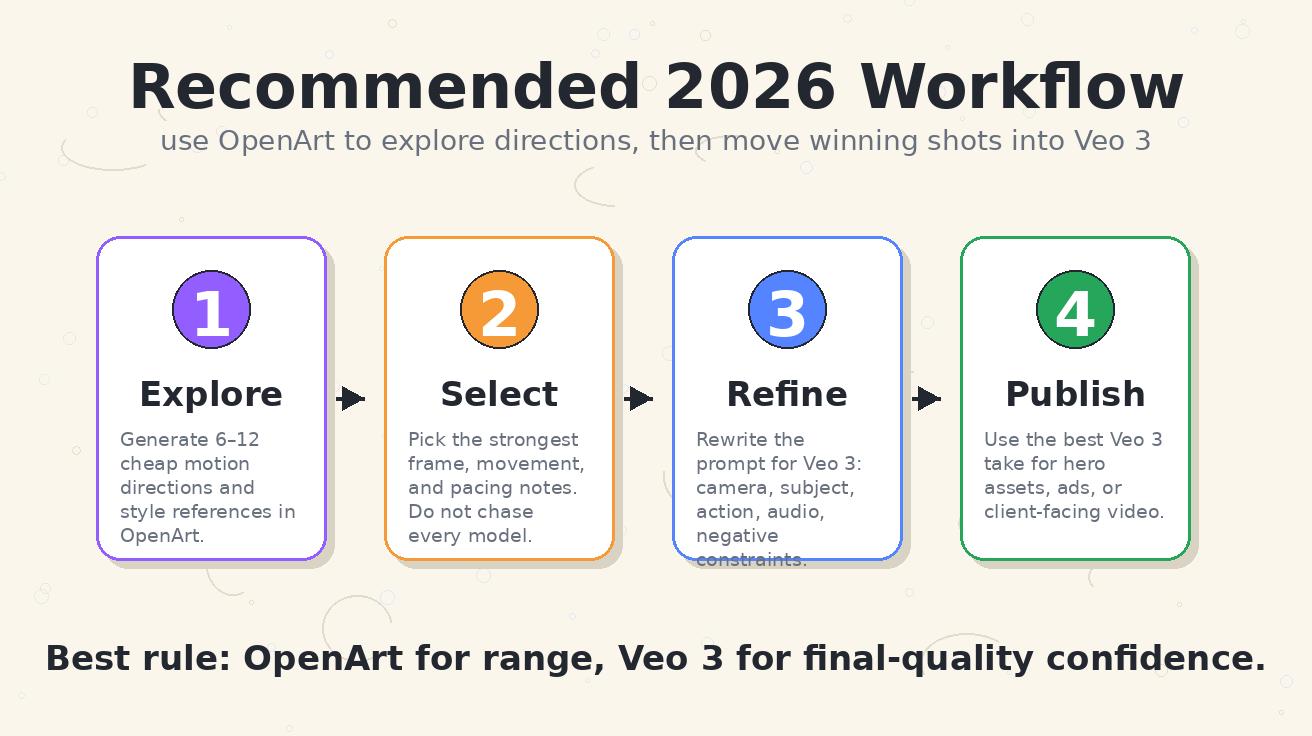
Recommended workflow: OpenArt for exploration, Veo 3 for final output
The highest-ROI workflow is a two-stage process.
Stage one: use OpenArt to explore. Generate several variations from the same idea. Test different model styles. Turn one or two still images into motion. Try a restyle. Save the best frame, motion direction, color palette, and pacing notes. The goal is not to create the final asset. The goal is to reduce uncertainty.
Stage two: use Veo 3 to finish. Rewrite the prompt with the lessons from exploration. Be specific about camera movement, subject identity, environment, lighting, action, duration, and audio atmosphere. Use the best OpenArt result as creative reference, not as the final benchmark. Then generate fewer, higher-quality takes.
This workflow solves the biggest AI video cost problem: paying premium-model prices while still guessing what you want. OpenArt reduces creative uncertainty. Veo 3 increases final-quality confidence.

Prompting tips for a fair comparison
A fair comparison needs the same creative brief, not the same vague prompt. Do not compare Veo 3 and OpenArt with “make a cool tech video.” Compare them with a production-grade brief.
Use this structure:
- Subject: who or what is in the shot?
- Action: what exactly happens during the clip?
- Camera: is it static, dolly, handheld, macro, aerial, or close-up?
- Lighting: studio, daylight, neon, softbox, golden hour, cinematic contrast?
- Style: photorealistic, editorial, documentary, 3D, anime, surreal, product render?
- Audio: ambient sound, dialogue, music mood, silence, sound effects?
- Constraints: avoid extra limbs, text artifacts, warped logos, random cuts, or identity drift.
For example:
A cinematic 8-second product shot of a matte black AI camera on a clean concrete desk. Slow macro dolly from left to right, shallow depth of field, cool blue rim light, soft studio reflection, tiny status light pulsing once. Minimal ambient electronic hum. No extra objects, no text, no logo distortion, no fast cuts.
Run that brief through both workflows. In OpenArt, test multiple models or image-to-video variants. In Veo 3, refine the shot language and focus on final coherence. Then judge the result by motion stability, product shape, lighting consistency, camera intention, and whether the clip is publishable without apology.
Decision checklist: OpenArt vs Veo 3
Choose Veo 3 if:
- You need a final clip for a public campaign or landing page.
- Realism and cinematic continuity matter more than model variety.
- You want a cleaner model decision and fewer variables.
- Audio or atmosphere is part of the creative concept.
- You can write detailed prompts and judge output quality carefully.
- You are willing to spend credits on fewer but higher-value generations.
Choose OpenArt if:
- You are still exploring styles, references, or motion directions.
- You want access to many models and tools in one place.
- You need image-to-video, restyle, video-to-video, upscale, lip sync, or editing features.
- You are experimenting with free or low-cost credits.
- You enjoy comparing multiple model personalities.
- The final output can be stylized or iterative rather than strictly photorealistic.
Use both if:
- You want a practical professional workflow.
- You need to reduce uncertainty before spending on premium generations.
- You are building a repeatable content pipeline.
- You want OpenArt’s range and Veo 3’s final-quality confidence.
Common mistakes when comparing Veo 3 vs OpenArt
The first mistake is comparing a platform to a model as if they were the same category. OpenArt is a multi-tool workspace. Veo 3 is a model family. If you compare them only by one output, you miss the workflow difference.
The second mistake is judging by the best demo. Every AI video tool has impressive demos. Your decision should be based on your own prompt, your own subject matter, and your own failure tolerance. Product videos, character videos, and abstract art all fail in different ways.
The third mistake is ignoring cost per usable clip. A cheap generation is not cheap if you need twenty attempts to get one usable result. A premium generation is not expensive if it produces the asset that actually ships. Measure cost by usable output, not by sticker price alone.
The fourth mistake is skipping prompt discipline. Multi-model platforms make it tempting to blame the model immediately. Premium models make it tempting to expect magic. In both cases, weak prompts create weak comparisons. Write the shot like a director, not like a keyword list.
Final recommendation
For most serious creators, the best answer to Veo 3 vs OpenArt is not a permanent winner. It is a workflow split.
Use OpenArt when you need creative breadth: testing styles, animating references, comparing models, restyling clips, and discovering what the video should become. Use Veo 3 when you need final-quality depth: cinematic realism, scene coherence, stronger camera interpretation, and a cleaner production decision.
If you are choosing one tool only, choose based on your current bottleneck. If your bottleneck is “I do not know what style I want,” start with OpenArt. If your bottleneck is “I know the shot and need it to look professional,” start with Veo 3. If your bottleneck is “I need to control cost at scale,” evaluate Veo model variants and consider using OpenArt as a low-cost exploration layer before final generation.
That is the practical 2026 answer: OpenArt helps you search the creative space. Veo 3 helps you ship the final scene.
FAQ
Is Veo 3 better than OpenArt AI video generator?
Veo 3 is usually better for polished cinematic final output, especially when realism, camera control, motion consistency, and audio-aware storytelling matter. OpenArt is better for exploration because it offers many models and tools in one creative platform.
Is OpenArt the same as Veo 3?
No. Veo 3 is a video generation model family. OpenArt is a broader AI creative platform that can provide access to multiple video models and tools such as text-to-video, image-to-video, restyling, upscaling, lip sync, and video editing.
Which is better for free AI video generation, OpenArt or Veo 3?
OpenArt is usually easier for quick free experimentation because it is designed as a general creative platform with free access paths. Veo 3 access depends on the route, such as Google products, Google AI Studio, API access, or third-party platforms. For final quality, Veo 3 is still the stronger choice.
What is the best Veo 3 model choice in 2026?
The best Veo 3 model choice depends on your goal. Use a higher-quality Veo option for final campaign assets, a faster option for time-sensitive production, and a lighter or cost-optimized option for drafts, high-volume testing, or developer workflows where cost per second matters.
Should I use OpenArt before Veo 3?
Yes, that is often the smartest workflow. Use OpenArt to explore styles, reference images, and motion directions. Once you know the winning direction, rewrite the prompt and use Veo 3 for the final high-quality generation.
Which tool is better for product videos?
Veo 3 is usually better for final product videos because product shape, lighting, camera motion, and realism matter. OpenArt can still be useful for early concepts, styleboards, or image-to-video experiments before the final Veo 3 generation.
Which tool is better for social media creators?
OpenArt is strong for social creators who need many fast experiments, stylized clips, and editing options. Veo 3 is better when the creator needs one premium clip that can anchor an ad, launch post, trailer, or high-quality brand video.
Related Articles
Continue with more blog posts in the same locale.
What is Google Veo 4?
Complete overview of Google Veo 4 AI video generator features, capabilities, and improvements over Veo 3.
Read article
How to Use Google Veo 4
Step-by-step guide to using Google Veo 4 AI video generator. Learn prompts, settings, and best practices for creating stunning AI videos.
Read article
Veo 3 Crowdfunding Video Generator 2026: Kickstarter Story Clips, Rewards, and Launch Prompts
A practical 2026 Veo 3 crowdfunding video generator workflow for Kickstarter and Indiegogo launch videos, reward-tier clips, campaign teasers, founder stories, prompts, QA, and compliance checks.
Read article