
Crane Shot Film Explained: What It Is and How It Works
Crane shot film explained: how camera cranes work, their payload limits, famous examples, and how to recreate a crane move with AI video tools.
Veo3 AI · 14 min read · Oct 27, 2026
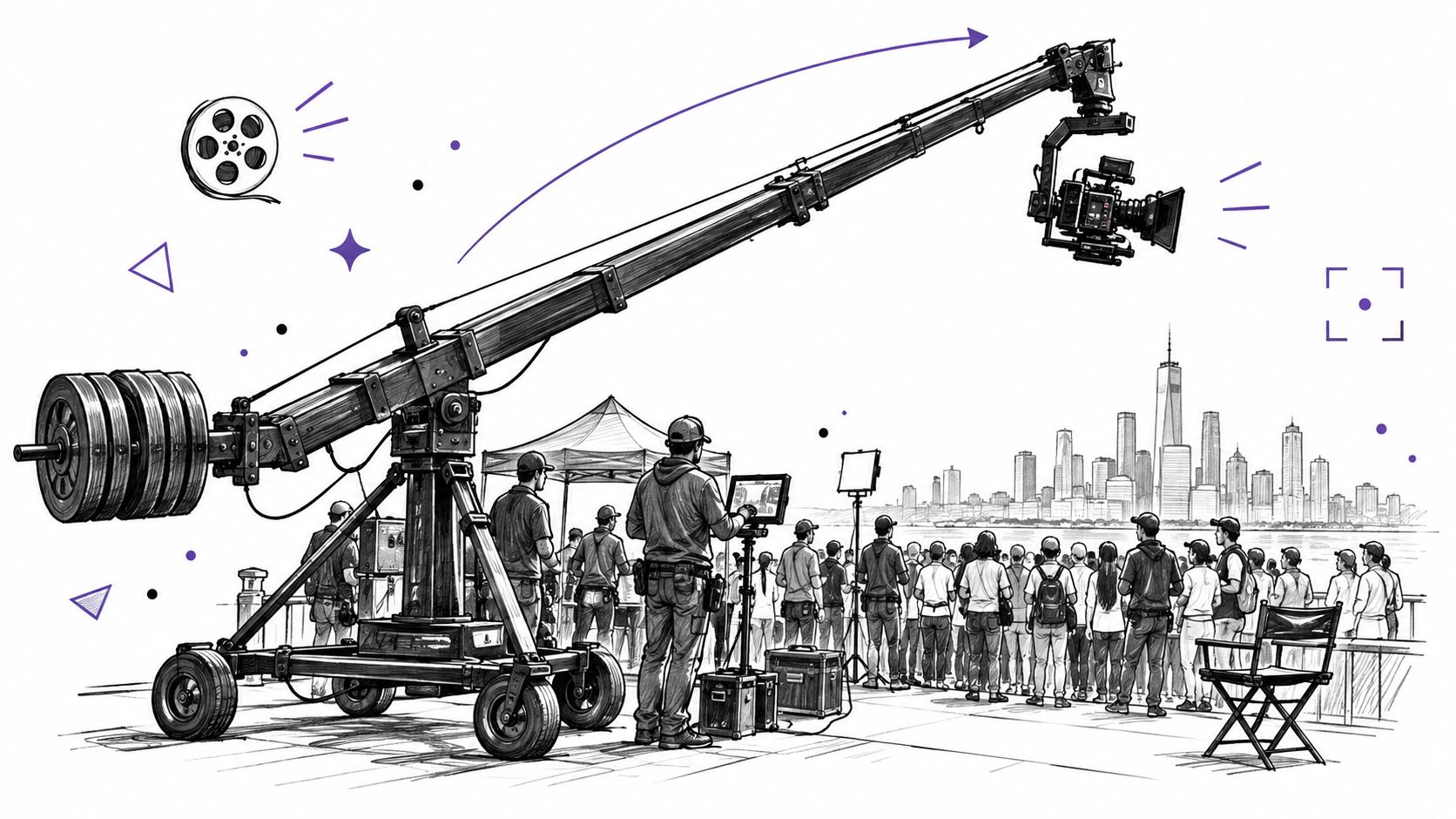
A crane shot mounts the camera on a long arm that pivots around a fulcrum, so the lens travels through an arc, combining vertical and horizontal movement in one continuous take and reaching heights of up to about 100 feet on large configurations. If you're trying to identify a crane shot in a film or plan one of your own, the key is to watch how the camera travels through space, not just whether it points up or down.
That distinction matters when you're choosing equipment, blocking performers, or writing a camera prompt. A tilt can reveal something above the frame, but it can't create the same changing viewpoint as a camera that physically rises. And although a crane can make a striking reveal, it isn't always the safest or most practical way to get the image.
Table of Contents
- What a Crane Shot Is and What It Does for a Scene
- Crane Shots Through History and Famous Films
- How the Arm, Counterweight and Lens Create the Move
- Crane Sizes and Payload Limits Compared
- How to Plan and Execute a Crane Shot on Set
- Choosing Between a Crane, Jib, Dolly, Drone and AI Move
- Simulating a Crane Move in AI Video Tools
<a id="what-a-crane-shot-is-and-what-it-does-for-a-scene"></a>
What a Crane Shot Is and What It Does for a Scene
A crane shot uses a camera mounted on a long arm that pivots around a fulcrum. Think of a fishing rod with a camera at the tip: the base stays in place while the tip sweeps up, down, and across. A counterweight on the shorter rear section balances the camera, lens, remote head, and other equipment, allowing the rig to move smoothly through an arc. The American Society of Cinematographers' overview of camera movement describes how this setup combines vertical and horizontal movement and can take the lens from near ground level to about 100 feet, depending on the crane configuration.
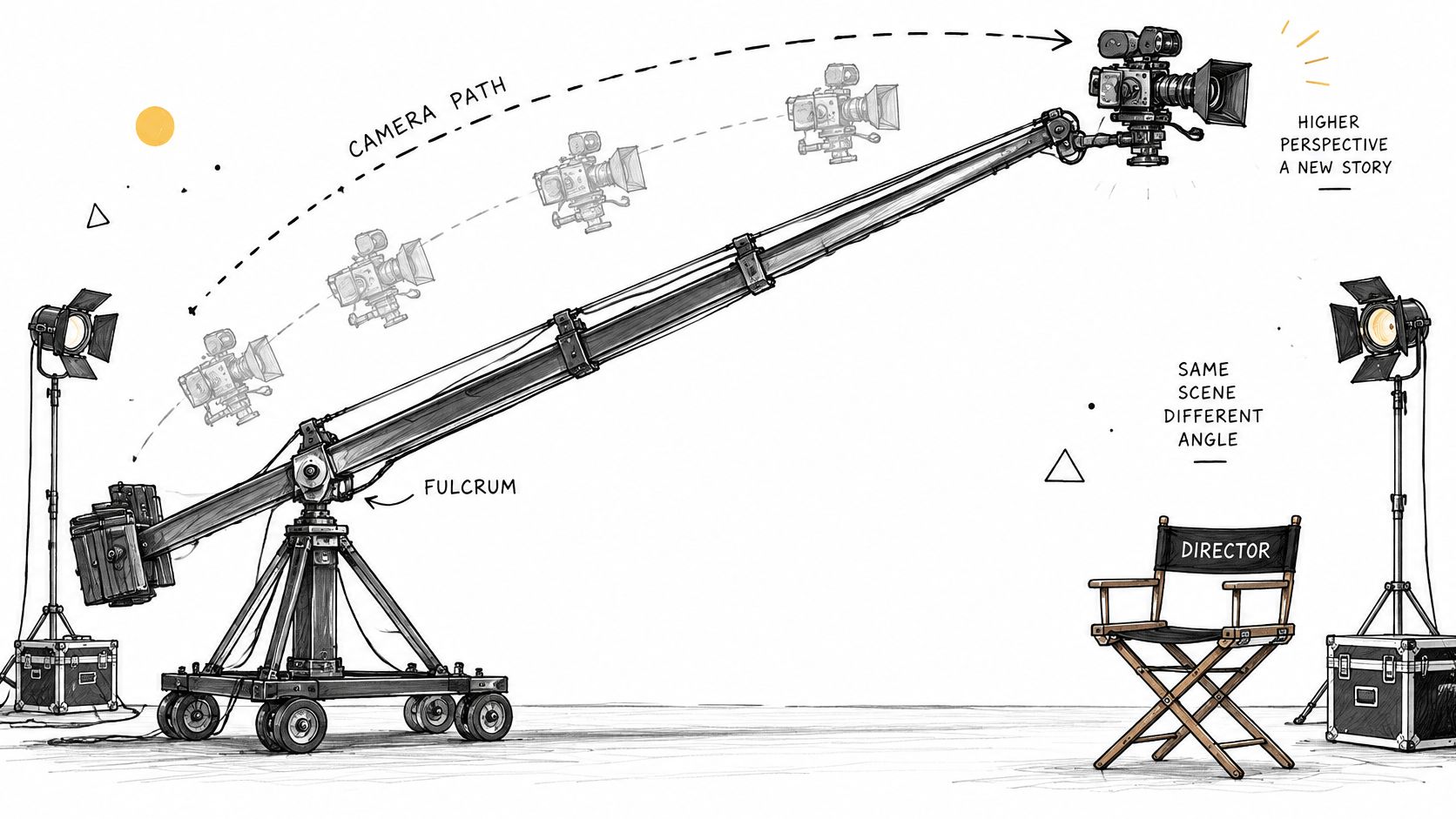
The movement has three recognizable visual signatures:
- A rising, descending, or swinging arc: The camera changes height and position in one continuous take, rather than swiveling from a fixed spot.
- A raised or overhead viewpoint: The camera can rise above performers or set pieces to show a view that a tripod on the ground can't reach.
- A reveal of scale: As the frame opens onto a larger space, the viewer discovers how an individual, crowd, or action fits into the environment.
The easiest way to tell a crane move from similar movements is to ask what the camera itself is doing. A pan rotates the camera left or right from a fixed position. A tilt points it up or down without moving its position through space. A dolly carries the camera along the ground, often toward or away from a subject. A crane can combine travel and rotation while raising or lowering the lens.
Quick test: If the camera rises or descends through an arc and the scene's perspective shifts along the way, you're probably watching a crane move.
<a id="crane-shots-through-history-and-famous-films"></a>
Crane Shots Through History and Famous Films
The camera move in Intolerance (1916) required an inventive solution. D. W. Griffith's crew built a mobile, counterbalanced elevator tower, then pushed it forward as the camera descended. The result combined vertical and horizontal movement, linking foreground action with the larger setting. The Columbia Film Language Glossary's account of the crane shot describes how the move revealed a scene's scale.
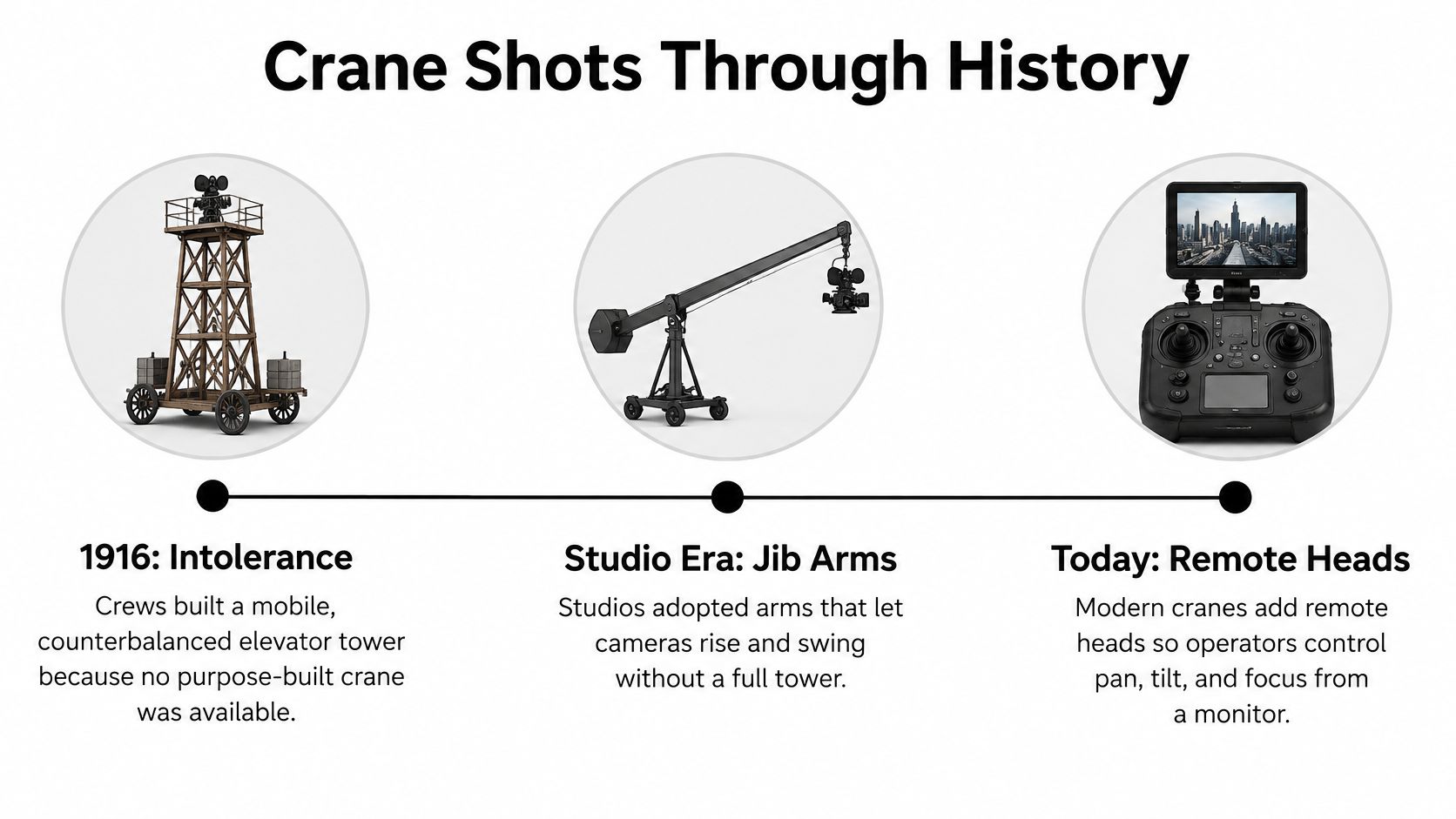
As productions grew more ambitious, purpose-built studio cranes became increasingly common during the 1930s. They let filmmakers carry a camera through a composition, guiding the viewer from one part of a scene to another and making large sets feel more imposing.
<a id="from-spectacle-to-storytelling"></a>
From spectacle to storytelling
In The Scarlet Empress (1934), crane movement helped make elaborate production design feel imposing, placing characters within a larger world. The Adventures of Robin Hood (1938) used spectacle differently: a raised view could connect foreground action with the surrounding space. In both cases, the move helps the audience understand how the action fits its setting.
Busby Berkeley's musical choreography also made overhead and rising camera movements familiar to audiences. From above, a crowd can form a pattern; as the camera moves, that arrangement can become a closer view of performers or a broader view of the stage. Across these examples, cranes developed from an improvised engineering solution into a storytelling tool.
A later example is the opening long take of Orson Welles's Touch of Evil (1958), often cited for its mobile camera work. The movement connects immediate action with the wider setting as characters and information enter the frame. When studying a crane shot, follow how the camera's path changes what the audience sees, then consider what that perspective suggests about the characters: are they exposed, small, or part of a much larger world?
<a id="how-the-arm-counterweight-and-lens-create-the-move"></a>
How the Arm, Counterweight and Lens Create the Move
Watch fence posts from a moving car: the nearby posts sweep past quickly while distant hills seem to drift. That difference in apparent motion is parallax, and it helps the viewer sense depth. A crane creates a similar effect as the camera rises, swings, or travels: objects near the lens shift across the frame faster than objects farther away. This changing relationship between foreground and background can make a reveal feel three-dimensional rather than like a static view from above.
The same idea explains why the lens matters. A wide or moderate lens preserves more of the space between foreground and background, making the camera's change in position easier to read. A long lens compresses apparent distance, which can make a substantial vertical move look more like a tilt. The Cinema Blography guide to crane-shot perspective recommends testing the move at the intended focal length and placing foreground elements close to the lens.
| Lens choice and how it changes a crane move | Parallax effect | How a vertical move reads | Best use |
|---|---|---|---|
| Wide | Strong foreground-to-background shift | Reads as a true rise with depth | Reveals and environmental scale |
| Moderate | Balanced separation | Reads as a rise with depth and subject focus | Most narrative crane moves |
| Long | Compresses distance | Can look close to a tilt | Isolating a subject while the camera rises |
Place a foreground object close enough to the camera to move noticeably across the frame, such as a doorway, railing, or performer passing near the lens. Leave clear space for the arm's arc so the rig can complete its planned movement without striking set pieces. Then rehearse at the chosen focal length and check the monitor: does the change in height feel like a rise through the scene, or does it look as if the camera merely tilted?
<a id="crane-sizes-and-payload-limits-compared"></a>
Crane Sizes and Payload Limits Compared
A crane's capacity depends on the full camera package, boom length, and counterweight balance. As the arm extends, the load puts more torque on the pivot, so the safe payload can decrease with reach. The SuperTechno 50 specifications show how reach, extension speed, tilt limits, and total operating mass shape the move.
The MovieTech CRANE 120 manual does not give reach, extension speed, or telescoping range. Confirm those figures with the manufacturer.
| Crane reference specifications | Reach or height | Telescoping range | Extension speed | Payload limit | Full unit weight |
|---|---|---|---|---|---|
| SuperTechno 50 | 50 ft max lens height | 37 ft 5 in | 6 ft 5 in per second | , | 5,464 lb |
| Technocrane 15 | 15 ft underslung reach | 8 ft 2 in | 4 ft 9 in per second | 80 lb | 706 lb |
| MovieTech CRANE 120 | , | , | , | Up to 30 kg (66 lb), lower as boom lengthens | , |
The SuperTechno 50's arm tilts from 60 degrees upward to 52 degrees downward. The Technocrane 15 specifications list an 80-pound maximum camera payload and a full crane weight of 706 pounds. Payload means the complete mounted package, not just the camera body. The MovieTech CRANE 120 manual gives a maximum capacity of 30 kg (66 lb) in certain configurations and notes that capacity falls as the boom gets longer.
<a id="read-the-configuration-not-just-the-headline"></a>
Read the configuration, not just the headline
A headline payload may apply only at a specific boom length. Check the rating for the configuration you plan to use, then add the camera, lens, matte box, wireless video transmitter, batteries, remote head, and focus accessories. Changing the package changes the moving load and may require rebalancing.
Even a small transmitter or battery can affect balance. Exceeding the rated payload can reduce balance and movement accuracy and compromise safe operation. Treat the payload figure as the limit for all equipment mounted on the crane.
<a id="how-to-plan-and-execute-a-crane-shot-on-set"></a>
How to Plan and Execute a Crane Shot on Set
A crane shot is a coordinated operation, not merely a camera placed at the end of an arm. The crane operator, remote-head operator, focus puller, and performers must work to shared timing and marks. The MovieTech CRANE 120 manual emphasizes configuration-specific payload limits, balance, a level base, rehearsal, and a clear exclusion zone. A useful plan follows the move from the first frame through the final safety check.
- Storyboard the arc. Sketch the start frame, end frame, camera height, tilt, lens, and any focus change. The drawing gives the crew a common reference for the shot's path and visual purpose.
- Calculate the full moving mass. Add the camera, lens, battery, wireless video, remote head, and focus gear, then compare the total with the payload limit for the planned boom length. A forgotten transmitter or battery can alter the load and balance.
- Survey the route and overhead space. Check for cables, power lines, sprinkler heads, ceilings, and other obstructions along the entire arm's path. Looking only at the camera's starting position can miss a hazard the arm reaches later.
- Choose and secure the base location. Set the crane on level, stable ground, away from slopes, curbs, and speed bumps. Uneven ground can create tip-over risk as the arm moves.
- Balance the crane. Set the counterweights for the complete camera package and rebalance whenever a lens or accessory changes. The arm must stay within the balancing capability of its supplied counterweight system.
- Assign operators and cues. Make sure the crane operator, remote-head operator, focus puller, and performers know their marks and the shared start cue. Agree on a clear abort signal before anyone moves.
- Rehearse without recording. Run the move with the intended focal length and check the monitor for framing, focus, and a visible height change. Rehearsal helps the crew find collisions or timing problems before a take.
- Set the exclusion zone and shoot. Keep people clear of the arm's operating area, warn anyone working nearby, and repeat takes only after the crew confirms it's safe to reset.
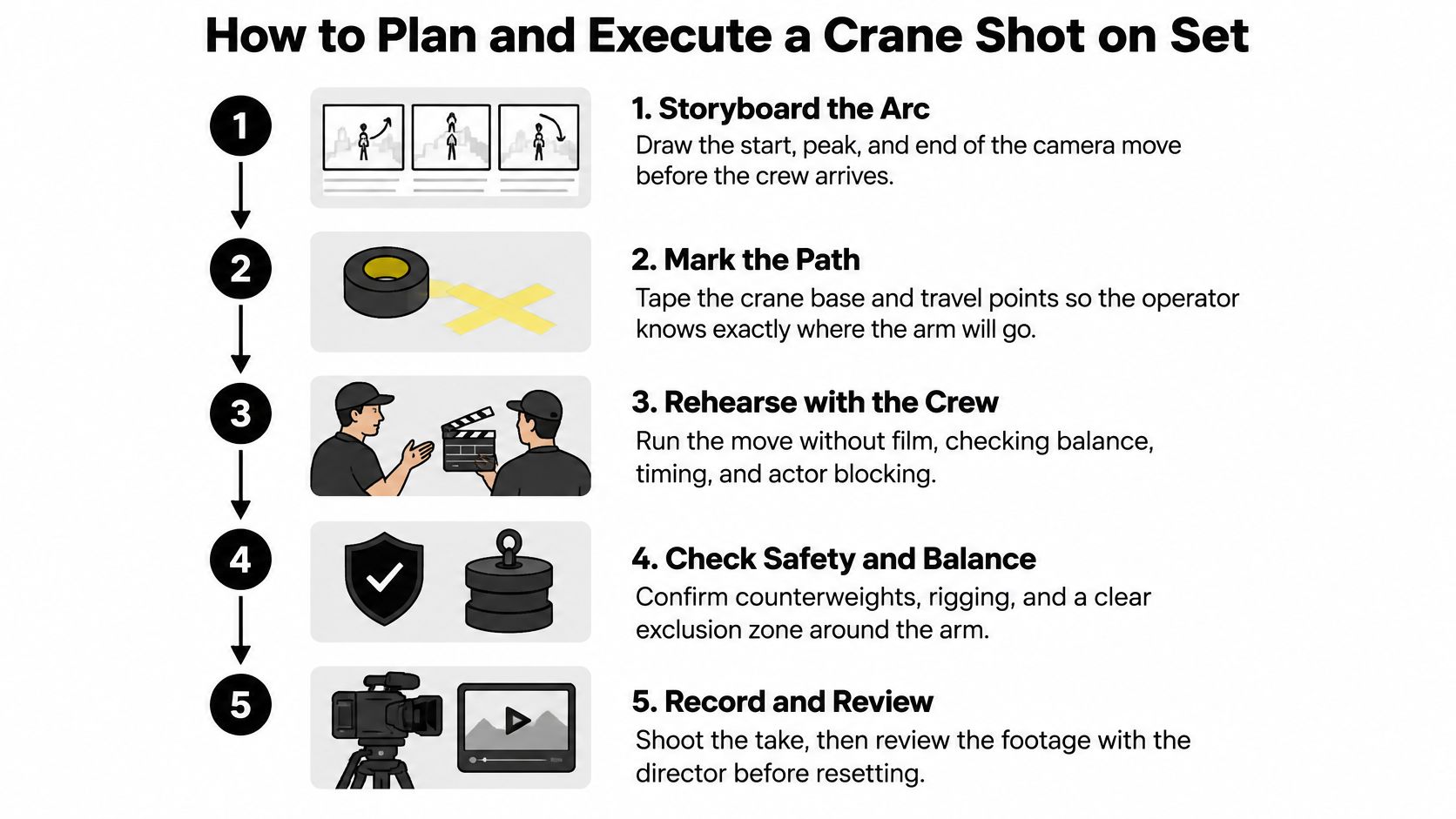
A completed plan can fit on one sheet: the camera arc, the total moving mass, the exclusion zone, and the crew's cues. For students learning how camera work fits into a broader path, filmmaking career guidance for home-educated students from The Online College of Art & Design offers a starting point for exploring the craft and its career routes.
<a id="choosing-between-a-crane-jib-dolly-drone-and-ai-move"></a>
Choosing Between a Crane, Jib, Dolly, Drone and AI Move
| Crane shot alternatives compared | Height and reach | Setup and crew | Best for | Main limit |
|---|---|---|---|---|
| Full camera crane | Up to about 100 ft on large configurations | Large crew, counterweight, exclusion zone | Sweeping reveals and rising transitions on large sets | Setup time, footprint, and safety zones |
| Camera jib | Short arm, modest height | Small crew, one operator on the head | Short rises and arcs | Limited reach and payload |
| Dolly with riser | Low to moderate vertical | Small crew, track on level floor | Smooth push-ins and rises | No true arc through space |
| Drone | Flexible aerial altitude | Pilot and compliance with flight rules | Exterior aerials | Flight rules, weather, and no indoor use |
| Gimbal or handheld rig | Low | One operator | Fast, low moves | Less controlled height change |
| Digital camera move (AI or VFX) | Set by the prompt or software | Prompt or software operator | Concept work, ads, and short social clips | Less physical authenticity |
Choose a full crane when the shot needs a large reveal, an overhead composition, or a rising transition, and the location has room for the rig and crew. A jib can handle a shorter rise or arc with a smaller crew. A dolly with a riser suits a smooth push-in on a level floor, while a gimbal or handheld rig is useful when the move needs to stay low and move quickly.
A drone can deliver an exterior aerial perspective where flight rules and conditions allow it. If aerial work is part of your plan, Ace Aviation Aerospace Academy drone training is a useful place to learn about drone licensing and training. For concept work, advertising, or short social clips, a digitally generated move may communicate the same raised viewpoint without putting a physical crane on set.
Before booking a crane, ask whether the high vantage point is essential to the story, whether the location has a level base and clear route, and whether the budget covers setup, crew coordination, and an exclusion zone. Ontario's film and television safety guideline for camera cranes calls for a stable base, clearance from overhead hazards, controlled movement orders, and warnings to people nearby. For short-form content, viewers may not distinguish a physical crane from a simulated boom, so the crane's footprint and safety burden can outweigh its practical benefit. What does the higher viewpoint mean to the story? If a simpler move delivers that meaning, choose it. If a physical crane is necessary, plan the route, crew cues, and safety zone before the shoot.
<a id="simulating-a-crane-move-in-ai-video-tools"></a>
Simulating a Crane Move in AI Video Tools
An AI video prompt that says only “crane shot” leaves too much unstated. Describe what the camera does, what it reveals, and how the perspective should feel. A clear prompt gives the model a start position, a movement path, and an endpoint, rather than just naming a piece of equipment.
Use this structure:
- Subject and setting: Name what's in the scene and where it takes place.
- Starting frame: Describe the initial camera height, angle, and framing.
- Movement: Specify a rise, descent, or arc, and whether the camera should tilt during it.
- Endpoint: State what becomes visible or where the camera finishes.
- Lens and perspective: Choose a wide, moderate, or long-lens look.
- Speed and lighting: Describe the movement's pace and the scene's light.
For example: “Slow rising arc from a rain-soaked street at dusk, camera lifts over a crowd and reveals a neon city skyline, 35mm lens, steady speed, shallow parallax.” The prompt works because it names the movement, the reveal, and the lens character rather than relying on a generic camera label.
If you need more control over the framing at the start and finish, try Veo 3.1, which supports first- and last-frame control and generates videos up to 4K. For further prompt ideas, use this guide to camera-control prompts as a reference for describing movement in concrete terms.
<a id="review-the-camera-path"></a>
Review the camera path
Check the generated clip for four things: whether foreground and background shift in a way that matches the rise, whether the perspective stays stable through the arc, whether the subject keeps a consistent shape, and whether the background drifts. If the movement is hard to read, simplify the prompt. One clear arc in a clip is easier to direct than a rising move combined with several unrelated pans, zooms, and turns.
Try three versions of the same prompt with different lens descriptions: wide, moderate, and long. Compare which result reads most clearly as a rising move, then use that version as a visual test before committing to a full production. The Veo 3 AI video generator can help you run that comparison, and its pricing page has plan details. The test clip shows whether the move reads before you invest in a larger shoot.
Veo3 AI is an all-in-one AI image-to-video generator with access to Veo3, Seedance, MiniMax, Kling, and Omni Flash, as well as a text-to-video tool for turning prompts into cinematic clips. Use Veo3 AI to test a rising arc, compare lens descriptions, and refine the reveal before planning a physical crane setup.
Related Articles
Continue with more blog posts in the same locale.

Text to Video Generator Compared: Models, Quality, Costs
Compare any text to video generator on quality tests, clip length, languages, credit costs and licensing, with a quick pick for each creator type.
Read article
MiniMax H3 Pricing: Rates, Credits and Clip Costs
MiniMax H3 pricing explained: per-second rates, credit packs, cost-per-clip examples and ways to lower your AI video budget.
Read article
How to Remove the Google Flow Watermark (2026 Guide)
Why Google Flow videos carry a Veo watermark, which plans skip it, how to fix an Ultra account that still shows it, what editing can and can't remove, and how to get a clean video.
Read article