
MiniMax H3 Pricing: Rates, Credits and Clip Costs
MiniMax H3 pricing explained: per-second rates, credit packs, cost-per-clip examples and ways to lower your AI video budget.
Veo3 AI · 18 min read · Oct 25, 2026
The standard MiniMax H3 model costs $0.08 per generated second at 768P and $0.13 per generated second at 2K, so a 5-second 2K clip costs about $0.65 before input charges. That headline is clean, but it isn't your budget. Your budget is the seconds you generate, the attempts you discard, and the inputs you attach, all multiplied together.
That's why MiniMax H3 pricing rewards a different habit. Don't ask what one second costs. Ask what one finished second costs once drafts, rejects, and final renders are counted. Once you normalize every option that way, the cheapest rate and the cheapest project often turn out to be different things, and the gap comes almost entirely from choices you control.
Table of Contents
- MiniMax H3 Per-Second Rates at a Glance
- Billing Components and Hidden Charges Explained
- Credit Packs and Cost per Clip
- Example Budgets for Real Projects
- H3 Pricing Against Other AI Video Options
- Cutting Costs Without Cutting Quality
- Frequently Asked Questions About H3 Pricing
- Pick Your H3 Tier Before You Spend
<a id="minimax-h3-per-second-rates-at-a-glance"></a>
MiniMax H3 Per-Second Rates at a Glance
The official API is pay-as-you-go. There's no fixed monthly fee in the rate card, and you pay for generated output by the second at the resolution you select. The MiniMax official API pricing documentation lists the standard model at $0.08 per second at 768P and $0.13 per second at 2K, with H3 Highspeed at $0.06 per second at 768P and H3 Lite at $0.04 per second at 768P.
Find your clip length, then read across the row. Every total below is simple multiplication, rate times seconds, because the model doesn't discount longer clips.
<a id="minimax-h3-cost-per-clip-by-model-and-resolution"></a>
MiniMax H3 Cost per Clip by Model and Resolution
| Model and setting | Rate per output second | 5-second clip | 10-second clip | 15-second clip |
|---|---|---|---|---|
| H3 standard, 768P | $0.08 | $0.40 | $0.80 | $1.20 |
| H3 standard, 2K | $0.13 | $0.65 | $1.30 | $1.95 |
| H3 Highspeed, 768P | $0.06 | $0.30 | $0.60 | $0.90 |
| H3 Lite, 768P | $0.04 | $0.20 | $0.40 | $0.60 |
The spread is the story. The flagship 2K rate is 3.25 times the Lite 768P rate, so tier and resolution choices move your bill far more than small differences in clip count. A creator who drafts everything at 2K and a creator who drafts on Lite can produce the same finished video at very different total costs, even before either one changes how many clips they make.
These are list rates for output only. They don't include input video charges or reference-image charges where those apply, and those extra lines are covered next. Treat the table as your base meter, not your final invoice.
Quick rule: Multiply the per-second rate by the seconds you need, then add any input charges that apply to your workflow.
That one calculation handles most planning. If you know your target length and your delivery resolution, you already know your output cost before you generate a single frame. The uncertainty in MiniMax H3 pricing never comes from the rate itself. It comes from how many seconds you run through the meter before you get a keeper, and from the extra billable items riding along with each generation.
<a id="billing-components-and-hidden-charges-explained"></a>
Billing Components and Hidden Charges Explained
Think of H3 billing like a taxi meter. The per-second output rate is the meter running while you ride. Input video and extra reference images are extra passengers, and each one can add to the fare before you reach your destination.
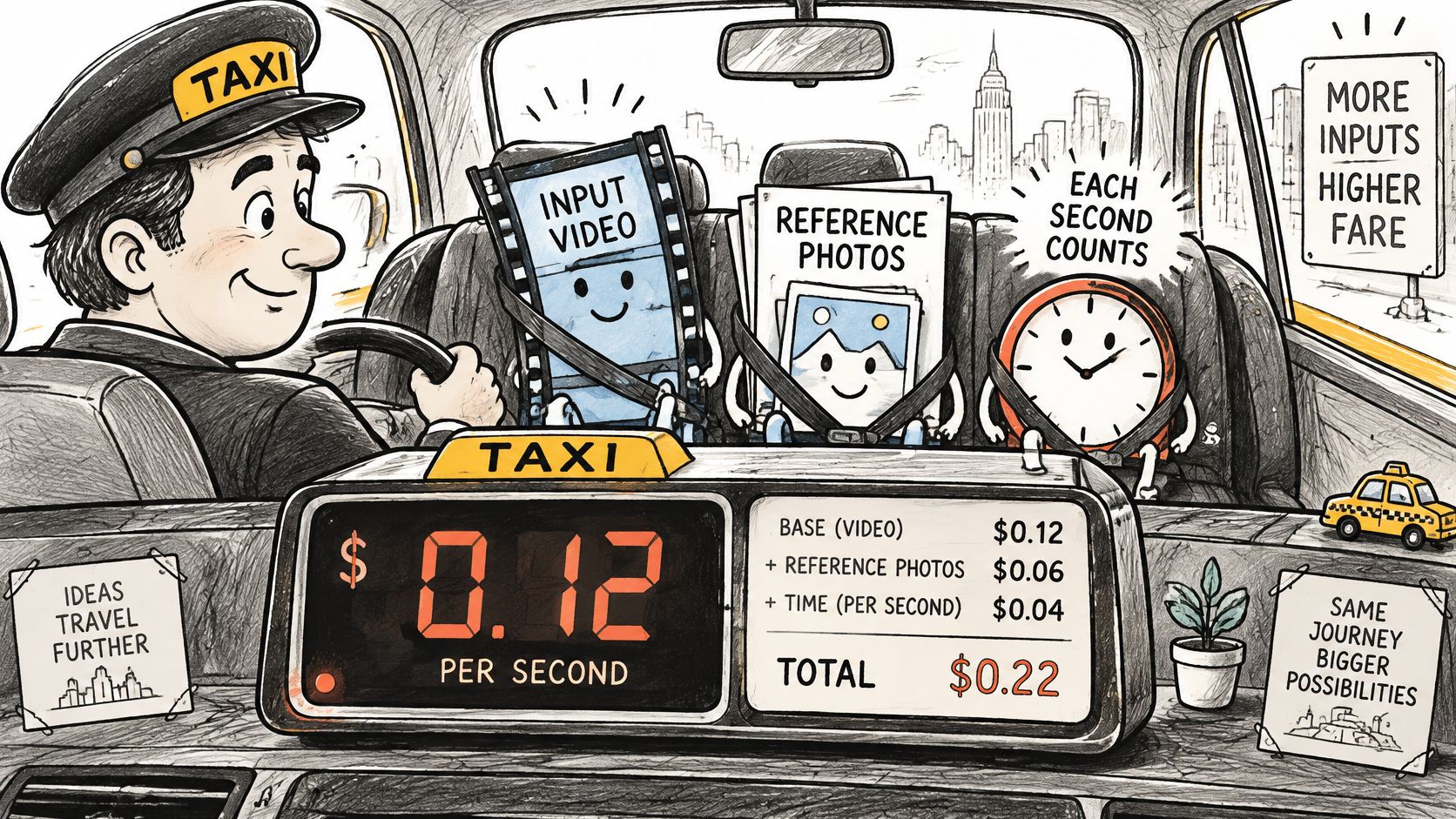
The MiniMax pricing documentation on billing components separates output video, input video, and reference-image usage instead of quoting one flat price. Check your own workflow against each component below before you assume the table above is your whole cost.
<a id="what-you-actually-pay-for"></a>
What You Actually Pay For
- Output video: You're charged per generated second at your chosen resolution, 768P or 2K. This is the rate in the table above, and it's the line that most budgets are built around.
- Input video: It's billed according to input duration at the selected output resolution. The documentation states the billing rule, but you'll need to confirm the current figure for your configuration in the official docs before you budget a video-to-video workflow.
- Audio input: Audio input is free, which matters if you're supplying a voice or music reference with each generation.
- Reference images: For a MiniMax-H3-Max task, the first two images are free and additional images are billed per image. Confirm which variant you're running, because the free allowance is variant-specific and assuming the wrong one understates reference-heavy jobs.
A worked example keeps this concrete. A 5-second 2K output costs about $0.65 at the list rate. That's the meter. Attach an input video or images beyond the free allowance for your variant, and each adds its own charge on top of that $0.65, so two creators generating identical 5-second outputs can pay different totals based purely on what they feed the model.
<a id="where-budgets-quietly-grow"></a>
Where Budgets Quietly Grow
- Stacked input charges: Input costs sit on top of the quoted output rate, so a workflow priced only from the rate table is understated by exactly those inputs.
- Regeneration seconds: Every attempt runs the meter again. Discarded takes aren't free, and they accumulate faster than any other line.
- Non-video credit use: In credit bundles, other features can consume the same balance you'd counted on for video, shrinking your real clip count.
- Price changes: Rates are the provider's to revise, so a budget built on today's card needs rechecking before a large run.
Add your output, input, and image lines together for one representative generation before you choose a tier. If the total surprises you, it's almost always the inputs or the attempt count, not the headline rate, and both are visible in advance if you itemize them.
<a id="credit-packs-and-cost-per-clip"></a>
Credit Packs and Cost per Clip
At 2K, the largest credit pack works out to about $1.26 per 5-second clip, based on its listed price and approximately 79 clips. At 768P, the same pack costs about $0.81 per clip. These estimates show why resolution affects the usable clip count as well as the headline pack price.
The MiniMax H3 credit pack pricing information lists 9 credits per billable second at 768P and 14 credits per billable second at 2K. Using those rates, a 5-second clip requires about 45 credits at 768P or 70 credits at 2K. Clip counts below divide each pack's credits by those per-clip requirements.
<a id="credit-packs-and-approximate-5-second-clips"></a>
Credit Packs and Approximate 5-Second Clips
| Pack price | Credits included | Price per 100 credits | 5-second clips at 768P | 5-second clips at 2K |
|---|---|---|---|---|
| $9.90 | 370 | about $2.68 | about 8 | about 5 |
| $49.90 | 2,500 | about $2.00 | about 55 | about 35 |
| $99.90 | 5,550 | about $1.80 | about 123 | about 79 |
The unit price falls as pack size increases, from about $2.68 per 100 credits on the smallest pack to about $1.80 per 100 credits on the largest. Packs are prepaid balances, not monthly subscriptions, so their value depends on whether production uses those credits. A lower unit rate does not lower the cost of clips left unmade.
For the $99.90 pack, dividing the price by the table's approximate clip counts gives about $0.81 per 5-second clip at 768P ($99.90 ÷ 123) and $1.26 at 2K ($99.90 ÷ 79). These are pack-level averages, not guaranteed costs for each finished clip. The calculation assumes every credit goes to video generation and every generation is usable. Regenerations increase the cost per keeper, while choosing 2K reduces the number of clips the balance can cover.
Every clip count in the table assumes all credits go to H3 video generation. Any other feature that consumes credits reduces the count by exactly what it takes.
Choose a pack by the number of usable clips your balance can fund at the resolution you expect to deliver. Estimate drafts and keepers separately, then account for repeated attempts: a pack's listed clip count is a ceiling under the table's assumptions, not a finished-output guarantee. The largest bundle offers the lowest listed cost per 100 credits, but it only saves money if you spend the balance on video rather than leaving credits unused.
<a id="example-budgets-for-real-projects"></a>
Example Budgets for Real Projects
Formulas beat guesses, so use this one for every project below: clips × seconds × per-second rate × attempts per keeper. Each scenario uses list output rates from the rate card and excludes input charges, so you can swap in your own numbers directly.
A solo creator testing ideas might run ten quick concept drafts and accept whatever comes back. A short-form creator publishing weekly needs keepers, not tests, so attempts enter the math. A marketer building a product ad works shot by shot at delivery resolution, while a brand team producing one hero clip concentrates the entire budget on a single long generation.
<a id="estimated-h3-budgets-for-four-common-projects"></a>
Estimated H3 Budgets for Four Common Projects
| Project | Clips and length | Settings and attempts | Estimated cost |
|---|---|---|---|
| Ten concept drafts | 10 clips x 5 seconds | Lite, 768P, one attempt each | $2.00 |
| Weekly TikTok series | 12 clips x 5 seconds | Standard, 768P, three attempts per clip | $14.40 |
| 30-second product ad | 6 shots x 5 seconds | Standard, 2K, two attempts per shot | $7.80 |
| 15-second hero clip | 1 clip x 15 seconds | Standard, 2K, three attempts | $5.85 |
The concept drafts are the cheapest row and the least useful comparison, because one attempt each means you're paying for exploration, not finished work. The TikTok series shows the opposite pattern. Twelve modest 5-second clips at 768P look inexpensive until three attempts per keeper triple the seconds billed, and suddenly a routine weekly series costs more than a polished 30-second ad built from six carefully planned 2K shots.
The product ad row explains a habit worth copying. Teams render only final shots at high resolution, so the 2K rate applies to a controlled number of seconds instead of an open-ended stream of experiments. The hero clip makes the same point from the other direction. One 15-second clip at 2K is a single deliverable, yet three attempts turn it into 45 billed seconds, and the total reflects attempts far more than the clip's modest length suggests.
Budget check: The attempts column is where budgets usually break. The rate is fixed and known. Your hit rate isn't.
These totals exclude input charges and any credit pack or subscription overhead, so treat them as output-cost floors rather than final invoices. Replace the sample attempt counts with your own hit rate from a small test batch before you commit to a monthly figure. Ten test clips will tell you more about your real MiniMax H3 pricing than any rate card, because your attempts per keeper is the one variable no provider can quote for you.
<a id="h3-pricing-against-other-ai-video-options"></a>
H3 Pricing Against Other AI Video Options
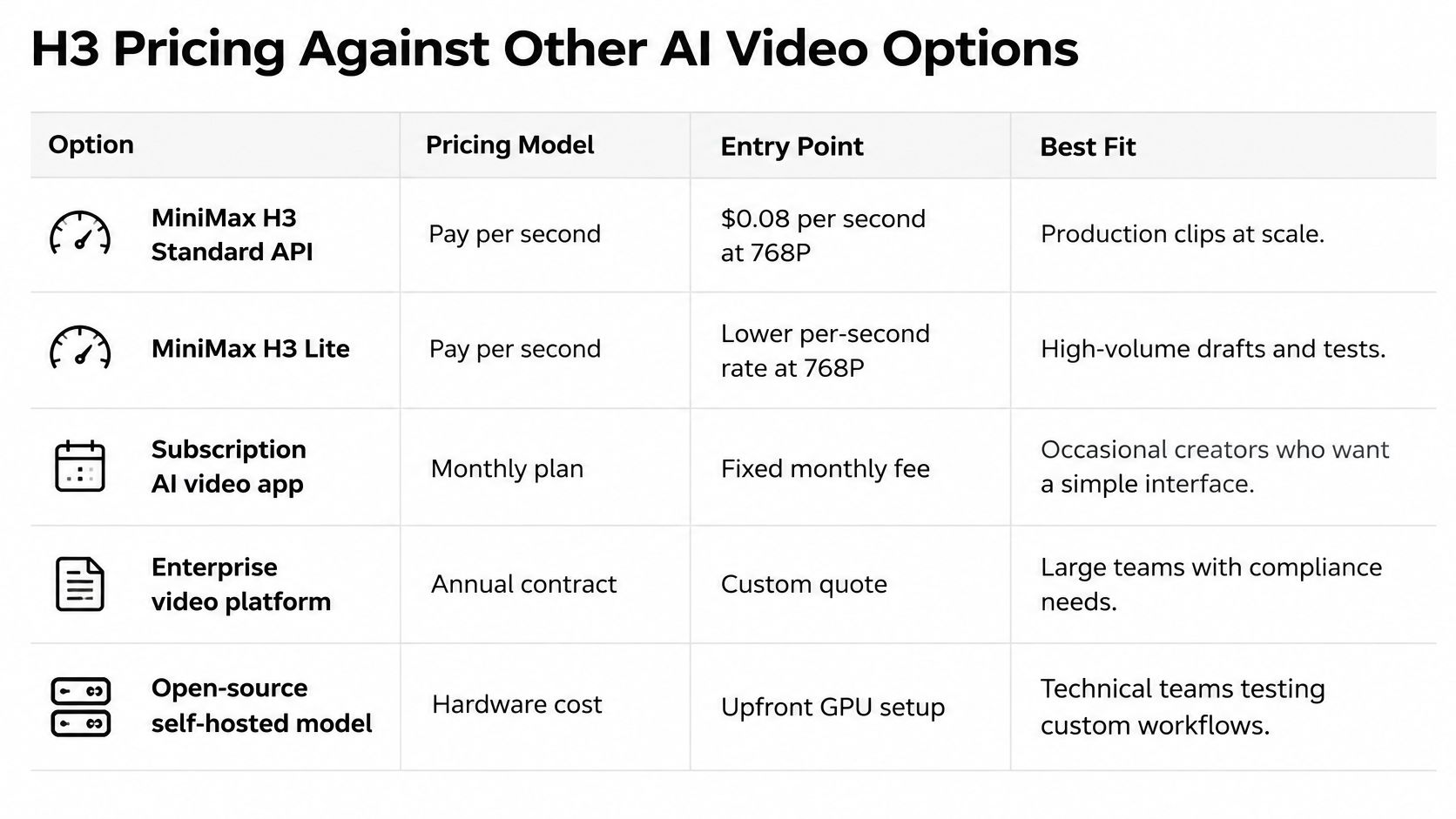
Comparing headline rates across providers misleads, because the pricing models differ before the numbers do. Compare the structure first, then the entry point, then decide which structure fits how regularly you generate.
<a id="ai-video-options-compared-by-pricing-model"></a>
AI Video Options Compared by Pricing Model
| Option | Pricing model | Entry point | Best fit |
|---|---|---|---|
| MiniMax H3 standard API | Pay-as-you-go per second | $0.08 per second at 768P | Developers who need exact cost per clip |
| MiniMax H3 Lite API | Pay-as-you-go per second | $0.04 per second at 768P | Cheap concept tests and drafts |
| MiniMax H3 credit packs | Prepaid credits | $9.90 for 370 credits | Occasional creators who want a fixed bundle |
| Veo 3 AI subscription | Monthly subscription with credits | See the pricing page | Regular creators who work across several models |
| Other mainstream video models | Varies by provider | Check the current provider rate card | Teams comparing on the same per-second basis |
Match your situation to a row. If you're a developer who needs exact, auditable cost per clip, the API wins because every second is priced before you generate it. If you create occasionally and want a bounded spend, a credit pack caps your exposure. If you generate steadily across several models, a subscription through a Veo 3 AI video generator, where you can also work with Veo 3.1, deserves a direct comparison at your monthly volume.
The metaphor is simple. Pay-as-you-go works like a taxi meter, fair for occasional trips and exact about distance. A subscription works like a gym membership, poor value if you rarely show up and excellent value if you're there every day. We use a credit system where each plan includes a set number of monthly credits, and our subscription plans may offer better value for regular users compared to credit packages, which is exactly the gym membership logic applied to generation volume.
MiniMax positions H3 aggressively within this field. The MiniMax H3 product announcement states that its 2K per-second price is less than one-third of mainstream models' pricing and that its 768P price is less than half the price of mainstream 720P offerings. Read that claim carefully. The advantage is resolution-specific, not a single universal discount, so it only holds when you compare the same resolution tier on both sides.
Prices on every option here can change, and ours may change with notice to users, so recheck current rates on each provider before a large commitment. The durable skill isn't memorizing today's numbers. It's normalizing any provider's offer to cost per finished second at your resolution and your attempt rate, then letting that single figure decide.
<a id="cutting-costs-without-cutting-quality"></a>
Cutting Costs Without Cutting Quality
Regeneration is the cost driver most budgets miss, because a rate card shows the price of a clip and says nothing about the price of the takes you throw away. At 2K, five attempts before a keeper cost $3.25 for one 5-second clip. At 768P, the same five attempts cost $2.00. Your delivered video is 5 seconds either way, but you paid for 25 seconds of generation to get it.

Duration compounds the same way. The MiniMax H3 model documentation on Hugging Face describes 4 to 15-second generations at up to 2K, at 24 frames per second, with native 32 kHz stereo audio and aspect ratios including 16:9 and 9:16. At that frame rate a 5-second clip is about 120 rendered frames and a 15-second clip about 360 frames, and because billing follows seconds, a 15-second clip costs three times a 5-second clip with no per-second discount for length.
So track one metric above all others: cost per finished second. Divide your total spend, including every discarded attempt, by the seconds you really deliver. That figure exposes waste that per-clip pricing hides, and it lets you compare a Lite draft workflow against a direct 2K workflow fairly.
<a id="five-moves-in-order-of-savings"></a>
Five Moves in Order of Savings
- Draft low, deliver high: Draft at 768P or on Lite, and switch to 2K only for locked shots. This attacks the largest cost first, because discarded seconds are your biggest expense and they should be your cheapest seconds.
- Build modular shots: Generate short shots of roughly 4 to 6 seconds rather than one long take. A failed moment then costs you one short regeneration instead of an entire 15-second rerun.
- Stay inside the free image allowance: Keep reference images within your variant's free allowance and reuse the same images across shots, so reference charges don't quietly stack onto every attempt.
- Generate at the target aspect ratio: Render 9:16 for vertical platforms from the start instead of reframing later, which avoids paying for a second generation just to fix the shape.
- Buy packs only on steady volume: A credit pack's lower unit price helps only when your monthly draft count is predictable. Irregular creators usually save more on pure pay-as-you-go.
Native stereo audio and vertical support also cut downstream editing time, since you're not sourcing sound or rebuilding the frame afterward. That saving doesn't change your API rate, but it's real money in hours. Count it when you compare workflows, then let cost per finished second make the final call.
<a id="frequently-asked-questions-about-h3-pricing"></a>
Frequently Asked Questions About H3 Pricing
<a id="is-there-a-monthly-fee-for-minimax-h3"></a>
Is There a Monthly Fee for MiniMax H3
No. The official API is pay-as-you-go per generated second, as the rate card in the first section shows. Credit packs are prepaid bundles, but they're still usage-based, so neither route requires a fixed monthly commitment.
<a id="does-input-video-raise-the-price"></a>
Does Input Video Raise the Price
Yes. Input video is billed by duration at your selected output resolution, while audio input is free. The billing section lists each component so you can itemize your own workflow before generating.
<a id="which-variant-gets-free-reference-images"></a>
Which Variant Gets Free Reference Images
For the H3-Max variant, the first two images in a task are free and extra images are billed per image. Confirm which variant you're running before you budget, because the allowance differs by variant.
<a id="which-option-costs-least-per-clip"></a>
Which Option Costs Least per Clip
H3 Lite at 768P carries the lowest listed rate at $0.04 per second, but reserve it for drafts and concept tests. The example budgets show how attempts per keeper can outweigh any rate advantage.
<a id="how-many-clips-does-a-credit-pack-cover"></a>
How Many Clips Does a Credit Pack Cover
The credit pack section gives approximate 5-second clip counts for each pack at both resolutions. Remember that any credits consumed by non-video features reduce those counts directly.
<a id="will-prices-change"></a>
Will Prices Change
Yes, they can. Recheck the provider's current rate card and pricing page before you budget a large run, and rebuild your estimate from the live figures rather than an older snapshot.
<a id="pick-your-h3-tier-before-you-spend"></a>
Pick Your H3 Tier Before You Spend
A ten-clip test gives you a measured attempts-per-keeper rate, which can matter more to the final budget than the headline price per second. Use the result to set your monthly target in finished seconds and choose a tier for each stage of production.
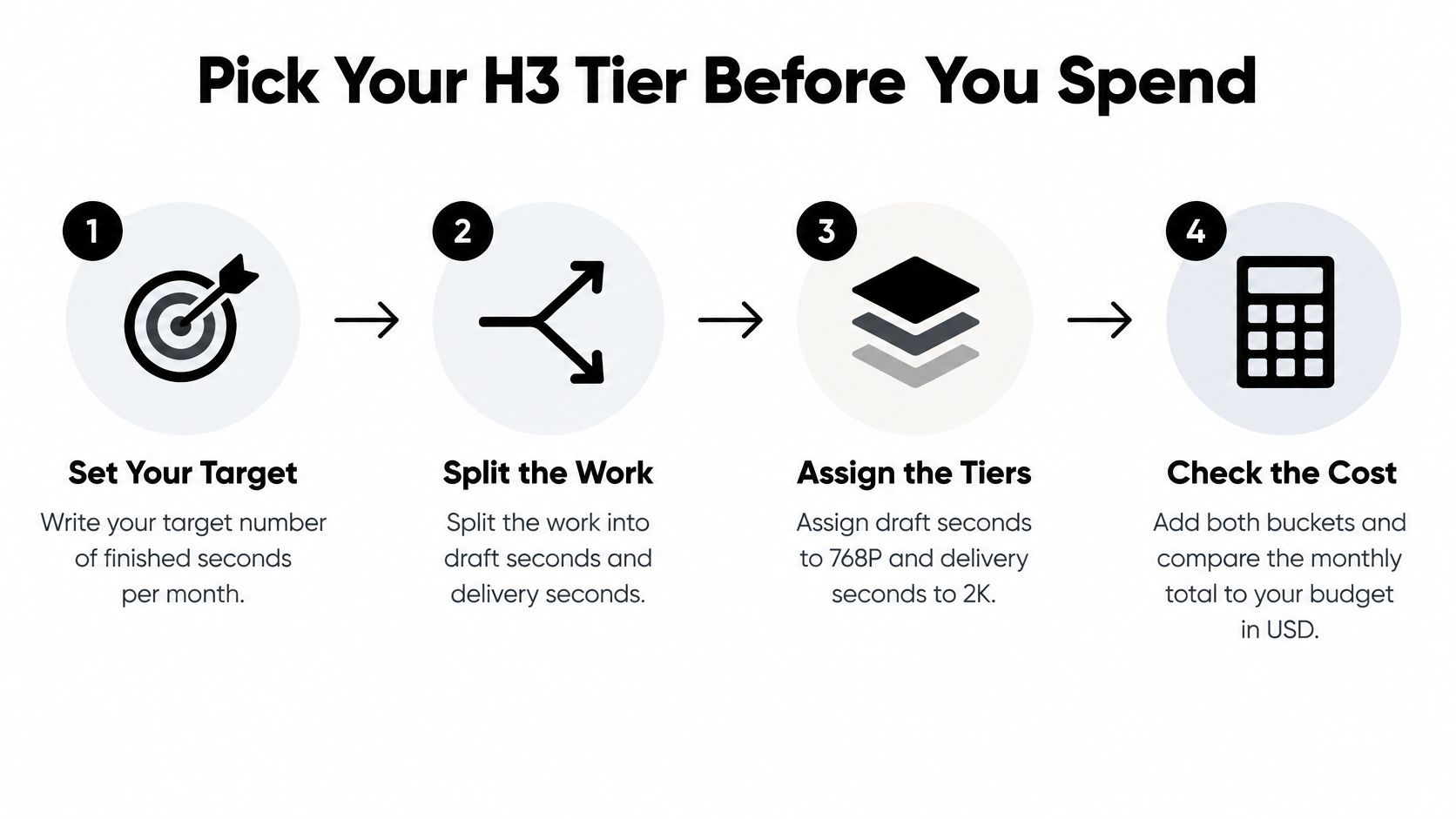
- Set your target: Estimate finished seconds per month rather than counting clips. This gives you a billable-volume baseline.
- Separate drafts from delivery: Assign draft work to Lite or 768P and reserve 2K for approved shots. Compare cost per finished second at the resolution each output actually needs.
- Measure attempts per keeper: Generate a test batch of ten clips and record how many attempts produce each usable result. If you are deciding how to divide work between H3 variants, consult this comparison of MiniMax H3 Max and Turbo variants.
- Include the inputs: Apply the rate card to each resolution bucket, then add any input-video and reference-image charges that apply to your workflow.
- Compare total costs: Estimate spend using your measured attempts per keeper, then compare that amount with the credit-pack clip counts and subscription option at your expected volume.
- Review plan terms: Check the current Veo3 AI pricing page before purchasing. Plan terms can change, and Veo3 AI allows users to upgrade or downgrade at any time. Confirm the terms that apply to your plan.
The workflow demonstration below shows draft and delivery decisions in practice.
<iframe width="100%" style="aspect-ratio: 16 / 9;" src="https://www.youtube.com/embed/rqNY8apFnxk" frameborder="0" allow="autoplay; encrypted-media" allowfullscreen></iframe>
Repeat the calculation as your volume and prompting change. Track cost per usable clip alongside cost per finished second: a lower rate can still produce a higher budget if it takes more attempts to get a keeper. Resolution also affects the comparison, since draft and final outputs may need different settings.
For a practical test, use the credit-based Mini, Standard, or Plus plans listed on the Veo3 AI pricing page. Run your ten-clip batch, record attempts per keeper, and use those results to estimate the cost of your expected finished output.
Related Articles
Continue with more blog posts in the same locale.

How to Remove the Google Flow Watermark (2026 Guide)
Why Google Flow videos carry a Veo watermark, which plans skip it, how to fix an Ultra account that still shows it, what editing can and can't remove, and how to get a clean video.
Read article
MiniMax H3 使い方: How to Set Up and Make Your First Video
Learn MiniMax H3 使い方 step by step: specs, first clip setup, prompts, multi-shot workflows, cost per clip and fixes for common errors.
Read article
MiniMax H3 Video to Video Explained for Creators
Learn how MiniMax H3 video to video works, what it preserves, how it compares with Veo 3.1, and how to prompt and tune clips safely.
Read article