
Kling 3.0 vs Veo 3.1 2026: Motion Quality, Prompt Control & Workflow Fit
A practical 2026 comparison of Kling 3.0 and Veo 3.1 for motion quality, prompt control, workflow fit, free limits, and AI video use cases.
Emma Chen · 20 min read · May 6, 2026
Related comparison paths: This is the current page for the
Kling 3.0 vs Veo 3.1intent. For broader background, see Veo 3 vs Kling 3.0 native-audio comparison and Veo 3 vs Kling AI overview.
If you are comparing Kling 3.0 vs Veo 3.1 in 2026, the right question is not simply “which model is better?” It is “which model fits the shot I need to make today, at the quality bar, budget, and review speed my workflow can tolerate?” Both models can create impressive AI video, both can fail on a first attempt, and both reward a very different way of prompting.
The short version: Kling 3.0 is usually the more comfortable lane when your priority is energetic motion, longer continuous action, and multi-shot experimentation. Veo 3.1 is usually the safer lane when your priority is prompt adherence, cinematic realism, integrated audio direction, dialogue, and production-grade workflow control through Google’s ecosystem. That does not mean every Kling clip beats every Veo clip on movement, or every Veo clip beats every Kling clip on story. It means your odds improve when you route the job to the model whose strengths match the job.
This guide compares Kling 3.0 and Veo 3.1 from a practical creator perspective: motion quality, prompt control, reference-image handling, workflow fit, free limits, commercial use cases, and the kind of prompt structure that makes each model behave better. Use it as a decision framework before you spend credits, queue final renders, or promise a client that a specific shot can be delivered in one pass.
Quick verdict: which should you choose?
Choose Kling 3.0 when the video depends on visible movement: camera travel, character action, product motion, physical transitions, multi-beat scenes, or fast social clips that need to feel alive. Kling’s positioning around longer clips, native audio, physics-aware motion, and multi-shot storyboarding makes it attractive for creators who want a single generation to cover more of the timeline. It is especially useful when you are still discovering the shot language and need to test several directions before final editing.
Choose Veo 3.1 when the video depends on controlled direction: a precise cinematic prompt, dialogue timing, character performance, scene composition, a first-frame/last-frame transition, or a pipeline that may later need Vertex AI, Flow, or team review. Google describes Veo 3.1 as a model built for stronger prompt adherence, audiovisual quality, rich synchronous audio, multiple aspect ratios, and professional creative controls. That makes it a better fit for scripted ads, explainer scenes, polished brand work, and clips where the soundstage is part of the prompt rather than an afterthought.
A simple rule works well: draft motion with Kling, lock story with Veo, then compare the best outputs instead of comparing first attempts. First generations are noisy evidence. The best model for your project is the model that gives you the most usable final clip after the number of iterations you can actually afford.
Kling 3.0 vs Veo 3.1 comparison table
| Category | Kling 3.0 | Veo 3.1 | Practical winner |
|---|---|---|---|
| Motion energy | Strong for kinetic camera moves, dynamic subjects, and longer action beats | Strong cinematic framing, but may require tighter prompting for complex movement | Kling 3.0 for motion-first scenes |
| Prompt adherence | Good, especially with clear shot segments and references | Very strong with structured cinematic prompts and audio instructions | Veo 3.1 |
| Audio and dialogue | Native audio features are promoted on supported platforms; check language and plan availability | Rich synchronized audio, dialogue, ambience, and SFX are core Veo 3.1 strengths | Veo 3.1 for dialogue-led clips |
| Clip length | Some access points promote up to 15 seconds and multi-shot storyboarding | Google’s Vertex-style docs describe 4, 6, or 8 second clip options | Kling 3.0 for longer single generations |
| Reference control | Strong for image references, element consistency, first/last-frame style workflows depending on platform | Strong image-to-video, ingredients-to-video, and first/last-frame workflows | Tie; choose by UI/API need |
| Social ad workflow | Fast variants, dynamic motion, strong for UGC-style tests | Better when script, voice, and brand polish matter | Tie by creative format |
| Production workflow | Useful through creative platforms and model aggregators | Stronger enterprise/API story through Vertex AI and Google tools | Veo 3.1 |
| Free access | Usually limited free generations where available; plan details vary by platform | Free access and limits vary by Google product, account, region, and date | Verify the dashboard before planning volume |
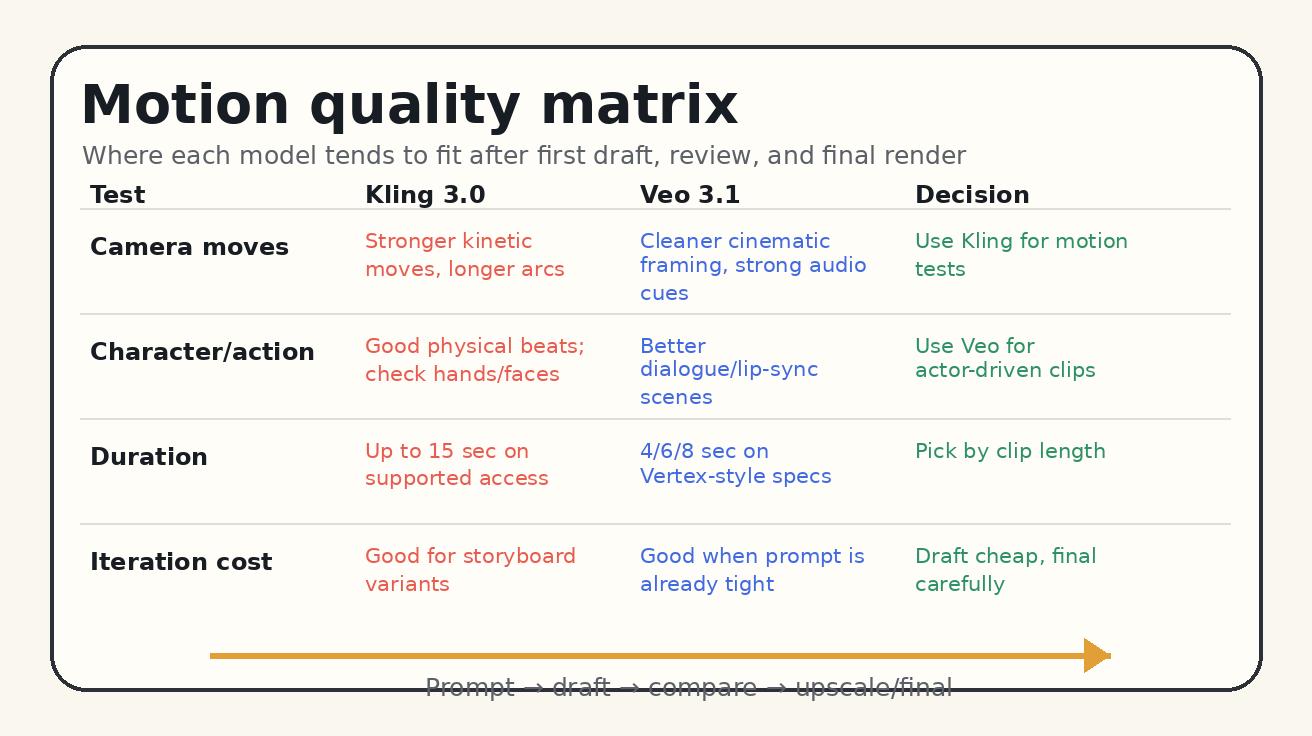
Motion quality: camera movement, physics, and usable takes
Motion quality is the main reason many creators search for Kling 3.0 vs Veo 3.1. Static beauty is no longer enough. A useful AI video model has to understand acceleration, body weight, object contact, camera parallax, and the difference between a pan, a tracking shot, a crane move, and a random drift.
Kling 3.0 tends to be attractive for motion-heavy prompts because its current positioning emphasizes physics-aware movement, longer continuous generation, and multi-shot storyboarding. In practice, that makes it a good candidate for prompts like “low-angle tracking shot of a runner moving through a neon alley,” “handheld food commercial with sauce pouring over a burger,” or “crane up from a character to reveal a large environment.” The model is often worth testing first when the camera itself is an actor in the scene.
Veo 3.1 can also handle camera language well, especially when the prompt is structured around cinematography. Google’s recommended prompt formula starts with cinematography, then subject, action, context, style, and ambiance. That is not just a writing tip. It tells you how the model expects direction. “Crane shot starting low, rising above the trees, revealing the character alone in a misty valley” is better than “make this epic.” Veo often rewards specificity more than raw adjective volume.
The important difference is how each model fails. Kling failures often show up as odd hands, overactive movement, strange object realism, or a camera move that is exciting but not exactly what you asked for. Veo failures often show up as a beautiful shot that is too restrained, a character action that is softened, or a scene that follows the mood but misses a hard physical beat. Those are broad tendencies, not laws, but they matter when you plan review time.
For production, judge motion with four checks:
- Intent: Did the camera move in the direction you specified?
- Physics: Do weight, contact, cloth, hair, liquid, and vehicles behave plausibly?
- Continuity: Does the subject remain stable across the full clip?
- Editability: Can the clip be cut into the final timeline without hiding the failure?
A model that wins the first two seconds but breaks at second six is not a winner for an eight-second ad. A model that makes a conservative move but stays stable may be better for a brand asset. That is why the real motion winner depends on the edit, not only the raw generation.
Prompt control: how the two models want to be directed
Prompt control is where Veo 3.1 has a clear strategic advantage for many teams. Google’s own guidance frames Veo 3.1 as a model for deliberate creative control: camera language, shot composition, lens behavior, sound effects, dialogue, ambient noise, image-to-video, “ingredients to video,” and first/last-frame transitions. If your team thinks in briefs, storyboards, and scene notes, Veo’s structure feels natural.
A strong Veo 3.1 prompt usually includes five layers:
- Cinematography: shot size, camera movement, lens, focus, angle
- Subject: who or what the viewer should track
- Action: the exact physical or emotional beat
- Context: location, background, props, time of day
- Style and ambiance: lighting, color, mood, film language, audio cues
For example: “Medium close-up, shallow depth of field, a product founder sitting at a kitchen table, opening a laptop and smiling as dashboard charts animate on screen, early morning natural light, calm optimistic startup documentary style. Dialogue: she says, ‘This is the first day it finally feels simple.’ Ambient sound: soft room tone and distant city traffic.”
That kind of prompt gives Veo 3.1 more than a visual idea. It gives the model a shot brief.
Kling 3.0 benefits from a slightly different style. Because it is often used for dynamic motion and multi-shot creation, it helps to write in segments. Instead of one dense paragraph, describe the sequence as beats:
- Shot 1: wide shot, athlete ties shoes on a wet track, low morning light
- Shot 2: tracking shot as the athlete accelerates, camera moves beside them
- Shot 3: close-up of water splashing from the shoe, energetic commercial style
- Audio: breath, footsteps, soft cinematic pulse
This structure reduces ambiguity. It also makes it easier to diagnose which beat failed. If the tracking shot works but the close-up fails, you can regenerate that portion or split the prompt into separate assets.
For both models, prompt control improves when you remove contradictions. Do not ask for “slow motion fast-paced handheld tracking shot with stable locked-off camera.” Do not request “photorealistic documentary footage” and then add “anime watercolor doodle lighting” unless the hybrid look is intentional. AI video models are powerful, but they are still pattern systems. Clear hierarchy beats decorative prompt stuffing.
Reference images and first-frame/last-frame workflows
Reference control matters because most real projects are not pure text-to-video. You may have product photos, a character sheet, a brand style frame, a storyboard panel, or a still generated in another tool. In that workflow, the question is not only which model produces prettier video. It is which model respects the input.
Veo 3.1 is strong for reference-driven workflows because Google emphasizes image-to-video, ingredients-to-video, and first/last-frame transitions. The practical use case is straightforward: create or upload a starting frame, optionally provide reference images for character, object, or style, then tell the model how to move from one visual state to another. For brand teams, this can be safer than pure text because it anchors composition and identity.
Kling 3.0 is also compelling for reference-based work, especially when the goal is movement around a known subject. If you need a product to rotate, a character to walk through a set, or a fashion shot to become a short scene, Kling’s motion-first personality can be useful. The challenge is consistency. You should check faces, logos, hands, text, and product geometry carefully before using the result in paid media.
A good reference workflow looks like this:
- Generate or select a clean first frame.
- Remove unnecessary background clutter before upload.
- Describe only the movement that should change.
- State what must remain consistent: face, outfit, logo, package shape, color palette.
- Generate two or three variants, then compare stability frame by frame.
If the reference image contains small text, complex packaging, or a legal logo, expect manual review. AI video can preserve broad identity, but small typography is still risky. For ecommerce and ads, use AI video for motion and atmosphere, then add exact text, prices, captions, and compliance overlays in an editor.
Workflow fit: creators, agencies, product marketers, and developers
The best model is the one that fits your team’s workflow. A solo TikTok creator, a performance marketing team, a film previsualization artist, and a developer building video generation into a product do not need the same tool.
For solo creators, Kling 3.0 is appealing when speed and visual energy matter. You can test bold movement, social hooks, and cinematic fragments without building a heavy pipeline. The goal is not perfect brand compliance. The goal is a clip that stops the scroll.
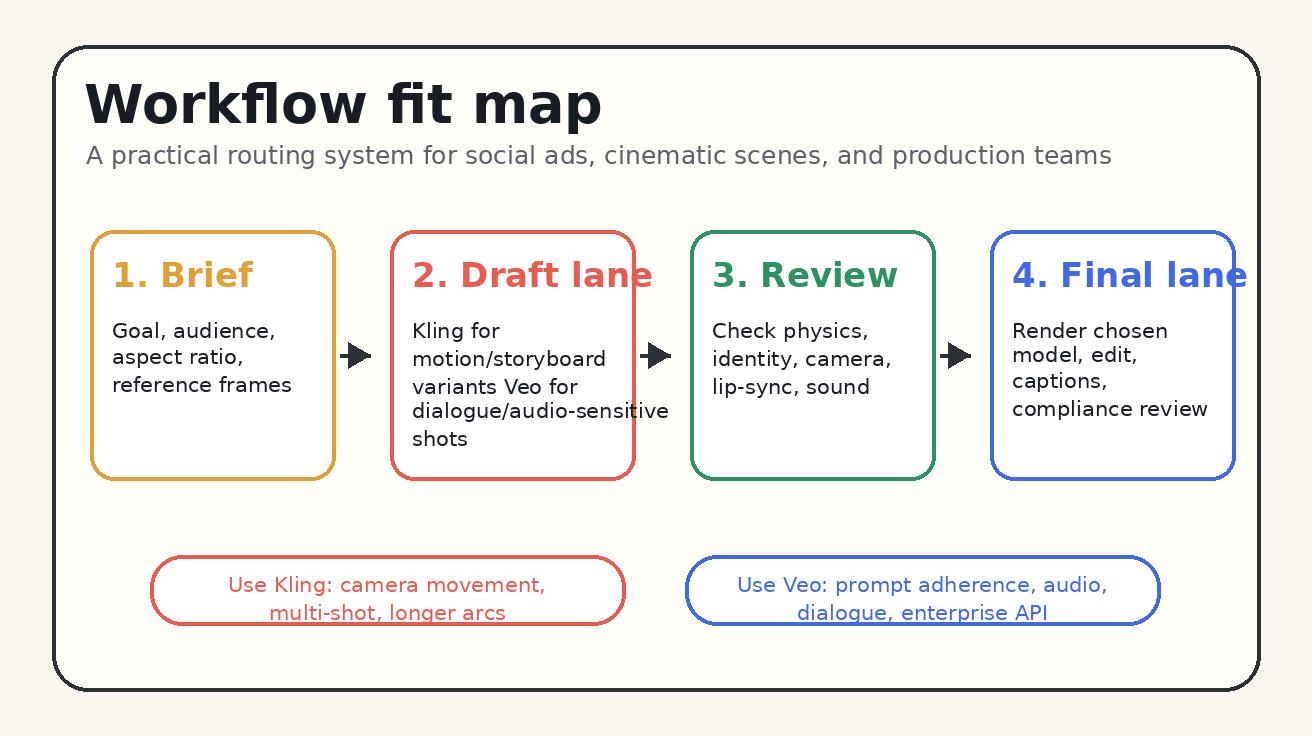
For performance marketers, the answer is split. Kling can produce dynamic visual variants for UGC-style ads, product reveals, and fast hooks. Veo 3.1 can be better when the ad depends on spoken lines, believable acting, carefully timed sound, or a controlled brand tone. A good paid social workflow is to draft five motion concepts in Kling, draft two dialogue versions in Veo, then edit the winners into platform-specific cuts.
For agencies, Veo 3.1 often has the better story because clients ask for repeatability, review trails, aspect-ratio planning, and a path from prototype to production. Vertex AI availability matters if the agency wants governance, API access, or integration with internal tools. That said, agencies should still keep Kling in the creative stack for motion exploration. It can help directors and clients see possibilities before a more controlled final pass.
For developers, Veo 3.1 has the clearer enterprise workflow. API access, model documentation, and integration with Google Cloud make it more predictable for productized pipelines. Kling may still be useful through platforms that expose it, but you should confirm commercial terms, rate limits, watermark behavior, and API availability before building a product around it.
For previsualization and filmmaking, use both. Kling can be a motion sketchpad. Veo can be a controlled cinematic pass with audio. The strongest workflow is not model loyalty; it is model routing.
Free limits, plans, and cost planning
Free limits change quickly, so treat any public number as a planning clue, not a contract. Kling 3.0 access depends on the platform you use. Some platforms promote limited free generations, while paid tiers unlock higher volume, faster queues, more models, commercial workflows, or team features. Before planning a campaign, open the exact Kling access point you will use and check credits, queue priority, watermark behavior, clip length, and commercial rights.
Veo 3.1 access also depends on the product path. Google’s ecosystem can include consumer-facing tools, Flow-style creative workflows, and Vertex AI for developers or enterprise teams. Public guides and product pages have described free access options, monthly or daily quotas, clip length limits, watermark limitations, and higher-resolution access on paid plans. Those details are subject to account, region, product, and date. For serious work, verify the current dashboard before promising output volume.
A practical budget method is to separate three phases:
- Exploration credits: low-pressure generations used to find the shot idea
- Selection credits: variants used to compare two or three promising directions
- Final credits: high-quality renders, upscales, or reruns after review
Do not spend final credits on an untested prompt. First, run a cheap draft or a lower-stakes generation. Then tighten the prompt. Then render. This matters more than which model you choose because bad prompt discipline can make either model feel expensive.
For teams, track cost per usable clip, not cost per generation. If Model A costs less per generation but needs ten attempts, and Model B costs more but lands in three, Model B may be cheaper. Include review time as part of the cost. A clip that looks good but requires thirty minutes of manual repair is not cheap.
Best use cases for Kling 3.0
Kling 3.0 is a strong first choice for motion-led videos. Use it when the clip needs to feel physical, kinetic, and visually varied.
Good Kling 3.0 use cases include:
- Product reveals with camera movement and object rotation
- Fitness, sports, dance, and action scenes
- Fashion movement, fabric motion, and lifestyle ads
- Multi-shot social hooks where the camera changes perspective
- Short cinematic tests for directors and creators
- Storyboard exploration before a final production pass
- Longer single-generation concepts where supported access allows more duration
A strong Kling prompt should define shot beats, camera behavior, subject movement, and what must remain stable. If you ask for a complex sequence, specify the order. If you need brand-safe output, inspect frames carefully and add exact copy in post-production rather than relying on generated text.
Best use cases for Veo 3.1
Veo 3.1 is a strong first choice for controlled cinematic generation, audio-aware scenes, and production workflows that need a cleaner route from prompt to review.
Good Veo 3.1 use cases include:
- Dialogue-led ads and founder-style clips
- Cinematic brand stories with precise mood and composition
- Image-to-video scenes from approved art direction
- First-frame/last-frame transitions for narrative control
- Explainer or product clips where audio, SFX, and visuals need to match
- Developer workflows that need Google Cloud integration
- Agency projects where repeatability and review structure matter
A strong Veo prompt should read like a miniature director’s brief. Start with the shot, define the subject and action, describe context, then add style and sound. If audio matters, write it explicitly: dialogue in quotation marks, ambient sound, sound effects, and emotional tone.
A practical decision framework
Use this framework before each generation:
Step 1: Identify the failure you can least tolerate. If the worst failure would be weak motion, start with Kling. If the worst failure would be mismatched dialogue, poor prompt adherence, or messy audio, start with Veo.
Step 2: Decide whether the clip is exploratory or final. For exploration, prioritize speed and variety. For final, prioritize control and reviewability.
Step 3: Match the model to the asset. A clean product photo with a simple movement may work well in either model. A multi-character dialogue scene is more likely to benefit from Veo. A kinetic montage may be better in Kling.
Step 4: Generate in pairs. When the budget allows, run the same brief through both models once. Do not compare one model’s first output against another model’s fifth output. Compare equal effort.
Step 5: Edit like a producer. AI generation is not the whole workflow. Add captions, exact text, voiceover, music, legal disclaimers, and brand elements in post. The model should create the scene; your editor should make it publishable.
Prompt templates you can copy
Kling 3.0 motion-first template
“Create a cinematic 9:16 social video. Shot 1: [wide/medium/close shot] of [subject] in [environment]. Shot 2: [camera movement] as [subject action]. Shot 3: [detail shot or reveal]. Keep [identity/product/logo/color] consistent. Motion should feel [smooth/energetic/handheld/luxury]. Audio: [ambience/SFX/dialogue if supported]. Style: [realistic/commercial/documentary].”
Example: “Create a cinematic 9:16 social video. Shot 1: close-up of a matte black running shoe on a wet track at sunrise. Shot 2: low-angle tracking shot as the runner accelerates, water splashing naturally from the shoe. Shot 3: detail shot of the sole gripping the track. Keep the shoe shape and black color consistent. Motion should feel energetic and premium. Audio: footsteps, breath, soft cinematic pulse. Style: realistic sports commercial.”
Veo 3.1 control-first template
“[Cinematography], [subject], [action], in [context]. [Lighting and style]. [Camera/lens/focus details]. Dialogue: ‘[line]’. SFX: [sound effect]. Ambient noise: [background]. Keep [reference/style/character/product] consistent.”
Example: “Medium close-up with shallow depth of field, a small business owner standing behind a bakery counter, placing a fresh pastry box into a customer’s hands, warm morning light through the window, natural documentary commercial style. Camera slowly pushes in. Dialogue: ‘Fresh out of the oven, just for you.’ SFX: soft paper box fold and a bell above the door. Ambient noise: quiet cafe room tone. Keep the bakery logo colors consistent.”
Final recommendation
In the Kling 3.0 vs Veo 3.1 comparison, there is no universal winner. Kling 3.0 is the stronger default for motion exploration, longer dynamic sequences, and social-first visual energy. Veo 3.1 is the stronger default for controlled prompts, audio-aware storytelling, dialogue, and production workflows. The smartest teams will use both: Kling to discover movement, Veo to lock controlled scenes, and a normal video editor to finish the asset.
If you are starting today, run one short test brief through both models. Score each output on motion, identity, prompt adherence, audio, editability, and cost per usable clip. The answer will become obvious faster than reading another generic ranking.
For more practical AI video workflows, explore our guides to text-to-video generation, image-to-video prompting, and the latest Veo tutorials on Veo3AI.io.
FAQ: Kling 3.0 vs Veo 3.1
Is Kling 3.0 better than Veo 3.1?
Kling 3.0 is often better for motion-first scenes, dynamic camera movement, longer action beats, and social video exploration. Veo 3.1 is often better for controlled cinematic prompts, dialogue, audio, prompt adherence, and production workflows. The better model depends on the shot.
Is Veo 3.1 better for prompt control?
Yes, Veo 3.1 is usually the safer choice when prompt control is the priority. It responds well to structured cinematic prompts that specify camera movement, subject, action, context, style, dialogue, sound effects, and ambience.
Which model is better for AI video ads?
Use Kling 3.0 for dynamic UGC-style ad hooks, product motion, and fast visual variants. Use Veo 3.1 for brand-polished ads where dialogue, sound, and exact creative direction matter. Many ad teams should test both and edit the strongest clips together.
Which model has better free limits?
Free limits change by platform, region, account type, and date. Kling 3.0 may be available with limited free generations on some platforms. Veo 3.1 access may include free quotas in parts of Google’s ecosystem. Always verify the current dashboard before planning campaign volume.
Can I use Kling 3.0 and Veo 3.1 commercially?
Commercial usage depends on the platform, plan, and terms you use to access each model. Before using generated video in paid ads, client work, or product marketing, confirm rights, watermark rules, content policy, and export limits in your current account.
What is the best workflow if I have access to both?
Use Kling 3.0 to explore motion concepts and generate dynamic storyboard options. Use Veo 3.1 for controlled scenes, dialogue, audio, and final production candidates. Then finish the video in an editor with exact captions, brand elements, and compliance review.
<script type="application/ld+json"> { "@context": "https://schema.org", "@type": "FAQPage", "mainEntity": [ { "@type": "Question", "name": "Is Kling 3.0 better than Veo 3.1?", "acceptedAnswer": { "@type": "Answer", "text": "Kling 3.0 is often better for motion-first scenes, dynamic camera movement, longer action beats, and social video exploration. Veo 3.1 is often better for controlled cinematic prompts, dialogue, audio, prompt adherence, and production workflows." } }, { "@type": "Question", "name": "Is Veo 3.1 better for prompt control?", "acceptedAnswer": { "@type": "Answer", "text": "Veo 3.1 is usually the safer choice when prompt control is the priority because it responds well to structured prompts covering cinematography, subject, action, context, style, dialogue, sound effects, and ambience." } }, { "@type": "Question", "name": "Which model is better for AI video ads?", "acceptedAnswer": { "@type": "Answer", "text": "Use Kling 3.0 for dynamic UGC-style ad hooks, product motion, and fast visual variants. Use Veo 3.1 for brand-polished ads where dialogue, sound, and exact creative direction matter." } }, { "@type": "Question", "name": "Which model has better free limits?", "acceptedAnswer": { "@type": "Answer", "text": "Free limits change by platform, region, account type, and date. Verify the current Kling or Veo dashboard before planning campaign volume." } }, { "@type": "Question", "name": "Can I use Kling 3.0 and Veo 3.1 commercially?", "acceptedAnswer": { "@type": "Answer", "text": "Commercial usage depends on the platform, plan, and terms used to access each model. Confirm rights, watermark rules, content policy, and export limits before using generated video in paid ads or client work." } }, { "@type": "Question", "name": "What is the best workflow if I have access to both?", "acceptedAnswer": { "@type": "Answer", "text": "Use Kling 3.0 to explore motion concepts and dynamic storyboard options. Use Veo 3.1 for controlled scenes, dialogue, audio, and final production candidates, then finish in an editor." } } ] } </script>
Related Articles
Continue with more blog posts in the same locale.

Veo 3 vs HeyGen 2026: AI Video Generation vs AI Avatar Studio
Veo 3 vs HeyGen 2026: compare AI video generation and AI avatar studio workflows, see where each excels, and decide which belongs in your video production stack.
Read article
Veo 3 vs InVideo AI: Which Should You Use in 2026?
Veo 3 vs InVideo AI: understand the core difference between AI video generation and AI-assisted production, see how each excels, and decide which fits your workflow in 2026.
Read article
Veo 3 vs Pollo AI: Which AI Video Generator Should You Choose in 2026?
Compare Veo 3 and Pollo AI across video quality, native audio generation, pricing, and use cases. Find out which AI video generator is right for your workflow in 2026.
Read article