
MiniMax H3 Prompt Guide for Better AI Video
MiniMax H3 prompt guide with practical templates, parameter tips, and workflow fixes for creators using Veo 3.1 and other top AI video models in 2026.
Veo3 AI · 16 min read · Oct 17, 2026

You can waste a lot of credits on MiniMax H3 by writing a gorgeous paragraph that sounds right and still makes the model improvise the wrong shot. The fix is usually not “better wording,” it's better structure, because H3 behaves more like a short-form production system than a blank-page writer. If you already know the pain of getting one clip that looks cinematic and another that feels unrelated even though the prompt only changed a little, the issue is almost always in the production spec, not the prose. For practical prompt rhythm, the AI prompt tips for beats article from Drumloop AI is a useful companion, because it reinforces the same discipline of timing and structure without turning into fluff.
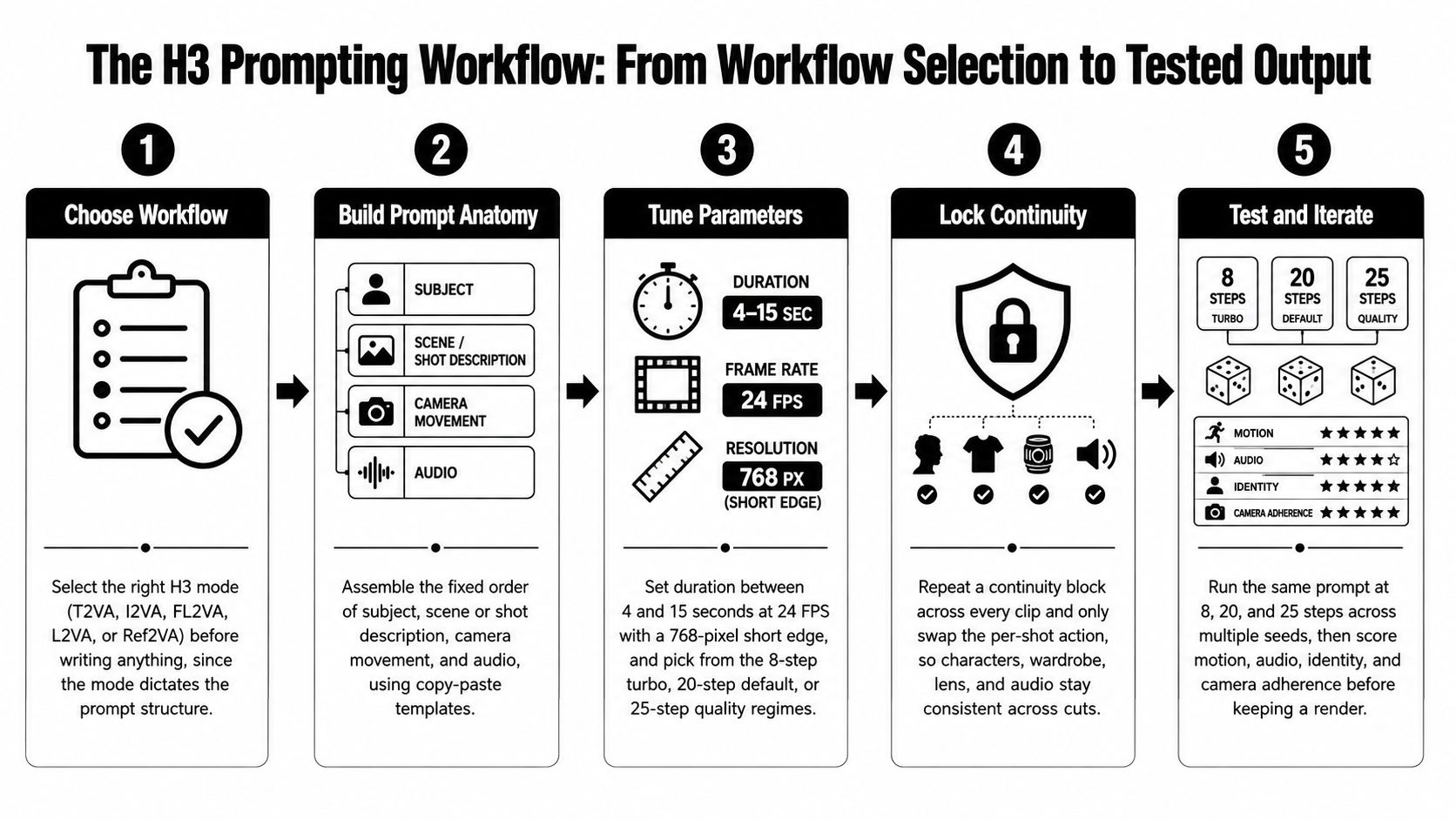
The best way to think about a MiniMax H3 prompt guide is as a repeatable workflow. First choose the right generation mode, then lock the prompt anatomy, then tune duration and step regime, then protect continuity across clips, and finally test the same prompt across seeds instead of cherry-picking the prettiest render. That mindset also pairs well with Veo 3 AI video generator, which is one of the cleaner options if you're comparing short-form video tools and want to keep your evaluation method consistent across models.
If you want a quick benchmark for the model itself, the official H3 guide and deployment docs make the constraints clear enough that “vibes-only” writing stops working fast. H3-Base outputs are documented at 4 to 15 seconds, 24 FPS, a 768-pixel short edge, and 32 kHz stereo audio source. That means the prompt is doing production planning, not creative freewriting, and the rest of this article follows that exact logic.
Table of Contents
- Why H3 Prompting Is a Production Problem, Not a Writing Problem
- Choosing the Right H3 Workflow Before You Write a Word
- The Fixed Prompt Anatomy and Two Templates You Can Reuse
- Parameter Tuning That Actually Changes the Output
- Keeping Continuity Across Multiple H3 Clips
- Negative Prompts and Reference Priority Without Instruction Collisions
- A Reproducible Testing Workflow and Quick Troubleshooting
<a id="why-h3-prompting-is-a-production-problem-not-a-writing-problem"></a>
Why H3 Prompting Is a Production Problem, Not a Writing Problem
A common H3 failure looks deceptively small. A creator writes one polished paragraph about a street scene, then rewrites it with a few extra camera words and suddenly the second clip feels tighter, cleaner, and more editable. The difference isn't poetic quality. It's that one prompt behaved like a production spec while the other behaved like a mood board.
<a id="the-model-rewards-structure-not-ornament"></a>
The model rewards structure, not ornament
H3's documented output window is short, synchronized, and technically bounded, which is why loose writing doesn't travel very far. The official guidance frames the prompt around multiple generation modes, timed shots, camera movement, and audio, not around descriptive flourish prompt guide. Once you accept that the clip is only 4 to 15 seconds with a 24 FPS cadence and 32 kHz stereo audio, the main task becomes choosing what the model must preserve and what it can invent deployment docs.
Practical rule: if a detail matters to continuity, it belongs in the spec. If it only sounds cinematic, leave it out.
That's why H3 prompting is closer to input curation than prose polishing. The model needs a subject, a scene, a camera path, and a sound plan that can survive a very short runtime. A useful framing is to treat the prompt like an edit decision list for an AI renderer, not like a paragraph in an ad concept deck.
This is also where the right resources help. A solid prompt reference like MiniMax H3 is useful because it keeps the focus on structure instead of style inflation. For broader prompt craft across different media types, video script generator can help with narrative sequencing, but H3 still needs a tighter production-first layer on top.
The rest of the system follows that logic. Pick the workflow first, then lock the anatomy, then tune the parameters, then keep continuity across clips, then test it like a production pipeline instead of a one-off art prompt.
<a id="choosing-the-right-h3-workflow-before-you-write-a-word"></a>
Choosing the Right H3 Workflow Before You Write a Word
H3 works best when the workflow choice happens before any creative writing starts. The model's base modes are T2VA, I2VA, FL2VA, and L2VA, with reference-driven generation handled separately through R2V prompt guide. If you pick the wrong mode, the prompt can be technically elegant and still produce the wrong kind of control.
<a id="match-the-mode-to-the-job"></a>
Match the mode to the job
T2VA is the cleanest option when you're ideating from scratch. Use it when there's no reference frame and you want the model to invent the scene from the ground up.
I2VA is for animating a single image. Use it when the still frame already carries the look you want and the prompt should only define motion, camera, and sound.
FL2VA is for controlled transitions between a first frame and a last frame. Use it when the opening and ending are both fixed, like a product reveal or a before-and-after shot.
L2VA is for anchoring the final frame. Use it when the endpoint matters more than the journey, such as a logo landing or a packshot.
R2V is the reference-heavy path. Use it when identity, motion, sound, or style continuity matters more than freeform generation.
The practical rule is simple. If the clip is mostly invention, use T2VA. If the clip is mostly transformation, use I2VA, FL2VA, or L2VA depending on which boundary matters. If the clip must preserve multiple things at once, use R2V.
A creator building a consistent brand mascot across a multi-clip Reel should not reach for T2VA just because it feels simpler. Ref2VA is the better fit when the mascot identity has to stay stable across shots, because the reference stack is the point of the workflow, not an optional extra. The documentation says Ref2VA accepts up to nine images, three video clips, and three audio clips, with a 12-file combined cap GitHub reference.
If you're mapping this to a scripted short, a guide to prompting with starryai can be useful as a contrast, because it shows how prompt structure travels across different generative tools even when the control surface changes.
<a id="quick-workflow-rules-you-can-actually-use"></a>
Quick workflow rules you can actually use
- T2VA: start from scratch, use when you need the model to invent the whole scene.
- I2VA: animate one image, use when the frame is already right and motion is the only missing part.
- FL2VA: use two endpoints, ideal when the transition itself is the creative object.
- L2VA: anchor the end, useful when the landing frame matters most.
- Ref2VA: supply references, use when identity or continuity matters more than novelty.
<a id="the-fixed-prompt-anatomy-and-two-templates-you-can-reuse"></a>
The Fixed Prompt Anatomy and Two Templates You Can Reuse
Once the workflow is right, the prompt itself needs a fixed order. The official H3 guidance organizes the body around subject definitions, scene or shot descriptions, camera movement, and audio prompt guide. That order matters because the model doesn't just need to know what's in the scene, it needs to know what changes over time.
<a id="the-syntax-rules-creators-skip-most-often"></a>
The syntax rules creators skip most often
The prompt body should be written in English, dialogue and lyrics belong inside <d> tags, and visible on-screen text should remain in its original language prompt guide. That sounds small, but it prevents a lot of confusion in multilingual ads and caption-led social clips.
For I2VA, the first line is a fixed image-alignment sentence, then a blank line, then the rest of the prompt. That opening line is not decoration. It tells the model to preserve the reference frame before it starts animating anything.
Keep the structure boring and the shot interesting. The prompt should carry the decision logic, not the adjectives.
<a id="copy-ready-t2va-template-for-a-product-hero-shot"></a>
Copy-ready T2VA template for a product hero shot
Prompt:
[Subject] a [product or person] in [environment], lit by [lighting style].
[Scene] The subject [first action], then [second action], then [final beat].
[Camera] The camera [shot type] and [movement path], with [speed and amplitude].
[Audio] [ambient sound], [action sound], [music or silence].
[Ending] End on [final composition].
A 6-second product hero shot works well with that structure because every clause has a job. The product, movement, and final frame are all stated before the model can wander into filler.
<a id="copy-ready-fl2va-template-for-a-controlled-transition"></a>
Copy-ready FL2VA template for a controlled transition
Prompt:
[First frame] [describe the opening frame clearly].
[Transition] The subject moves from [opening state] to [ending state] through [specific motion or transformation].
[Camera] The camera [movement] while maintaining [what must stay stable].
[Audio] [soundscape], [effect sounds], [music].
[Last frame] End on [describe the final frame clearly].
That template is useful when the point of the clip is the shift itself, not just the content of the opening image. It's also the easiest place to keep product reveals clean, because the start and finish are already pinned.

The fastest way to adapt either template is to swap only three things, subject, camera, and sound. If you rewrite the whole prompt every time, you usually introduce collisions instead of control.
<a id="parameter-tuning-that-actually-changes-the-output"></a>
Parameter Tuning That Actually Changes the Output
The technical limits shape the creative choices more than expected. H3 supports clips from 4 to 15 seconds at 24 FPS, with a 768-pixel short edge and dimensions rounded to multiples of 32 open-source announcement. Duration is quantized in a 17k+5 frame pattern, so the requested length may not map to an arbitrary frame count open-source announcement. That makes timing language in the prompt more important than assumed.
<a id="duration-frames-and-the-cost-of-indecision"></a>
Duration, frames, and the cost of indecision
A 5-second clip at 24 FPS is roughly 120 frames, which is enough room for a short story beat but not enough room for three competing ideas deployment docs. If you write “dynamic,” “cinematic,” and “energetic” without timing the actual beats, the model fills the gap itself.
The default ComfyUI workflow uses 20 inference steps. Moving to about 25 steps can improve motion quality, while an 8-step turbo setting renders much faster but can reduce motion and audio quality open-source announcement. That makes the choice less about perfection and more about whether you're testing, validating, or finalizing.
Benchmark rule: test the same scene at 8, 20, and 25 steps, then keep the render that scores best on motion, sync, identity, and camera adherence.
One benchmark on four H200 GPUs reported a mean inference latency of 75.10 seconds across three prompt-and-seed pairs for a 5-second T2VA workload at 1,344 × 768, 24 FPS, and 50 sampling steps deployment docs. A separate FL2VA benchmark on four B300 GPUs reported 86.964 seconds of mean client latency for 1,248 × 768 output with 209 frames and 50 steps deployment docs. The point isn't that one setup is better than the other, it's that iteration cost is real enough that casual reruns get expensive fast.
| H3 step regime tradeoff | Typical use | Motion quality | Audio quality | Render cost |
|---|---|---|---|---|
| 8 steps | Fast tests and rough checks | Lower | Lower | Lowest |
| 20 steps | Default quality pass | Balanced | Balanced | Moderate |
| 25 steps | Cleaner motion and final passes | Higher | Better than turbo | Higher |
A good habit is to express the action in beats, not adjectives. Say what happens at the start, what changes in the middle, and what the ending frame should feel like.
<a id="keeping-continuity-across-multiple-h3-clips"></a>
Keeping Continuity Across Multiple H3 Clips
Multi-clip work is where H3 becomes more like a production line than a generator. A single strong shot is useful, but a TikTok, Reel, or ad usually needs several clips that share the same identity, tone, and audio logic. That's where a continuity block earns its place, because repeating the important facts is cheaper than trying to fix drift after the fact.
<a id="build-one-block-then-swap-only-the-action"></a>
Build one block, then swap only the action
The continuity block should lock character descriptors, wardrobe, location, time of day, lens language, dialogue conventions, and an audio policy. Then each shot gets a small variable list for action, framing, and beat timing.
For example, a 9:16 product ad built from three 5-second H3 clips for TikTok or Reels can keep the same continuity block in every shot, while only the action lines change. That keeps the product, atmosphere, and voice consistent without forcing every clip to repeat the whole script.
This matters even more when you're comparing H3 against Veo 3.1, because Veo 3.1 also supports native vertical 9:16 output through Ingredients to Video and can upscale to 1080p or 4K Veo 3.1 ingredients article. If your target is short-form social video, the format question isn't theoretical. It's part of the brief.
<a id="a-usable-continuity-block"></a>
A usable continuity block
Character: same mascot, same face shape, same eye color, same proportions.
Wardrobe: same jacket, same shirt, same shoes.
Location: same kitchen, same counter, same background props.
Time: late afternoon, warm indoor light.
Lens language: clean commercial framing, shallow depth of field.
Dialogue policy: only one speaker at a time, no overlapping speech.
Audio policy: stable room tone, light product handling sounds, no sudden music change.
<a id="per-shot-variable-list"></a>
Per-shot variable list
- Shot 1: introduce the product and establish the setting.
- Shot 2: move to the hero action and tighten framing.
- Shot 3: close on the end state and land the final composition.
The key is restraint. If the continuity block stays fixed, the shots can change without the edit collapsing into identity drift or random audio shifts.
<a id="negative-prompts-and-reference-priority-without-instruction-collisions"></a>
Negative Prompts and Reference Priority Without Instruction Collisions
A lot of prompt damage comes from trying to force too much into the same request. More adjectives do not equal more control. In H3, the cleaner move is often to say what must not happen and to rank the references by importance.
<a id="say-what-to-avoid-not-just-what-to-chase"></a>
Say what to avoid, not just what to chase
A useful negative prompt set includes extra fingers, wrong-language on-screen text, sudden camera flips, and off-brand color casts. Those are the kinds of failures that waste take after take because they look plausible on first glance and then break the edit.
The bigger issue is reference priority. For Ref2VA, the order should usually be identity first, then wardrobe, then motion reference, then audio reference, then style reference. If the assets disagree, the model needs a hierarchy or it will compromise across all of them.
<a id="minimum-viable-reference-set"></a>
Minimum viable reference set
For a brand mascot clip, you often don't need a giant bundle. One identity image, one motion reference, and one audio reference are enough to start, especially if the story is simple and the continuity block is doing the rest.
More references can reduce consistency if they introduce contradictory poses, lighting, or character details. The model has to reconcile them somehow, and that reconciliation can blur the exact thing you were trying to protect.
H3 expertise is shifting from descriptive writing toward input curation.
That shift is useful because it changes the question. Instead of asking “how many cinematic words can I fit in,” ask “which asset owns identity, which asset owns motion, and which asset owns sound.” For a lot of commercial clips, that answer is the whole prompt strategy.
<a id="a-reproducible-testing-workflow-and-quick-troubleshooting"></a>
A Reproducible Testing Workflow and Quick Troubleshooting
If you want to know whether a prompt is good, don't judge it on the first render that happens to look polished. Run the same prompt at 8, 20, and 25 steps, then score motion coherence, audio sync, identity retention, and camera adherence separately. After that, compare multiple seeds and keep the average pattern, not one lucky sample.
<a id="a-simple-benchmark-loop"></a>
A simple benchmark loop
- Lock the prompt so the wording doesn't change between runs.
- Run three step regimes at 8, 20, and 25.
- Score four dimensions, motion, audio, identity, and camera.
- Repeat across seeds instead of trusting one winner.
- Keep only the version that holds up on the most criteria.
That loop is useful for H3, but it also works for models like Veo 3.1, because the core evaluation question is the same. Can the model follow the brief, preserve the subject, and land the shot without you rescuing it in post?
<a id="common-h3-failure-modes-and-fixes"></a>
Common H3 failure modes and fixes
| Symptom | Likely cause | Quick fix |
|---|---|---|
| Clip length feels wrong | Duration request doesn't match H3's supported timing | Rewrite the shot around 4, 6, 8, or a supported short clip window and tighten the beat count |
| Audio drops or feels disconnected | Sound wasn't specified clearly enough | Add an explicit audio line for ambience, effects, and music |
| Character drifts between shots | Identity wasn't fixed in a continuity block | Repeat the same identity anchors in every clip |
| On-screen text renders incorrectly | Prompt language or text handling is mixed up | Keep the prompt in English and preserve on-screen text in its original language |
| Camera feels random | Movement path wasn't stated as one continuous action | Replace stacked camera verbs with one ordered path |
The same troubleshooting mindset also helps when you're deciding whether a tool fits a real production task. The documented English prompt language and the 50 requests per minute per base model quota for veo-3.1-generate-001 make it obvious that prompt discipline matters there too model documentation. If you're comparing models before you spend on credits, a strict test loop tells you more than any single showcase clip.
If you're comparing short-form video tools and want a platform that keeps prompt work, image-to-video work, and model testing in one place, Veo3 AI is built around that kind of workflow. It gives you a practical way to experiment with AI video generation while keeping the production logic centered on the prompt. Visit Veo3 AI and try the same continuity-first approach on your next clip.
Related Articles
Continue with more blog posts in the same locale.

Minimax H3 Free Guide to Access and Video Use
Wondering about Minimax H3 free access? Learn what H3 is, free tiers, safe setup, legal notes and Veo3 AI workflows.
Read article
Higgsfield Genjutsu vs Veo 3.1: Which Do You Need?
Higgsfield Genjutsu edits footage you already shot; Veo 3.1 generates new clips from text or images. Compare inputs, length, audio and use cases, and pick the right one.
Read article
MiniMax H3 Explained: The 2026 Multimodal Video Model
Learn what MiniMax H3 is, how its 33B-parameter omni-modal architecture works, and how creators can use its 2K, 15-second video output in 2026.
Read article