
Minimax H3 Free Guide to Access and Video Use
Wondering about Minimax H3 free access? Learn what H3 is, free tiers, safe setup, legal notes and Veo3 AI workflows.
Veo3 AI · 14 min read · Oct 16, 2026
You're usually in one of two moods when you search minimax H3 free. Either you want a quick clip for a post, or you're trying to figure out why every “free” result seems to mean something different. One page talks about a demo, another about open weights, another about hosted API access, and suddenly the word free is doing too much work.
The cleanest way to think about it is simple. Free can mean a capped trial, downloadable weights you can run yourself, or a hosted service where someone still has to pay the GPU bill. If you know which of those you need, you stop wasting time on the wrong signup page and you avoid treating a short demo like a full production pipeline.
Table of Contents
- What Minimax H3 Free Really Means for Creators
- Understanding Minimax H3 as an Audiovisual Model
- Free Access Paths Trial Credits and Open Weights
- Safe Download and Setup Without Risky Files
- Licensing Regions and Legal Notes Before Commercial Use
- Free Alternatives When H3 Limits Slow You Down
- Practical Use Cases and Promo Video Workflow
<a id="what-minimax-h3-free-really-means-for-creators"></a>
What Minimax H3 Free Really Means for Creators
A creator usually hits this search after a familiar frustration. The idea is solid, the script is ready, and the only question left is whether the model can make a usable clip without blowing up the budget. That's where confusion starts, because free can point to very different access paths, and each one shifts the cost to a different person.
<a id="three-meanings-behind-the-same-word"></a>
Three meanings behind the same word
One version of free is a promotional demo with caps. Another is open weights under a license that still needs checking before you use them commercially. A third is hosted inference, where the provider or a platform absorbs the complexity while you still face queueing, usage limits, or per-second billing. MiniMax H3 fits all three conversations, but not in the same way.
The practical question is not whether H3 is free in the abstract. It's free for whom, how many generations, at what resolution, and under whose billing account. If you're testing a concept, a trial might be enough. If you're making ad variations, the answer changes fast.
Practical rule: if the platform doesn't tell you who pays for compute, assume the answer is “someone does,” and read the limits before you start writing prompts.
Creators who understand that distinction avoid two common mistakes. They don't treat a demo like a production tool, and they don't assume downloadable weights are automatically usable everywhere. That's the difference between a useful test and a messy surprise.
<a id="understanding-minimax-h3-as-an-audiovisual-model"></a>
Understanding Minimax H3 as an Audiovisual Model
MiniMax H3 works like a small film crew in one box. Text provides the brief, images provide reference, video provides motion cues, and audio provides voice or atmosphere. Instead of splitting those jobs across separate tools, H3 is described as an omni-modal model that handles them together, with native synchronized audio-video output and support for clips up to 2K resolution and 15 seconds in length, as described on the model page and official blog MiniMax H3 on Hugging Face, MiniMax H3 blog.
<a id="why-the-one-box-idea-matters"></a>
Why the “one box” idea matters
Short-form video often breaks at the handoff points. One tool writes the script, another renders visuals, and a third adds sound later. H3 reduces those handoffs by keeping dialogue, effects, and picture inside one generation pipeline. For creators making a TikTok, Shorts, or Reels clip, that can keep the result aligned instead of patched together after the fact.
Two task-specific modes make the workflow easier to follow. FL2VA is built for text-to-audio-video generation with first-or-last-frame conditioning. Ref2VA is built for reference-based audio-video generation using images, videos, and audio. FL2VA gives you storyboard-like control when you already know the opening and closing beat. Ref2VA helps when you want the model to follow a look, motion pattern, or voice texture from source material MiniMax H3 on Hugging Face.
<a id="how-to-choose-the-right-mode"></a>
How to choose the right mode
Use the first-frame or last-frame style when the opening and ending are already fixed. Use reference-driven generation when consistency matters more than invention. A product teaser often fits the first-and-last-frame approach, while a mascot clip may work better with reference images and a matching voice sample.
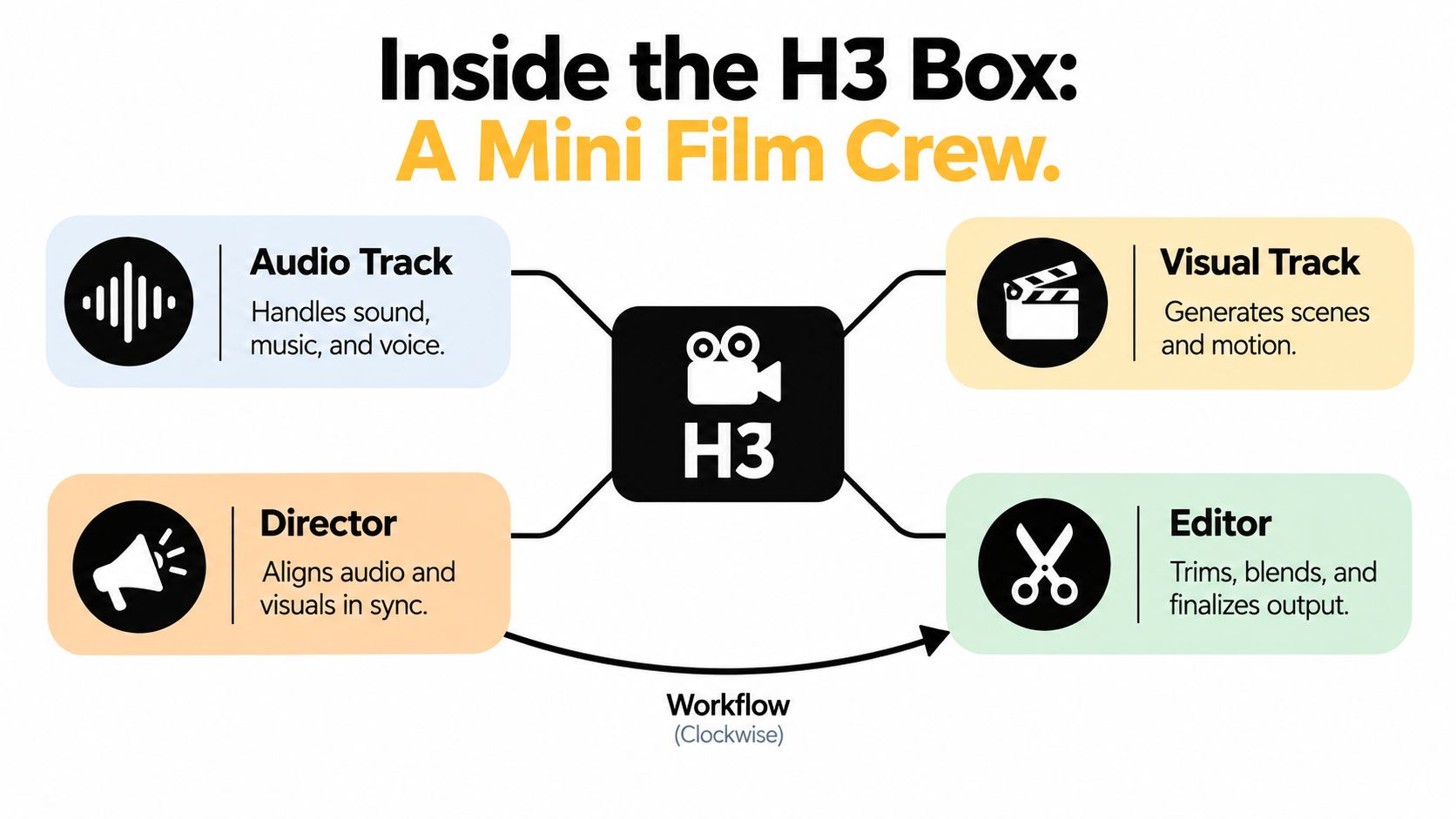
H3 is easier to prompt when you stop treating the assets as isolated files and start assigning roles. One asset can guide appearance, another can guide motion, and audio can steer the feel of the final shot.
With FL2VA and Ref2VA chosen deliberately, the next question is what access path costs you.
<a id="free-access-paths-trial-credits-and-open-weights"></a>
Free Access Paths Trial Credits and Open Weights
The word free depends on who pays the compute bill. For a creator, the choice usually falls into three paths, a trial or demo, open weights you run yourself, or hosted inference that bills usage behind the scenes. The clip may look free on the page, while the processing cost still lands somewhere.
<a id="trial-hosted-api-and-open-weights-are-not-the-same-thing"></a>
Trial, hosted API, and open weights are not the same thing
A demo is the easiest starting point because it removes setup friction. The tradeoff is clear. Caps are normal, queues are common, and the platform controls the rules. Hosted API use gives you more control and usually better automation, but the service is pay-per-use rather than universally free, and MiniMax's pricing page lists $0.08 per second for 768P video, with audio listed as free MiniMax pricing overview.
Open weights work differently. MiniMax describes the H3 open release as royalty-free for research and commercial use under the MiniMax H3 Community License, but local inference still runs on your hardware, your electricity, and your storage. A free license can still carry compute, maintenance, and time costs.
<a id="what-a-short-clip-really-costs-in-practice"></a>
What a short clip really costs in practice
A 5-second 768P render corresponds to $0.40 in video-generation charges before any platform markup, based on the official $0.08 per second rate. A 10-second 768P clip lands at $0.80 on the same rate sheet. Short-form teams also need room for retries, upscaling, and alternate versions, so the budget usually starts above the first successful render.
For a simple comparison, this table keeps the access paths separate.
| Access path | Who pays for compute | Typical limits | Best for |
|---|---|---|---|
| Trial or demo | The platform, through caps or subsidies | Queueing, duration limits, fewer generations | First test clips and prompt practice |
| Hosted API | You, through usage billing | Per-second charges, resolution tiers, workflow limits | Repeatable production work |
| Open weights | You, through hardware and electricity | Your own GPU floor, local storage, maintenance | Local evaluation and custom deployment |
If you want a broader comparison of no-cost access patterns, the guide to Perplexity's no-cost tier shows how a service can appear free while still relying on limits that shape real usage. The same logic applies here, so the useful question is not whether an access path says free, but what it asks you to pay in practice.
For a related example of how no-cost access is framed in AI tools, see Gemini gratis. That kind of comparison helps because a free sign-up and a free production workflow rarely mean the same thing.
Budget rule: if you need retries, upscaling, or multiple ad variants, treat the nominal clip price as the floor, not the full cost.
Treat any free tier as an access level with limits, and match it to your clip length, resolution, and turnaround before committing.
<a id="safe-download-and-setup-without-risky-files"></a>
Safe Download and Setup Without Risky Files
The first safety check is simple, and easy to skip when you are eager to test a clip. Start with the official MiniMaxAI model page, then confirm that the files match the open release layout, which includes FL2VA and Ref2VA variants plus supporting pieces such as the tokenizer, processor, text encoder, visual VAE, and separate audio VAE. If a download page looks like a repackaged bundle instead of that structure, treat it with caution.
<a id="what-to-verify-before-you-click-download"></a>
What to verify before you click download
Check the source, the file purpose, and the package structure before you save anything locally. H3 is documented as a combined audiovisual stack, not a video-only model, so mirror sites that strip out pieces or rename files are not the same as the official release. The same model card also points to BF16 precision, native synchronized audio-video output, and outputs up to 2K and 15 seconds, which gives you a clear signal for what a real package should support.
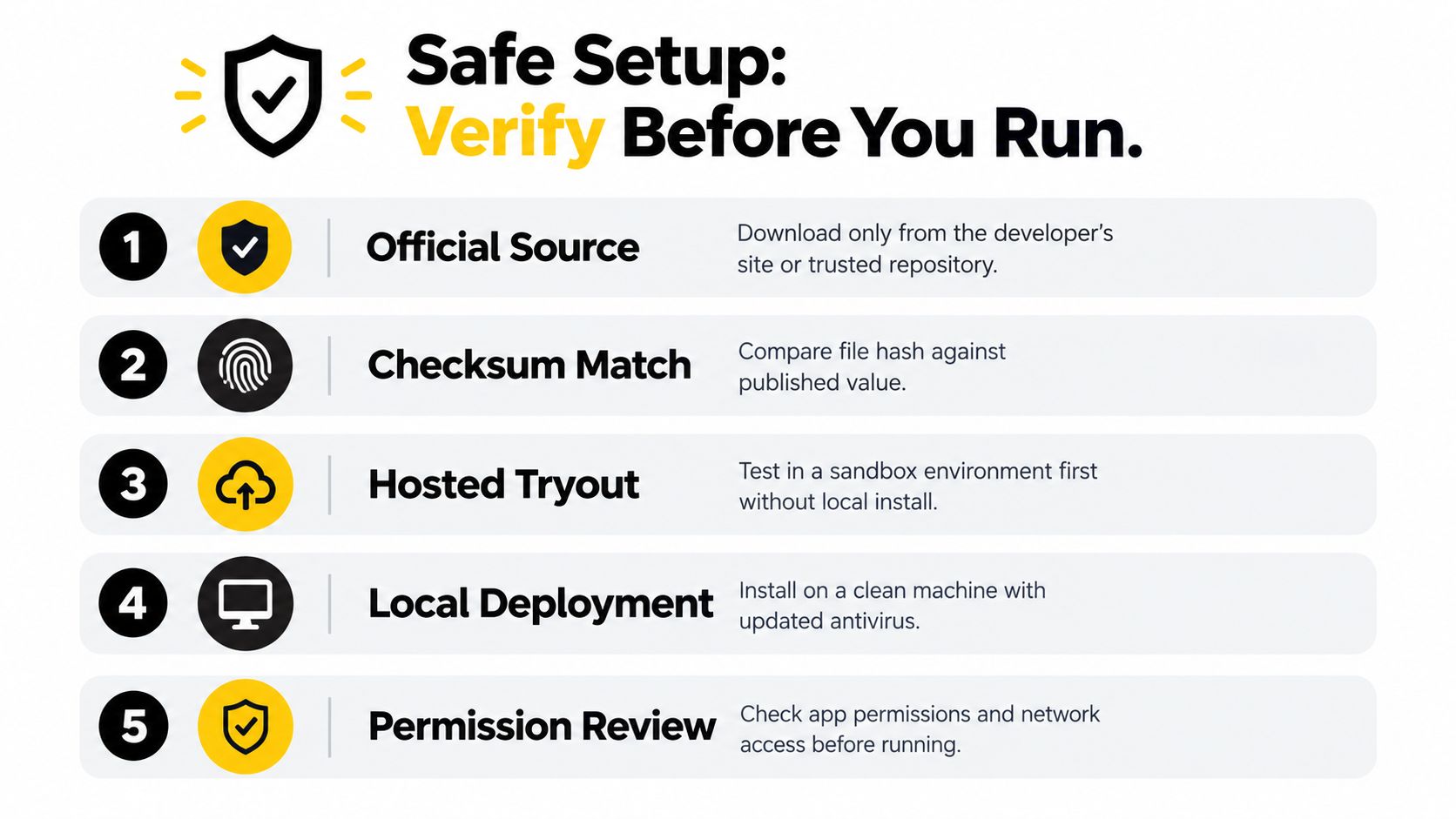
Before local setup, check these basics:
- Official Source: download only from the developer's repository or trusted model page.
- Checksum Match: compare hashes if the publisher provides them.
- Hosted Tryout: test a sandbox or browser flow first if you just need a quick clip.
- Local Deployment: use a clean machine with updated security tools.
- Permission Review: inspect app permissions and network access before launch.
<a id="why-local-setup-is-not-automatically-free"></a>
Why local setup is not automatically free
Local inference can still carry a real cost. In one published benchmark, four H200 GPUs produced a 5-second, 1,344 × 768 text-to-audio-video sample with 124 frames, 24 FPS, and 50 inference steps, with mean latency of 75.10 seconds across three prompt-and-seed pairs. A separate run on two RTX 5090 32 GB GPUs reported 8 minutes 38 seconds of client end-to-end time for the same general setup, which shows how the bill moves from a platform invoice to your own hardware, storage, and electricity.
That is the meaning of free here. The platform may not charge you for the clip itself, but local use still asks someone to pay for compute, either through owned hardware or through trial limits that hide the cost in another place.
A browser demo and a local machine solve different jobs. The browser path is easier and avoids installation risk. Local deployment gives you control, but it also shifts the work of maintaining the machine onto you.
If you only need to validate an idea, start in a hosted environment first. Move local only when the workflow is worth the setup cost.
A practical first test is a short 5-second clip with one clear prompt and one reference set. If the result looks stable, you can decide whether the extra control is worth the friction before you put it into a short-form video workflow.
<a id="licensing-regions-and-legal-notes-before-commercial-use"></a>
Licensing Regions and Legal Notes Before Commercial Use
A common mistake is assuming that if you can see a model, you can use it everywhere. That's not how H3's open-weight story works. One source states that open weights are currently excluded from the EU, UK, US, and South Korea, while hosted API access may still be available, and organizations in excluded regions can apply for a reviewed license MiniMax H3 design notes.
<a id="territory-matters-more-than-the-download-button"></a>
Territory matters more than the download button
That creates a split that many creators miss. You may be able to experiment through a hosted interface, but still be unable to legally download, self-host, or commercially deploy the same weights in your country. The difference is not just geographic access, it's the gap between experimentation, production use, redistribution, and self-hosting.
The checklist for commercial use should be straightforward. Confirm account access, check API eligibility, verify whether open-weight territory restrictions apply, review the commercial-use threshold, think through how data is handled, and decide whether generated media can be used in paid ads. Those questions matter more for agencies and cross-border teams than for casual hobby use.
<a id="why-agencies-should-be-careful"></a>
Why agencies should be careful
If you serve global clients, you need predictable compliance, not a temporary demo that disappears when the campaign goes live. That's especially true for Japanese and Korean creators working with international accounts, because a clip made in one country can easily end up in ads elsewhere. Local deployment also doesn't make cost disappear, because hardware, electricity, storage, and maintenance still sit on your side of the ledger.
For related compliance thinking around creative assets, the royalty-free music for ads guide is a useful reminder that usage rights often matter as much as the creative output itself. Video models are no different. If the rights story is unclear, the workflow isn't ready for client delivery.
Compliance rule: don't confuse “I could generate it” with “I can legally ship it.”
The safest path is to treat jurisdiction as part of the brief. Once you do that, you stop building on assumptions and start building on usable rights.
<a id="free-alternatives-when-h3-limits-slow-you-down"></a>
Free Alternatives When H3 Limits Slow You Down
Sometimes the limit isn't legal, it's operational. The queue is long, your hardware isn't ready, or the resolution you need doesn't match the tier you've got. When that happens, the best move is to keep producing instead of waiting for a perfect H3 path.

<a id="three-practical-fallback-paths"></a>
Three practical fallback paths
If you're testing ideas, stay on a capped H3 demo and use it like a sketchpad. If you need predictable output and can accept usage billing, a hosted API path is cleaner. If you want a broader all-in-one workflow for rapid prototypes and polished finals, a platform such as the Veo 3 AI video generator can give you another route for prompt-to-video production, with the first mention of Veo 3.1 linking to its dedicated page and pricing kept on the pricing page rather than in the body Veo 3.1, Veo 3 AI pricing.
That's useful because creators rarely need only one tool. They need a fast way to test a hook, a way to iterate on style, and a clean path to export the final asset. If H3 is blocked by caps or territory, a different generator can keep the project moving while you sort out access.
<a id="how-to-decide-fast"></a>
How to decide fast
- Capped demo: use it when you're still testing the hook or prompt.
- Paid usage: use it when you already know the clip needs to ship.
- Alternative platform: use it when speed matters more than model-specific control.
The main point is not loyalty to one model. It's preserving momentum for TikTok, Shorts, and Reels work when one path slows down.
<a id="practical-use-cases-and-promo-video-workflow"></a>
Practical Use Cases and Promo Video Workflow
H3 fits best when the video already has a clear shape. A product teaser can open with a clean first frame, move through one motion beat, and close with a final frame that is ready for social. A brand mascot clip can use reference images and a voice sample, then move through a separate editing pass for polish.
<a id="a-simple-workflow-that-creators-can-repeat"></a>
A simple workflow that creators can repeat
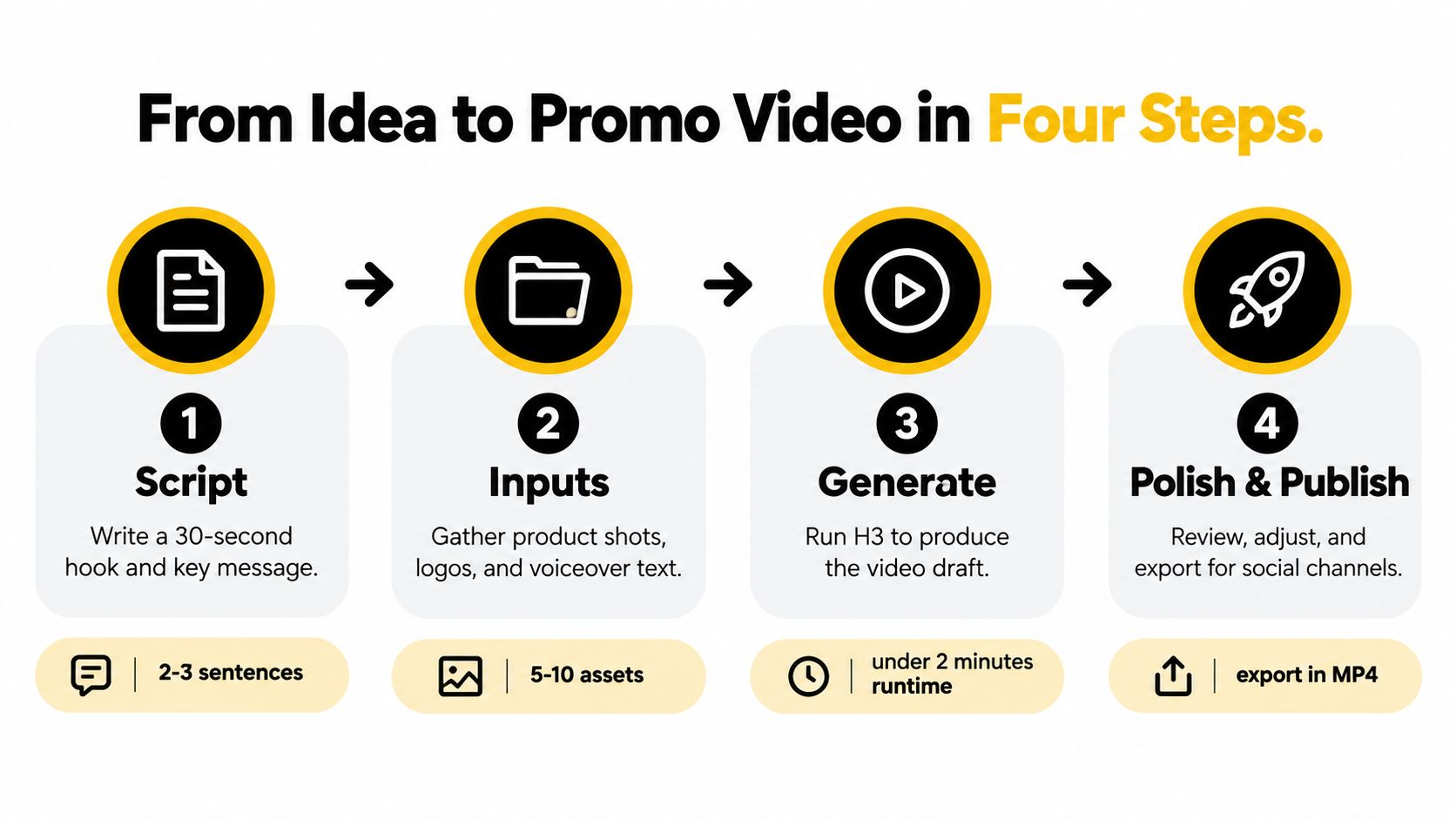
Start with the script. Keep it short, because short-form video works better when the hook is tight and the message is clear. Then gather the inputs, such as product shots, logos, or voiceover text, and use H3 to generate the first draft. After that, finish the output in your editing stack, especially if you need platform-specific formatting or final captions.
Generation latency, covered in the setup section, is part of the workflow, not a technical footnote. If render time is slow, it affects pacing, retries, and publish timing. Treat it the same way you treat image quality or audio sync.
For teams that automate publishing, retries should be part of the process. If a first render misses the timing, regenerate with cleaner inputs instead of forcing a weak draft into the edit. The Yelly Nelly video automation piece is useful here because it shows how creators move from raw output to repeatable edits.
Creator rule: let H3 handle the audiovisual draft and reserve your editor for captions, formatting, and final polish.
That sequence keeps the process manageable. Free access also changes the cost math, because someone still pays for compute, whether that cost shows up as trial credits, usage caps, or time spent waiting for a rerender. Before commercial use, check the regional license terms for the place where the clip will be published and used, since access and rights can differ by territory.
Related Articles
Continue with more blog posts in the same locale.
Higgsfield Genjutsu vs Veo 3.1: Which Do You Need?
Higgsfield Genjutsu edits footage you already shot; Veo 3.1 generates new clips from text or images. Compare inputs, length, audio and use cases, and pick the right one.
Read article
MiniMax H3 Explained: The 2026 Multimodal Video Model
Learn what MiniMax H3 is, how its 33B-parameter omni-modal architecture works, and how creators can use its 2K, 15-second video output in 2026.
Read article
Is Google Flow Free? Pricing, Credits & Limits (2026)
Is Google Flow free? See Flow's 50 daily credits, Google AI plan prices, credit costs per Veo 3.1 clip, peak-hour limits, and what free credits really buy.
Read article