
MiniMax H3 Explained: The 2026 Multimodal Video Model
Learn what MiniMax H3 is, how its 33B-parameter omni-modal architecture works, and how creators can use its 2K, 15-second video output in 2026.
Veo3 AI · 12 min read · Oct 15, 2026

MiniMax H3 is a 33-billion-parameter open-weights omni-modal video model launched on July 31, 2026. It can generate 15-second clips at up to 2K resolution with native stereo audio from a unified context of text, images, video, and audio.
That combination sounds incremental until you compare it with the way most video tools still work. H3 doesn't just make a clip, it tries to keep the visual and audio logic inside one generation pass, which is why the model matters to creators, marketers, and developers who care about sync, continuity, and reuse more than headline demos.
Table of Contents
- What MiniMax H3 Is
- Inside the H3-Omni-Transformer Architecture
- How H3 Compares to Veo 3.1 and Other 2026 Models
- Real Workflow Trade-Offs Behind 2K and 15-Second Claims
- Inference Cost and Latency in Practice
- Choosing Between FL2VA and Ref2VA Variants
- Next Steps for Creators Comparing H3 in 2026
<a id="what-minimax-h3-is"></a>
What MiniMax H3 Is
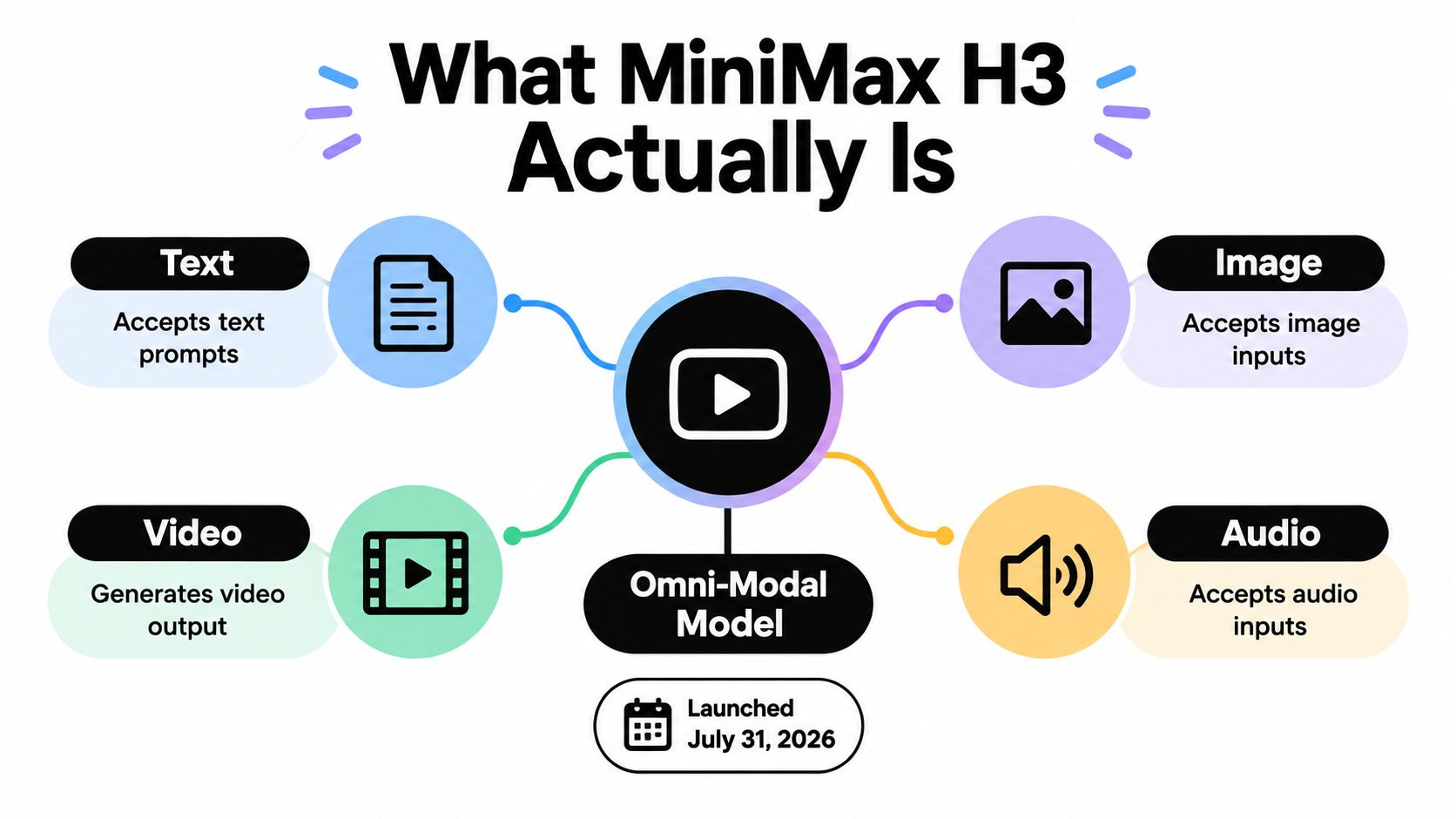
MiniMax H3 arrived as a public launch, and that matters because it marks a shift in how multimodal video systems are packaged for real use. Reuters reported that H3 accepts text, images, video, and audio inside one unified context, then generates video with native stereo sound and a maximum output of 15 seconds at 2K. That places it in a different category from tools that treat audio as an afterthought or add sound later.
The practical point is straightforward. When audio is generated in the same workflow as the visuals, the model has a better chance of keeping motion, timing, and ambience aligned instead of stitching them together after the fact. That collapses a production step that has historically broken lip sync and realism, especially in short-form branded content and concept clips.
H3 works like a director receiving the scene brief, the reference frame, the sound cue, and the motion reference in one briefing, instead of sending each piece through separate departments. That same workflow concern shows up in resources like SleekPost's AI content guide, where the value of content systems depends on how well the parts stay aligned.
Practical rule: if a model's audio is added later, you are still doing post-production. H3 matters because it tries to move that work into generation itself.
MiniMax positioned H3 for advertising, e-commerce, gaming, product design, and general content creation, which shows the company is aiming beyond hobbyist clips and toward commercial workflows. Reuters also reported that MiniMax planned to release the model weights shortly after launch, subject to applicable laws and regulations, which would let developers download and customize the system instead of relying only on a hosted interface. That openness changes who can inspect, adapt, and deploy the model.
<a id="inside-the-h3-omni-transformer-architecture"></a>
Inside the H3-Omni-Transformer Architecture
H3's architecture is what makes its omni-modal claim concrete. MiniMax described the H3-Omni-Transformer as a 33-billion-parameter dense, single-stream Transformer, with about 13 billion parameters in AdaLN-related branches. H3 is one large system generating across modalities in a shared internal flow, rather than four small tools glued together.

H3 works like a single chef who reads the recipe, watches the plating reference photos, listens to the soundtrack cue, and checks a reference video at the same time. Split kitchen stations can each optimize their own piece and still serve the wrong meal. The point of the single stream is to keep creative context aligned while the model generates.
That scale matters because dense models of this size are not lightweight consumer tools. A 33-billion-parameter system signals a general-purpose design, not a narrow filter or a demo built for one effect. The roughly 13 billion AdaLN-related parameters also suggest that a meaningful share of the model is dedicated to modulation and control paths, which fits a system built to coordinate mixed inputs instead of only processing text prompts.
MiniMax's open-source move on August 3, 2026 is the other major part of the story. The company said it was releasing the full weights to support further development, including fine-tuning. For teams, that means more room to audit behavior, adapt the model to internal assets, and self-host it where latency, privacy, or data-sovereignty concerns make hosted APIs awkward.
For creators who care about continuity, that openness is strategically important. H3 can sit inside a custom pipeline instead of forcing everyone through a fixed interface, which matters when reference handling and identity control are part of the job. A useful companion read on that problem is AI videos with consistent characters.
Developers get a model that can be inspected, adapted, and deployed under their own constraints.
<a id="how-h3-compares-to-veo-31-and-other-2026-models"></a>
How H3 Compares to Veo 3.1 and Other 2026 Models
Creators comparing video models in 2026 are not asking whether a system can make a pretty clip. They are choosing between control over resolution, length, audio, reference inputs, and deployment. H3 stands out because it combines omni-modal context with open weights, while other models may lead on polish, ecosystem integration, or guided access.
| Capability | MiniMax H3 | Veo 3.1 |
|---|---|---|
| Resolution ceiling | Up to 2K | Managed platforms in the Veo 3.1 ecosystem offer a guided, production-oriented path |
| Clip length | Up to 15 seconds | Workflow-dependent on the managed platform |
| Native audio | Native stereo sound | Platform-dependent audio handling |
| Input modalities | Text, images, video, audio | Guided input handling inside the platform |
| Openness | Open weights announced | Closed platform access |
That table stays narrow on purpose. The useful comparison is not brand aura, it is what each system exposes to production teams. H3's advantage is structural. It accepts more input types in one context and can be run with released weights, which matters for self-hosted research, fine-tuning, and compliance-heavy environments.
Veo 3.1 belongs in the same decision set for a different reason. Many creators want a guided, production-oriented path with polished tooling, and the managed Veo 3.1 ecosystem fits that workflow. For teams that want a focused interface rather than model weights, that trade-off can matter more than raw flexibility.
For a tighter side-by-side framing, Gemini Omni vs MiniMax H-3 is useful because it surfaces the same tension, control versus convenience. H3 is the stronger option when the workflow depends on reference-heavy generation, self-hosting, or internal experimentation.
Decision rule: if you need open deployment and multi-input control, H3 is the more interesting system. If you need a guided production environment with less setup, a managed platform may be the better fit.
Seedance 2.0 and Kling 3.0 belong in the same decision set, but the analyst's takeaway stays the same. H3 is not trying to win by being only a text-to-video model with nice audio. It is trying to become a broader multimodal generator that can absorb more of the creative brief before rendering begins.
<a id="real-workflow-trade-offs-behind-2k-and-15-second-claims"></a>
Real Workflow Trade-Offs Behind 2K and 15-Second Claims
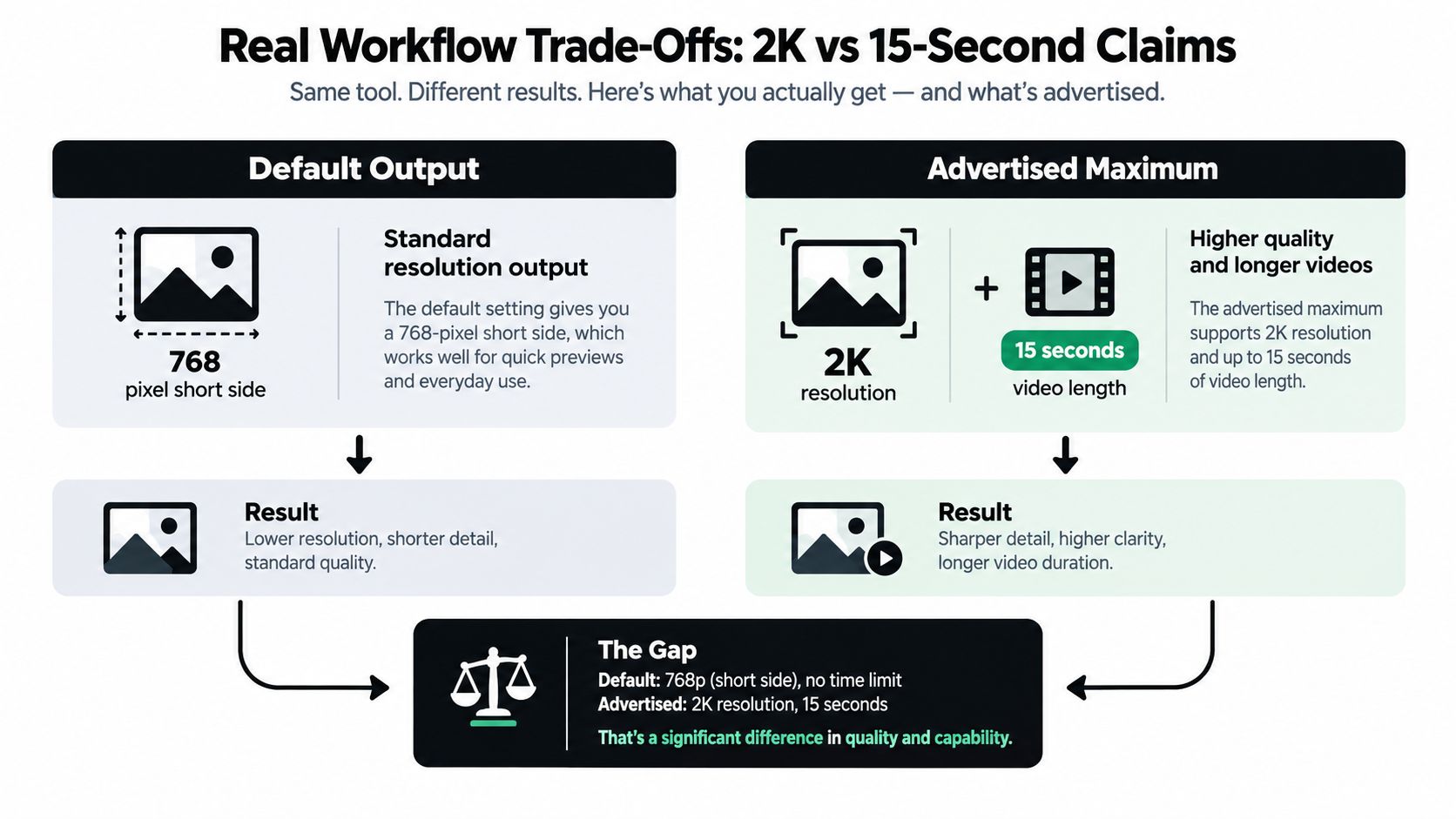
The headline numbers on H3 hide the part that matters most in production. The open implementation defaults to a 768-pixel short side, and 2K output requires a separate H3-Regenerate-2K stage that feeds the initial result and the original context back into the model. That means “2K support” is really a two-step workflow claim, not a single-pass promise.
<a id="what-the-regeneration-step-changes"></a>
What the regeneration step changes
Think of the first render as a working shot and the 2K pass as a controlled re-shoot, not a simple enlargement. In a re-shoot, the model has another chance to correct detail, but it can also drift on text fidelity, character consistency, motion, or audio synchronization if the second pass interprets the scene differently.
That distinction matters for short-form ads and social inserts because the clip has to survive actual use, not just look good in a demo gallery. A model that can create a strong base version but loses alignment on the regeneration pass may still be useful, but buyers need to know where the quality holds and where it slips.
H3's supported clip range starts at 4 seconds and goes up to 15 seconds, with 24 FPS output in the technical summaries. Those numbers are useful because they describe the clip format creators should budget for, especially when they're planning a sequence of ad variations or a reference-driven social asset. The key point is that the high end is a ceiling, not a default experience.
Practical rule: compare clips at the same duration and resolution before you compare models. A clean 4-second result tells you far less than a clean 15-second result, and a regenerated 2K clip can behave differently from the first pass.
The honest takeaway is that H3's 2K claim is real, but operationally layered. If you care about cost, consistency, or turnaround time, you need to test the base output and the regenerated output separately rather than assuming the higher number is the normal path.
<a id="inference-cost-and-latency-in-practice"></a>
Inference Cost and Latency in Practice
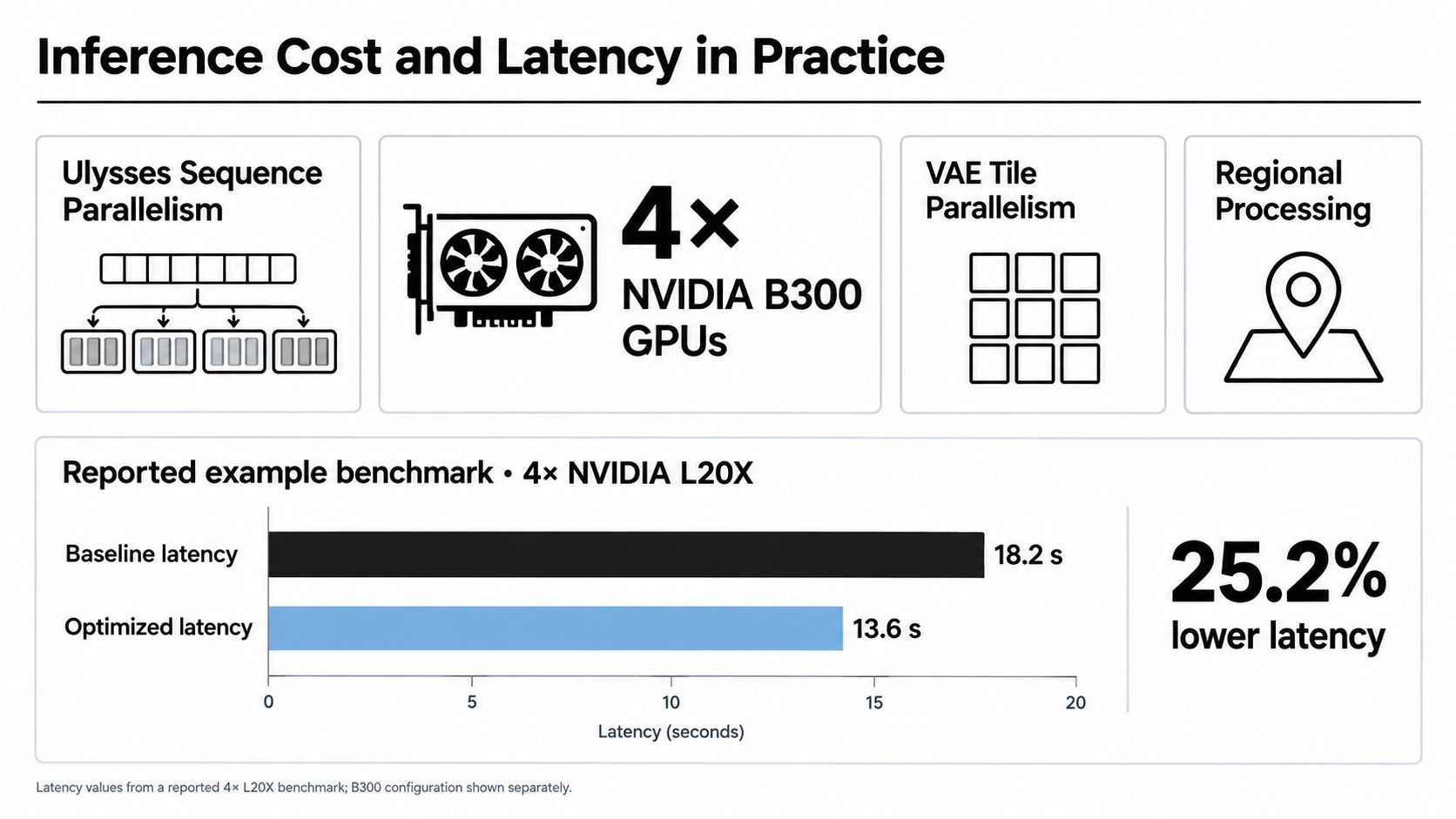
The most useful H3 number isn't the parameter count, it's the latency profile under a real benchmark. MiniMax documents a configuration using four NVIDIA B300 GPUs, Ulysses sequence parallelism, VAE tile parallelism, and regional compilation, producing a 1248×768 output with 209 frames across 50 sampling steps. After one warm-up request, the reported mean client latency was 86.964 seconds across three requests.
<a id="turning-latency-into-a-buyers-rule-of-thumb"></a>
Turning latency into a buyer's rule of thumb
That benchmark output corresponds to roughly 8.7 seconds of footage at 24 fps. So under that high-end setup, the model is spending about 10 seconds of rendering time per generated video-second. That's a useful mental model because it turns a raw latency figure into a rough production cost expectation.
The figure does not mean H3 always runs that slowly. Latency shifts with resolution, frame count, sampling steps, parallelism, GPU generation, and whether pieces of the model are offloaded. It does mean that H3's main constraint is inference cost, not prompt quality alone.
The production response to that reality is straightforward:
- Warm workers: keep model processes hot so the first user isn't paying cold-start penalties.
- Batching: queue similar jobs together when your platform can do it.
- Resolution presets: don't default every request to the highest output tier.
- Short-duration defaults: reserve longer generations for clips that need them.
These levers matter more than abstract benchmark bragging because they control queue time and GPU cost in actual use. A team evaluating H3 should compare quality at equal duration and resolution, not raw generation times across unrelated settings.
The benchmark also explains why small workflow differences can feel huge in practice. If one pipeline uses a more conservative frame count or a lower resolution preset, it may look "faster" without being more efficient, so apples-to-apples testing is the only fair comparison.
<a id="choosing-between-fl2va-and-ref2va-variants"></a>
Choosing Between FL2VA and Ref2VA Variants
H3's two open variants point to two very different production habits. FL2VA is the text-to-video path with optional first and last frame control, while Ref2VA accepts up to nine images, three video clips, and three audio clips as references. That's not just a feature list, it's a workflow split.
FL2VA is the better fit when the prompt already contains most of the direction and you want a fast generation path with limited visual anchoring. Ref2VA is closer to a continuity director, because it can consult a mood board, reference footage, and audio cues all at once. For character-driven shorts or brand prototypes, that extra reference capacity is the whole point.
The trade-off is complexity. More reference material can improve continuity, but it also raises questions the public summaries haven't answered cleanly, including mixed-language prompt behavior, audio sync after editing, and whether heavier reference stacks increase compute burden enough to hurt turnaround.
A few practical use cases help clarify the split:
- FL2VA: quick concept shots, camera tests, and simple product visuals.
- Ref2VA: character-consistent shorts, multilingual ad prototypes, and music-driven inserts.
- Either mode: short cinematic beats where the shot matters more than a long narrative arc.
That list is deliberately conservative because H3 isn't a long-form storytelling engine in the usual sense. It's stronger as a short-form audiovisual generator where the references define the shot and the model tries to preserve that identity through rendering.
If continuity is the main risk, use references. If speed and simplicity matter more, use the lighter path.
The useful analyst's conclusion is that the variants are less about choice of style and more about choice of control surface. FL2VA is a narrower prompt-to-shot path, Ref2VA is a richer production interface, and neither should be treated as interchangeable just because both live under the H3 name.
<a id="next-steps-for-creators-comparing-h3-in-2026"></a>
Next Steps for Creators Comparing H3 in 2026
H3 looks strongest when you test the gap between the headline specs and the actual production path. A 2K claim is only useful if your workflow can reach it without a separate regeneration pass, and a 15-second clip matters only if the render holds up at the quality level you need.
The practical check is simple:
- Test one-pass output against regenerated 2K output.
- Measure a 15-second clip at your target quality.
- Record warm and cold latency separately.
- Stress multilingual prompts and reference-heavy briefs.
- Compare that path with a still-image workflow such as Photo for Video works if your input is already a strong frame.
Those tests show whether H3 fits your real production cadence or whether a managed workflow is easier to run. They also make the trade-off visible: H3 gives more control, but control adds steps.
If you want a simpler route into short-form generation, compare H3 against Veo3 AI on the same brief, with the same timing target and the same reference assets. Use the result to judge which setup gives you clips you can ship with less friction.
Related Articles
Continue with more blog posts in the same locale.

Is Google Flow Free? Pricing, Credits & Limits (2026)
Is Google Flow free? See Flow's 50 daily credits, Google AI plan prices, credit costs per Veo 3.1 clip, peak-hour limits, and what free credits really buy.
Read article
Gemini Omni Kosten Explained: Costs Tiers for Creators
Gemini Omni kosten breakdown: consumer and API pricing, token models, resolution costs, and free access options for short-form video creators.
Read article
Gemini Omni Gratis: Free Access Routes That Work
Find every working gemini omni gratis route in 2026, from YouTube Shorts Remix to free-tier trials, with setup tips and limits explained.
Read article