
MiniMax H3 vs Kling 3.0: A Practical 2026 Guide
MiniMax H3 vs Kling 3.0 compared on quality, speed, cost, audio, and real workflows, so you can pick the right model for your next video in 2026.
Veo3 AI · 14 min read · Oct 19, 2026
You've got a product shot due Friday, three talking-head scripts that need voice, and a credit balance that's already lower than you'd like. MiniMax H3 vs Kling 3.0 isn't an abstract leaderboard question in that moment. It's a practical one. Which model gets you a publishable clip in fewer renders, and which one leaves you reshooting the same push-in until the budget's gone?
I've shipped work on both types of models, and my take is direct. Stop asking which one wins overall. Ask which one wins your brief at the lowest cost per finished clip. That's the frame this guide uses, and it ends with a repeatability test you can run on your own prompts before you commit real money.
Table of Contents
- Choosing Between H3 and Kling 3.0
- Architecture and Core Specifications
- Visual and Audio Output in Real Test Conditions
- Speed, Hardware, and Day-to-Day Workflow
- Cost Per Minute and Budget Planning
- Best Use Cases by Content Type
- Integration With Veo3 AI-Style Pipelines
- Which Model to Pick and When
<a id="choosing-between-h3-and-kling-30"></a>
Choosing Between H3 and Kling 3.0
Usable takes are what you pay for. A model that looks stunning once in five renders costs you more, in money and in deadline stress, than a slightly less flashy model that nails the shot three times in five. That is why the MiniMax H3 vs Kling 3.0 decision should start with your shot list.

<a id="what-youre-deciding"></a>
What You're Deciding
Write down your next ten clips before you generate anything. Count how many are dialogue-led, how many depend on directed camera movement, and how many need to be delivered larger than phone size. That tally points to your default model far better than any preference ranking.
Both are credible 2026 options. MiniMax announced H3 on July 31, 2026, positioning it as a general-purpose multimodal model, as detailed in the MiniMax H3 launch announcement. Kling 3.0 followed a separate rollout path as a closed model, so access and features depended on its rollout stage rather than on an identical release moment.
- If most clips talk: You need audio that arrives with the picture and faces that stay in frame.
- If most clips move: You need the camera to obey the direction you wrote, every time.
- If most clips are hero work: You need resolution headroom for delivery, not just for preview.
I won't declare a universal winner because there isn't one worth trusting. I'll tell you which model I'd pick for each brief and where I'd refuse to use it.
<a id="architecture-and-core-specifications"></a>
Architecture and Core Specifications
H3 is built as one shared context for text, images, video, and audio. That design choice changes how you brief it. Instead of staging separate steps, you hand it a package of references and let it reason across them together. The MiniMax H3 model documentation lists a 33-billion-parameter dense transformer and a visual autoencoder using 16× spatial compression, 4× temporal compression, and 24 latent channels.
Kling 3.0 bets on delivery ceiling. Its reported maximum is native 4K, equivalent to 3840 × 2160 pixels, at up to 60 frames per second, according to the Kling 3.0 model profile. That ceiling is materially higher than H3's reported 2K at 24 FPS.
<a id="h3-and-kling-30-specification-snapshot"></a>
H3 and Kling 3.0 Specification Snapshot
| Capability | MiniMax H3 | Kling 3.0 |
|---|---|---|
| Duration | 4 to 15 seconds | Up to 15 seconds |
| Frame rate | 24 FPS | Up to 60 FPS |
| Resolution path | 768-pixel short side by default, 2K via regeneration | Native 4K maximum |
| Audio | Native 32 kHz stereo | Separately handled audio path |
| Input modes | Text, image, video, audio, first/last-frame, editing | Text and image driven generation |
| Aspect ratios | 21:9, 16:9, 4:3, 1:1, 3:4, 9:16 | Varies by route |
The two-stage question matters in production. H3 generates at a 768-pixel short side by default, with 2K available through the H3-Regenerate-2K process, per the MiniMax H3 open source specifications. Don't treat that as identical to native 2K. Test detail retention on skin, fabric, and small product text before you promise it to a client.
H3's first/last-frame control and multimodal reference workflows are the staging advantage. You can lock where a shot starts and ends, then let references carry identity or style through the middle. If you want to try that workflow directly, the MiniMax H3 model page is a practical starting point.
One caution before you over-read any of this. These are vendor-reported specifications, not independent quality verdicts. Architecture tells you how to brief a model. It doesn't tell you how often it'll obey you.
<a id="visual-and-audio-output-in-real-test-conditions"></a>
Visual and Audio Output in Real Test Conditions
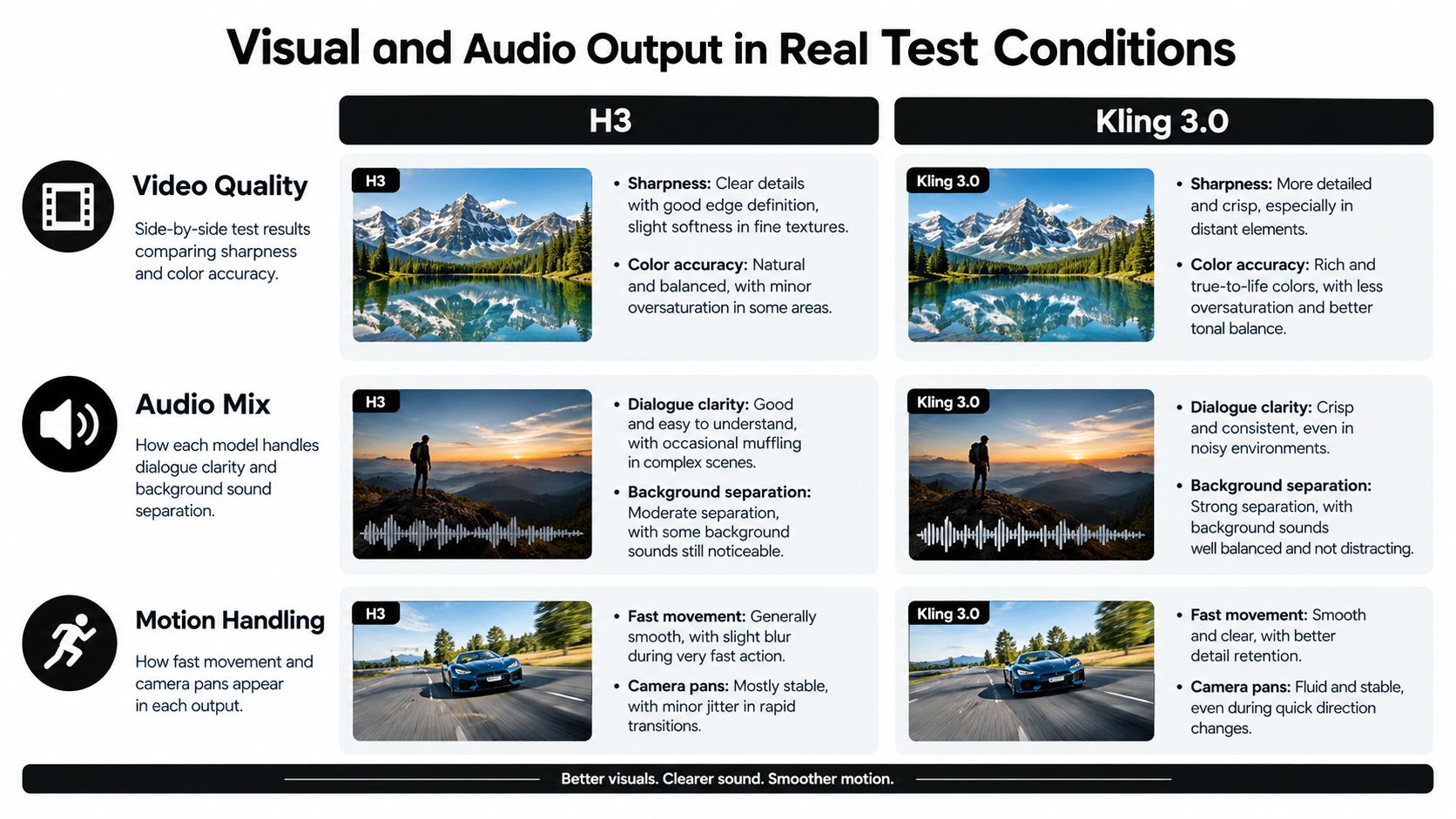
Shot type decides this comparison, not overall sharpness. In independent side-by-side testing, H3 was found more reliable for a speaking character held in frame, while Kling 3.0 Pro followed a product-camera push-in more clearly, as reported in the Artificial Analysis comparison summarized for MiniMax H3. That split matches how I'd route real work.
<a id="dialogue-shots"></a>
Dialogue Shots
For a talking character, H3's native stereo audio is a first-class output, not an afterthought. The line, the face, and the timing arrive together, which means less manual lip-sync repair on short ads. When you're feeding it mixed references, a solid grounding in how combined inputs interact helps, and the 2026 multimodal machine learning guide is worth reading before you build complex reference packages.
<a id="product-motion-shots"></a>
Product Motion Shots
Kling earns its keep when the brief is a directed move. A slow push toward a bottle, a pan that reveals a label, a hero arc around a shoe. If the camera instruction is the shot, I'd start with Kling and make H3 prove it can match that obedience on my exact prompt.
One prompt per category is not enough to declare a winner. Seed variation alone can flip a single comparison.
The preference data backs that skepticism. H3 ranked second in an audio-inclusive text-to-video preference pool with an Elo of 1,239.36 based on 6,035 appearances, while the nearest model scored 1,244.07, and the overlapping confidence intervals don't establish a meaningful difference, according to the MiniMax H3 benchmarks and hardware review. A nominal leaderboard gap shouldn't pick your subscription.
My working rule is simple. H3 for faces that talk. Kling for cameras that travel. Anything else, test it yourself with the protocol later in this guide.
<a id="speed-hardware-and-day-to-day-workflow"></a>
Speed, Hardware, and Day-to-Day Workflow
Monday morning, you've got twelve clips to deliver by Thursday. Speed stops being a benchmark and becomes your schedule. One independent test recorded Kling 3.0 as the fastest of three models at 1 minute 55 seconds while producing a 4K file, while H3 took 3 minutes 25 seconds and produced 2K, in the MiniMax H3 versus Kling 3.0 workflow comparison. Treat those numbers carefully. That was a single observational run, not an official benchmark.
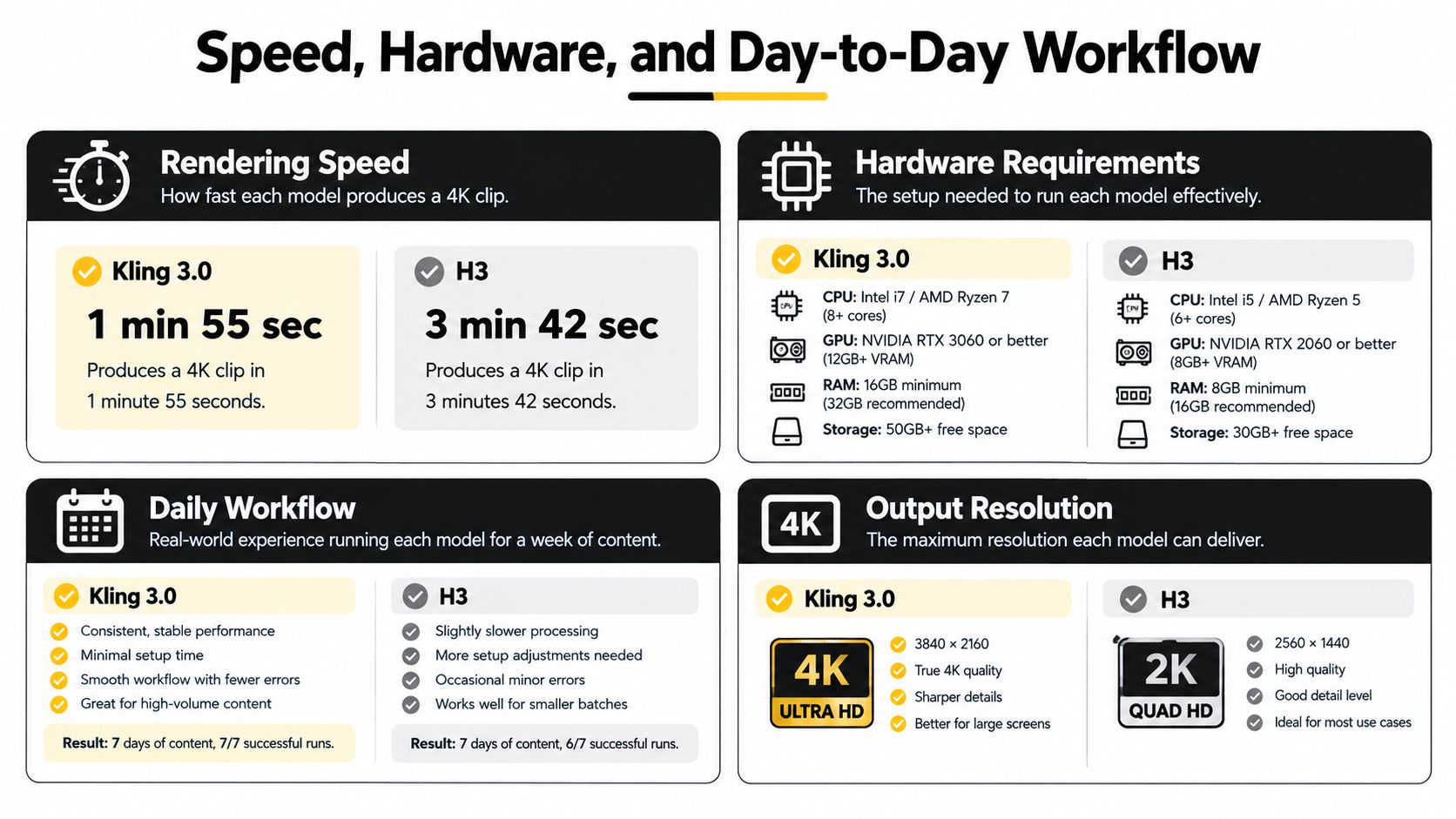
Even as a rough signal, the implication is real. Faster renders mean more iterations before deadline pressure forces you to accept a mediocre take. H3's two-stage path to 2K adds a regeneration step, so build that latency into your day rather than discovering it at export time. Draft at the lower resolution, approve the performance, then regenerate only the takes you've already chosen.
Watching both models work through the same prompt is more useful than reading about render times.
<iframe width="100%" style="aspect-ratio: 16 / 9;" src="https://www.youtube.com/embed/yxSmTY_ldfs" frameborder="0" allow="autoplay; encrypted-media" allowfullscreen></iframe>
If you're outsourcing finishing work rather than handling every render yourself, it helps to know what external video animation services typically cover, so you can decide which steps to keep in-house.
Before you lock either model into a recurring series, answer these.
- Queue tolerance: Can your posting schedule absorb slower 2K regeneration, or do you publish same-day?
- Iteration budget: How many renders per clip does your deadline allow?
- Finishing load: Who handles audio cleanup, captions, and upscaling, and in what tool?
- Fallback plan: When your first-choice model fails a shot type, what's the second route?
<a id="cost-per-minute-and-budget-planning"></a>
Cost Per Minute and Budget Planning
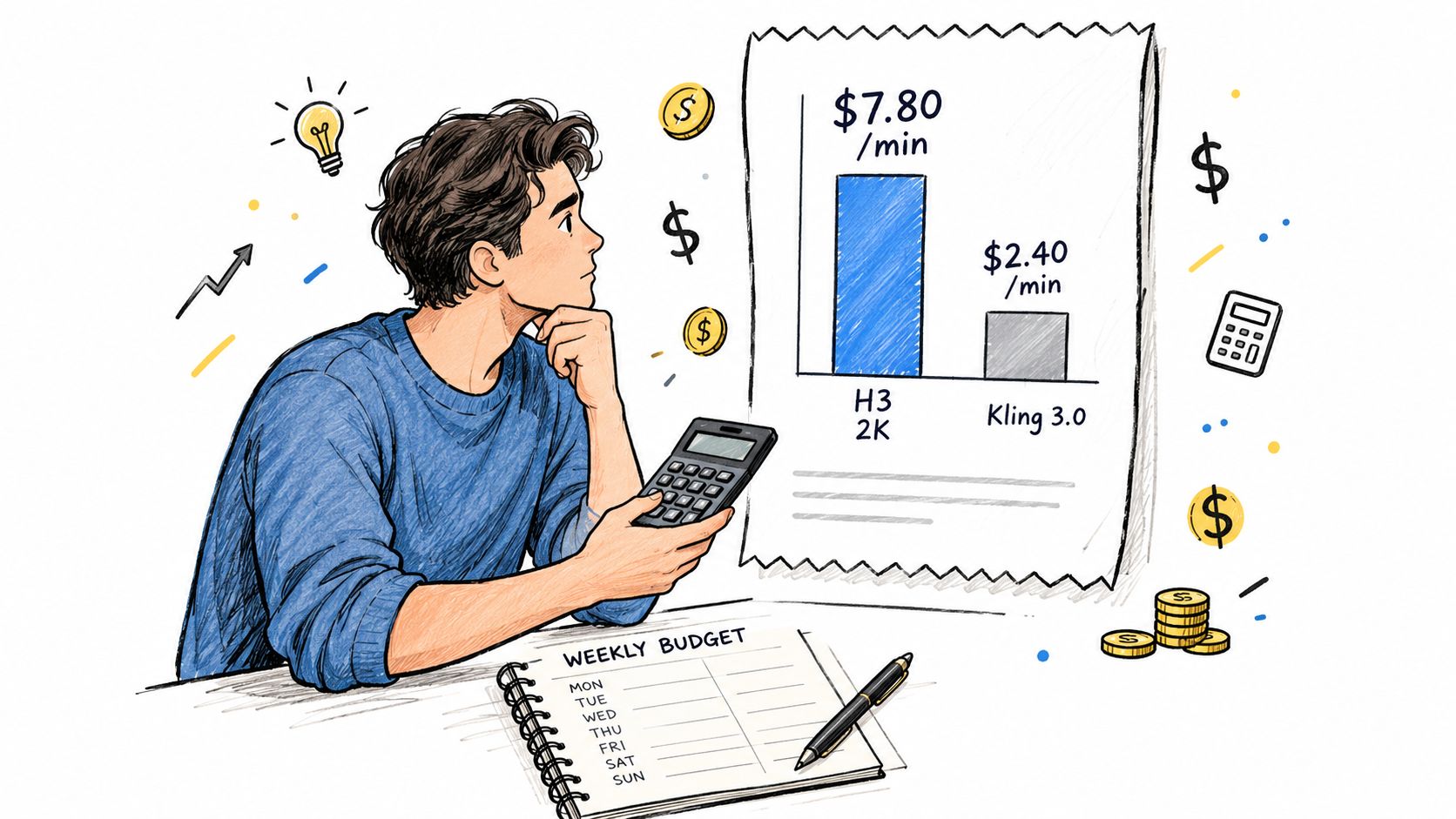
Cost is where H3 makes its strongest measurable case. One third-party analysis cited an estimate of approximately $7.80 per minute for H3 at 2K versus about $20.16 per minute for Kling 3.0 at 1080p. On that basis, H3's estimated cost was roughly 61% lower, or about 2.6 times cheaper, despite the higher cited resolution. Those figures came with a warning that MiniMax hadn't published an official benchmark table, so treat them as planning anchors, not invoices.
<a id="a-simple-per-clip-worksheet"></a>
A Simple Per-Clip Worksheet
Divide the per-minute estimate by sixty, then multiply by your clip length. Then, and this is the step most creators skip, multiply by your expected renders per accepted clip. A cheap render you repeat six times isn't cheap.
- Six-second clip: Roughly one-tenth of the per-minute rate per render, before retries.
- Ten-second clip: Roughly one-sixth of the per-minute rate per render, before retries.
- Accepted clip cost: Per-render cost multiplied by your average attempts. This is your true unit cost.
Published comparisons also note that H3 cost less per second at every tested resolution, with a 768p draft costing about one-third as much as the comparable Kling route. That's your budget lever. Draft cheap, finish expensive, and only on approved takes.
Real spending varies by subscription, API tier, duration, resolution, audio settings, queue priority, and regional pricing. Check your own numbers on the Veo3 AI pricing page rather than budgeting from anyone else's snapshot, including mine.
<a id="best-use-cases-by-content-type"></a>
Best Use Cases by Content Type
Match the model to the brief and both look good. Mismatch them and both look broken. Here's how I'd route the three brief types that make up most short-form production work.
<a id="talking-head-shorts-for-tiktok-and-reels"></a>
Talking-Head Shorts for TikTok and Reels
Pick H3. Native audio and stable, held faces cut your dubbing and sync time, which is where talking-head production bleeds hours. Generate the performance and the voice together, caption it, and post. If you're producing training or onboarding clips in this same format, the roundup of AI video tools for compliance and microlearning covers how teams structure those short educational pieces.
<a id="product-hero-clips-and-4k-ads"></a>
Product Hero Clips and 4K Ads
Pick Kling 3.0, and pay the premium without apologizing. Directed camera movement and a native 4K ceiling are exactly what hero work is judged on. A product push-in that drifts off-axis doesn't get fixed in editing. It gets reshot, and the reshoot costs more than the upgrade did.
<a id="educational-and-explainer-content"></a>
Educational and Explainer Content
Lean H3 when control matters more than resolution. Documented first/last-frame inputs let you start on a diagram, a title card, or a presenter's face and land exactly where the next segment begins. That predictability beats raw pixel count for stitched-together lessons.
Synchronized audio reduces post-production on dialogue-led clips, while visible camera choreography and 4K delivery still decide high-end hero work. Neither advantage cancels the other.
Segment your results by content type when you review a month of work. A blended average hides the pattern that should drive your next purchase.
<a id="integration-with-veo3-ai-style-pipelines"></a>
Integration With Veo3 AI-Style Pipelines
Most small teams don't run one model. They run a pipeline, and the smart question is where each model sits inside it. Working through a Veo 3 AI video generator style setup means you can route a brief to the right model without rebuilding your editing stack each time.
<a id="assign-each-model-a-layer"></a>
Assign Each Model a Layer
Think in layers, not loyalties. H3 becomes your dialogue and audio layer, handling speaking characters, reference-heavy animations, and edits to existing source video. Kling 3.0 becomes your hero layer, handling 4K product shots and directed camera moves. A model like Veo 3.1 can sit alongside both in the same multi-model environment, so you're choosing per shot rather than per subscription.
Audio handling is the handoff point that trips people up. H3 delivers native stereo with the picture, so your editor receives a clip that's already timed. Kling output may need its audio treated as a separate finishing step, which means you should budget sync and mix time into those clips rather than assuming the render is the finish line.
- Export discipline: Keep masters at the highest resolution each model produced, and create platform versions from those masters only.
- Naming discipline: Tag every file with model, resolution, and seed or prompt version, so a winning take can be reproduced.
- Cleanup discipline: Do captions, loudness, and color in one unified editor, not per model, or your series will look inconsistent.
<a id="run-a-repeatability-test-before-you-commit"></a>
Run a Repeatability Test Before You Commit
Don't trust my routing, and don't trust a single side-by-side you saw online. Run this instead. It takes an afternoon and it answers the only purchasing question that matters. How many renders produce one publishable clip?
- Pick five shot categories: Dialogue, product motion, faces, on-screen text, and action. Use prompts from your real upcoming work, not demo prompts.
- Generate ten seeds per category on each model, holding duration, aspect ratio, and audio settings as constant as the platforms allow.
- Score every render as publishable, fixable in editing, or failed. Be strict. Publishable means you'd post it today.
- Record the operational data for each batch. Failure rate, usable-take rate, generation time, and total spend.
- Calculate cost per accepted clip by dividing total spend by publishable takes. This number, not cost per render, picks your default model per category.
A 30-render sweep across your worst three categories will tell you more than any leaderboard. If H3 gives you four publishable dialogue takes in ten and Kling gives you two, your dialogue routing is settled regardless of what either launch page claims. Reverse the result on product motion and your pipeline writes itself.
The published record has gaps. MiniMax hasn't released a formal model-quality benchmark table, a multi-seed failure analysis, or a safety evaluation alongside H3. Your own repeatability data isn't a nice extra here. It's the deciding evidence, because it's measured on your prompts, your standards, and your deadlines.
<a id="which-model-to-pick-and-when"></a>
Which Model to Pick and When
Here's my situational verdict, stated plainly. If your week is mostly dialogue-led short-form on a tight budget, make H3 your default and draft at the lower resolution before regenerating winners. If your week is mostly 4K hero work with directed camera moves and a client reviewing on a large screen, make Kling 3.0 your default and accept the higher per-minute cost as the price of fewer reshoots.
<a id="guardrails-for-a-seven-day-trial"></a>
Guardrails for a Seven-Day Trial
Don't evaluate either model on vibes during a trial week. Set the rules first.
- Render budget: Cap attempts per accepted clip in advance, and log every overrun by shot type.
- Acceptance standard: Define publishable before you generate, using last month's posted work as the bar.
- Flip threshold: Decide now what usable-take gap would make you switch defaults, so the data decides instead of your mood.
Budget flips the choice at predictable points. When volume is high and margins are thin, H3's lower estimated cost per minute compounds fast. When a single clip carries a campaign, Kling's resolution and motion obedience are cheap insurance. Deadline flips it too. Same-day publishing rewards whichever model your test shows is faster and more consistent on your dominant shot type.
Screenshot version. H3 for dialogue-led short-form and tight budgets. Kling 3.0 for 4K hero work and directed motion. Both inside one pipeline, routed by shot type, if you can manage it. That's the whole decision.
Run your repeatability test where both models live side by side, compare cost per accepted clip on your own prompts, and build the routing rules that fit your briefs. Visit Veo3 AI to generate, compare, and finish your H3 and Kling 3.0 clips in one workspace.
Related Articles
Continue with more blog posts in the same locale.

7 AI Funny Video Tools for Hilarious Shorts
Discover 7 AI funny video tools for memes, avatars, surreal clips, and short-form content, plus practical ways to make viewers laugh.
Read article
MiniMax H3 Prompt Guide for Better AI Video
MiniMax H3 prompt guide with practical templates, parameter tips, and workflow fixes for creators using Veo 3.1 and other top AI video models in 2026.
Read article
Minimax H3 Free Guide to Access and Video Use
Wondering about Minimax H3 free access? Learn what H3 is, free tiers, safe setup, legal notes and Veo3 AI workflows.
Read article