
Veo 3.1 vs Kling 3.0: Which AI Video Model Wins in 2026
Veo 3.1 vs Kling 3.0 compared side by side on quality, speed, pricing, and use cases. Find out which AI video model fits your workflow in 2026.
Veo3 AI · 17 min read · Sep 30, 2026
You're halfway through a short-form campaign, the Friday deadline is approaching, and two browser tabs are open beside the edit timeline. One tab promises cinematic control and native sound. The other offers a wider short-form generation window and a more social-first feel. The question isn't which model wins in a laboratory comparison. It's which model deserves your next render budget.
For most production teams, the decision comes down to three things: what the brief demands, how precisely the prompt must control the shot, and what your existing pipeline can ingest. A cinematic brand film, a vertical product ad, and a fast music teaser shouldn't automatically use the same generator. A practical starting point is the Veo 3 AI video generator, which gives creators a way to work with modern AI video tools in one environment, but the model choice still matters.
Table of Contents
- Choosing Between Veo 3.1 and Kling 3.0 in 2026
- What Each Model Actually Is
- Output Quality and Motion Compared
- Prompt Controls and Format Support
- Security, Ownership, and Access Models
- Best Use Cases for Each Model
- Final Verdict and Migration Checklist
<a id="choosing-between-veo-31-and-kling-30-in-2026"></a>
Choosing Between Veo 3.1 and Kling 3.0 in 2026
I'd make the decision before writing a long prompt. First, classify the job. If the shot needs controlled duration, high-resolution output, synchronized sound, or repeatable visual references, start with Veo 3.1. If the job needs longer continuous social clips, rapid variations, or a more interpretive visual style, start with Kling 3.0.
That isn't a quality deathmatch. It's a workflow fit problem. A model can create a beautiful frame and still be the wrong choice if it forces too many regeneration breaks, lacks the format you need, or makes the editor rebuild the shot around missing sound.
Producer rule: choose the model that removes the most work after generation, not the one that produces the most impressive isolated demo.
<a id="the-three-questions-i-ask-before-rendering"></a>
The three questions I ask before rendering
What does the brief demand? A cinematic narrative shot usually benefits from deliberate image references, audio-aware generation, and tightly managed output settings. A social-first brief often rewards speed, flexible clip duration, and easy vertical iteration.
How much control does the prompt need? Some shots depend on a specific camera move, character action, or reveal. Other shots only need a strong mood, product movement, and a usable first frame. The more exact the shot, the more important prompt interpretation and reference controls become.
What can the studio pipeline ingest? Check resolution, aspect ratio, duration, audio, file handling, and the route used to access the model. A technically strong generation still creates friction if your editor, review process, or delivery specification can't accept it cleanly.
<a id="the-quick-decision"></a>
The quick decision
- Choose Veo 3.1 for narrative-driven agency work, cinematic advertising, audio-aware concepts, and controlled short clips.
- Choose Kling 3.0 for social production, longer single-pass sequences, product motion, and rapid visual experimentation.
- Test both when the brief combines high-end visual direction with demanding social turnaround.
The rest of the decision follows that split: model identity, output behavior, prompt controls, access realities, creator use cases, and a hands-on migration test.
<a id="what-each-model-actually-is"></a>
What Each Model Actually Is
The names suggest a simple version comparison, but the release sequence tells a more useful story. Veo 3.1 reached Google's enterprise and Gemini platform as a general availability release on November 17, 2025, while Kling 3.0 launched on February 5, 2026. That makes Kling 3.0 roughly 80 days newer in the major-model rollout timeline, placing it later in the same fast-moving generation of high-end video systems. Google documents Veo 3.1 as veo-3.1-generate-001 and lists a planned retirement date of November 17, 2026 or later, which indicates at least a 12-month supported lifecycle from launch in a managed cloud environment. The dates and lifecycle details appear in Google's Veo 3.1 model documentation.
I treat Veo 3.1 as a structured creative model. Its appeal is the combination of cinematic output control, reference-image guidance, audio support on supported endpoints, and resolution options that suit polished production work. The first mention of Veo 3.1 should be understood in that context. It's not merely a prompt box for attractive clips. It's better suited to briefs where the shot has a defined role in a larger edit.
Kling 3.0 has a different identity. Its official model page describes a “fully rebuilt multimodal architecture” that supports text, image, audio, and video as inputs and outputs within one unified system. That makes the release more than a routine version bump. It represents a structural reset for the product line, arriving after Veo 3.1 had already entered general availability. The architecture and release positioning are described on the official Kling 3.0 model page.
<a id="how-the-identities-affect-production"></a>
How the identities affect production
Veo 3.1 is the model I'd put at the center of a shot list that has to feel authored. You can define the desired format, guide the generation with reference images, and build around sound when the endpoint supports it.
Kling 3.0 is more attractive when the creative team needs to explore. Its multimodal design and emphasis on continuous video and multi-shot structure make it a strong candidate for sequences where one generation should carry more of the storytelling load.
Neither should be treated as a research preview. Both belong in a real production test, with human review, editing, sound finishing, and rights checks around the generated material.
<a id="output-quality-and-motion-compared"></a>
Output Quality and Motion Compared
The visual difference matters less than the failure mode you can tolerate. Veo 3.1 is the safer choice when a short clip must conform to a precise delivery specification. Kling 3.0 is the stronger starting point when a sequence benefits from a longer continuous generation and a more flexible interpretation of the brief.
The following comparison uses the documented output and duration information available for both systems. It avoids pretending that one universal benchmark can predict every prompt, subject, and style.
<a id="veo-31-vs-kling-30-output-quality-comparison"></a>
Veo 3.1 vs Kling 3.0 output quality comparison
| Criteria | Veo 3.1 | Kling 3.0 |
|---|---|---|
| Clip presets | 4, 6, or 8 seconds | Flexible duration from 3 to 15 seconds |
| Maximum documented duration | Up to 148 seconds through repeated extensions | Up to 15 seconds per generation, with up to 3 minutes total through continuation workflow |
| Resolution | 720p, 1080p, and 4K options | Documented comparison describes 720p and 1080p |
| Audio | Native audio on supported endpoints | Audio is part of the multimodal positioning, but the comparison describes weaker audio integration in typical workflows |
| Motion profile | Strong fit for controlled, coherent cinematic motion | Strong fit for longer storytelling sequences, stylized movement, and complex scene activity |
| Prompt behavior | More literal and structured | More interpretive and flexible |
| Turnaround | Higher per-render latency is a practical trade-off in quality-focused workflows | Faster iteration is a practical strength for social production |
| Best production role | Controlled cinematic clips and audio-aware concepts | Longer short-form sequences and rapid visual variation |
The duration and resolution comparison comes from the documented Veo 3.1 and Kling 3.0 comparison. Veo 3.1's ability to reach a documented 148-second maximum through repeated extensions shouldn't be confused with a single uninterrupted generation. Kling 3.0's 15-second per-generation limit also remains important, even though continuation can build a longer sequence.
<a id="where-the-trade-off-appears-on-screen"></a>
Where the trade-off appears on screen
Veo 3.1 makes sense when the shot depends on human movement, dialogue, ambient sound, or a controlled cinematic finish. Native audio can reduce the need to create a scratch sound pass during concept development, although I'd still review every word, sound effect, and synchronization point before delivery.
Kling 3.0 earns its place on shots with multiple subjects, stylized art direction, energetic camera movement, or a longer single-pass structure. The model's interpretive quality can be useful when the prompt describes a feeling rather than a rigid blocking plan. It can also create extra cleanup when the action must match the prompt exactly.
Latency deserves an honest treatment. There isn't a single verified, apples-to-apples latency figure in the provided evidence, so don't choose based on an invented render-time promise. In practice, production teams should measure the full path, from submission to approved export, because regeneration, review, upscaling, audio replacement, and editing often matter more than the first render.
The producer takeaway: pick Veo 3.1 when the shot must obey a specification. Pick Kling 3.0 when the shot must carry energy through a longer, more exploratory sequence.
<a id="prompt-controls-and-format-support"></a>
Prompt Controls and Format Support
Prompt control is where the choice becomes tangible. Veo 3.1 gives the director a more explicit set of constraints around output and references. Kling 3.0 is better understood as a flexible motion system that can accept a wider range of creative conditioning.
Veo 3.1 supports up to 3 reference images for guiding generation, a concrete advantage when the brief depends on a character, prop, costume, or environment remaining recognizable. That capability is documented in Google's announcement about Veo 3.1 reference images and creative controls.
<a id="prompt-controls-and-format-support-at-a-glance"></a>
Prompt controls and format support at a glance
| Capability | Veo 3.1 | Kling 3.0 |
|---|---|---|
| Reference images | Supports up to 3 reference images | Use image and video conditioning through the Kling workflow |
| Output duration | 4, 6, or 8-second presets | Flexible from 3 to 15 seconds |
| Extended sequence workflow | Repeated extensions can reach a documented 148 seconds | Continuation can reach 3 minutes total |
| Resolution | 720p, 1080p, and 4K | Release information documents 720p and 1080p output |
| Vertical output | Added vertical video output for Shorts-style formats | Strong fit for vertical social production, with the exact route settings requiring verification |
| Audio | Native audio on supported endpoints | Unified multimodal architecture includes audio input and output |
| Best control advantage | Reference-led consistency and structured output selection | Flexible conditioning for motion and sequence exploration |
Google's product announcement confirms that Veo 3.1 can generate cinematic 4K video and added vertical video output for Shorts-style formats, with upscale options to 1080p or 4K in the same release cycle. Those capabilities are outlined on Google's Veo 3.1 creative capabilities page.
<a id="how-id-direct-each-model"></a>
How I'd direct each model
For Veo 3.1, write the prompt like a shot brief. State the subject, action, lens impression, camera movement, lighting, environment, and audio intention in a clear order. Use the reference-image slots when the character or object matters more than visual novelty.
For Kling 3.0, combine the text direction with the strongest available visual conditioning. Ask for the action and the sequence, then let the model interpret the style. That approach works well for social clips, but it requires a stricter review pass when continuity, body mechanics, or product geometry must remain exact.
The verified evidence doesn't establish universal rules for negative prompts, seed controls, frame-rate options, or every aspect ratio. Don't assume that an interface feature exists just because another generator exposes it. Confirm those controls on the exact platform or API route you'll use.
Kling 3.0's release notes explicitly define continuous video generation from 3 to 15 seconds, which is the hard per-generation boundary to plan around. The detail appears in the Kling 3.0 release notes. For fast-turnaround social work, that range is clean and practical. For a tightly designed cinematic shot, Veo 3.1's resolution and reference controls deserve priority.
<a id="security-ownership-and-access-models"></a>
Security, Ownership, and Access Models
Access is part of production quality. A model that looks excellent in a browser but creates uncertainty around client assets, prompts, exports, or commercial delivery belongs in experimentation, not in the core agency pipeline.
Veo 3.1 can be encountered through Google's managed cloud and Gemini ecosystem, including enterprise-oriented routes such as Vertex AI and the Gemini API. Kling 3.0 is available through the Kling platform and API access. The exact permissions, retention terms, account requirements, rate limits, and commercial conditions depend on the route and the current terms, so review those documents before a client upload.
<a id="what-to-verify-before-a-paid-job"></a>
What to verify before a paid job
- Ownership language: Confirm who receives rights to the generated output and whether those rights cover the intended commercial use.
- Input handling: Check how the platform treats uploaded faces, product images, brand assets, reference videos, and prompts.
- Training choices: Look for a documented training opt-out or data-use control. Don't infer one from a general privacy statement.
- Account separation: Keep client work in the appropriate workspace rather than mixing confidential assets with personal experiments.
- Export records: Save the prompt, reference files, model route, generation settings, and final approved export with the project.
For agencies, the managed-cloud and API route around Veo 3.1 is the more natural starting point when governance, repeatability, and client review matter. That doesn't automatically settle ownership or privacy. It gives technical teams a clearer place to inspect access controls and build an auditable process.
For solo creators, Kling 3.0's direct platform workflow may feel more approachable for quick ideation and publishing. The convenience shouldn't replace a rights audit, especially when a clip contains a client's product, a real person's likeness, or licensed source material.
<a id="migration-is-mostly-an-asset-problem"></a>
Migration is mostly an asset problem
Moving between models won't preserve a hidden creative state. Export the reference images, prompt versions, shot list, audio notes, aspect-ratio requirements, and approved frames. Keep the original assets outside the generator so a platform change doesn't strand the project.
Neither model should be treated as a complete Premiere Pro or DaVinci Resolve replacement. Plan to bring generated clips into the editor for trimming, compositing, captions, sound finishing, color work, and delivery. Watermark behavior, export formats, and API limits must be tested on the route you'll use. Don't make a client promise based on a demo interface.
<a id="best-use-cases-for-each-model"></a>
Best Use Cases for Each Model
The fastest way to choose is to match the model to a creator job. Abstract rankings won't tell you whether a generator can support the edit you're already cutting.
<a id="veo-31-belongs-in-controlled-narrative-work"></a>
Veo 3.1 belongs in controlled narrative work
A brand agency producing a cinematic hero film should start with Veo 3.1 when the brief includes dialogue, ambient sound, or a recurring character. Its up to 3 reference images give the team a practical way to guide the visual identity of the subject, while supported native audio can help shape an early sound-aware version of the scene.
An indie filmmaker building a narrative short also benefits from Veo 3.1's structured approach. Use it for a character introduction, a controlled product reveal, or a shot that must fit a defined resolution and aspect-ratio plan. The model is particularly useful when the producer would rather regenerate a constrained shot than edit around a surprising interpretation.
A SaaS company making a YouTube intro can use Veo 3.1 for a polished opening sequence with a consistent visual language. The prompt should specify the product environment and the intended transition into the live screen recording. That makes the generated material serve the edit instead of competing with it.
<a id="kling-30-belongs-in-fast-social-production"></a>
Kling 3.0 belongs in fast social production
A TikTok ad or Reels campaign needs a different operating rhythm. Kling 3.0's 3-to-15-second generation range gives social teams a straightforward way to build short sequences, test multiple hooks, and continue a promising idea into a longer edit when needed.
Kling 3.0 also fits product motion shots, fashion lookbooks, dance clips, and stylized anime or game-cinematic concepts. These jobs benefit from movement, visual exaggeration, and a willingness to explore several interpretations before choosing the usable take.
For creator teams experimenting with using AI avatars in UGC, Kling 3.0 can fit the rapid variation stage, while the final workflow still needs consent checks, identity review, brand approval, and editorial control. An avatar format can speed up creative testing, but it doesn't remove the responsibility to disclose or manage synthetic media appropriately.
<a id="scenario-based-recommendations"></a>
Scenario-based recommendations
| Scenario | Start with | Why |
|---|---|---|
| YouTube intro with a polished cinematic opening | Veo 3.1 | Structured visual direction and supported audio workflows |
| TikTok product ad with repeated hooks | Kling 3.0 | Flexible short-form duration and rapid iteration |
| Indie narrative short | Veo 3.1 | Reference-led character and scene control |
| Fashion lookbook | Kling 3.0 | Stylized motion and exploratory visual variation |
| SaaS explainer | Veo 3.1 | Better fit for controlled scenes that lead into an edited explanation |
| Music teaser | Kling 3.0 | Energetic sequences and social-first experimentation |
My rule is simple. If the editor needs to protect continuity, start with Veo 3.1. If the social producer needs to discover a visual hook quickly, start with Kling 3.0.
<a id="final-verdict-and-migration-checklist"></a>
Final Verdict and Migration Checklist
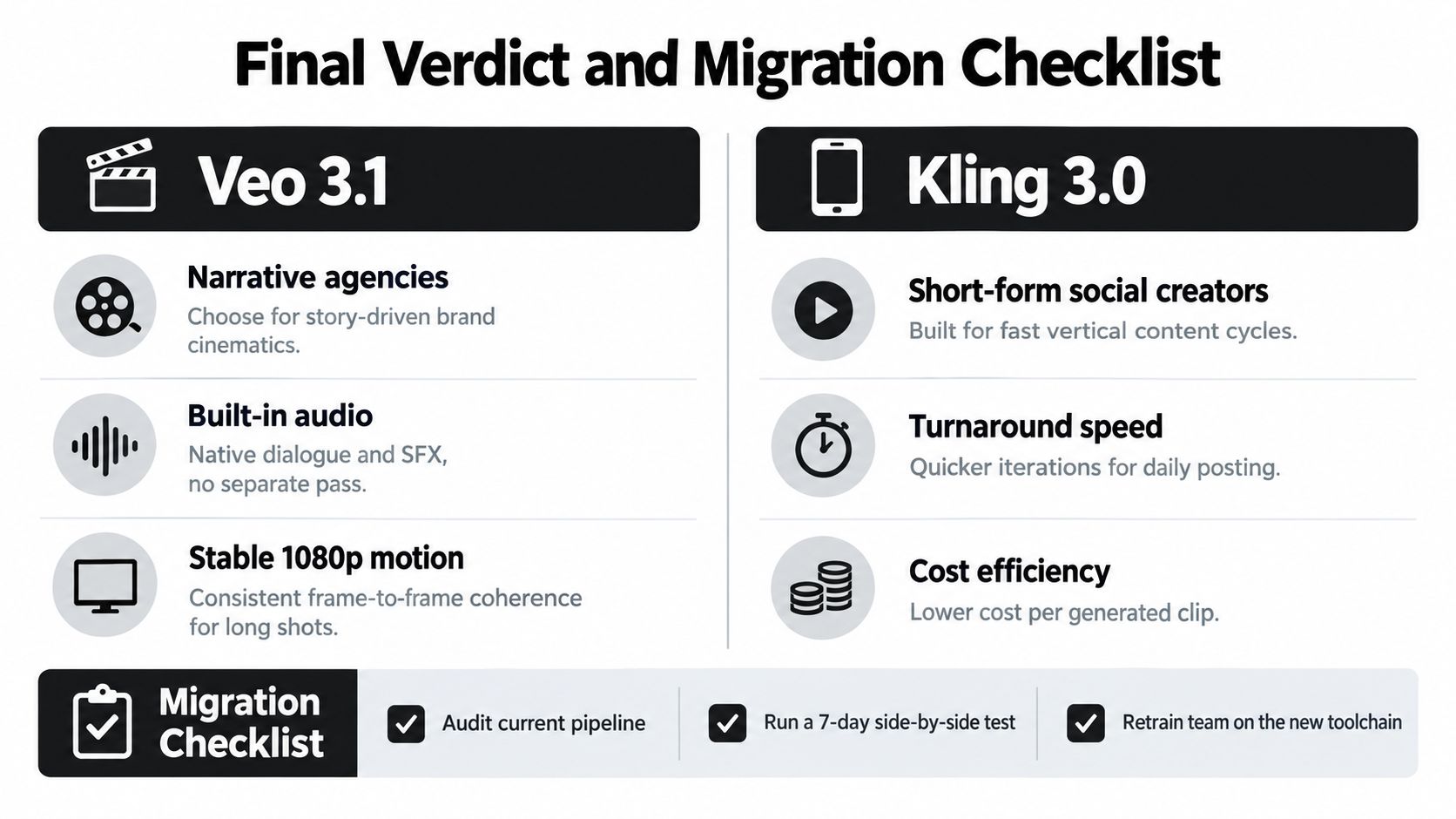
For narrative-driven agencies and brand cinematics, choose Veo 3.1. It's the better fit when the production needs stable visual direction, 1080p motion, reference-led consistency, and built-in audio on supported endpoints.
For short-form social creators, choose Kling 3.0. Its flexible 3-to-15-second generation window suits rapid content cycles, and its multimodal design supports a workflow built around visual exploration and continued sequences. Don't select it because a leaderboard declares a winner. Select it because your publishing process needs more variations with fewer regeneration breaks.
<a id="run-this-migration-test-before-committing"></a>
Run this migration test before committing
- Use the same 15-second prompt on both models. Keep the subject, action, camera direction, and visual style identical. This tests workflow behavior rather than prompt quality.
- Benchmark 720p, 1080p, and 4K. Confirm which options are native, which are upscaled, and which routes expose them.
- Test 9:16 and 1:1 crops. Check whether the subject remains composed for vertical and square delivery.
- Verify reference-image support. Use the same character or product references and inspect consistency across generations.
- Confirm audio synchronization. Review dialogue, sound effects, room tone, and music timing instead of judging the image alone.
- Measure render-to-delivery latency. Include regeneration, review, editing, audio finishing, and export in the measurement.
- Audit usage rights and ownership clauses. Read the terms for the exact platform or API route, not a general product summary.
- Pilot one paid campaign end to end. Run briefing, generation, approval, editing, delivery, and archive before moving the whole pipeline.
The verdict is workflow-first. Veo 3.1 wins for controlled narrative production. Kling 3.0 wins for fast, flexible social creation. If your team serves both jobs, keep both available and route each brief deliberately.
<iframe width="100%" style="aspect-ratio: 16 / 9;" src="https://www.youtube.com/embed/gQwssND_Cig" frameborder="0" allow="autoplay; encrypted-media" allowfullscreen></iframe>
Use that test to compare approved deliverables, not just raw generations. The model that saves the most correction work is the one that belongs in your pipeline.
Veo3 AI brings multiple video generation models, including Veo3, Seedance, and Hailuo, into one platform for turning text prompts or static images into videos with adjustable resolution and format settings. Visit Veo3 AI to test a workflow that lets you compare AI video approaches without juggling separate tools.
Related Articles
Continue with more blog posts in the same locale.

Veo 4 Explained: What It Is and How to Use It
Understand Veo 4 and how it changes AI video creation. Learn about features, workflow, and practical tips for making better videos.
Read article
Gemini Omni Flash 1.1 Explained
Master Gemini Omni Flash 1.1 with our guide to its 10-second scene extension, 4K upscaling, and multilingual limits. Learn how to integrate it into your
Read article
Google Omni Free Access and Video Limits
Is Google Omni free for video creators? We break down the real limits of free access, eligibility rules, and the best alternative workflows
Read article