
Veo 3 Product Ads Video Generator 2026: Short Ad Prompts for Ecommerce
A practical Veo 3 ecommerce ad guide with 6-second and 15-second structures, product ad prompts, hooks, workflows, CTA variants, and QA checks.
Emma Chen · 22 min read · May 3, 2026
Ecommerce product ads have a very different job from ordinary brand videos. A brand video can spend time on mood, story, or identity. A product ad has to prove value fast: show the product clearly, make the use case obvious, create desire, and move the shopper toward a click before attention drops. That is why a Veo 3 product ads video generator workflow needs shorter prompts, tighter shot planning, and a stricter quality checklist than a general AI video workflow.
Veo 3 is especially useful for ecommerce because it can turn a product brief, reference image, or structured scene description into short, cinematic product clips. The best results do not come from one vague prompt like “make a cool product ad.” They come from modular Veo 3 product video prompts that define the product truth, hook, scene, camera movement, benefit, CTA, and platform format.
This guide is built for ecommerce teams, DTC founders, Shopify operators, Amazon sellers, paid social buyers, and creative strategists who need repeatable short ads. You will get 6-second and 15-second ad structures, product demo workflows, prompt templates, hooks, CTA variants, a QA checklist, and a practical comparison between Veo 3 and generic AI ad tools.
What Makes a Product Ad Different from a Product Video?
A product video explains. A product ad sells. That difference changes everything about the prompt.
A product video can show a 360-degree rotation, a lifestyle moment, packaging, materials, or a longer product walkthrough. A product ad must compress that information into a decision moment. It must answer four questions almost instantly:
- What is the product?
- Who is it for?
- What problem does it solve or desire does it trigger?
- What should the viewer do next?
For ecommerce, the strongest AI product ads usually have a simple structure: product visible in the first second, benefit visible by the third second, CTA or offer by the final second. If the product is unclear, the ad fails even if the visuals are beautiful. If the claim is exaggerated, the ad may create trust or policy problems. If the CTA is buried, the clip may get views without clicks.
Veo 3 helps because it can generate polished scenes without a full production crew, but it still needs direction. Treat it like a fast production partner, not a mind reader. Your prompt should contain the same inputs you would give a human director: product details, audience, setting, camera, pacing, claim boundaries, and final deliverable.
The Veo 3 Ecommerce Ad Prompt Formula
Use this core formula for most short product ads:
Product truth + audience + hook + scene + action + camera + lighting + format + CTA + restrictions.
Here is the formula broken down:
- Product truth: exact product type, color, material, shape, size, packaging, and what must not change.
- Audience: the shopper segment, such as busy parents, gym commuters, skincare beginners, home office workers, or pet owners.
- Hook: the first visual idea, not just the headline. Examples: messy desk becomes clean, dull skin becomes dewy, tangled cables disappear.
- Scene: where the product appears: kitchen counter, bathroom shelf, gym bag, studio turntable, living room, travel suitcase.
- Action: what the product does in the shot: opens, pours, clips on, rotates, lights up, folds, reveals texture, solves a small problem.
- Camera: macro close-up, handheld lifestyle, slow push-in, overhead flat lay, orbit, whip pan, split-screen before/after.
- Lighting: clean studio, natural window light, premium rim light, warm home light, high-key beauty light.
- Format: 9:16 vertical for TikTok/Reels/Shorts, 1:1 for feeds, 16:9 for YouTube or product pages.
- CTA: visual ending: “Shop Now,” “Try the bundle,” “See colors,” “Build your kit,” or “Get the launch offer.”
- Restrictions: no fake results, no impossible transformation, no misleading size, no unreadable text, no changed logo.
A strong prompt is specific enough to protect the product and flexible enough to let Veo 3 produce motion. The goal is not to control every pixel. The goal is to control the commercial message.
6-Second Product Ad Structure
A 6-second ad is ideal for paid social testing, retargeting, and product page snippets. It should usually contain one idea only. Do not try to explain the entire product line.
6-Second Structure A: Problem to Product
0-1s: Show the problem visually.
1-3s: Product enters and solves the problem.
3-5s: Show the result or benefit.
5-6s: CTA card or product hero shot.
Prompt template:
Create a 6-second vertical ecommerce product ad for [product]. Start with [specific customer problem] in a realistic [setting]. In the second shot, show [product] being used naturally to solve the problem. Use [camera movement] and [lighting style]. End with a clean product hero shot and the visual CTA “[CTA]”. Keep the product appearance accurate: [color, material, size, logo placement]. No exaggerated claims, no fake reviews, no distorted packaging.
Example:
Create a 6-second vertical ecommerce product ad for a matte black magnetic cable organizer. Start with a messy home office desk covered in tangled charging cables. In the second shot, show the organizer snapping cables into a clean row along the desk edge. Use a quick overhead-to-close-up camera move and soft daylight. End with a clean product hero shot and the visual CTA “Clean your desk in seconds.” Keep the organizer matte black, compact, and rectangular. No exaggerated claims, no fake reviews, no distorted packaging.
6-Second Structure B: Product Beauty Shot
Use this when the product is visually attractive: skincare, fragrance, jewelry, coffee gear, home decor, tech accessories, fashion.
0-2s: Macro detail or packaging reveal.
2-4s: Slow motion product interaction.
4-6s: Hero shot plus CTA.
Prompt template:
Create a 6-second premium product ad for [product]. Open with an extreme close-up of [texture/material/detail]. Move into a slow [action] shot that shows [key benefit]. Use [lighting] and a minimal [background]. End with the product centered, packaging visible, and CTA “[CTA]”. The product must remain accurate to the reference: [product truth].
This structure works well when the product does not need heavy explanation. The ad sells through desire, clarity, and finish.
15-Second Product Ad Structure
A 15-second ad gives you enough time for a hook, proof, use case, and CTA. It is the best starting format for cold audience testing because it can teach and sell at the same time.
15-Second Structure A: Hook, Demo, Proof, CTA
0-2s: Hook — a visual interruption or direct problem.
2-7s: Demo — show the product in action.
7-11s: Proof — show the outcome, texture, fit, before/after, or comparison.
11-15s: CTA — product hero, offer, color options, bundle, or shop prompt.
Prompt template:
Create a 15-second vertical AI product ads video for [product] aimed at [audience]. Scene 1, 0-2 seconds: [visual hook]. Scene 2, 2-7 seconds: demonstrate [main product action] in [setting]. Scene 3, 7-11 seconds: show [proof or outcome] without exaggerating the result. Scene 4, 11-15 seconds: clean product hero shot with [offer or CTA]. Visual style: [style]. Camera: [camera plan]. Keep product details accurate: [product truth]. Avoid false claims, fake ratings, and unreadable text.
Example:
Create a 15-second vertical AI product ads video for a leakproof stainless steel travel mug aimed at commuters. Scene 1, 0-2 seconds: a bag tipping over on a train seat while the mug stays sealed. Scene 2, 2-7 seconds: hand opens the lid, steam rises from coffee, and the mug fits into a car cup holder. Scene 3, 7-11 seconds: close-up of the secure lid and brushed steel texture, no spills visible. Scene 4, 11-15 seconds: product hero shot with three color options and CTA “Choose your commute color.” Visual style: clean realistic ecommerce ad. Camera: handheld lifestyle shot, macro lid close-up, studio hero shot. Keep product details accurate: brushed stainless steel body, black lid, slim cylindrical shape. Avoid false claims, fake ratings, and unreadable text.
15-Second Structure B: Three Use Cases
This structure is useful when the product has broad appeal.
0-2s: Product hero and promise.
2-5s: Use case one.
5-8s: Use case two.
8-11s: Use case three.
11-15s: Product lineup and CTA.
Prompt template:
Create a 15-second ecommerce product ad showing three real use cases for [product]. Open with the product on a clean hero background and the message “[short promise]”. Then show use case one: [scene]. Use case two: [scene]. Use case three: [scene]. End with a product lineup, packaging, and CTA “[CTA]”. Keep each scene realistic, mobile-first, and visually consistent. Maintain exact product appearance across all shots.
Short Hook Library for Ecommerce Ads
Hooks should be visual first. Text can support the hook, but the first frame should already communicate a reason to watch.
Problem Hooks
- “This is why your [problem] keeps happening.”
- “Stop doing [old habit] the hard way.”
- “Your [routine] does not need to look like this.”
- “One small fix for [annoying problem].”
- “If your [space/body/bag/device] looks like this, try this.”
Desire Hooks
- “Make [routine] feel premium.”
- “The 10-second upgrade for [use case].”
- “A cleaner way to [task].”
- “Your [product category] should feel this easy.”
- “Small product, big shelf appeal.”
Demonstration Hooks
- “Watch what happens when…”
- “From messy to ready in one motion.”
- “The detail you cannot see in photos.”
- “Before you buy, look at this part.”
- “Here is the feature customers actually use.”
Offer Hooks
- “New bundle just dropped.”
- “Pick your color before it sells out.”
- “Build your starter kit.”
- “Try the launch set.”
- “Shop the compact version.”
Use hooks responsibly. Avoid claims like “guaranteed,” “miracle,” “cures,” “instant permanent results,” or fake social proof unless your product page can substantiate them.
Product Ad Shot List for Veo 3
A shot list keeps your prompt focused. Instead of asking Veo 3 to “make an ad,” tell it what shots to generate.
Hero Shot
Purpose: make the product recognizable.
Prompt language: “product centered, clean hero composition, packaging visible, no clutter, accurate proportions.”
Use when: opening frame, final CTA, product page thumbnails.
Macro Detail Shot
Purpose: show material, texture, quality, or mechanism.
Prompt language: “extreme close-up of [detail], shallow depth of field, product photography lighting.”
Use when: premium products, beauty, accessories, tech, craftsmanship.
In-Use Demo Shot
Purpose: prove the product function.
Prompt language: “person uses [product] to [action] in [setting], realistic hand motion, clear view of product.”
Use when: problem-solving products, kitchen tools, fitness gear, home gadgets.
Before/After Shot
Purpose: show contrast without misleading.
Prompt language: “split-screen before and after, realistic improvement, no exaggerated transformation.”
Use when: organization, cleaning, styling, home improvement, workflow tools.
Scale Shot
Purpose: show size and context.
Prompt language: “product held in one hand next to [common object], accurate scale, natural lighting.”
Use when: small accessories, bags, electronics, travel products.
Lifestyle Shot
Purpose: show identity and emotional fit.
Prompt language: “product used by [audience] in [aspirational but realistic setting], natural candid motion.”
Use when: fashion, wellness, home, outdoor, food, travel.
CTA Shot
Purpose: make the next action obvious.
Prompt language: “final frame with product lineup, clean space for text overlay, CTA [text], ecommerce ad style.”
Use when: every ad.
For best results, generate each important shot as a separate Veo 3 clip, then edit them together. One long prompt can work, but separate clips give you more control and easier replacement when one scene is imperfect.
Prompt Templates by Ecommerce Category
Beauty and Skincare
Create a 15-second vertical product ad for [skincare product]. Open with a macro shot of [texture: gel, cream, serum] on a clean fingertip or glass applicator. Show [audience] applying the product in a bright bathroom with soft natural light. Cut to a product hero shot on a minimal counter with packaging visible. Visual style: clean beauty ad, dewy, realistic, premium but not clinical. CTA: “[CTA]”. Keep product color, bottle shape, label placement, and texture accurate. Do not imply medical results or instant permanent transformation.
Apparel and Accessories
Create a 15-second ecommerce ad for [apparel/accessory]. Open with a quick outfit transition showing [audience] preparing for [occasion]. Show the product in motion: [strap adjustment, fabric stretch, zipper, pocket, clasp]. Include one close-up of material and one full-body lifestyle shot. End with three color options and CTA “[CTA]”. Style: natural fashion lookbook, mobile-first 9:16. Keep fit realistic, no impossible body changes, no distorted logo.
Home and Kitchen
Create a 15-second product demo ad for [home/kitchen product]. Scene one shows [common household problem]. Scene two shows the product solving it in one simple action. Scene three shows the clean result in a warm kitchen or home setting. End with packaging and CTA “[CTA]”. Camera: overhead demo, close-up mechanism, warm hero shot. Keep the product size, material, and function realistic.
Tech Accessories
Create a 6-second product ad for [tech accessory]. Open with a close-up of [device problem: low battery, cable mess, unstable stand, scratched case]. Show [product] fixing the problem with a clean snap, slide, charge, or fold motion. Use crisp studio lighting, smooth camera push-in, and a final product hero shot. CTA: “[CTA]”. Keep ports, buttons, logo, and device compatibility visually accurate.
Food and Beverage
Create a 15-second vertical ecommerce ad for [food/beverage product]. Start with an appetizing macro shot of [texture or pour]. Show the product being prepared or served in [setting]. Include a sensory close-up: steam, crunch, fizz, drizzle, or pour. End with packaging and CTA “[CTA]”. Style: realistic food commercial, warm lighting, no impossible ingredients, no fake nutrition claims.
Pet Products
Create a 15-second product ad for [pet product]. Open with a realistic pet-owner problem: [mess, boredom, storage, walking, feeding]. Show the product being used safely with a calm pet in a bright home setting. Include a close-up of the key feature and a final product hero shot. CTA: “[CTA]”. Keep pet behavior natural and product size accurate. Do not show unsafe use.
CTA Variants for Ecommerce Product Ads
The CTA should match the campaign stage. A cold prospect may not be ready for “Buy now,” while a retargeting viewer may respond to a bundle or color option.
Soft CTA
- See how it works
- Explore the collection
- Find your fit
- Watch the demo
- Compare the colors
Shopping CTA
- Shop the launch set
- Build your bundle
- Choose your color
- Add it to your routine
- Upgrade your setup
Offer CTA
- Get the starter kit
- Try the limited bundle
- Claim the launch offer
- Save on the set
- Bundle before checkout
Product Page CTA
- View details
- See size guide
- Check compatibility
- Pick your shade
- See what is included
Avoid writing tiny CTA text inside the generated video if your editor can add text later. Veo 3 may create text that looks good in concept but is not perfectly readable. A better workflow is to generate clean space for a CTA card, then add exact typography in your editing tool.
Product Demo Workflow: From SKU Brief to Finished Ad
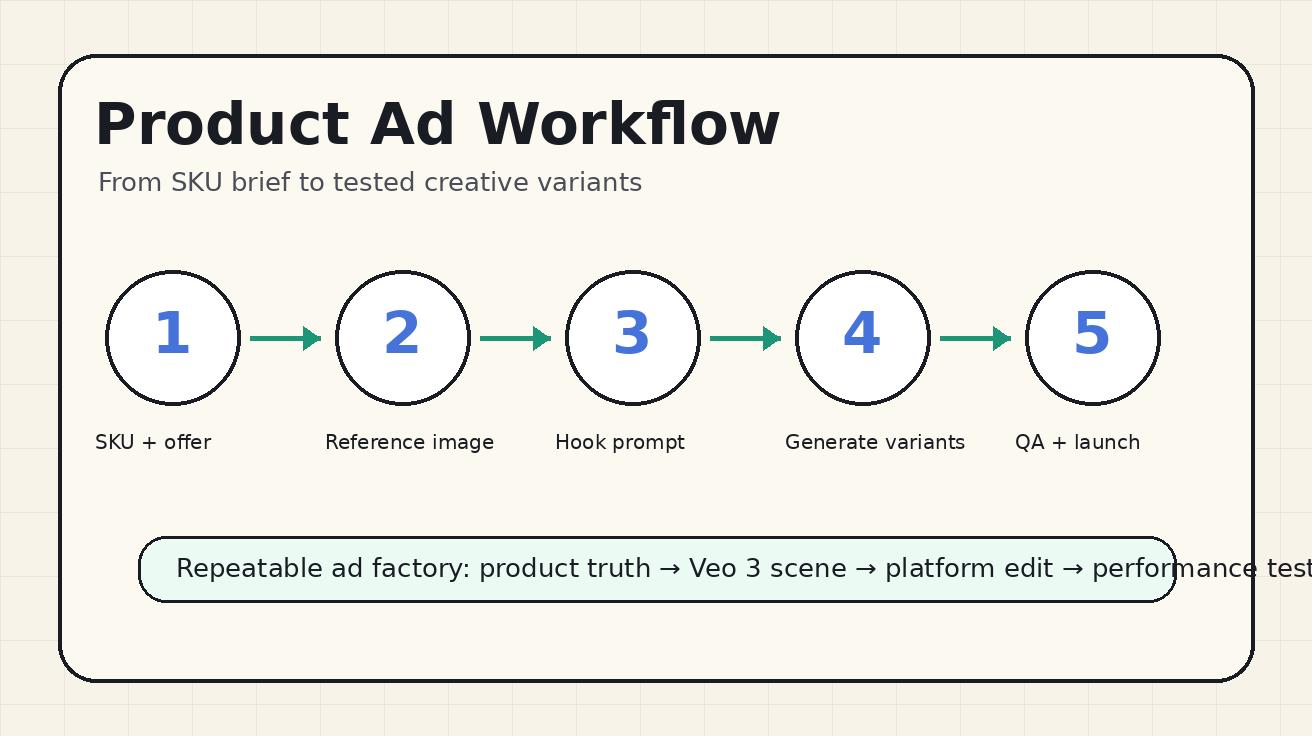
A repeatable workflow prevents random creative. Use this system for every SKU.
Step 1: Build the Product Truth Sheet
Write a short product truth sheet before prompting Veo 3:
- Product name and category
- Exact color, shape, material, and size
- What the product does
- What the product does not do
- Target shopper
- Primary benefit
- Secondary benefit
- Offer or CTA
- Required disclaimers or claim limits
- Reference image URL or product photo notes
This sheet protects accuracy. If the product is a real SKU, the AI video should not invent extra buttons, change packaging, or imply features that do not exist.
Step 2: Choose the Ad Job
Every product ad should have one job:
- Drive first-click interest
- Explain a feature
- Show a use case
- Retarget product page visitors
- Launch a new color
- Promote a bundle
- Reduce purchase anxiety
The ad job decides the structure. A first-click ad needs a stronger hook. A retargeting ad can show a close-up benefit or offer. A product page video should be clearer and calmer than a TikTok prospecting ad.
Step 3: Generate Shot Variants
Create separate prompts for the hook, demo, proof, and CTA. Generate at least two or three variants for the hook because the first two seconds are the highest-leverage part of the ad. Keep the product truth sheet unchanged across variants so the product remains consistent.
Step 4: Edit Outside Veo 3
Use Veo 3 for footage, then use an editor for final text, logo placement, subtitles, music, and exact CTA. This gives you control over brand compliance and readability. It also lets you create multiple platform versions from the same generated clips.
Step 5: QA Before Launch
Before an ad goes live, compare the video against the product page. Does the product look the same? Is the size honest? Are claims supported? Is the CTA readable? Does the video still make sense without sound? If any answer is no, fix it before spending media budget.
Veo 3 vs Generic AI Ad Tools
Generic AI ad tools are convenient. Many can create template-based clips, auto-generate copy, resize assets, and assemble ads quickly. They are useful when speed matters more than custom visuals. But they often produce ads that look like templated slideshows: stock background, product cutout, animated text, generic music, and a standard CTA.
Veo 3 is stronger when you need custom motion: a hand opening packaging, a product being used in a kitchen, a macro texture shot, a realistic lifestyle moment, or a premium product reveal. It is not just assembling assets. It can create new video scenes from a detailed prompt.
Here is the practical difference:
| Workflow | Best for | Limitation |
|---|---|---|
| Generic AI ad tools | Fast template ads, static product images, simple offers | Often looks generic and may rely heavily on text overlays |
| Veo 3 product ad workflow | Custom product scenes, demos, lifestyle shots, premium visuals | Requires better prompting, QA, and editing |
| Hybrid workflow | Scaling paid creative while keeping brand quality | Needs a system for prompts, assets, and approvals |
For most ecommerce teams, the best approach is hybrid. Use Veo 3 to create the footage that generic tools cannot create, then use your editing or ad platform tools to add exact text, subtitles, logos, and variants. This keeps creative quality high while still moving quickly.
QA Checklist for AI Product Ads
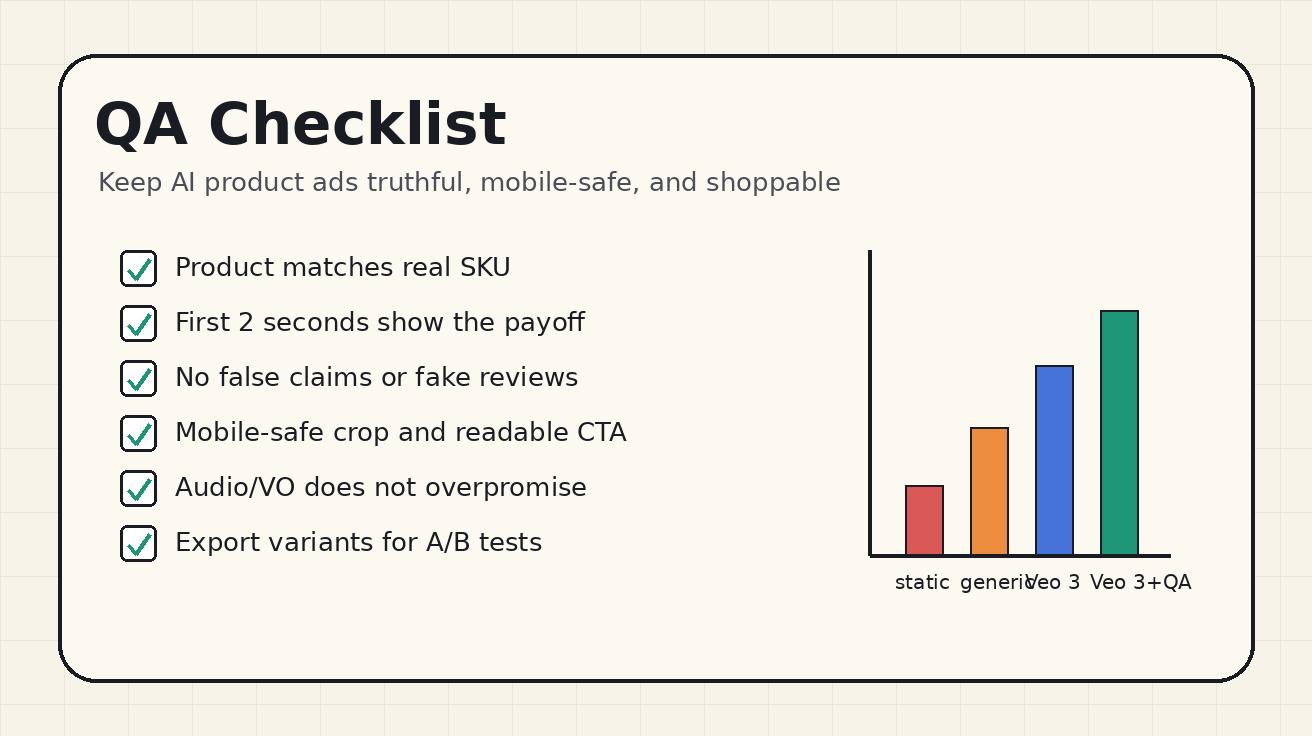
Use this checklist before publishing or running paid traffic:
- Product accuracy: Does the product match the real SKU in shape, color, size, packaging, and details?
- No invented features: Did Veo 3 add lights, buttons, textures, ingredients, accessories, or claims the product does not have?
- Claim safety: Are all visible claims supported by the product page and brand documentation?
- No fake social proof: No invented star ratings, testimonials, logos, awards, or “best seller” badges.
- Mobile readability: Can the viewer understand the ad on a phone in two seconds?
- CTA clarity: Is the next action visible and appropriate for the campaign stage?
- Sound-off comprehension: Does the ad work without audio?
- Platform fit: Is the crop correct for TikTok, Reels, Shorts, YouTube, Amazon, or Shopify?
- Policy fit: Does the ad avoid prohibited before/after claims, medical claims, unsafe behavior, or misleading guarantees?
- Landing page match: Does the product, offer, and promise match the page where the ad sends traffic?
This checklist matters because AI video can make a product look more polished than reality. That is useful for creative quality, but dangerous if it crosses into misrepresentation. The best ecommerce ad is not the most dramatic one. It is the clearest truthful version of the buying reason.
Example Prompt Pack: One Product, Five Ads
Assume the product is a compact cordless desk vacuum. Here is a prompt pack that can create multiple creative angles.
Ad 1: Messy Desk Problem
Create a 6-second vertical ecommerce ad for a compact white cordless desk vacuum. Start with keyboard crumbs and dust on a home office desk. Show a hand using the small vacuum to clean the surface in one smooth pass. End with a clean desk and the product standing upright beside a laptop. CTA: “Clean your desk in seconds.” Keep the vacuum compact, white, cylindrical, and realistic. No exaggerated suction claims.
Ad 2: Study Setup Lifestyle
Create a 15-second vertical product ad for a compact white cordless desk vacuum aimed at students and remote workers. Open with a cluttered study desk after snacks and coffee. Show the vacuum cleaning crumbs near a keyboard, then a close-up of the removable dust cup, then a clean desk setup with notebook and laptop. End with product hero shot and CTA “Upgrade your desk reset.” Natural daylight, realistic hand motion, mobile-first composition.
Ad 3: Feature Close-Up
Create a 6-second macro product ad for a compact white cordless desk vacuum. Open with a close-up of the nozzle approaching crumbs near a keyboard. Show the crumbs disappearing into the nozzle in a realistic pass. Cut to the dust cup being removed and emptied. End with the product hero shot. Clean studio lighting, accurate product size, no impossible suction, no fake text.
Ad 4: Bundle Offer
Create a 15-second ecommerce ad for a desk cleaning bundle featuring a compact white cordless desk vacuum, microfiber cloth, and small brush. Open with a messy desk. Show each product used once in a fast, satisfying sequence. End with the three-item bundle arranged neatly and CTA “Build your desk clean kit.” Keep every item realistic and avoid exaggerated before/after transformation.
Ad 5: Retargeting Product Page Clip
Create an 8-second calm product page video for a compact white cordless desk vacuum. Show the product rotating on a clean white surface, then demonstrate the power button, nozzle, and dust cup. End with the product next to a keyboard for scale. Style: clear ecommerce product demo, no hype, no text, accurate size and materials.
This pack gives the media buyer multiple angles: problem/solution, lifestyle, feature, bundle, and product page reassurance. That is more useful than one beautiful but isolated ad.
How to Use Veo 3 Product Ads on Ecommerce Pages
Product ads are not only for paid media. The same clips can support your product page, collection page, email campaigns, and organic social.
On a product detail page, use a calmer version. Shoppers are already interested, so the video should reduce uncertainty: scale, texture, use, packaging, what is included. For product page use, avoid overly aggressive hooks and use clear demo shots.
On paid social, lead with tension or desire. The first frame should stop the scroll. Use stronger motion, tighter crops, and a clearer CTA.
In email, use a short GIF or video thumbnail that shows the product benefit quickly. The subject line and thumbnail should work together.
For organic social, show behind-the-scenes, use cases, or product tips. Not every clip needs to be a direct sales ad. Some clips can build trust and educate shoppers.
If you are already using tools like a text-to-video generator or image-to-video generator, Veo 3 product ads are the next layer: instead of creating generic creative, you build a repeatable commerce system around SKU truth, prompt templates, and performance testing.
Common Mistakes to Avoid
Prompting for a “Viral Ad” Instead of a Specific Buying Reason
“Make this product viral” is not a production brief. Replace it with a clear buying reason: save time, reduce mess, improve fit, show texture, simplify setup, look premium, or make gifting easier.
Showing the Product Too Late
If the product appears after five seconds, the ad may lose shoppers before they understand what is being sold. For ecommerce, show the product in the first second whenever possible.
Letting AI Generate Final Text
AI-generated text inside video can be misspelled, unstable, or hard to read. Ask Veo 3 for clean space for text, then add exact CTA copy in an editor.
Overusing Before/After Transformations
Before/after can be powerful, but it can also become misleading. Keep the improvement realistic and tied to what the product actually does.
Ignoring Platform Crops
A beautiful 16:9 product scene may fail in a 9:16 feed if the product is too small. Prompt for the final format from the beginning.
FAQ
Is Veo 3 good for ecommerce product ads?
Yes. Veo 3 is useful for ecommerce product ads when you give it structured prompts, accurate product references, and clear shot instructions. It is strongest for custom product demos, lifestyle scenes, macro details, and short ad variants.
What is the best length for AI product ads?
Use 6 seconds for simple retargeting clips, product page snippets, and single-benefit ads. Use 15 seconds when you need a hook, demo, proof, and CTA for cold audiences.
Can I use Veo 3 product ads for paid social?
Yes, but you should review every ad for product accuracy, claim safety, mobile readability, and platform policy compliance before spending budget. Add final text, captions, and CTA in an editor for better control.
Should I use product reference images with Veo 3?
Whenever possible, yes. Reference images help preserve product shape, color, packaging, and key details. They are especially important for real ecommerce SKUs where accuracy matters.
How is Veo 3 different from generic AI ad makers?
Generic AI ad makers often assemble templates from existing assets. Veo 3 can generate custom motion and realistic scenes from prompts, which is better for product demos and lifestyle shots. A hybrid workflow usually works best.
What should I include in a Veo 3 product ad prompt?
Include the product truth, target audience, visual hook, scene, action, camera movement, lighting, format, CTA, and restrictions. The more specific your commercial intent, the more useful the output.
Final Takeaway
A strong ecommerce product video generator workflow is not just about making more videos. It is about making more useful buying moments. Veo 3 can help ecommerce teams create short product ads faster, but the winning system is built around prompt discipline: one product truth sheet, one ad job, one clear hook, one realistic demo, and one CTA.
Start with one product, create five prompt variants, generate separate hook and demo shots, edit text outside Veo 3, and run a strict QA pass before launch. That process turns Veo 3 from a creative experiment into a practical AI product ads video engine for ecommerce growth in 2026.
Related Articles
Continue with more blog posts in the same locale.

How to Make Sports Highlight Videos with Veo 3 AI (2026)
Create stunning sports highlight videos with Veo 3 AI. Generate dynamic action shots, slow-motion sequences, and dramatic replays using AI prompts.
Read article
How to Make a Short Film with Veo 3 AI (2026 Guide)
Learn how to create professional short films using Veo 3 AI. Step-by-step guide with prompts, workflow tips, and cinematic techniques.
Read article
How to Make Documentary Videos with Veo 3 AI (2026 Guide)
Create compelling documentary videos with Veo 3 AI. Learn prompting techniques, narrative structure, realistic footage generation, and post-production tips.
Read article