
How to Get Access to Veo 3: The Complete Guide
Learn how to get access to Veo 3 through Google subscriptions, APIs, or the Veo 3 AI video generator platform. Compare paths, limits, and setup steps.
Veo3 AI · 12 min read · Oct 5, 2026
You've opened Gemini, searched for Veo 3, and found no video button. Maybe you've even paid for a Google AI plan, only to see a locked feature or a message saying the tool isn't available in your country. That frustration is understandable, because getting access to Veo 3 isn't a single signup process. Google distributes it through different subscriptions, apps, cloud products, developer programs, and regional rollouts.
The fastest route depends on what you need. A creator testing ideas should start with Gemini or Flow. A developer building a repeatable production pipeline should look at the Gemini API or Vertex AI. If you want to avoid separate subscriptions, cloud billing, and regional uncertainty, a unified third-party platform may be the more practical choice. This guide breaks down the trade-offs so you can choose without wasting money.
Table of Contents
- How Google Officially Distributes Veo 3
- Navigating Consumer Subscriptions and App Surfaces
- Setting Up Developer and Enterprise Cloud Access
- Comparing Official Routes with Unified Aggregator Platforms
- Troubleshooting Common Entitlement Errors
- Maximizing Your First Video Generation Workflow
<a id="how-google-officially-distributes-veo-3"></a>
How Google Officially Distributes Veo 3
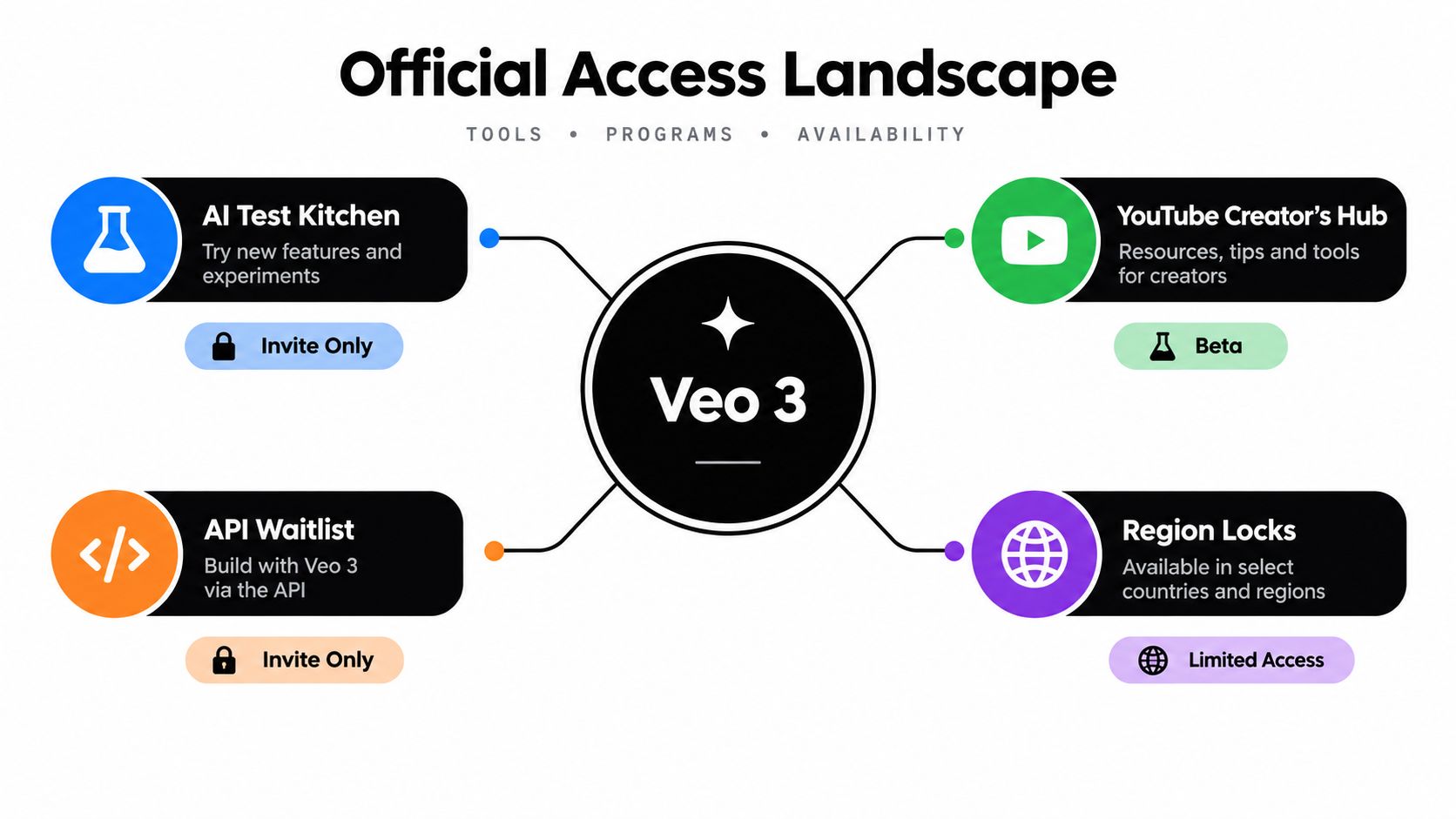
Google's initial Veo 3 rollout was tightly restricted. In May 2025, Google offered the model first to Google AI Ultra subscribers in the United States through Gemini and Flow. Enterprise users could access it through Vertex AI. Within days, Google expanded availability to 71 new countries, but Google AI Pro subscribers in those markets received limited access, including a 10-pack of trial video generations in Gemini. Google later reported Ultra availability in 73 countries, while Pro users received limited Flow access and mobile access through Gemini. Google's rollout announcement records that progression.
Those details have a practical consequence: your Google account does not determine access by itself. Geography, subscription tier, and product surface all matter at once. A valid plan may still lack Veo 3 in your country. The feature may appear in Flow but remain absent from the Gemini app. Ultra is Google's highest-access consumer tier, while Pro provides a more restricted route rather than one consistent Veo 3 experience.
<a id="check-the-access-matrix-first"></a>
Check the access matrix first
Before paying, verify four items:
- Country support: Google may enable a plan before enabling every Veo 3 surface in that country.
- Subscription entitlement: Ultra and Pro offer different access levels and quotas.
- App availability: Gemini and Flow can expose different capabilities.
- Account identity: Open the feature with the Google account that owns the subscription.
This fragmentation makes third-party aggregator platforms worth comparing. They can provide a more unified entry point than managing separate consumer subscriptions, app surfaces, cloud billing, and regional restrictions.
If you only want to test the model, review this Veo 3 waitlist and access guide before paying. Check the plan and country combination first, then subscribe.
<a id="navigating-consumer-subscriptions-and-app-surfaces"></a>
Navigating Consumer Subscriptions and App Surfaces
For most individual creators, the consumer route is the easiest official starting point, but only if you follow the correct order. Don't subscribe from one Google account and then open Gemini with another. That basic mismatch is one of the most common reasons a paid user sees no Veo 3 option.
<a id="follow-this-sequence"></a>
Follow this sequence
-
Sign in to the intended Google account. Use the account that will own the subscription, prompts, generated assets, and future billing history.
-
Check regional eligibility before payment. Google has expanded Ultra access to 73 countries, and it has also described a rollout of Veo 3 through AI Pro in every country where the Gemini app is available in India. Availability still varies by product and location, so a country appearing on one list doesn't guarantee identical access everywhere. Google's mobile expansion update is the right place to check the rollout context.
-
Choose the tier based on usage, not marketing language. Ultra is the high-access consumer route. Pro is more limited and may expose Veo 3 only through selected surfaces or capped access.
-
Open Gemini or Flow directly. Don't assume that a generic Gemini chat automatically starts video generation. Look for the video creation control in the relevant product surface.
-
Run a small test before designing a full campaign. Confirm that the generation button appears, audio is enabled where expected, and the output downloads correctly.
Google support materials indicate that Ultra users in Gemini may be limited to about 5 Veo 3 generations per day, and that these generations reportedly don't consume AI credits. Treat that cap as an operational constraint, not a minor detail, especially if you need several variations of each shot. Google's support guidance also highlights account, region, and product-surface problems.
<iframe width="100%" style="aspect-ratio: 16 / 9;" src="https://www.youtube.com/embed/mqEeJbPp8OA" frameborder="0" allow="autoplay; encrypted-media" allowfullscreen></iframe>
Practical rule: Never judge a subscription by its name alone. Confirm the exact Veo 3 surface and quota available to your account before you build a workflow around it.
If you need occasional concept clips, consumer access is reasonable. If you expect repeated iterations, client revisions, or batch production, the daily cap can become more restrictive than the generation quality is valuable. In that situation, move to a metered developer route or use a unified platform rather than stacking consumer upgrades.
<a id="setting-up-developer-and-enterprise-cloud-access"></a>
Setting Up Developer and Enterprise Cloud Access
Consumer subscriptions are designed for interactive creation. They're not the right foundation for a production system that needs repeatable requests, application integration, logging, or controlled usage. Developers should use the Gemini API, Google AI Studio, or Vertex AI instead.
Google introduced Veo 3 to developers in paid preview through the Gemini API and Vertex AI on July 17, 2025, with a listed price of $0.75 per second for video and audio output. Google's developer announcement establishes the key difference from consumer plans: you pay according to usage rather than relying only on a subscription entitlement.
<a id="pick-the-right-technical-entry-point"></a>
Pick the right technical entry point
- Google AI Studio: Use it for prompt experiments and early API-oriented testing without designing a full enterprise deployment.
- Gemini API: Choose it when your application needs to send generation requests programmatically and process results inside an existing workflow.
- Vertex AI: Choose it when your organization already operates in Google Cloud and needs a cloud-managed environment for production experimentation or enterprise integration.
Google Cloud listed Veo 3 in public preview for Google Cloud customers and partners through Vertex AI on June 26, 2025. Enterprise pricing pages also showed generation costs such as $0.40 per count for Veo 3 video plus audio generation. Those figures come from different pricing descriptions, so don't compare them as though they represent the same billing unit. Google Cloud's Vertex AI announcement provides the cloud-side context.
<a id="a-sensible-implementation-path"></a>
A sensible implementation path
Start with one controlled prompt and record the request parameters, output metadata, and failure behavior. Then add authentication, quota monitoring, retry handling, asset storage, and a review step before connecting the model to a larger content pipeline.
The best workflow is usually hybrid. Use Gemini or Flow to test creative direction quickly, then move successful prompt patterns into the API or Vertex AI when reproducibility, quota control, and integration matter. Public-preview status and regional support may still be narrower than consumer availability, so confirm access in the specific Google Cloud project before planning a launch.
<a id="comparing-official-routes-with-unified-aggregator-platforms"></a>
Comparing Official Routes with Unified Aggregator Platforms
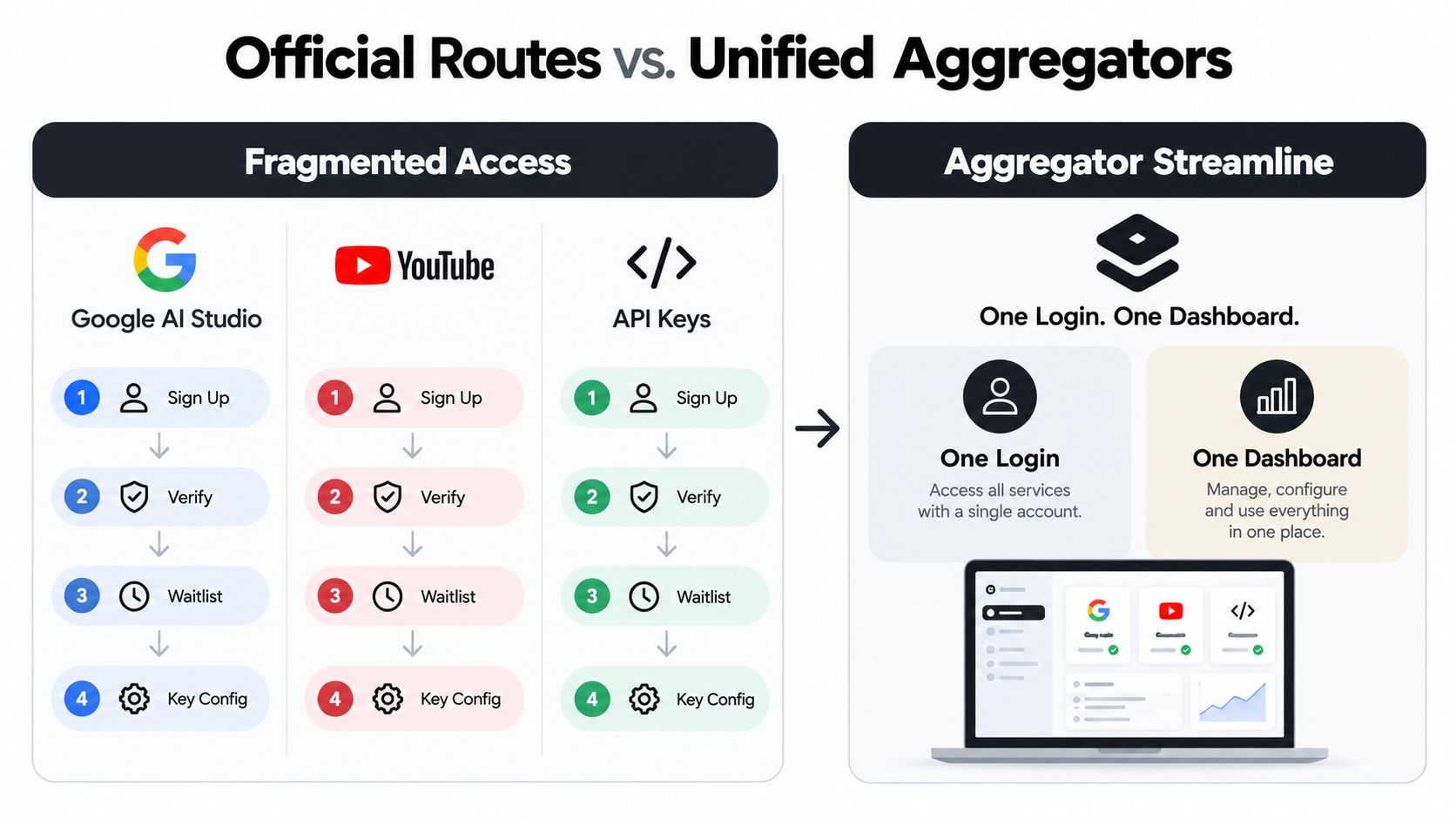
Google's official routes give you direct access to Google's own products, but they split the experience across separate gates. A creator may need a qualifying subscription, the correct Google account, a supported country, and the correct app. A developer may instead need an AI Studio setup, API credentials, cloud billing, quota management, and a supported region.
A unified aggregator changes the workflow rather than the underlying model. Instead of managing every official entry point separately, you work from one dashboard where model selection, prompting, generation, and asset handling sit together. That's useful for creators who want to compare models or produce short-form clips without building a cloud environment first.
<a id="which-route-fits-your-workflow"></a>
Which route fits your workflow
| Your priority | More suitable route |
|---|---|
| Quick prompt testing | Gemini or Flow |
| Google Cloud integration | Vertex AI |
| Programmatic generation | Gemini API |
| Comparing several video models | Unified aggregator |
| Avoiding separate cloud setup | Unified aggregator |
| Maximum control over application logic | API or Vertex AI |
A platform such as the Veo 3 AI video generator presents Veo 3 alongside other generative video models in one environment. Its stated workflow lets users select Veo 3, enter a text prompt or upload a static image, and generate from the same interface. That can remove much of the setup friction, although you should still review the pricing page and confirm the platform's current model availability, usage rules, and commercial terms before starting client work.
The official route is better for infrastructure control. The unified route is better when your bottleneck is access and workflow friction.
Don't choose an aggregator because it promises to eliminate every limitation. Choose it when the value of one login, one dashboard, and model comparison outweighs the control you'd gain from managing Google's tools directly. For a solo creator, that trade-off often favors simplicity. For a software team with existing Google Cloud operations, direct API access may remain the cleaner long-term choice.
<a id="troubleshooting-common-entitlement-errors"></a>
Troubleshooting Common Entitlement Errors
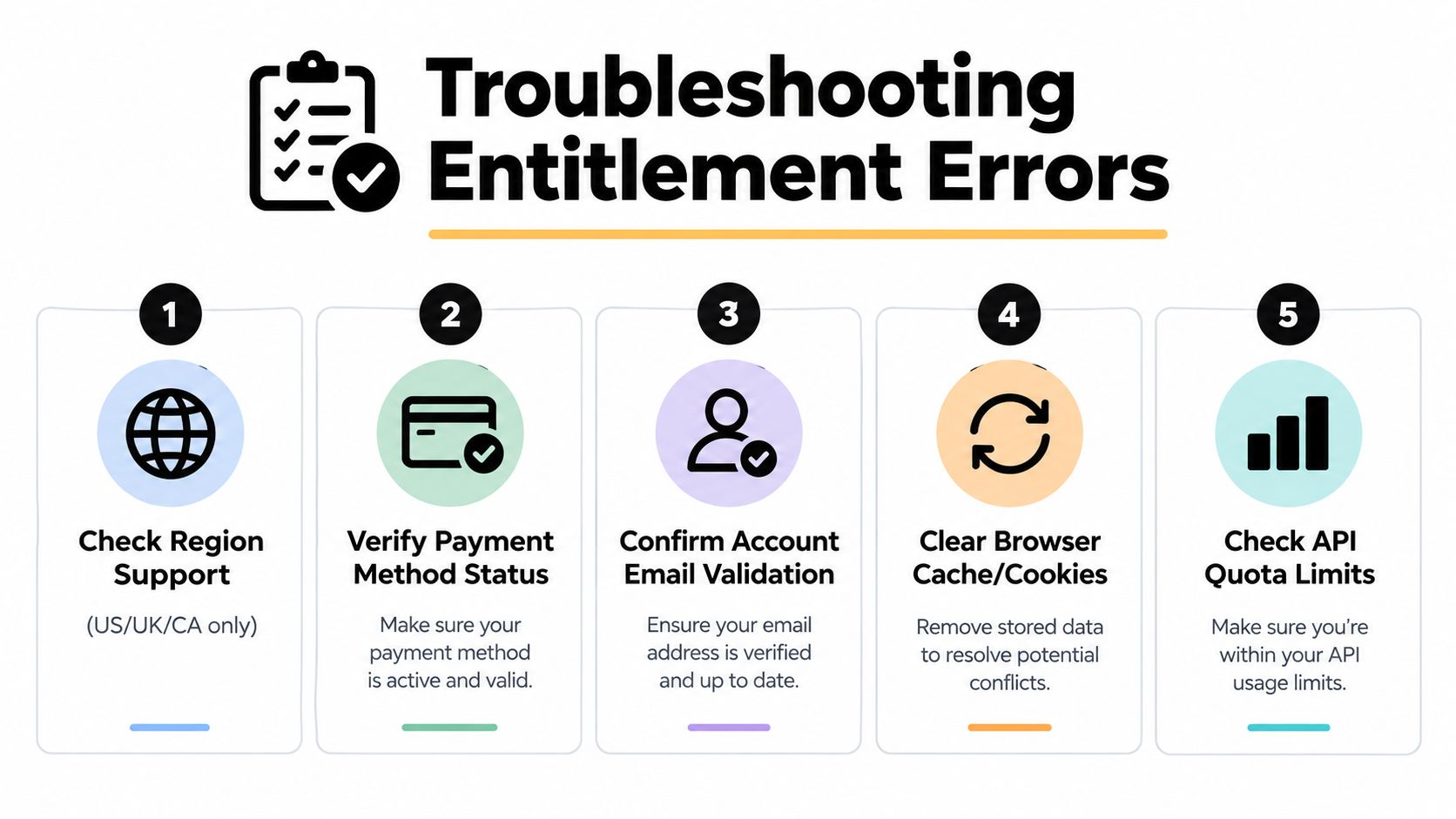
Most missing Veo 3 buttons aren't caused by prompt quality. They're caused by entitlement mismatches. Google's support guidance points to three recurring causes: the wrong account, an unsupported region, or the wrong product surface.
<a id="diagnose-the-account-before-changing-the-plan"></a>
Diagnose the account before changing the plan
First, open the Google account profile and confirm that it matches the account used for the AI subscription. If you manage several personal, work, or workspace accounts, sign out of the extras or use a private browser window. Then reopen the Gemini app or Flow and check whether the video feature appears.
Next, verify country support. A subscription purchased while traveling, a VPN connection, or a billing profile from another country can create confusing signals. Don't buy a second plan until you've confirmed that the current account and region are eligible.
<a id="use-this-short-fault-finding-checklist"></a>
Use this short fault-finding checklist
- Wrong account: Switch to the Google account that owns the subscription, then reload the product.
- Missing rollout: Check whether Veo 3 has reached your country and whether your specific tier is included.
- Wrong interface: Test Gemini and Flow separately. A feature appearing in one doesn't guarantee it appears in the other.
- Stale browser state: Sign out, clear the relevant session data, and open a fresh browser session.
- Developer quota issue: If the API rejects a request, inspect project permissions, billing status, and available quota rather than changing the prompt.
A locked interface is different from an API authorization failure. If the API returns an HTTP status, use this practical guide to HTTP 401 and 403 errors to distinguish authentication problems from permission denials. That distinction saves time because the fixes are different.
Fastest diagnostic: Test the same account in the intended product surface from a normal supported connection. If the feature is still absent, check entitlement before troubleshooting your prompt.
Keep a record of which account, region, plan, and interface you tested. That information makes support requests more useful and prevents you from repeating the same failed login path across multiple browsers.
<a id="maximizing-your-first-video-generation-workflow"></a>
Maximizing Your First Video Generation Workflow
Access is only the first hurdle. Your first generation should answer a creative question, not attempt to produce an entire finished commercial in one prompt. Start with a single subject, a clear action, a defined camera movement, and one audio direction.
For example, don't ask for a crowded market, several characters, multiple camera changes, detailed signage, dialogue, music, and a complex action sequence in the same request. Ask for a close shot of one vendor preparing a dish, specify the camera movement, describe the lighting, and request the sound of the cooking surface. That gives you a cleaner test of motion, atmosphere, and audio.
<a id="build-a-prompt-you-can-revise"></a>
Build a prompt you can revise
Use a repeatable structure:
- Subject: Who or what appears in the shot.
- Action: What changes during the clip.
- Camera: The shot type and movement.
- Environment: Location, light, time, and visual mood.
- Audio: Dialogue, ambient sound, or music direction.
- Constraints: Elements that must remain visible or consistent.
Generate a prototype, identify one failure, and change one variable. If the subject disappears from frame, adjust the composition or camera instruction first. If the audio is wrong, revise the audio direction without rewriting the visual description. This makes each attempt informative instead of random.
<a id="reserve-your-quota-for-decision-points"></a>
Reserve your quota for decision points
Consumer limits make careless exploration expensive in attention and available generations. Create a short shot list before opening the tool, then prioritize the shots that determine whether the concept works. A talking character, a product close-up, and a transition shot may teach you more than generating several variations of the same establishing scene.
Google has expanded access to Veo 3.1 across the Gemini app, YouTube Shorts, Flow, the Gemini API, Vertex AI, and Google Vids, so the right surface depends on whether you're creating, publishing, developing, or collaborating. Google's Veo 3.1 announcement describes that wider product presence. Google also says personal accounts can use Google Vids to generate 10 video generations per month at no cost, which is a separate Vids access rule rather than a general Veo 3 consumer offer. Google's Google Vids update explains that distinction.
For commercial work, review the terms of the exact service you use and retain your source prompts, uploaded assets, and final exports. A polished workflow separates experimentation from delivery. Prototype quickly, select the strongest result, refine only the chosen shot, then assemble the final sequence in your editor or publishing tool.
Veo3 AI offers a unified workspace for generating videos from text prompts or static images while bringing multiple video models into one interface. If you want to avoid switching between subscriptions, regional gates, and cloud setup while testing Veo 3 workflows, visit Veo3 AI and compare its current access options.
Related Articles
Continue with more blog posts in the same locale.
Gemini Omni vs Seedance 2.0: The Creator's Guide
Gemini Omni vs Seedance 2.0: which AI video model wins for your workflow? Compare speed, quality, pricing, and find the best tool for short-form creators.
Read article
Seedance 2.0 Price Guide 2026: Plans, Costs, and Savings
Seedance 2.0 price varies by plan and provider. Compare subscriptions, per-second rates, and token costs with this complete 2026 guide to find the best deal.
Read article
Gemini Omni vs Kling 3.0: The Full 2026 Comparison
Gemini Omni vs Kling 3.0 compared on quality, speed, pricing, multi-shot control, and workflows — plus recommendations and sample prompts for creators.
Read article