
AI Video for Social Media: Formats, Workflow and Trust
Learn how to use AI video for social media on TikTok, Reels and Shorts, with platform specs, a build workflow and disclosure tips.
Veo3 AI · 16 min read · Nov 19, 2026
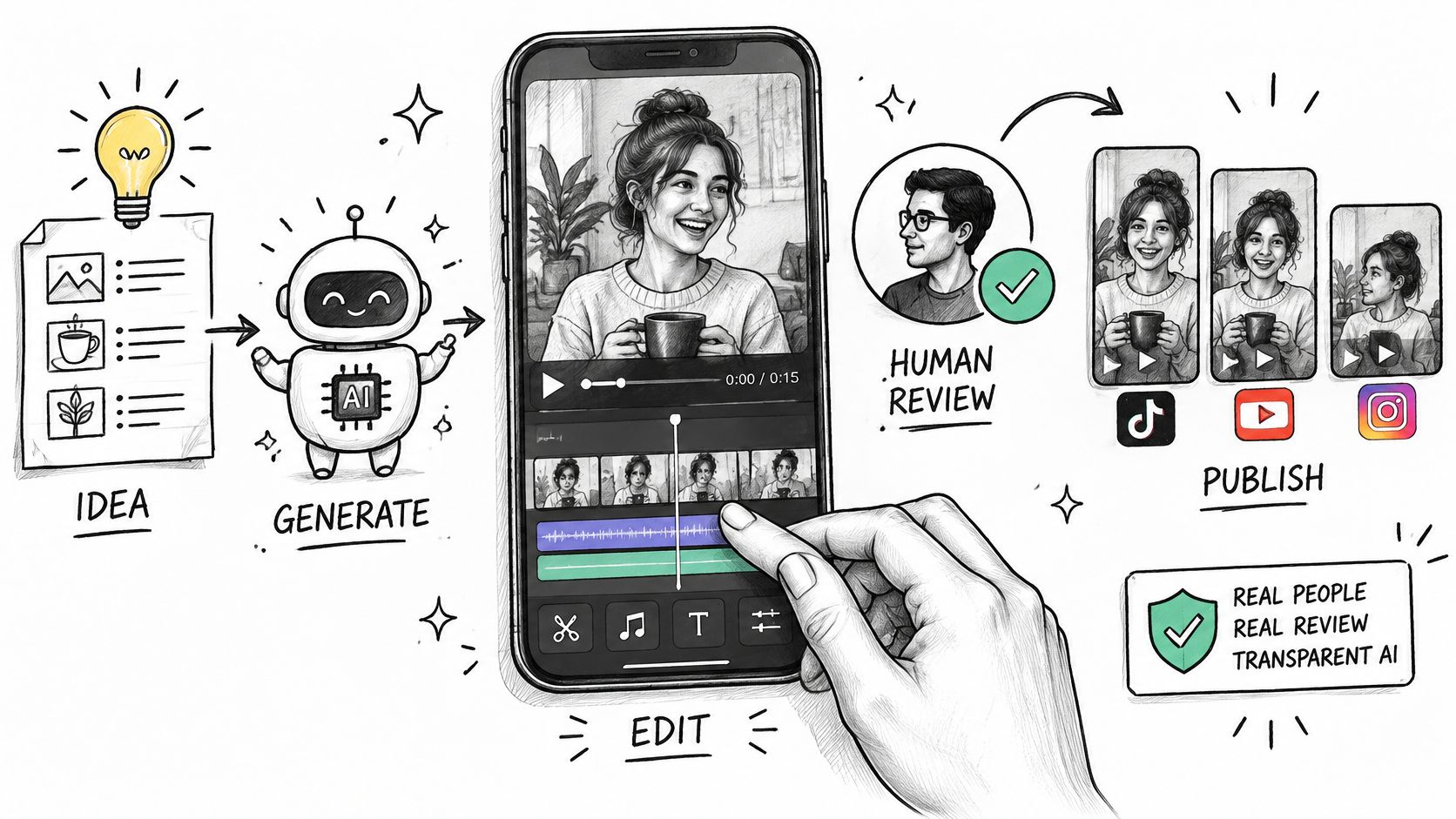
AI platforms collectively generated more than 8 million videos in 2025, according to Luma's generative-media statistics compilation. Volume stopped being the interesting number the moment it crossed into millions. What matters now is whether any of those clips survive contact with a platform.
They usually don't, at first. 83% of surveyed creators report using generative AI throughout or in parts of their workflow, per Digiday's report on Wondercraft's survey of 514 creators, which means a huge share of short-form footage now arrives in the feed having never been spec-checked, cleared for audio, or labelled.
The right mental model is that AI video is a source layer, not a finished post. Generation gives you clean footage fast. The work that decides whether a clip performs happens after: matching the file to the destination, cutting a master into platform versions, passing the three-second test, clearing the music, disclosing what the model made, and rebuilding the script for each language you publish in. Get those five checks right and the tool barely matters. Skip them and the best render you've ever produced dies in review.
Table of Contents
- Platform Formats, Lengths and Limits at a Glance
- Choosing Format and Subject Before You Generate
- How to Build One Vertical Master and Adapt It
- Hooks That Hold Viewers Past Three Seconds
- Disclosing AI Use Without Losing Viewers
- Localizing One Source for Japanese and Korean Viewers
<a id="platform-formats-lengths-and-limits-at-a-glance"></a>
Platform Formats, Lengths and Limits at a Glance
| Platform | Aspect ratio | Length guidance | Resolution and file rules |
|---|---|---|---|
| Instagram Reels | 9:16 recommended (1.91:1 to 9:16 allowed) | 3 seconds to 15 minutes; keep under 3 minutes for new audiences | Min 720 px, min 30 FPS, max 300 MB, MOV or MP4, H.264 or HEVC, AAC audio |
| YouTube Shorts | Square or vertical | Up to 3 minutes; over 1 minute with an active copyright claim is blocked globally | Max 1080p; square or vertical uploads after October 15, 2024 |
| TikTok | 9:16 | Keep cuts under 3 minutes to match the Reels discovery threshold; current TikTok caps are listed in the length guide linked below | 1080x1920 MP4, H.264, AAC (the standard master spec) |
| 9:16 for Reels and Stories placements | Reuse the Reels cut; feed placements take longer versions | Same 1080x1920 MP4 master, no separate render needed |
Instagram publishes its limits precisely enough to build a workflow around. The Instagram Graph API media reference sets the container and size rules at a 300 MB maximum, MOV or MP4, H.264 or HEVC video with AAC audio, and a run time from 3 seconds to 15 minutes. A separate Reels specification page fixes the aspect ratio between 1.91:1 and 9:16, requires a minimum of 30 FPS, and demands at least 720 pixels of resolution. A 480p render will not present well, and a 24 FPS render fails outright.
<a id="the-two-rules-that-catch-creators-out"></a>
The two rules that catch creators out
The first is the discovery cap. Instagram's own guidance states that Reels longer than 3 minutes are not recommended to new audiences, even though the editing system accepts up to 20 minutes (Instagram help centre). If your AI clip is meant to find strangers, cut it under three minutes. Longer Reels are for people who already follow you.
The second is the audio trap on Shorts. YouTube classifies square or vertical videos uploaded after October 15, 2024 as Shorts when they run up to 3 minutes, caps them at 1080p, and blocks any Short longer than 1 minute that carries an active copyright claim, globally (YouTube Shorts help). A trending track you grabbed for the vibe can mute a whole market. The fix is cheap: clear every track before upload, or add the sound inside the platform after export.
TikTok and Facebook move too often to treat as fixed rules. TikTok's caps get revised faster than many creators update their templates, so check the current TikTok video length limits before you cut. Facebook behaves like a distribution layer for the same master, with 9:16 for Reels and Stories placements and looser expectations in feed.
One 9:16 vertical master at 1080x1920 covers most of that table. Cut your platform versions from it, standardise one length before you generate, and re-check the two moving targets (TikTok's cap and Shorts' copyright rule) every time you batch. For the full per-placement breakdown, this guide to social media video sizes covers the crops each destination expects.
<a id="choosing-format-and-subject-before-you-generate"></a>
Choosing Format and Subject Before You Generate
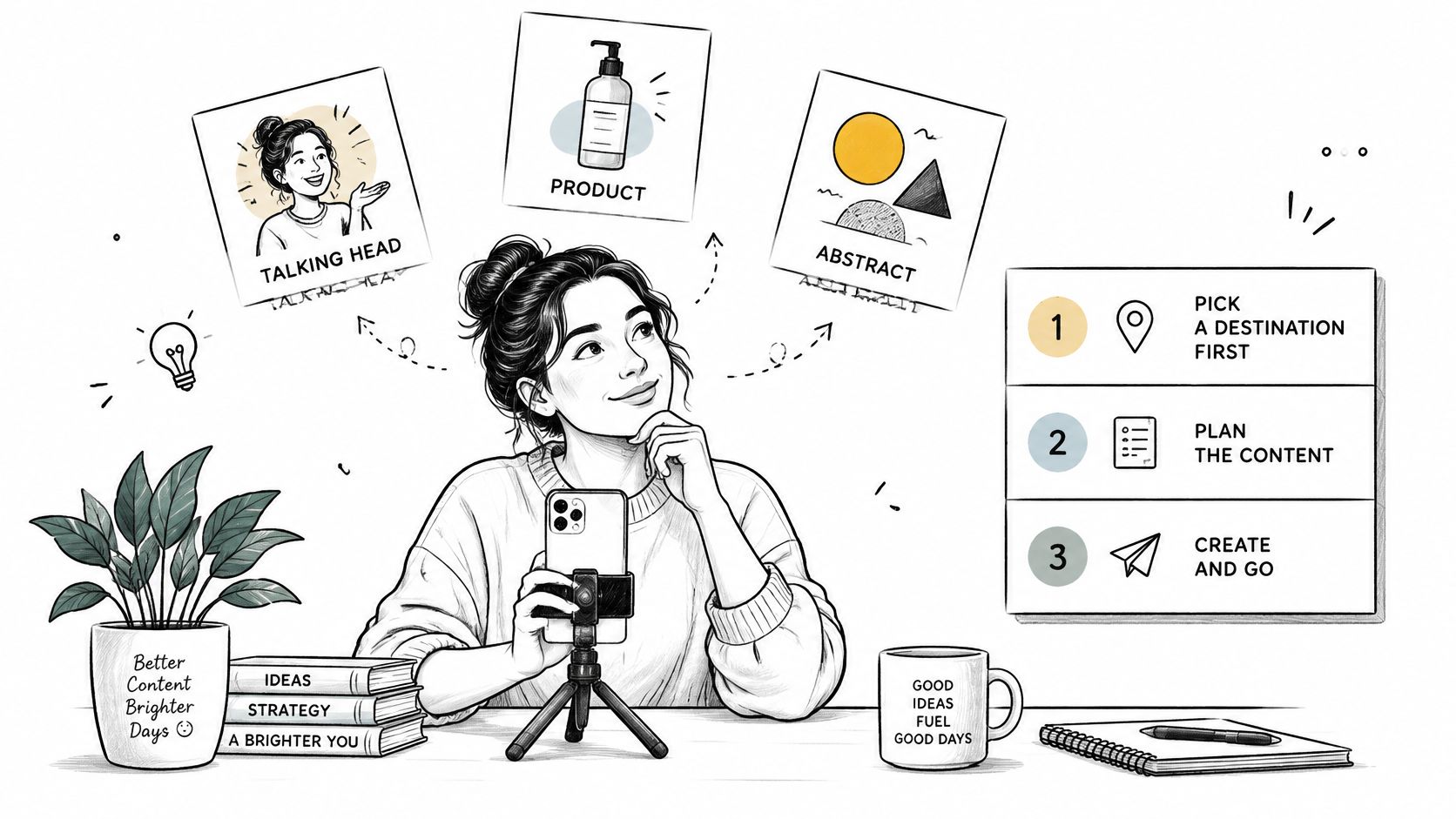
The destination row decides more than the model does. Work through these checks in order, because each one narrows what you're allowed to generate.
- Pick the subject type first. A real person, a product, or a pure visual idea. A real person carries the heaviest trust burden. The TechSmith 2024 Video Viewer Study, which surveyed 1,000 people across the US, Australia, Canada, France, Germany and the UK, found 75% of respondents receptive to AI-assisted video, but 90% still voiced concerns, split into 45% worried about accuracy, 24% about quality and 21% about origin. And 87% preferred a real person over an animated character or AI avatar. If you're generating a synthetic face, have a reason that survives that number.
- Fix the master at 9:16 and under three minutes. That single decision satisfies Reels discovery and Shorts in one pass, and it keeps you out of the long-form editing path you didn't plan for.
- Confirm every track and every voice is yours to publish. Licensed library music, your own narration, or cleared audio. This check happens before generation, not after, because it changes what the edit can sound like.
- Decide the disclosure line now. What will the caption say, and what appears on screen. Retrofitting a label after the creative is locked means reshooting on-screen text or re-rendering clips.
- Assign AI its narrow job. Concepts, b-roll, product shots, hook variants, alternate openings. You keep the message, the pacing and the final cut. Treating generation as a creative strategy rather than a production layer is how teams end up with beautiful clips that sell nothing.
Clip length sets the storyboard. Veo 3.1 is where to check the current capabilities, including how audio is handled, before you plan shots. Generated segments run short in practice, and Veo3 AI generates videos up to 8 seconds in length on all plans, so a 60-second Reel is a sequence of eight or more pieces stitched together in the edit with matched movement and lighting.
In the Veo 3 AI video generator, a product ad starts with an uploaded product image, an AI avatar or a template, then a prompt describing the scene, hook or message, and you generate and download the result. Costs and plan limits sit on the pricing page, worth reading before you batch a month of tests.
The one action that starts the workflow: generate a single 9:16 master, run the three-second hook check on it, and publish one Reels or Shorts test cut before you make a second variant. Ten variants of a broken opening waste ten times the effort.
<a id="how-to-build-one-vertical-master-and-adapt-it"></a>
How to Build One Vertical Master and Adapt It
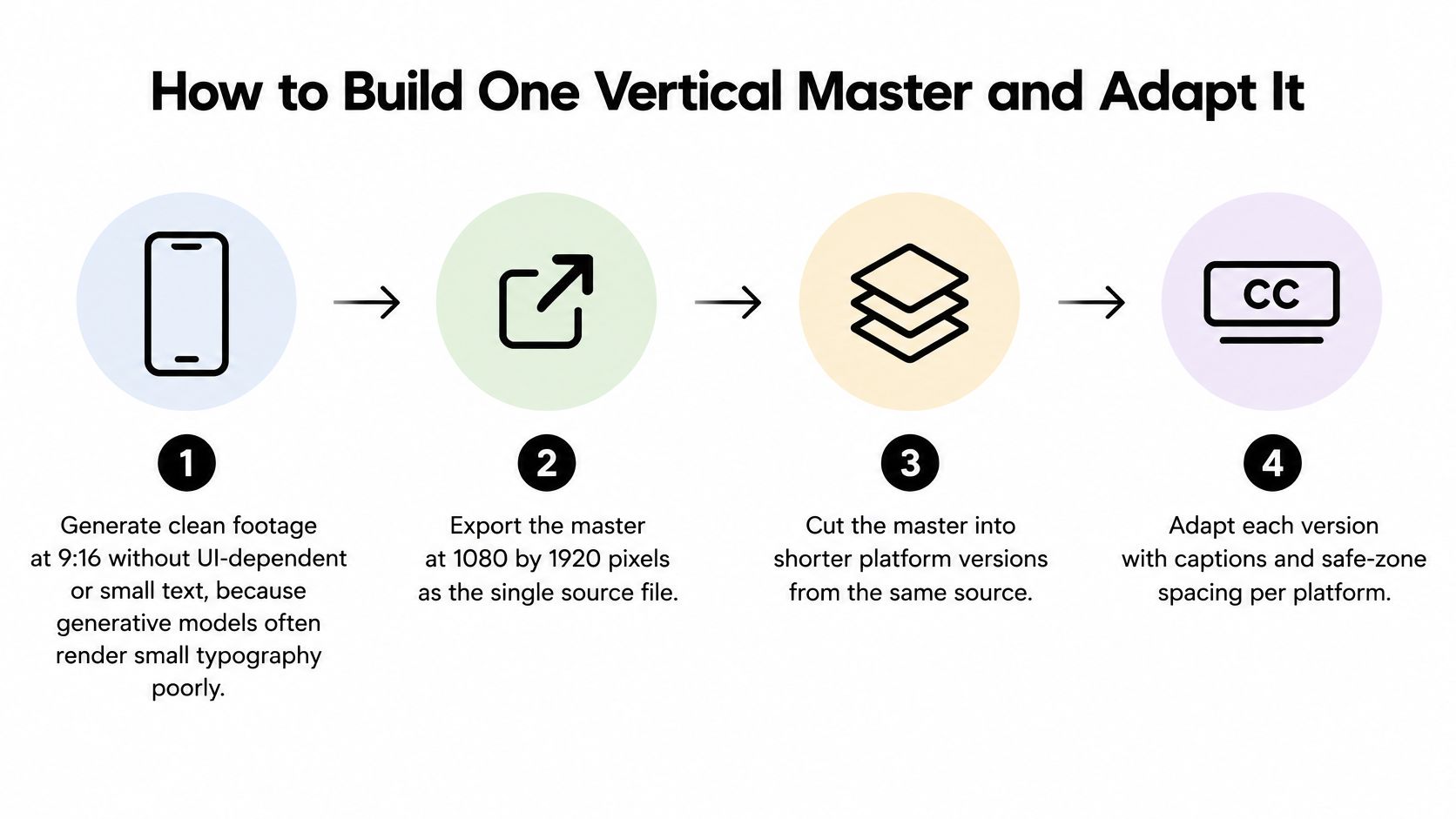
The production baseline is boring and it works: a 9:16 vertical master exported at 1080×1920 pixels, MP4 container, H.264 video, AAC audio, which is the delivery format commonly recommended for TikTok, Instagram Reels and YouTube Shorts and holds enough resolution to survive recompression (Sprout Social's video specs guide). Here's the order that avoids re-renders.
- Generate footage clean, with no small text. Ask for scenes, not title cards. Generative models render tiny typography badly, and a garbled logo baked into the frame can't be fixed later without regenerating. Keep prompts product-and-action focused.
- Export the master before you touch anything else. One file, 1080×1920, MP4, H.264, AAC. This is the single source every platform version comes from, and skipping it means each cut drifts in colour and crop.
- Verify the technical floor. Frame rate at or above the Reels minimum and resolution comfortably above it. A master that fails these checks will look soft in feed after the platform's own compression runs.
- Add captions, logos and branding in the final edit. The slip that ruins good footage is adding captions before the crop, which pushes text into the control zone. Keep faces, text and logos clear of the lower caption band and the right-side buttons.
- Cut platform versions from that one master. A full Reels cut, a Shorts cut, and a shorter hook-led version for paid. Same footage, different pacing and different first frame if the paid placement needs it.
- Lock the audio before export. Swap anything unlicensed, and keep the licence record with the project file. Rights problems surface weeks later when a track gets claimed and the clip goes quiet.
- Review each cut on a phone, full screen. Not on a monitor at 60% zoom. The caption collisions and unreadable type only show up at actual size in a vertical frame.
Most creators already work this way without calling it a workflow. Adobe's survey of 2,165 Australian creators found that in 2025, 60% used creative generative AI for editing, upscaling or enhancement, while 56% used it to generate new assets such as images and video (Adobe newsroom). The edit stage is where AI earns its keep, and it's also where the platform fit gets fixed.
A ready master looks like this: a clean vertical frame with no baked-in UI-dependent text, readable captions sitting inside the safe area, audio you can prove you own, and a short version list naming each destination. If you're pushing that same master to four networks, social media cross posting covers the scheduling mechanics so you're not rebuilding uploads by hand.
Practical rule: the master is a source file, not a post. Nothing gets published straight out of generation.
<a id="hooks-that-hold-viewers-past-three-seconds"></a>
Hooks That Hold Viewers Past Three Seconds
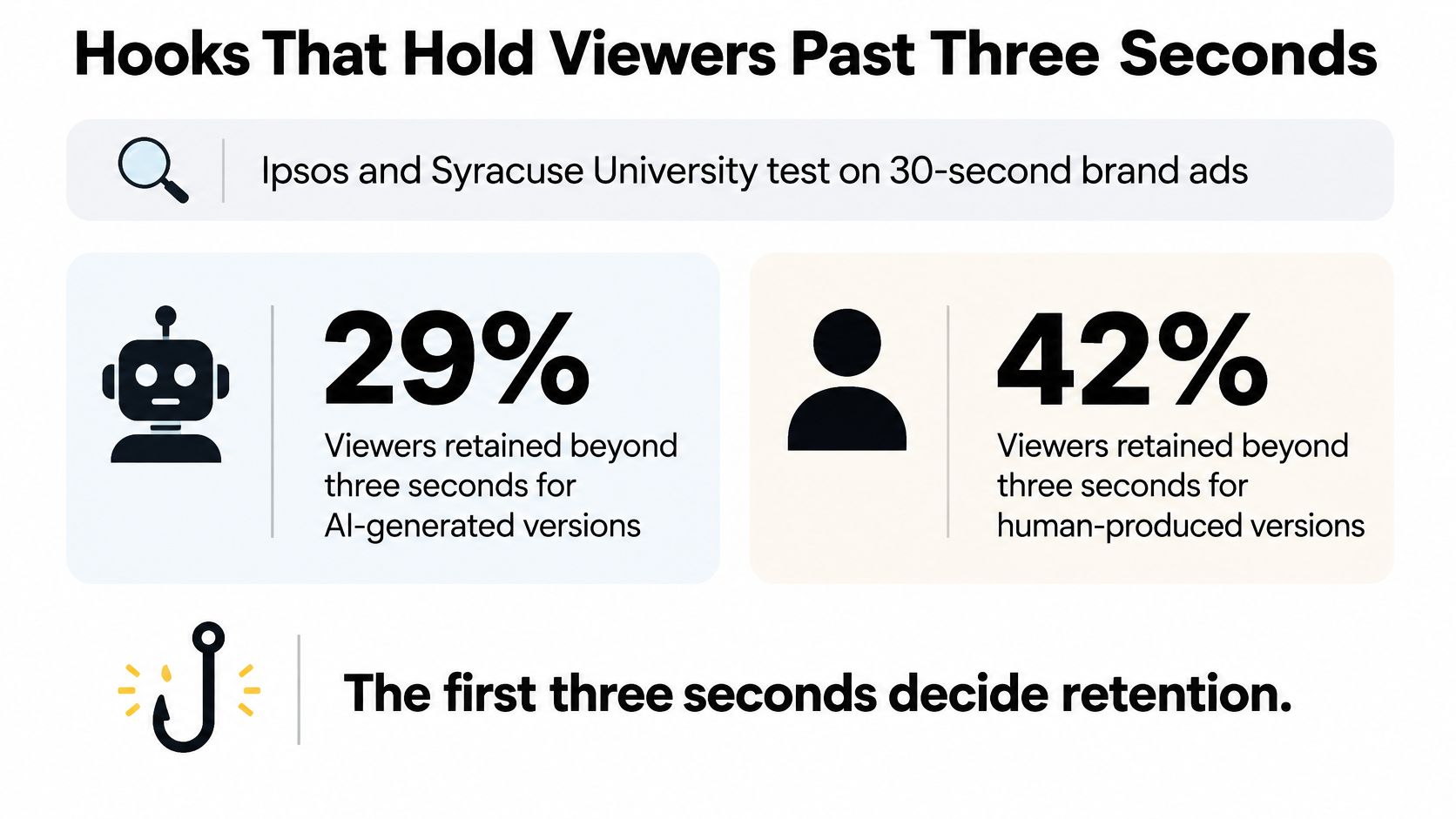
In an Ipsos and Syracuse University test of 30-second brand advertisements, 29% of viewers were retained past the three-second mark for AI-generated versions against 42% for human-produced versions, and acquisition cost came in at $52.10 versus $38.40 (MarketSplash's AI advertising statistics). Novelty gets a glance. It doesn't buy attention.
That gap is the whole argument for treating generation as a first draft of footage and nothing more. The opening frame has to do a job: name the subject, or show the problem.
<a id="three-hooks-that-survive-the-scroll"></a>
Three hooks that survive the scroll
The problem in frame one. Show the broken thing, the tangled cable, the empty shelf, the stained shirt, before any explanation. Whatever the product fixes should be legible in a single still. If a viewer paused at second zero, they'd already know what the video is about.
The result before the method. Lead with the finished outcome, then rewind to how it happened. This works because the payoff answers the only question a scroller has, which is whether the next 20 seconds are worth spending.
A real person's reaction. A face, a gesture, a sentence in the first person. This is the pattern that most often justifies keeping a human on camera rather than an avatar, and it's the one AI struggles to fake convincingly at speed.
The three-second number and the cost-per-acquisition number are separate targets, and paid short-form campaigns should be tracked that way. A clip can win attention and still lose money, and an AI-generated ad that looks striking but converts poorly is a budget problem dressed as a creative win.
Retention check for every draft: pause at second three. If someone who has never seen the product can't name the subject, cut the opening, shorten the generated lead-in, and move the product or the problem forward.
Short-form is where this gets decided at scale, since short-form video averaged a 9.3% engagement rate across platforms in 2024, with TikTok, YouTube Shorts and Instagram Reels named as the leading ecosystems for bite-sized content (Small Business Trends' social media statistics). High engagement rates reward openings that land instantly and punish slow ones.
Here's how that plays out in a real edit.
<iframe width="100%" style="aspect-ratio: 16 / 9;" src="https://www.youtube.com/embed/Xqy9L-88wcw" frameborder="0" allow="autoplay; encrypted-media" allowfullscreen></iframe>
The human pass is what tightens pacing, adds the authenticity the model can't invent, and places the call to action where it gets seen. Run AI for the visual layer and keep a person on the timing.
<a id="disclosing-ai-use-without-losing-viewers"></a>
Disclosing AI Use Without Losing Viewers
Treat disclosure as part of the adapt pass, not a toggle you hit at upload. At least eight major platforms, including TikTok, Instagram, Threads, Vimeo and YouTube, give creators a way to label synthetic media, and TikTok describes its AI label as a disclosure mechanism rather than a ranking signal (ACM paper on AI disclosure practice). Read that carefully. The label keeps you compliant. It does not keep viewers confident.
The audience risk is simpler than the policy wording. Most consumers say disclosure matters, and hiding AI use tends to erode trust once people feel a real face, voice or place was implied. A generic "made with AI" tag on everything does nothing for those viewers, because it tells them nothing about what changed.
<a id="where-disclosure-scales-with-the-change"></a>
Where disclosure scales with the change
The mistake is treating every use of AI as the same event. A colour grade and a synthetic spokesperson are not equivalent, and labelling them identically trains your audience to ignore the label.
| AI use | Disclosure level | Where to label |
|---|---|---|
| Fully generated person or voice | Explicit label | Platform AI setting and on-screen notice |
| Fully generated scene or product shot | Explicit label | Platform AI setting and caption |
| Synthetic actor or avatar | Explicit label | Platform AI setting, caption and on-screen notice |
| Cloned voice narration | Explicit label | Caption and voice credit line |
| AI cleanup, upscaling or colour correction | Light note or none | Platform setting only if the platform requires it |
| AI scripting, captions or translation | Light note or none | Credit in description where appropriate |
Label in proportion to what a viewer would feel misled by. A synthetic presenter reading a script is a person who does not exist, and that needs saying plainly. If that face or voice is based on a real performer, clearance and consent sit upstream of the platform toggle. An upscale pass on your own footage is a technical step, closer to noise reduction than to casting.
<a id="two-lines-of-copy-that-do-the-job"></a>
Two lines of copy that do the job
A caption that states the facts without apologising: "Presenter and visuals generated with AI. Product details, pricing and claims are ours." It answers the origin question, keeps the offer credible, and separates the generated layer from the claims you stand behind.
An on-screen notice that's small, early and specific: "AI-generated presenter" in the corner for the opening seconds, then gone. Naming the element beats a vague badge, because it tells viewers exactly what to recalibrate.
Rule for every publish: flip the platform's AI setting every time, and add a written caption note whenever a real person's face or voice has been synthesised or cloned. If the audience would be surprised to learn how it was made, that's the line that needs to be disclosed.
<a id="localizing-one-source-for-japanese-and-korean-viewers"></a>
Localizing One Source for Japanese and Korean Viewers
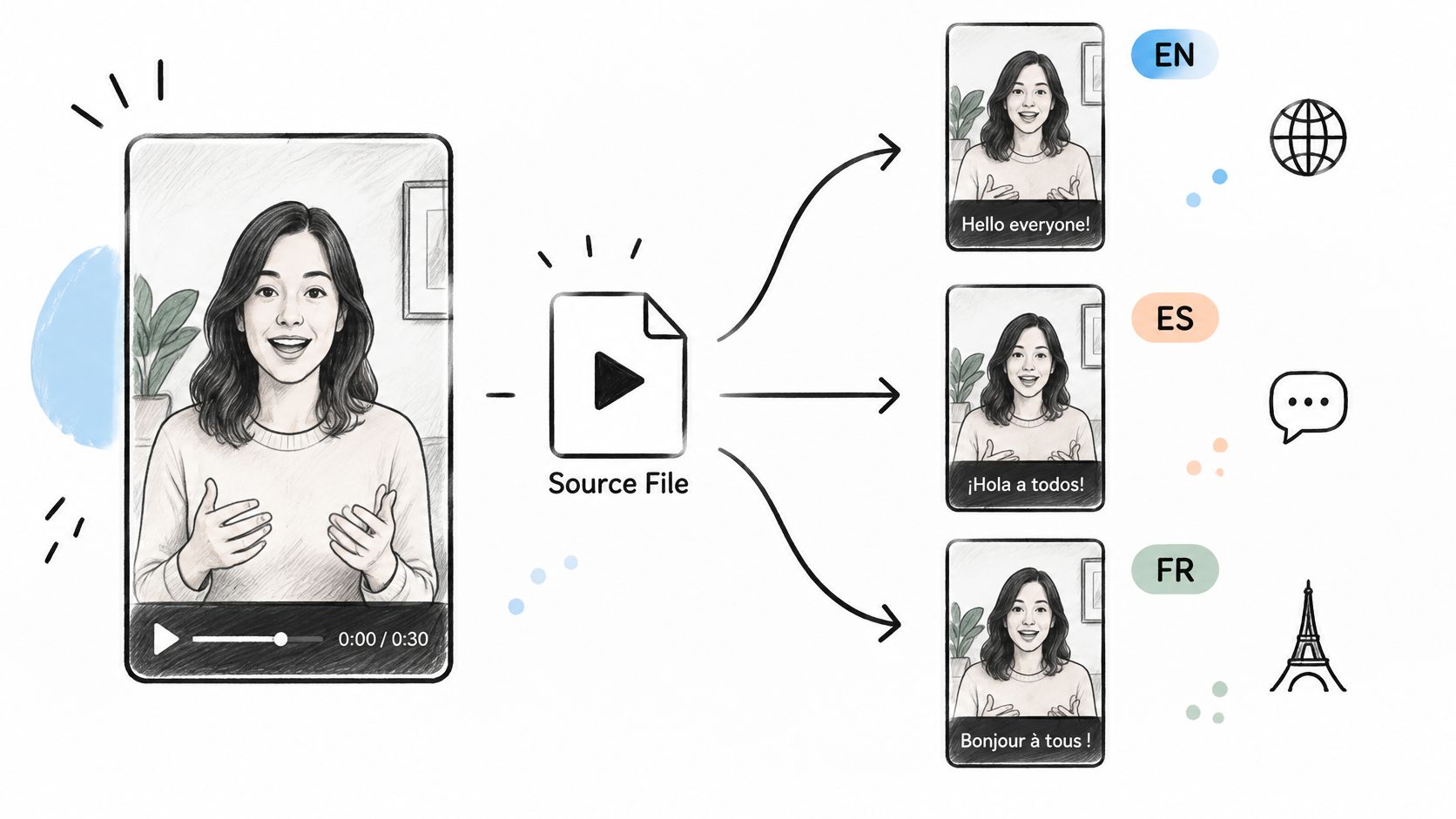
The most useful AI workflow isn't the one that produces the most realistic clip. It's the one that produces several usable versions from a single source asset. Research on creator workflows recommends multilingual and multimodal captioning that combines local languages, global lingua francas and sign languages while preserving linguistic authenticity, and notes that video creation remains largely inaccessible to creators with sensory impairments (ACM proceedings on accessible video workflows). Accessibility and localization are the same production problem wearing two hats.
<a id="what-actually-changes-between-versions"></a>
What actually changes between versions
Literal translation is the failure mode. A hook that lands in English often reads as blunt or strange once rendered word for word, so rewrite it for the local idiom and keep the emotional beat rather than the sentence.
- Script adaptation, not translation. Rebuild the hook, the joke and the closing line for the market. Adjust honorifics and formality to the platform and the audience.
- Caption safe areas sized for the language. Japanese and Korean on-screen text needs its own line-break rules, and character counts per line differ from Latin script. Check the caption band doesn't collide with platform controls.
- Typography at phone size. Test the smallest text on an actual handset. Dense kanji or hangul at small point sizes turns into grey texture.
- Speaker identification and audio description. If the visuals carry meaning that the narration doesn't, describe it. If two voices trade lines, name who's speaking.
- Subtitle limits per platform. Each destination trims or hides captions differently, so keep lines short enough to survive the tightest one.
Synthetic dubbing can also create errors that a translator would catch. A polite register in one language can land as rude in another. A product claim that's legal in one market may not translate into a permissible claim in the next. Numbers, sizes and units travel badly.
The repeatable version looks like this. Generate the visual once, in 9:16, with universal action and no baked-in text. Then build a Japanese narration, a Japanese caption set and hook, a Korean set, and any aspect-ratio variant, all preserving the original subject, timing and brand meaning. Dubbing tools handle the voice swap, and this hands-on look at Rask AI is useful for judging how the output holds up before you commit a campaign to it.
Then a human reviews names, honorifics, slang and every claim before anything publishes. That review is not a formality. It's the step that stops a localized clip from damaging a market you can't easily visit.
Veo3 AI turns a text prompt or a single product photo into vertical clips built for TikTok, Reels, Shorts and Facebook, with 9:16 exports at up to 1080p, AI avatars for UGC-style spots, and templates for launch, unboxing and problem-and-solution ads. Generate one clean master, put it through the format, hook, audio and disclosure checks in this guide, then cut your first platform variant from it. Start at Veo3 AI and let the source layer do the heavy lifting while you keep control of the message.
Related Articles
Continue with more blog posts in the same locale.

Online Video Generator Guide: How AI Video Tools Work
Learn how an online video generator turns prompts and images into video, which features matter, and how to use one for social and marketing clips.
Read article
AI Video for Business: Uses, Workflow and ROI in 2026
Learn how AI video for business works across marketing, product demos, internal training and localization, with workflow, measurement and trust guidance.
Read article
7 Full Shot Examples for AI Video Prompts in 2026
Seven full shot examples for AI video, with prompt ideas, framing notes, movement tips, and use cases for ads, dance, action, and brand content.
Read article