
Bulk AI Video Generator: How to Batch-Create Veo 3 Videos at Scale (2026)
How to use a bulk AI video generator workflow to batch-create dozens of consistent Veo 3 videos — master prompts, variable sheets, seed control, production playbooks, cost control, and QA at scale.
Emma Chen · 14 min read · Jun 25, 2026
The Bottleneck: Why You Can't Scale Veo 3 One Clip at a Time
If you produce AI video for a living — a faceless channel, a content agency, an e-commerce catalog, a paid-ads team — you already know the math doesn't work clip by clip. A single Veo 3 generation gives you eight seconds. A ten-video batch for one TikTok campaign means opening the prompt box ten times, re-typing variations, waiting on each render, downloading each file, and trying to remember which seed gave you the look you liked. By video three you've lost the thread, and by video ten your style has drifted.
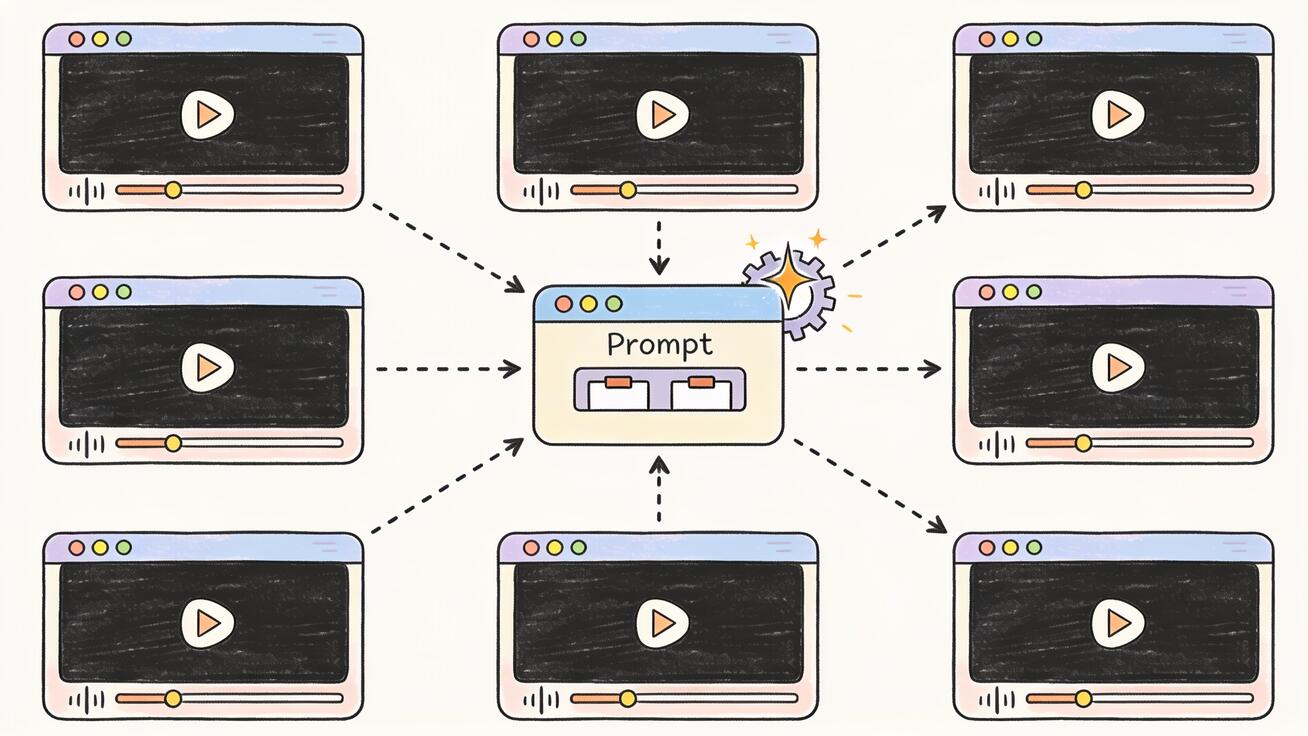
A bulk AI video generator workflow fixes that. Instead of treating every clip as a one-off, you treat a batch as the unit of work: one prompt system, one set of variables, one consistency strategy, and a repeatable process that turns ten core ideas into a hundred usable clips. In 2026 the most capable engine to build that system around is Google's Veo 3, because its native audio, strong prompt adherence, and seed control are exactly what batch production depends on.
This guide is the practical version — not "AI is changing video," but the actual workflow: what a bulk video generator does, why Veo 3 fits batch work, the step-by-step process, a prompt system that holds style across a whole run, three production playbooks you can copy, how to keep cost sane at volume, and the quality-control checks that decide whether a batch ships or gets re-rendered.
What a Bulk AI Video Generator Actually Does
"Bulk" doesn't mean a magic button that spits out a hundred finished videos. A realistic bulk AI video generator workflow does four things:
- Templatizes the prompt. You write one master prompt with slots — subject, setting, action, camera move, lighting, audio — and fill those slots from a list instead of rewriting the whole thing each time.
- Generates in parallel or in a queue. Rather than babysitting one render, you submit a batch and collect outputs together.
- Enforces consistency. Seeds, reference frames, and a fixed style block keep clip #47 looking like clip #1 so the set reads as one body of work.
- Standardizes output. Same aspect ratio, same length target, same naming, same QA pass — so a hundred clips drop into your edit or scheduler without manual cleanup.
The point isn't volume for its own sake. It's predictable volume: the difference between "I made a video" and "I run a content line that ships every day." If you want the strategic version of that shift, our guide on how to scale content creation covers the operating model; this article is the production engine underneath it.
Why Veo 3 Is the Right Engine for Batch Production
Plenty of models generate video. Few are built for repeatable output, which is what batch work actually needs. Veo 3 earns the spot for four concrete reasons:
- Native audio. Veo 3 generates synchronized sound — ambient noise, effects, even dialogue — inside the same pass. For bulk work this is enormous: you skip a whole second pipeline of sourcing, syncing, and licensing audio for every clip. Silent-clip models force you to rebuild the soundtrack a hundred times; Veo 3 doesn't.
- Strong prompt adherence. Batch consistency lives or dies on whether the model does what the prompt says. Veo 3 follows structured instructions closely, which means a templated prompt produces predictable results across a run instead of ten wildly different interpretations.
- Seed control. Reusing a seed (or a tight seed range) lets you lock a look and vary only one element — the single most important lever for keeping a batch on-brand.
- Cinematic baseline. Even default output reads as intentional footage rather than the warped, flickering look that makes automation channels obvious. That quality floor is what lets bulk content survive on a real platform.
If you've only ever generated single clips, the Veo 3 character consistency guide is worth reading before you scale — consistency problems that are tolerable in one clip become glaring across fifty. You can run every workflow in this article through veo3ai.io, which gives you a low-friction path to Veo 3 without wiring up raw API calls yourself.
The Bulk Veo 3 Workflow, Step by Step
Here is the repeatable process. Run it once end to end and you'll have a system you can reuse weekly.
Step 1: Define the batch, not the clip
Before you generate anything, decide what the set is. A batch should share a purpose and a look: "20 product hero clips for the summer catalog," "15 faceless history shorts," "12 testimonial-style ad variants." Write down the constants (style, aspect ratio, length, audio mood) and the variables (subject, setting, action). Those two lists are your whole production plan.
Step 2: Build a master prompt with slots
Turn your constants into a fixed style block and your variables into placeholders. A master prompt looks like this:
[SUBJECT] in [SETTING], [ACTION].
Camera: [CAMERA_MOVE]. Lighting: warm cinematic, shallow depth of field.
Audio: [AUDIO]. Style: photoreal, 9:16 vertical, steady framing.
Everything after "Camera" rarely changes — that's your brand. The bracketed slots are what you swap per clip.
Step 3: Make a variable sheet
List your rows. Ten rows = ten clips from one template:
| # | SUBJECT | SETTING | ACTION | AUDIO |
|---|---|---|---|---|
| 1 | ceramic coffee mug | sunlit kitchen counter | slow steam rising | gentle morning ambience |
| 2 | leather backpack | mossy forest trail | camera orbits slowly | birdsong, soft wind |
| 3 | running shoe | wet city street at night | splash in slow motion | rain, distant traffic |
This sheet is your batch. Structured, repeatable prompts scale far better than free-text — if you want to go fully programmatic, our Veo 3 JSON prompt generator guide shows how to express the same template as JSON so a script can iterate over it.
Step 4: Lock the look with a seed
Generate one clip you love. Note its seed. Reuse that seed across the batch when you want maximum consistency, or step through a small range when you want controlled variety. Changing only the subject while holding the seed is how you get a set that obviously belongs together.
Step 5: Generate the batch
Work through the variable sheet, swapping slots and submitting. On veo3ai.io you queue generations through the interface; if you're operating at API scale, you loop over the sheet programmatically. Either way the discipline is the same — one template, many rows, consistent settings.
Step 6: Collect, name, and QA together
Download everything into one folder with a naming convention (campaign_subject_v1.mp4). Don't review clips as they finish — review the whole set at once so you catch drift, tone mismatches, and the two or three that need a re-render. Batch QA is faster and catches consistency problems single-clip review never will.
For a fully hands-off version of steps 5 and 6, see our Veo automation and AI video workflows guide, which connects generation, storage, and scheduling into one pipeline.
A Prompt System for Batch Consistency
The single biggest reason batches look messy is that people rewrite the prompt every time and accidentally change five things at once. A prompt system prevents that. Three rules:
Freeze the style block. Your lighting, lens, mood, aspect ratio, and grade should be identical strings across every prompt in the batch. Copy-paste them; never retype. The moment you paraphrase "cinematic" as "filmic," the model can drift.
Vary one axis at a time. If a batch is meant to feel cohesive, change only the subject, or only the setting — not both plus the camera move plus the audio. Controlled variation reads as a series; uncontrolled variation reads as chaos.
Keep an audio convention. Because Veo 3 generates sound, decide the batch's audio identity up front — "soft ambient room tone," "upbeat market bustle," "no dialogue, light foley" — and reuse that phrasing. Inconsistent audio is just as jarring as inconsistent visuals, and it's the thing teams forget because older tools never produced sound at all.
Here are three reusable templates you can drop straight into a variable sheet:
Product / e-commerce template
[PRODUCT] on [SURFACE], [HERO_ACTION].
Camera: slow push-in. Lighting: soft studio key, clean background.
Audio: subtle ambient, faint product sound. Style: photoreal, 9:16, premium and minimal.
Faceless explainer template
[VISUAL_METAPHOR] illustrating [CONCEPT], [MOTION].
Camera: smooth dolly. Lighting: high-key, modern.
Audio: calm ambient bed, no dialogue. Style: clean 16:9, documentary realism.
Social hook template
[SUBJECT] doing [SURPRISING_ACTION] in [SETTING].
Camera: dynamic handheld. Lighting: bold, high contrast.
Audio: punchy effects, energetic room tone. Style: vertical 9:16, scroll-stopping first frame.
Three Bulk Production Playbooks
Volume looks different depending on what you ship. Here are three concrete patterns.
Playbook 1: The faceless channel
Faceless channels are the purest bulk use case — they live on a steady back catalog. Build a weekly batch of 10–15 clips from one niche template, hold a consistent visual identity with a fixed style block, and let the library compound. The whole faceless model used to choke on visuals; a batch engine with native audio removes that bottleneck. Our deep dive on building an AI faceless video generator workflow pairs perfectly with this — use that for the channel strategy and this article for the production line.
Playbook 2: E-commerce and paid ads
Ad teams don't want one perfect video; they want variants to test. Take one product, hold the style block, and vary the hook, setting, and action across 12–20 clips. Ship them into your testing rotation, kill the losers, scale the winners. Because the style is locked, every variant is on-brand even when the creative angle changes. When a winning eight-second ad needs to become a longer cut, our guide on how to extend Veo 3 video beyond 8 seconds shows how to stretch the standout without re-rendering the whole batch.
Playbook 3: Daily social shorts
For a daily posting cadence, batch a week ahead. Monday morning you generate seven hooks from the social template, QA them together, schedule, and you're done — instead of scrambling for a clip every single day. The bulk discipline buys back your time precisely because the work happens once, in a block, not scattered across the week.
Keeping Cost Under Control at Volume
Bulk generation has a real cost, and the fastest way to blow a budget is to brute-force it. Four habits keep spend sane:
- Prototype on one row first. Nail the master prompt and style block on a single clip before you run forty. Re-rendering a whole batch because the template was off is the most expensive mistake there is.
- Lower the variable count. Every extra moving part raises the odds of a re-render. Tight templates produce keepers on the first pass.
- Batch in waves. Generate ten, QA, adjust the template, then generate the next thirty. Don't fire off a hundred blind.
- Match length to placement. Don't generate longer clips than the platform needs. Eight seconds is plenty for most hooks and product shots.
If you're comparing where to actually run this — interface versus API, free allowance versus paid tiers — our roundup of the best AI video generator apps breaks down which paths make sense at different volumes.
Quality Control at Scale
This is the step most people skip, and it's the one that separates a content line from a pile of clips. At volume, QA has to be systematic. Run every batch through the same checklist:
- Consistency: Do all clips share the look? Pull them into a grid and scan — drift is obvious side by side, invisible one at a time.
- Subject integrity: No warped hands, melting text, or morphing objects. These slip through single-clip review and embarrass you across a set.
- Audio sanity: Native audio is a feature until a clip generates the wrong ambience. Listen to all of them; mute and re-render the misfires.
- Motion quality: No stutter, no impossible physics, no jarring cuts mid-clip.
- Spec compliance: Right aspect ratio, right length, right naming. A batch that fails spec clogs your edit and your scheduler.
Flag the failures, re-render only those rows with a tweaked prompt or new seed, and ship the rest. Two or three re-renders out of fifty is normal and fine. The goal isn't perfection on every clip — it's a consistent set where the misfires are caught before they go live.
Common Mistakes When Scaling Veo 3
- Changing too many variables. The batch stops looking like a series. Hold the style block; vary one axis.
- Skipping the prototype. Running the full batch before validating the template wastes the most money and time.
- Reviewing clip by clip. You miss drift and tone mismatches that only show up across the set.
- Forgetting audio is generated. Teams used to silent tools forget Veo 3 makes sound, then ship clips with mismatched ambience.
- No naming convention. A hundred files called
video_final_2.mp4is its own special hell at edit time. - Treating volume as the goal. A hundred mediocre clips lose to ten great ones. Bulk is a means to consistent quality at cadence, not an excuse to flood.
Frequently Asked Questions
What is a bulk AI video generator? It's a workflow (and the tooling around it) for producing many AI videos from one prompt system instead of generating each clip from scratch. You templatize the prompt, fill variables from a list, hold consistency with seeds and a fixed style block, and QA the whole set together. With Veo 3 you can turn roughly ten core ideas into a hundred cohesive clips.
Can Veo 3 generate videos in bulk automatically? Veo 3 generates one clip per request, but you scale it by batching — looping a templated prompt over a variable sheet through an interface like veo3ai.io or programmatically via API. The "bulk" comes from the system around the model, not a single one-click button.
How do I keep a hundred Veo 3 clips looking consistent? Freeze a style block (lighting, lens, grade, aspect ratio) and reuse it verbatim, lock a seed, and vary only one element per clip. Review the batch in a grid so drift is visible. Structured or JSON prompts make this far more reliable than free-text.
How long can each clip be? Veo 3 generates short clips (around eight seconds). For longer pieces you stitch or extend standout clips after the batch rather than generating long videos directly — extending only the winners keeps cost down.
Is bulk generation expensive? It can be if you brute-force it. Prototype on one clip, keep templates tight, generate in waves, and match clip length to the platform. Done with discipline, batch production is far cheaper per usable clip than manual one-off generation.
Does Veo 3 add audio to every clip in a batch? Yes — native audio is generated per clip. That's a major advantage for bulk work because you skip a separate sound pipeline, but it means audio needs to be part of your QA pass so no clip ships with the wrong ambience.
Interface or API for batch work — which should I use? Start in an interface like veo3ai.io: it's the fastest way to validate your master prompt and style block without writing code, and for batches up to a few dozen clips a week it's usually all you need. Move to the API only when your volume justifies the engineering — when you genuinely want a script looping over a spreadsheet of hundreds of rows on a schedule. Most creators never need that step; the interface plus a tight variable sheet covers the vast majority of real production lines.
How many clips can I realistically batch in one session? There's no hard rule, but plan in waves of ten to thirty rather than one giant run. Generating in waves lets you QA, tweak the template, and improve the next wave instead of discovering a flaw after a hundred renders. Most teams settle into a weekly batch of 10–20 clips per content line, which is enough to sustain a daily posting cadence with a comfortable buffer.
The Bottom Line
The reason most creators never scale isn't talent or ideas — it's that one-at-a-time generation caps your output. A bulk AI video generator workflow lifts that cap by making the batch the unit of work: one master prompt, a variable sheet, a locked style, seed-controlled consistency, and a single QA pass. Veo 3 is the right engine for it because native audio, strong prompt adherence, and seed control are exactly what repeatable production needs.
Start small. Build one master prompt, run a ten-row batch, QA it as a set, and ship. Once that loop works, scaling from ten to a hundred is just more rows — not more effort per clip. You can generate your first batch right now with the free allowance on veo3ai.io.
— Emma Chen
Related Articles
Continue with more blog posts in the same locale.

How to Make Sports Highlight Videos with Veo 3 AI (2026)
Create stunning sports highlight videos with Veo 3 AI. Generate dynamic action shots, slow-motion sequences, and dramatic replays using AI prompts.
Read article
How to Make a Short Film with Veo 3 AI (2026 Guide)
Learn how to create professional short films using Veo 3 AI. Step-by-step guide with prompts, workflow tips, and cinematic techniques.
Read article
How to Make Documentary Videos with Veo 3 AI (2026 Guide)
Create compelling documentary videos with Veo 3 AI. Learn prompting techniques, narrative structure, realistic footage generation, and post-production tips.
Read article