
Google Veo 無料
Google veo 無料. Find out if Google Veo is really free, what limits apply, and how to start using it today. A clear guide for creators comparing free options.
Veo3 AI · 16 min read · Oct 11, 2026
Google Veo isn't universally free. Limited Gemini and Flow access can provide 720p output, 8-second clips, visible watermarks, and regional restrictions, while production use moves toward paid API tiers or alternative platforms.
You've probably seen three conflicting answers already. One page says Veo is free, another points you toward a Google AI subscription, and a third sends you to Vertex AI with billing attached. That confusion makes sense because Google exposes Veo through several products, not one uniform service.
The practical question behind “Google Veo free” isn't just whether you can generate a clip without paying. It's whether the route available in your country gives you the resolution, duration, ownership terms, audio, image-to-video controls, and volume your project needs. For casual testing, Google's free access can be useful. For regular short-form publishing or client work, its limits appear quickly.
Table of Contents
- What Most Creators Get Wrong About Free Veo Access
- Understanding Google Veo From the 2024 Launch to Veo 3.1
- Where Veo Is Free and Where It Isn't
- How to Enable Free Veo Inside Gemini and Flow
- Caveats That Block Real Production Work
- Why Veo3 AI Is the Stronger Free Alternative for Most Creators
- Matching the Right Free Option to Your Use Case
- Three Decisions to Make Before You Generate Your First Clip
<a id="what-most-creators-get-wrong-about-free-veo-access"></a>
What Most Creators Get Wrong About Free Veo Access
You open Gemini, Flow, Google Vids, Vertex AI, or the Gemini API and assume you're using the same Veo product under the same rules. You're not. Google distributes Veo across different surfaces, and each surface can apply separate limits to cost, quotas, clip duration, resolution, features, and watermark policy.
That's why one creator may report successful free generation while another sees a subscription prompt or a billing requirement. The answer depends on the product they opened, their account type, their location, and the specific model exposed there.
<a id="the-five-routes-are-not-interchangeable"></a>
The five routes are not interchangeable
The main surfaces are:
- Gemini: A consumer route for limited video generation, with access and quotas that vary by plan and region.
- Flow: A filmmaking-oriented interface where access has been tied to Google AI plans and selected trials.
- Google Vids: A workspace-style video creation product whose availability and Veo features depend on account eligibility.
- Vertex AI: A developer and enterprise route designed for controlled API use, not casual unlimited experimentation.
- Gemini API: A programmable path where production-scale generation is subject to model, region, and billing rules.
The same word, “Veo,” hides these differences. A free consumer trial isn't equivalent to API access, and API availability isn't proof that a creator can use every feature in Gemini or Flow.
Practical rule: Treat “free Veo” as a route-specific offer, not a permanent product-wide promise.
By the end of this guide, you should be able to identify which Google surface is available to you, what the free allowance includes, and when a separate platform will save time. The right decision isn't always to avoid payment. Sometimes the cheapest workflow is the one that lets you generate usable clips without switching between five Google products.
<a id="understanding-google-veo-from-the-2024-launch-to-veo-31"></a>
Understanding Google Veo From the 2024 Launch to Veo 3.1
Google Veo did not start as a free tool. It started as a high-end model announcement, and that distinction matters if you are trying to understand why “free Veo” means very different things across Google products.
At Google I/O on May 14, 2024, Google introduced Veo as its most capable video generation model at the time. The launch positioned Veo around 1080p video, prompt-driven cinematic control, and clips longer than one minute, but access began through a limited VideoFX preview rather than open public use. Google's launch announcement set the benchmark that still drives expectations today.
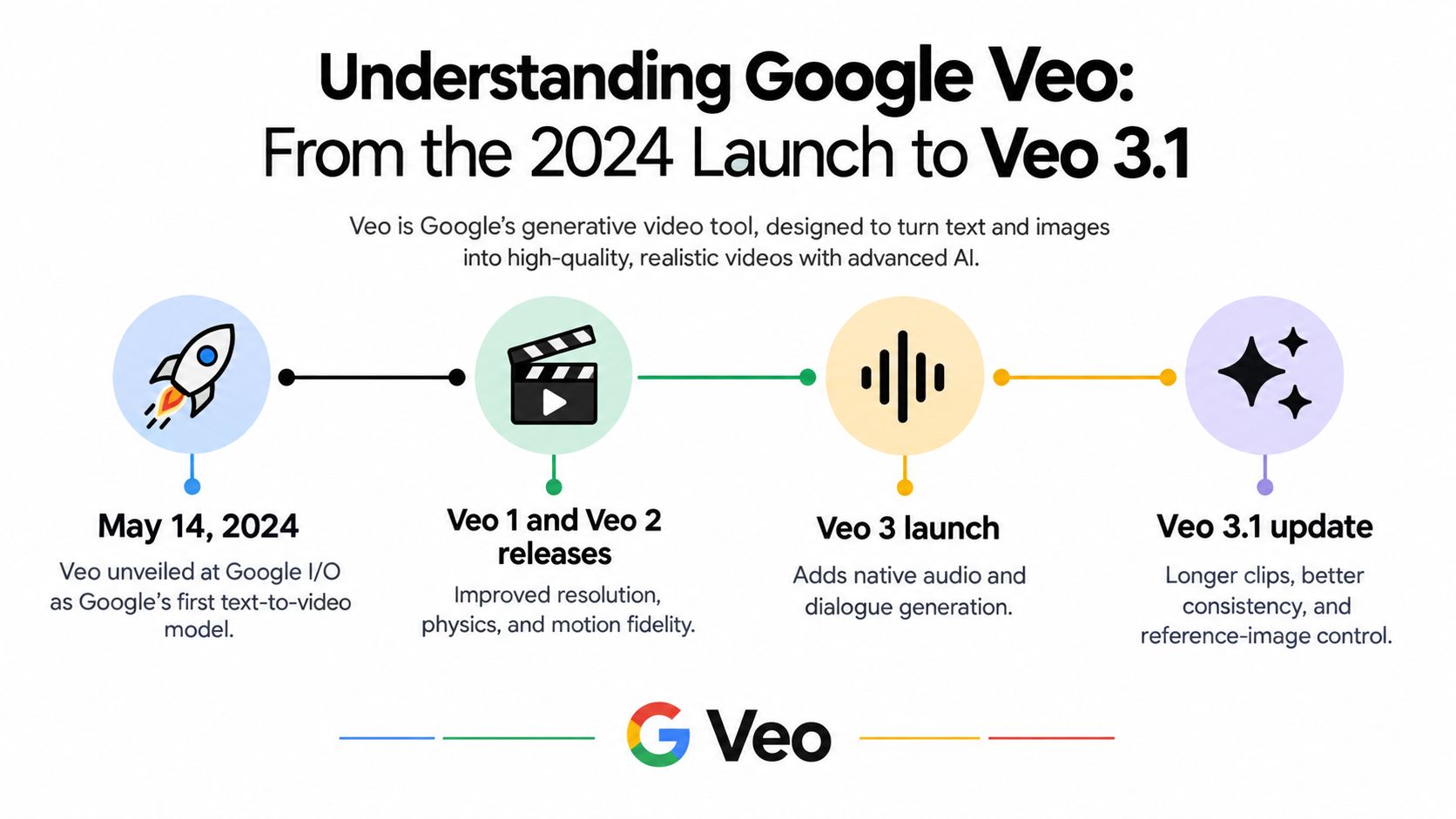
The timeline matters because the product story changed. Early Veo was mainly about visual fidelity and longer-form generation. Veo 3 pushed the model into a different class by adding synchronized audio with video, including dialogue, ambient sound, and sound effects. That removed one of the biggest practical gaps in AI video workflows. Instead of generating a silent clip and fixing sound elsewhere, creators could get motion and audio together.
Google also published competitive evaluation context for Veo 3. In the head-to-head human preference tests described in The Veo 3 model card, Veo 3 was preferred overall against several named video models and scored strongest on prompt adherence. Read that as a model claim, not a guarantee that every Google surface gives you the same result.
<a id="veo-31-is-a-workflow-model-not-just-a-quality-upgrade"></a>
Veo 3.1 is a workflow model, not just a quality upgrade
Veo 3.1 capabilities and access options show why the latest version matters in production. It is documented as an eight-second video-generation model with native audio, and depending on the variant and interface, it supports 720p, 1080p, or 4K output.
More important, Veo 3.1 adds controls that make repeatable shot building possible:
- Text-to-video generation
- Image-to-video generation
- First-and-last-frame conditioning
- Video extension
- Reference-image control
Those features are what separate casual testing from an actual workflow. You can guide shots with visual anchors, extend material, and keep more consistency across clips instead of hoping one prompt carries an entire sequence. Google Cloud's documentation describes 16:9 and 9:16 aspect ratios, 24 FPS, MP4 output, and up to four generated videos per prompt for the documented workflow. Google Cloud's Veo 3.1 documentation is the clearest reference for that production envelope.
So before you ask whether Google Veo is free, get specific about the model generation you mean. The jump from Veo to Veo 3 to Veo 3.1 changed the feature set enough that “free access” without the route attached is too vague to be useful.
<a id="where-veo-is-free-and-where-it-isnt"></a>
Where Veo Is Free and Where It Isn't
Google does offer free Veo access, but creators get tripped up when they treat every Google surface as the same product. They are not. Gemini, Flow, Google Vids, Vertex AI, and the Gemini API each come with different limits, rollout rules, and production tradeoffs.
Independent coverage puts free Gemini Veo access at around 5–10 videos per day, usually with 720p resolution, an 8-second cap, and a visible watermark. The same overview notes Google Cloud Veo 3.1 availability in us-central1. This independent Veo access overview is useful because it separates casual consumer access from cloud deployment.
<a id="a-route-by-route-comparison"></a>
A route-by-route comparison
| Surface | Model | Free Quota | Resolution | Clip Length | Best For |
|---|---|---|---|---|---|
| Gemini app | Consumer Veo access | Around 5–10 videos per day, commonly | 720p | Up to 8 seconds | Personal testing and occasional clips |
| Flow | Veo access tied to eligible plans or trials | Limited access varies by account | Plan and feature dependent | Short clips | Narrative experiments and shot planning |
| Google Vids | Veo features tied to account eligibility | Availability varies | Product and account dependent | Short clips | Workspace-style editing and simple projects |
| Vertex AI | Veo API models | Not an ongoing free production route | Documented model tiers | 4, 6, or 8 seconds for Veo 3.0 | Developer and enterprise workflows |
| Gemini API | Veo API models | Billing and quota rules apply | Variant dependent | Model dependent | Programmatic generation |
Gemini is the easiest starting point, but treat it as a test bench, not a publishing system. You can check prompt response, audio behavior, and general visual quality fast. You cannot assume that a free Gemini result means the same workflow will scale cleanly in Flow, Vids, or the API.
Flow deserves its own lane. It is the better option if you plan in shots instead of one-off clips. Google's rollout details matter here. Google said the Ultra plan was available in 73 countries, and eligible Pro subscribers got limited Flow access plus a ten-generation trial package in Gemini. Google's expansion announcement is the key source for those account and rollout details.
Google Vids also needs separate treatment. It is a workspace product with Veo features, not a duplicate front end for Gemini. Access can depend on the product setup and the account behind it, which is why some users see Veo-style features in one Google environment and not another.
Vertex AI and the Gemini API are different again. They are closer to production tooling, with clearer model controls and developer-facing options. They also bring billing, quota handling, and regional constraints, so calling them “free Veo” is misleading unless you mean limited testing rather than ongoing output.
If your goal is professional profile content, the bottleneck often is not generation quality. It is deciding what the clip should communicate before you spend a limited attempt. A resource like LinkedIn photo ideas from Secta can help tighten the concept first.
The practical takeaway is simple: free Veo access is route-specific. Check the surface, the model version, the country rollout, the watermark, the export quality, and the quota before you commit to any workflow.
<a id="how-to-enable-free-veo-inside-gemini-and-flow"></a>
How to Enable Free Veo Inside Gemini and Flow
You open Gemini, type a prompt, and get nothing that looks like video generation. That usually is not a prompting problem. It means this specific Google surface is not enabled for your account yet, or your plan, country, or rollout status does not match the access path you expected.
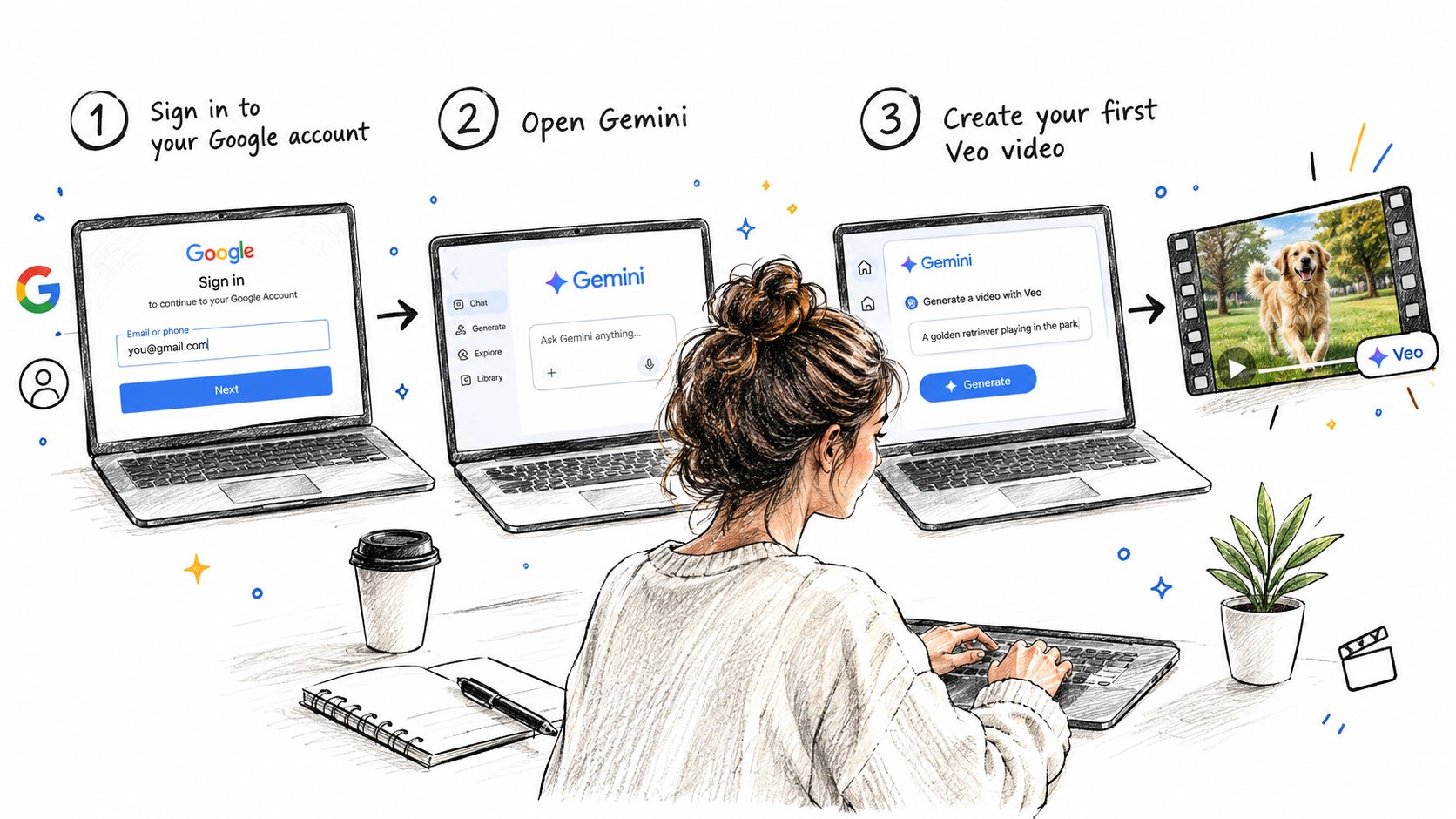
Start with Gemini only if you want the fastest possible test. Sign in with a personal Google account, check whether the video option appears, and run one tightly scoped prompt. Keep it concrete. Name the subject, action, setting, camera movement, lighting, and sound in one pass. “A red ceramic cup on a wooden café table, steam rising as morning light crosses the surface, slow push-in camera movement, soft room tone and distant espresso-machine sounds” will outperform “make a cool video” almost every time because the model has fewer gaps to fill.
<a id="a-practical-setup-sequence"></a>
A practical setup sequence
- Check account access first. If Gemini does not show a video-generation control, do not keep rewriting prompts. The blocker is account access, region, plan, or rollout status.
- Run one controlled test. Use a single subject and one camera move. Save the prompt. Then check whether the result includes audio, a visible watermark, and the aspect ratio you wanted.
- Use Flow if it appears on your account. Flow is the better route for connected shots, especially if you want a sequence that feels planned instead of a pile of unrelated clips. Add a reference image or a precise visual description when character or product consistency matters.
- Pick the output setting that is available. Some accounts expose different export options than others. Do not assume you can get the highest setting just because Veo supports it elsewhere in Google's stack.
- Download the MP4 and inspect it immediately. Check framing, watermark visibility, sound sync, and whether the clip survives a crop without falling apart.
As noted earlier, Google's rollout details for Gemini and Flow changed by plan and region. Treat any free access path as provisional, not permanent.
Prompt discipline: Spend one attempt proving the visual idea. Then fix the weakest part. Do not burn limited generations on five unrelated concepts.
<a id="caveats-that-block-real-production-work"></a>
Caveats That Block Real Production Work
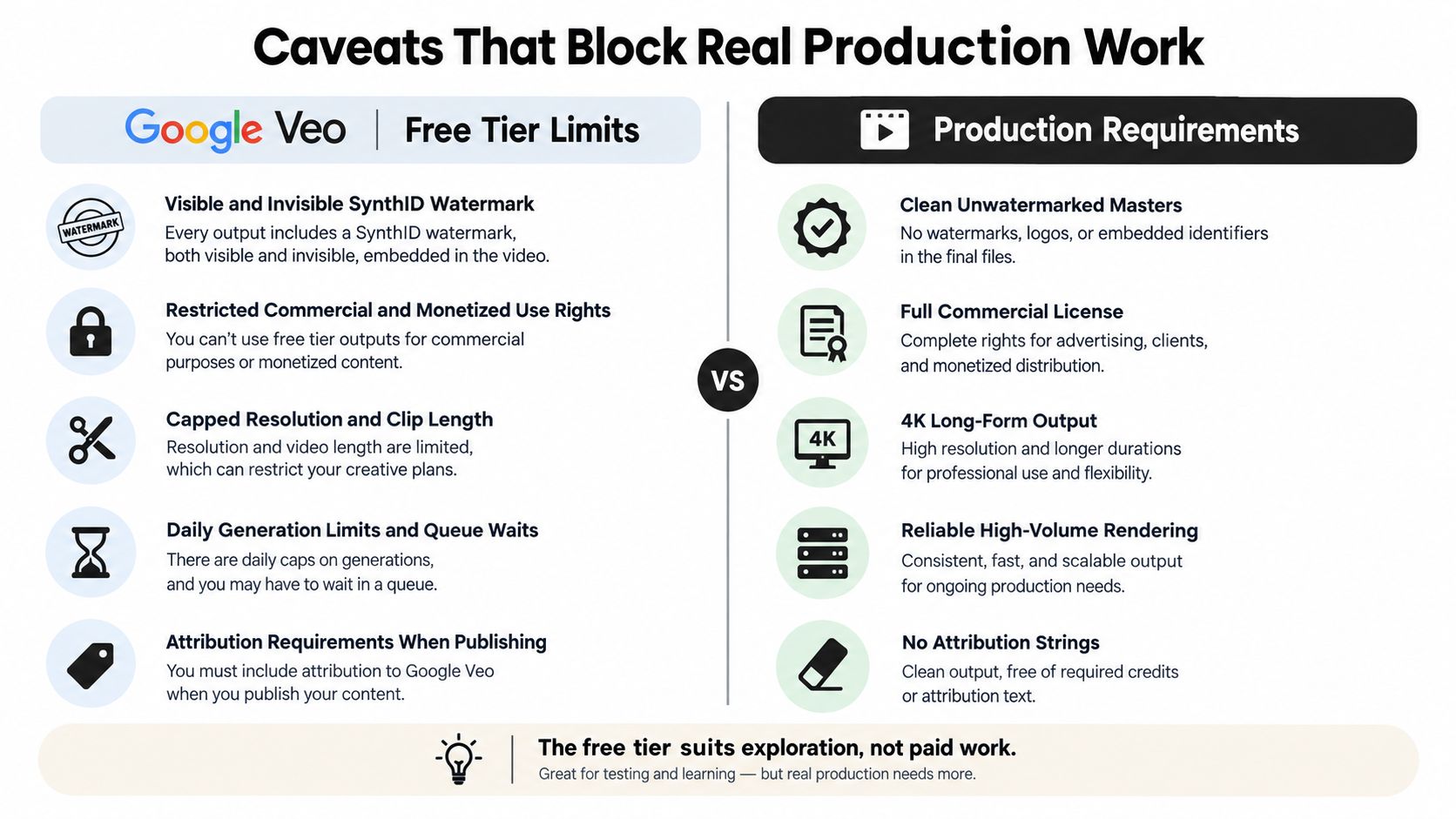
A free clip can look impressive and still fail a client brief. The most obvious problem is the visible watermark on many consumer-generated outputs. Google also uses SynthID, an invisible provenance signal intended to identify media created or edited by Google AI models. Google documents the detected SynthID watermark in its Gemini support guidance and identifies an exception to the visible watermark for videos made by Ultra members in Flow. Google's SynthID and watermark guidance explains why visible and invisible provenance are separate issues.
The technical limits are just as important. The documented Veo 3 API supports outputs of 4, 6, or 8 seconds, at 720p or 1080p, with a fixed 24 FPS, MP4 delivery, and image-to-video inputs capped at 20 MB. It supports 16:9 and 9:16 aspect ratios, and can return up to four videos per prompt. The Veo 3 generation documentation sets out those constraints.
<a id="why-short-clips-change-the-edit"></a>
Why short clips change the edit
An 8-second generation can work well as a social hook, product detail, transition, or B-roll insert. It won't replace a longer narrative shot by itself. You'll need to plan a sequence, preserve continuity between clips, and edit around fixed frame-rate and MP4 delivery.
The regional problem is harder to work around. Image-to-video or editing capabilities may be restricted in the European Economic Area, the United Kingdom, and Switzerland. Google Cloud documentation lists Veo 3.1 support in us-central1, while independent technical coverage reports no documented EU region and identifies U.S.-only data residency for the relevant enterprise platform.
That distinction matters for confidential work. A creator may reach a consumer interface but still lack a required feature, an approved processing region, or a procurement path for client data.
Production test: Before accepting a paid brief, verify watermark treatment, commercial rights, processing region, image-input handling, export resolution, and expected generation volume. A successful personal test proves none of those requirements.
<a id="why-veo3-ai-is-the-stronger-free-alternative-for-most-creators"></a>
Why Veo3 AI Is the Stronger Free Alternative for Most Creators
You get one decent clip in Gemini, then hit the core problem. The work is spread across different Google surfaces, each with its own limits, access rules, and production tradeoffs. For casual testing, that is fine. For regular publishing, it slows you down.
Google's free route is useful for learning Veo inside Google's ecosystem. Veo3 AI is easier to use when you need one place for text-to-video, image-to-video, export settings, downloadable files, and access to more than one model family. It combines Veo 3.1 with other models such as Seedance and Hailuo in a single browser-based workspace.
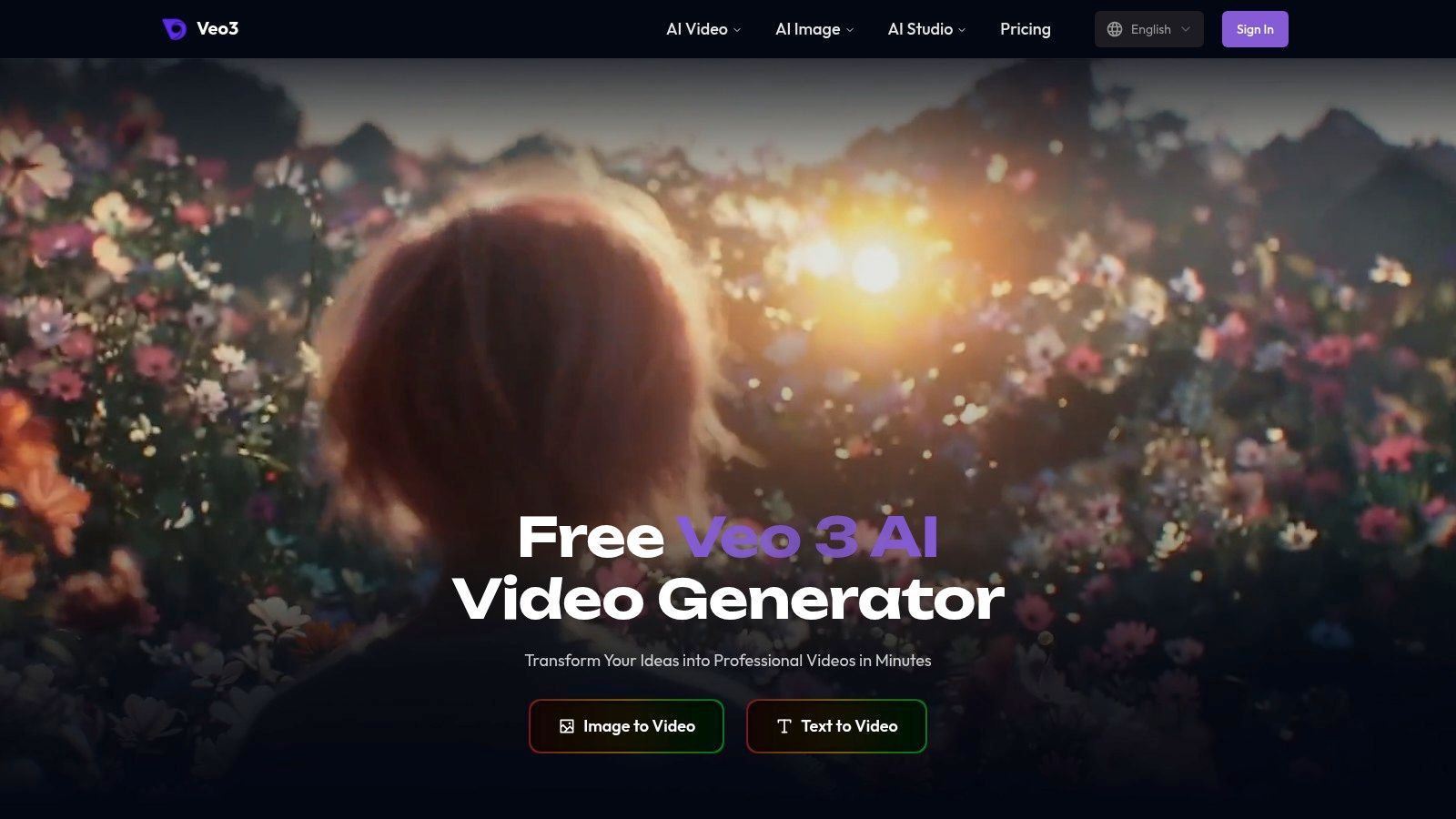
That difference matters more than feature lists. You write a prompt or upload an image, choose the output settings that are available, generate, review, and download in one place. You are not bouncing between Gemini for one task, Flow for another, and a cloud console for something more advanced. That makes iteration faster, especially for short-form creators who need multiple attempts before a clip is usable.
<a id="where-the-alternative-fits"></a>
Where the alternative fits
- TikTok, YouTube Shorts, and Reels creators benefit from a single text-or-image workflow and can plan vertical output without depending on a crop after generation.
- Marketers can test several visual directions quickly before pushing a concept into a larger campaign process.
- Japanese and Korean creators may prefer a localized interface instead of adjusting everything inside an English-first dashboard.
- Teams comparing models can test different generation styles without creating separate accounts for every experiment.
The Veo 3.1 mechanics covered earlier still apply here. You are still working with the same core generation model behavior. The advantage is simpler access and fewer workflow interruptions, not a different technical foundation.
If your idea starts with a track rather than a written prompt, it also helps to turn audio into a finished video as part of the same creative process.
<iframe width="100%" style="aspect-ratio: 16 / 9;" src="https://www.youtube.com/embed/IAlyZR5BBzU" frameborder="0" allow="autoplay; encrypted-media" allowfullscreen></iframe>
I would not choose a tool on vague promises about free usage. Check current pricing on the site, then test the actual workflow on the Veo 3 AI video generator. The practical question is simple. Which option lets you get from prompt to a usable downloaded clip with the fewest obstacles? For many creators, that answer is Veo3 AI.
<a id="matching-the-right-free-option-to-your-use-case"></a>
Matching the Right Free Option to Your Use Case
A free Veo route only works if it matches the job.
For a quick test, a joke post, or one-off experimentation, Gemini is the simplest starting point. You can generate a clip without touching the API, and the 720p, 8-second watermarked output is good enough to judge motion, prompt adherence, and whether your idea is worth pushing further.
Regular short-form publishing is different. TikTok, Shorts, and Reels creators do not fail because they lack one working prompt. They fail because iteration eats quota fast. One clip can miss on pacing, framing, subject consistency, or text treatment, which means you need another run, then another. In that situation, Google's free route starts to feel narrow. Veo3 AI makes more sense if you want text-to-video and image-to-video in one place and a faster path from prompt to downloaded asset. If you plan to publish on a schedule, review current access terms before you build your workflow around any free allowance.
Client advertising and agency work need a stricter standard. The Gemini API gives you more documented control over generation settings and image inputs, but it also brings billing, quota management, and regional constraints, including the us-central1 requirement already noted earlier. That is workable for technical teams. It is less attractive for marketers who need review, revisions, and delivery in one operational flow. If your decision goes beyond raw generation quality, use this guide to compare business video tools.
Region still decides a lot. EU, UK, and Swiss users should check image-to-video availability, editing access, data handling, and commercial fit separately. A consumer login proves access. It does not prove production readiness.
<a id="three-decisions-to-make-before-you-generate-your-first-clip"></a>
Three Decisions to Make Before You Generate Your First Clip
First, choose the Google surface deliberately. Use Gemini for a quick consumer test, Flow for narrative experiments if your account exposes it, and the API only when you understand billing, quotas, and region requirements.
Second, decide whether 720p, 8 seconds, and a visible watermark are acceptable. They're fine for exploration and personal posts. They're a poor fit for polished ads, recurring monetized content, or client delivery.
Third, check your country and expected volume before investing time in prompts. Free access may exist but still fail because a feature is blocked, the processing region is unsuitable, or the quota is too small for iteration.
Google's free path is narrow, not useless. For most creators comparing tools, Veo3 AI's Veo 3.1 workflow is the more practical alternative when a single environment matters. Open it now, run one test prompt, and compare the result side by side with the same prompt in Google's free route within the next ten minutes.
Veo3 AI brings Veo 3.1, Seedance, and Hailuo into one web-based workflow for text-to-video and image-to-video creation, with downloadable outputs and creator-focused controls. Visit Veo3 AI, run the same prompt you tested in Gemini, and choose the workflow that gives you usable results with fewer restrictions.
Related Articles
Continue with more blog posts in the same locale.
Best AI B Roll Generator Tools Compared for 2026
Find the best AI B Roll Generator tools for short-form video. Compare Veo 3 prompts, strengths, limits, and tips for adding B-roll to Reels and Shorts.
Read article
AI Movie Generator Compared: Models, Rights and Costs
Compare AI movie generator models on quality, speed, customization, rights and pricing, with scoring and use cases for creators and marketers in 2026.
Read article
Sora 2 Pricing: What It Cost, Why It Ended and What to Use Now
Looking up Sora 2 pricing? The Sora 2 API was removed on September 24, 2026. See what it cost and what the main alternatives cost today.
Read article