
Short Form Video Creator: How to Ship Polished Clips
Learn how to use a short form video creator to turn prompts and images into polished vertical clips, from output specs to retention checks and testing.
Veo3 AI · 17 min read · Nov 27, 2026

5,696,685 short-form videos across 582,456 accounts is the sample Metricool's 2025 analysis worked through, and the number of clips in that dataset rose 71% year over year (Marketing Tech News summary of Metricool's 2025 State of Short Form Video report). Read that as a supply shock. The scarce resource is no longer a camera or an editor. It's a pipeline that turns one idea into several native versions without the quality collapsing somewhere between the prompt box and the publish button.
The tool is the middle station of that pipeline, not the whole railway. Before it sits a written output spec and a shot list. After it sits a fixed polish pass, a retention audit against real checkpoints, a fourteen-day measurement window, and a disclosure and provenance step most creators skip entirely. Get the order right and a dozen vertical clips a week is a Tuesday. Get it wrong and you'll spend the same hours re-rolling a shot that was never specified in the first place.
Table of Contents
- Set the Output Spec Before You Write a Prompt
- Choose the Starting Point That Fits the Shot
- Turn a Prompt Into a Clip Step by Step
- Keep the Same Character Across Every Shot
- Polish the Cut Before It Reaches the Feed
- Disclose and Protect AI-Generated Clips
- Diagnose Broken Clips and Judge Results After Fourteen Days
<a id="set-the-output-spec-before-you-write-a-prompt"></a>
Set the Output Spec Before You Write a Prompt
Write the spec sheet first. Everything else in the pipeline, the prompt, the shot list, the polish pass, inherits its settings from six lines you type before generating anything.
The volume figures show why this discipline matters. The average YouTube account published 16 clips a month in 2025, ahead of Instagram at 15.17, TikTok at 9.38 and Facebook at 6.47, according to Metricool's 2025 short-form video report. Treat those as a production spec rather than a leaderboard. Every one of those clips needs an aspect ratio, a length and a resolution, and if you decide those after the render, the render decides for you.
One idea is never one file. A single 20-second concept ships as a 9:16 TikTok, a 9:16 Reel with the text pulled inside a different safe zone, a 9:16 Short that has to hold an audience trained on horizontal video elsewhere on the channel, and often a 1:1 or 4:5 cut for a feed placement or a landing page. Four exports from one shoot, each with its own way of going wrong.
So open a notes file and write six lines: destination, ratio, pixel dimensions, target length, frame rate and the master resolution you'll archive. Read them before generating anything.
| Destination | Aspect ratio | Typical length | What breaks first |
|---|---|---|---|
| TikTok | 9:16 | 15-60 s | Captions and calls to action hidden under the bottom UI bar |
| Instagram Reels | 9:16 | 15-90 s | Text pushed too close to the top or bottom edge |
| YouTube Shorts | 9:16 | 15-60 s | A 16:9 export arriving letterboxed with black bars |
| Facebook Reels | 9:16 | 15-90 s | A recycled TikTok export carrying a foreign watermark |
| Feed and in-article placements | 1:1 or 4:5 | 6-30 s | Crop cuts heads and product labels |
| Re-crop master file | 9:16 | any | Downscaling from a small render softens overlay text |
Two reasons to lock this down first. Generators render a few seconds per pass, so a 30-second clip is a shot list rather than one generation. The moment the target length changes, the shot count changes, and every prompt written against the old count has to be redone. And a 4K master is cheap insurance when the clip will be re-cropped or carries overlay text that has to stay legible after a downscale. Rendering small and upscaling later is the most common quality loss in AI-assisted work, and no export setting recovers detail the render never produced.
<a id="the-two-decisions-editing-cannot-rescue"></a>
The two decisions editing cannot rescue
Wrong aspect ratio is the first. A 16:9 generation cropped to 9:16 loses the sides of the frame, and any subject placed near an edge drops out of view. Center-framing helps, but subjects drift across a shot, and a drift toward the edge in the source becomes a half-subject in the crop.
A slow first shot is the second. If the opening frame is a wide establishing view with no motion, no trim recovers the viewer who swiped at second two. Specify the opening frame in the spec sheet itself: subject in motion, close enough to read on a phone screen, no slow build.
Practical rule: write the spec sheet before the prompt. If a destination isn't on it, that destination doesn't get a version this week.
Keep a current social media video size chart open while you build the sheet, and re-check the safe zones once a quarter, because platform UI bars move. A caption that cleared the TikTok bottom bar in January can sit underneath it by spring.
<a id="choose-the-starting-point-that-fits-the-shot"></a>
Choose the Starting Point That Fits the Shot
Every generation starts somewhere: a sentence, a photo, a reference frame or a pair of frames. Choosing the wrong entry point is why a clip looks almost right and still fails. Match the input to the job before you touch a prompt.
| Input | Best for | What you supply | Typical failure |
|---|---|---|---|
| Text prompt | Concept shots, B-roll, scenes with no real subject | A shot sentence with camera move, light and style | Generic, drifting visuals with no clear subject |
| Single image | A real product, person or location you already own | A clean, well-lit photo with space around the subject | Background animates while the subject stays frozen |
| Reference image | Matching a look, palette or character design | One or two frames plus a style instruction | Reference dominates and the action stalls |
| First-and-last frame | Transitions, before-and-after, loop points | Two frames with identical framing and lighting | Frames disagree on light and the middle warps |
Text prompts carry concept shots, B-roll and anything with no real subject in it. What you supply is a shot sentence: subject, action, camera move, lighting, style. Skip the camera move and the model invents one, usually a slow drift with no destination.
A single image is the right start for a real product, a real person or a real location you already own. The photo needs to be clean, well lit, and framed with breathing room around the subject, because whatever sits at the edge becomes the first thing that moves. The classic failure is a background that comes alive while the subject stands there like a mannequin.
Reference images suit look-driven shots: palette, wardrobe, character design, packaging style. Supply one or two frames and a style instruction. Give the reference too much weight and the model treats it as the entire shot, so the action stalls before it starts.
First-and-last-frame control handles transitions, before-and-afters and loop points. It demands two frames with identical framing and lighting. If the light direction differs between them, the model warps the middle trying to reconcile the disagreement.
If the shot has to be recognisably yours, start from an image. If it has to be fast, start from a prompt.
That rule settles most decisions without further thought. A product close-up you'll run as a paid ad starts from the product photo. A two-second abstract transition between two talking-head beats starts from a sentence.
<a id="turn-a-prompt-into-a-clip-step-by-step"></a>
Turn a Prompt Into a Clip Step by Step
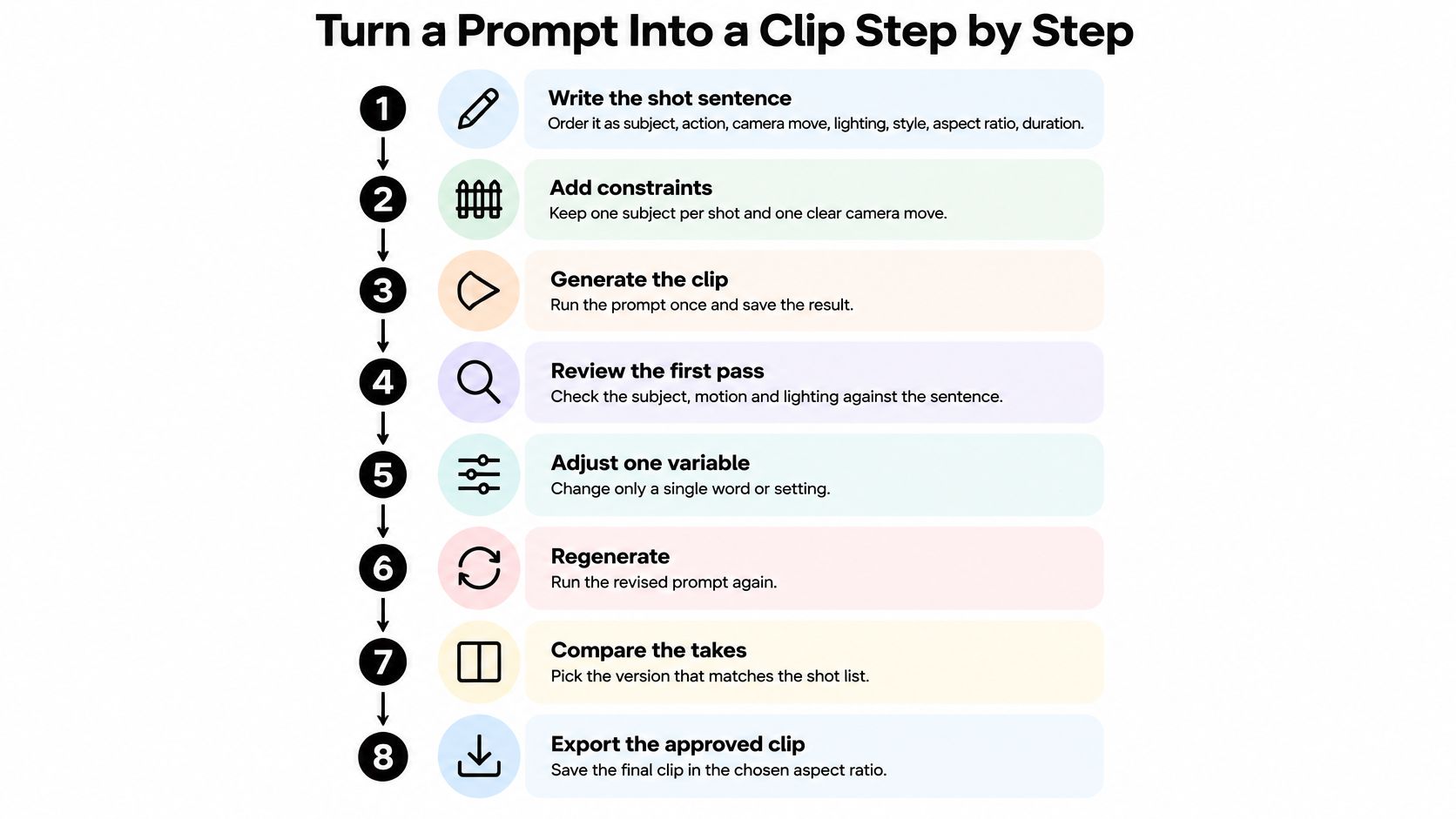
A loop that runs identically every time beats a clever prompt, because it lets you attribute a change in performance to a change in the clip. Run these eight steps in order.
- Write the shot sentence in a fixed order. Subject, action, camera move, lighting, style, aspect ratio, duration. The order matters. It forces you to commit to motion and light before you reach for mood words, which is where most prompts go soft.
- Add constraints. One subject per shot. No on-screen text. No logos. Every constraint you leave out is a decision you hand to the model, and it will make that decision differently on every render.
- Generate three or four low-cost variants before you commit to a hero render. Variants are cheaper than regret, and they tell you which part of the sentence the model is ignoring.
- Judge each variant on its first frame. That frame is the hook, so it gets judged before motion, before colour, before anything else.
- Change one variable per re-roll. Swap the camera move, or the lighting, or the duration. Change three and you've learned nothing about which one mattered.
- Re-render the winner at the target resolution from your spec sheet, not at whatever the draft came out as.
- Trim the dead frames. Cut the first three to five frames where motion hasn't started, and cut the tail where it settles into stillness. Both ends of a generated clip are usually padding.
- Log the prompt that worked in the same file as the spec. Six weeks later, that log is the only reason you'll be able to reproduce a look you liked.
<a id="why-camera-language-beats-adjectives"></a>
Why camera language beats adjectives
Set a weak prompt next to a strong one and the difference isn't vocabulary, it's specificity about motion.
"A video of a coffee shop" produces a drifting, generic interior with no subject and no reason to keep watching.
"Barista pours latte art, slow push-in at chest height, morning window light, shallow depth of field, muted film grade, vertical 9:16, 6 seconds" produces a shot you can cut into a sequence, because the camera has a job.
The second version works because a push-in implies a start point, an end point and a subject to move toward. Adjectives like "cinematic" and "beautiful" describe a feeling; camera language describes a movement, and movement is what the model can reliably execute. Lighting comes next in importance, because it sets continuity across shots, and style words come last, since they mostly change the grade rather than the action.
One structural fact to plan around: most renders are only a few seconds long. A 30-second clip is therefore a shot list of five or six generations cut together, not one heroic prompt. Build the template once, save it, and fill in the bracketed slots for every new shot.
<a id="keep-the-same-character-across-every-shot"></a>
Keep the Same Character Across Every Shot
A viewer decides whether two clips come from the same account in under a second, and the tell is rarely the topic. It's the wardrobe, the light direction, the grade, the lens.
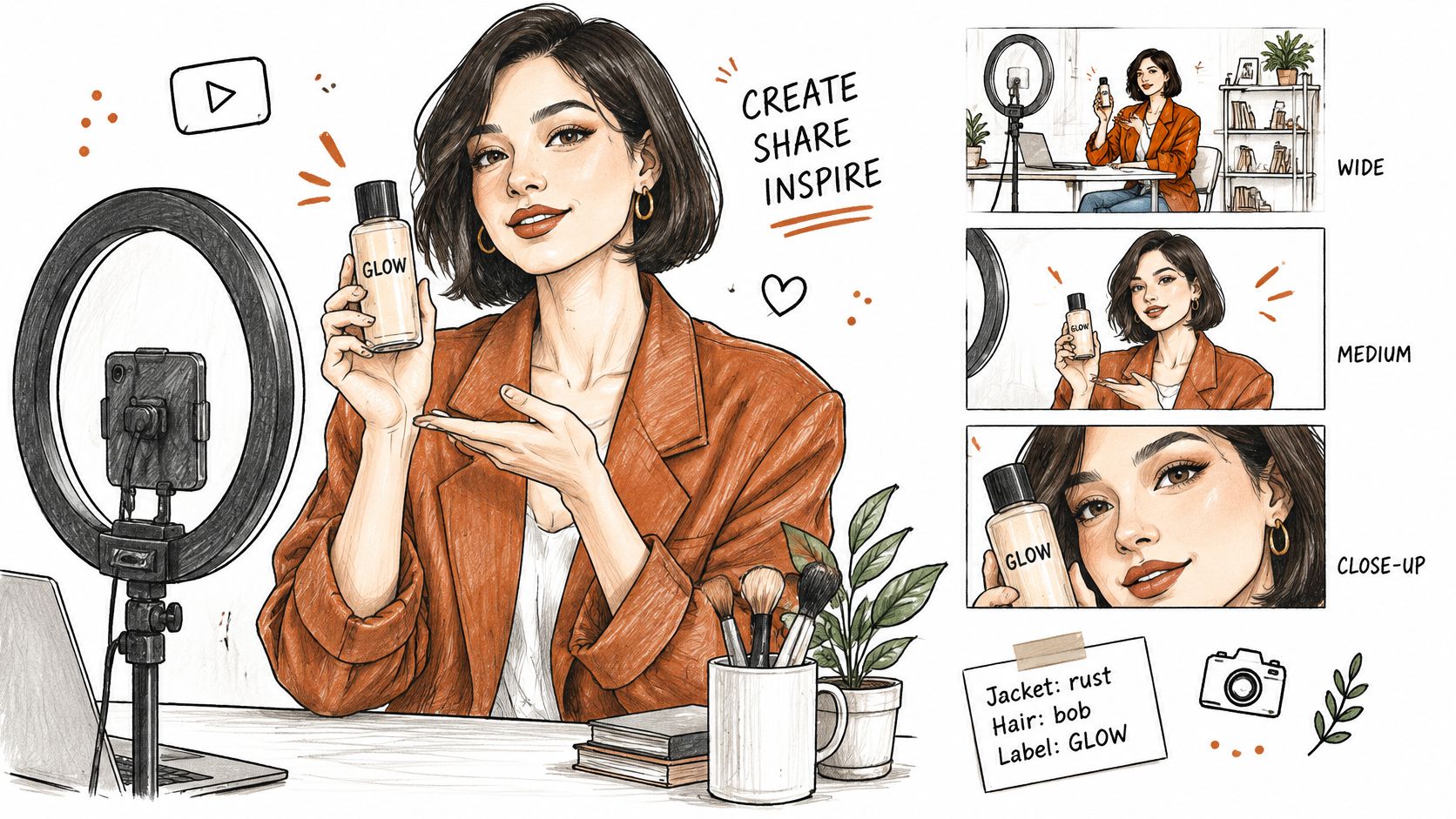
Continuity is a pre-production habit, not a re-roll problem. Start with a shot list of three to six shots and a one-line identity card for the subject: wardrobe, hair, product label, dominant colour, time of day. Paste that card into every prompt in the sequence. It costs eight words and prevents the model from redesigning your subject without warning between renders, which is the single most common reason a series looks like it was made by six different people.
Two mechanics do the heavy lifting after that. Image references hold the look: feed the model a still of your subject or your product so each generation starts from the same face, the same label, the same palette. First-and-last-frame control chains the movement: take the final frame of shot A and feed it as the first frame of shot B, so camera direction and lighting carry across the cut instead of resetting. The Veo 3.1 page describes first-and-last-frame control and reference-to-video tools, with output up to 4K, which map directly onto these two mechanics. For a creator building a repeatable look across TikTok, Reels and Shorts, that pairing is the difference between a clip and a series.
Anchor four things and refuse to vary them within a sequence: one lens language, one light direction, one time of day, one locked aspect ratio. If shot one is a slow push-in at chest height in morning window light, shot four does not become a handheld pan in noon overhead light. The model will happily give you both. Your job is to say no.
<iframe width="100%" style="aspect-ratio: 16 / 9;" src="https://www.youtube.com/embed/h5kjDJrHw_g" frameborder="0" allow="autoplay; encrypted-media" allowfullscreen></iframe>
The five-minute check before you export: lay every shot side by side at thumbnail size on one screen and ask whether a stranger would believe they came from the same account. Small screens are unforgiving in a useful way. At thumbnail size, inconsistencies in grade and framing show up instantly, while inconsistencies in content are invisible, so you end up auditing exactly the layer your audience judges. If two shots read as different brands, fix the identity card before you fix the render, because a re-roll built on a vague prompt drifts again.
Continuity failures are almost never the model's fault. They're a missing line in a prompt you wrote once and didn't reuse.
<a id="polish-the-cut-before-it-reaches-the-feed"></a>
Polish the Cut Before It Reaches the Feed
Polish happens after generation and before publishing, in a fixed order, because doing it out of order means doing it twice.
Choose the hook frame first, then trim everything before it. Place captions inside the safe zone rather than under the platform's UI, and check them at phone size, not on your monitor. Balance audio levels so dialogue and music don't compete, then decide on purpose between a clean resolution and a continuous loop, because a clip that ends ambiguously reads as an accident.
Then audit against checkpoints instead of instinct. For a 30-second clip, the directional targets reported in a short-form video retention benchmark analysis are at least 60% still watching at three seconds, at least 45% at the midpoint, and roughly 25-35% completion. Those are directional benchmarks, not algorithm requirements, and they shift with topic and audience.
| Checkpoint | Where in a 30-second clip | Directional target | Fix when it falls short |
|---|---|---|---|
| Three-second hold | 0-3 s | at least 60% still watching | Open on the payoff or the unresolved question, delete the intro |
| Midpoint retention | around 15 s | at least 45% still watching | Add a visual or information change every 3-5 seconds |
| Completion | through the last frame | roughly 25-35% reach the end | Cut to 18-22 s or build a seamless loop |
| Shares and saves | whole clip | above your own median | Give the clip a takeaway viewers want to keep |
| Rewatch rate | whole clip | above one play per viewer | Trim the final half-second so the loop feels seamless |
A weak three-second hold is a hook problem, not a pacing problem. A weak midpoint with a strong three-second hold is usually a structure problem, where the setup outlasts the payoff. Read the two numbers together and the diagnosis writes itself.
The rescue edit: delete the first two seconds and open on the payoff. It fixes more flat clips than any other single change.
For the export itself, matching the bitrate and resolution the destination expects matters as much as the edit. The RevelRaw Instagram export settings guide walks through the values Instagram rewards, which is a faster route than trial and error across a dozen uploads.
<a id="disclose-and-protect-ai-generated-clips"></a>
Disclose and Protect AI-Generated Clips
Decide disclosure before you touch the publish button, not after a comment asks. Label realistic synthetic scenes wherever a platform asks for it, and confirm each platform's current rule instead of assuming one label fits all three. TikTok, Instagram and YouTube Shorts draw the line between realistic AI scenes and ordinary assistive editing differently, and that line moves.
Keep provenance intact. Save the original master alongside its prompt, aspect ratio, duration and model settings, and keep that log through every crop, resize and subtitle pass. When someone asks what was generated and what was edited, the log answers in ten seconds and the argument ends.
Avoid interchangeable output. Prompt marketplaces and shared workflows produce near-identical assets, so add something the prompt library can't supply: your own script, your voice, location footage, client context, a fact you checked. Originality here is editorial, not technical.
Four-point check before every post. Is the AI use disclosed where the platform requires it? Is the master file and prompt log saved? Does the clip contain something only you could have made? Do you hold the rights to every person, place and product shown?
A no on any point means the clip waits. That sounds strict until the first time a takedown or a mislabelled ad costs you a week of publishing.
<a id="diagnose-broken-clips-and-judge-results-after-fourteen-days"></a>
Diagnose Broken Clips and Judge Results After Fourteen Days
Diagnose before you re-roll. Most generated-clip defects have one cause and one fix, and re-rolling the same prompt until something decent appears teaches you nothing about which variable mattered.
| Symptom | Likely cause | Fix |
|---|---|---|
| Hands or faces warp mid-shot | Too much body motion in the prompt | Shorten the action and add a camera move instead |
| Subject changes clothes or colour between shots | No reference image or anchor frame | Reuse the last frame of shot A as the first frame of shot B |
| On-screen text and logos come out garbled | The generator was asked to render typography | Generate a clean plate and add text in the editor |
| Export looks soft on mobile | Upscaled from a small render | Render at target resolution or 4K, then downscale |
| Clip is polished but gets no traction | Volume without differentiation | Change one variable (hook, length or topic) and re-test |
| Feed looks interchangeable with competitors | Same model, same stock prompts | Add your own script, voice, location footage or client context |
When a clip is clean and still flat, the cause is differentiation rather than production. Metricool's 2025 report found that YouTube Shorts publishing rose 61% while engagement fell 36% year over year, Instagram Reels views dropped 59.15%, and Facebook Reels views rose 24% (Metricool's short-form video report). Output is not distribution. The response is a first frame nobody else has, a topic narrow enough to earn a repeat viewer, platform-native versions, and a reason to send the clip to someone.
Then measure properly. A practical short-form video engagement benchmark methodology is to let posts mature for at least 14 days, compare medians rather than averages so one viral outlier doesn't flatter the whole account, and log platform, topic, duration, hook type, views, likes, comments, shares, saves, watch time and completion rate. Change one variable per test. Benchmark against platform-specific medians rather than raw likes: 5.20% like-to-view on Instagram Reels, 4.85% on TikTok, 1.77% on YouTube Shorts.
Start this week with one written prompt or one product photo through the Veo 3 AI video generator, run it through the eight-step loop, and check current plan details before you scale to a dozen clips. Then leave it alone for fourteen days and compare the median, not the best day.
Veo3 AI turns a text prompt or an original image into a vertical clip in minutes, and it renders the 9:16 output that TikTok, Reels and Shorts all expect, with commercial rights to what you generate. Take the spec sheet from the top of this article, generate one shot from it, and run that shot through the full loop before you build a second. Visit Veo3 AI to make the first clip and let the fourteen-day median tell you whether it earned a series.
Related Articles
Continue with more blog posts in the same locale.
Short Videos for Social Media: A 2026 Platform Workflow
Learn how to create short videos for social media once, then adapt them for TikTok, Reels and Shorts with the right specs, length and captions.
Read article
Short Videos for Instagram: A 2026 Step-by-Step Guide
Learn how to make short videos for Instagram in 2026: exact Reel specs, length benchmarks, a step-by-step production workflow, music rights and fixes.
Read article
Short Form Video Ads: Formats, Principles and Metrics
Short form video ads explained: platform specs for TikTok, Reels and Shorts, creative rules that hold attention, and the metrics that show what works.
Read article