
Veo 3 for Shopify Product Video Ads 2026: From Store Photos to Testable Creative
A practical Veo 3 workflow for Shopify product video ads, store-photo prompts, SKU testing, QA checks, and ecommerce creative.
Emma Chen · 17 min read · May 5, 2026
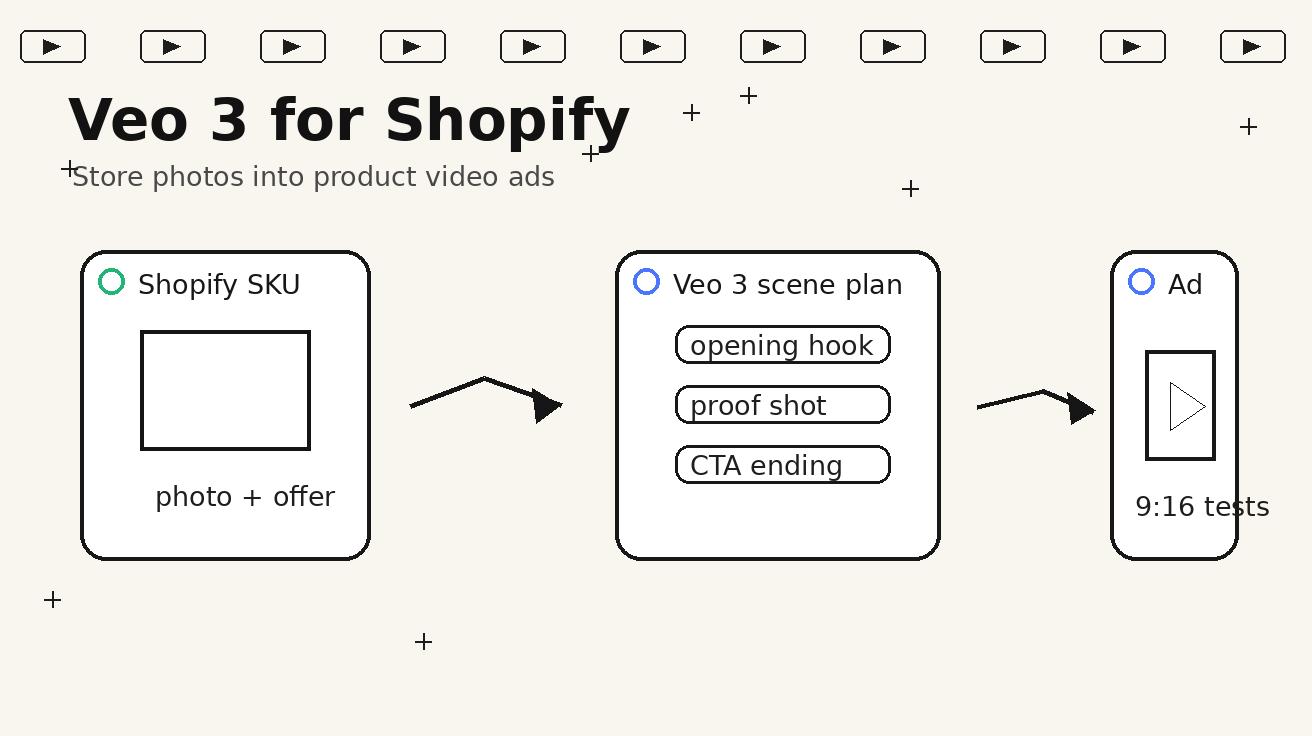
Shopify brands often reach the same creative bottleneck: the product page is polished, the photos are clean, the offer is clear, but the video pipeline cannot keep up with testing. A store may need product-page loops, TikTok hooks, Instagram Reels, YouTube Shorts, retargeting reminders, and email visuals for the same SKU. Shooting every angle is slow. Editing every concept from scratch is expensive. Reusing the same product photo for every ad makes campaigns feel static.
Veo 3 can help Shopify teams turn store assets into a more flexible video workflow. The strongest use case is not “make a random AI ad.” The stronger use case is SKU-level creative testing: take a real product photo, define one buyer question, write a controlled scene prompt, generate a short motion draft, and review it against the product page before using it in ads or landing pages. That turns Veo 3 into a practical creative research layer for ecommerce teams.
This guide explains how to use Veo 3 for Shopify product video ads in 2026. It covers prompt structure, storyboard planning, product accuracy checks, safe claim boundaries, image-to-video references, ad testing matrices, and publishing QA. The goal is simple: create more useful video drafts without making the product look different from what customers actually receive.
Why Shopify creative needs a SKU-level system
Most Shopify video problems are not solved by one hero commercial. Ecommerce teams need many small assets that answer different shopper questions. One clip should show product size. Another should show texture. Another should demonstrate a common use case. Another should remind visitors why they clicked the product the first time. Another should show a bundle or colorway. These assets do not all need a full production crew, but they do need a consistent process.
A SKU-level system starts with the product, not the platform. The team chooses one product, one buyer stage, and one creative job. The buyer stage might be discovery, comparison, hesitation, or return visit. The creative job might be hook, proof, clarification, or call to action. Veo 3 then becomes the motion generator inside that brief. It is easier to review a five-shot storyboard for one SKU than a vague prompt asking for an “amazing ecommerce ad.”
This matters because Shopify growth depends on iteration. A product with traffic but weak conversion may need clearer media. A product with strong conversion but high ad fatigue may need new hooks. A product with many support questions may need a visual explanation. Veo 3 can support all three scenarios if the prompt is specific enough and the final output is reviewed carefully.
The Veo 3 Shopify workflow
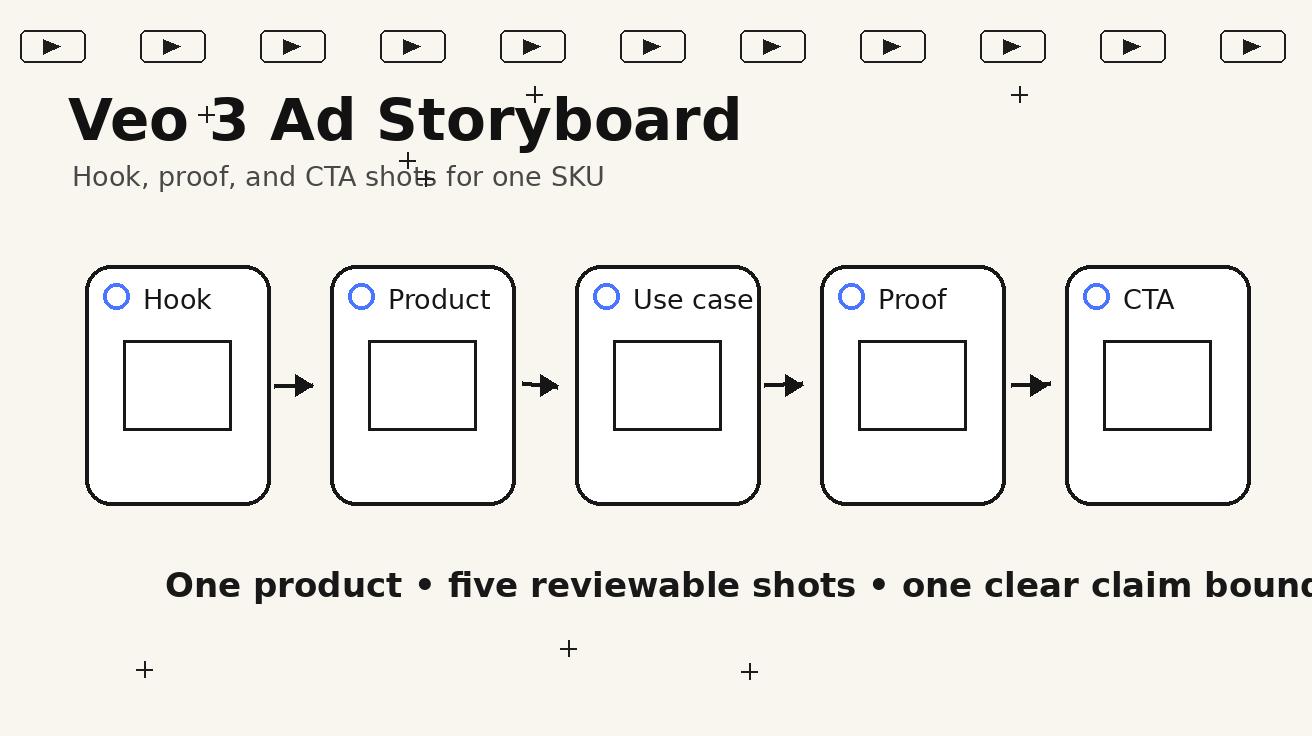
A practical workflow has five steps. First, select one SKU with enough commercial value to justify creative testing. Second, collect the product page inputs: title, price context, top benefits, objections, reviews, dimensions, usage photos, and any claim that is already approved. Third, choose the placement: product page, paid social, retargeting, collection launch, email, or landing page. Fourth, write a storyboard with a clear opening frame, proof shot, and final action. Fifth, generate and review Veo 3 outputs before adding text overlays in an editor.
The important step is the storyboard. Even a short six-second video benefits from structure. A Shopify ad should not wander. It should start with a recognizable situation, show the product accurately, make one believable point, and end with a useful frame for copy or CTA. When the storyboard is clear, Veo 3 prompts become easier to write and easier to evaluate.
A simple storyboard might be: “messy countertop, product enters frame, close-up shows texture, product used once, clean final setup.” Another might be: “static product photo on a store page, transition into lifestyle scene, hand demonstrates scale, final hero shot with space for caption.” These are not complicated scenes, but they are valuable because they answer ecommerce questions quickly.
Prompt template for a product-page loop
A product-page loop should feel calm and trustworthy. The visitor is already on the page, so the video does not need to shout. It needs to clarify the product. Use Veo 3 to show scale, material, package shape, and use context while keeping the product consistent with the reference image.
Use this prompt:
Create a short Shopify product-page video with Veo 3. Use the attached product photo as the exact reference. Show the product on a clean surface in a realistic home or studio setting. Start with a close-up hero angle, then slowly push in to show material, texture, and package details. Add one simple scale cue beside the product. Keep the product shape, color, label placement, size, and included accessories consistent with the reference. Make the motion smooth and loopable. Do not invent awards, certifications, discounts, medical claims, extra accessories, or features that are not visible on the product page. Leave space for text overlay, but do not generate text inside the scene.
This prompt is intentionally controlled. It tells Veo 3 what to show and what to avoid. It also keeps text overlays out of the generated footage, which makes the final ad easier to edit and safer to approve. If the store wants a specific claim such as “dishwasher safe” or “ships in 24 hours,” that copy should be added later only if the product page supports it.
Prompt template for a paid social hook
Paid social needs a stronger opening. The first second should make the product category obvious or show a problem the buyer recognizes. For Shopify products, good hooks often start with friction: a cluttered drawer, a travel bag that will not close, an overpacked desk, a pet hair problem, an awkward beauty routine, or a dull product photo turning into a useful scene. The key is to make the problem visual without exaggerating the product outcome.
Use this prompt:
Generate a 6-second vertical video ad for a Shopify product using Veo 3. Use the attached product image as the exact product reference. Opening frame: show a realistic everyday problem related to this product category, easy to understand without audio. Middle: introduce the product naturally and show one practical benefit. Ending: clean hero shot with empty space for a headline and call to action. Camera style: realistic ecommerce lighting, slight handheld push-in, no dramatic fantasy effects. Keep the product design, color, proportions, and visible branding consistent with the reference. Do not show fake customer reviews, fake discounts, competitor logos, celebrity likenesses, medical transformations, or impossible before-and-after results.
The output should be judged by clarity first. If a cold viewer cannot tell what the product is or why it matters in the first few seconds, the hook needs rewriting. Veo 3 can generate beautiful motion, but ecommerce creative has to sell understanding before it sells style.
Prompt template for retargeting reminders
Retargeting video does not need to introduce the product from zero. The viewer has already visited the site or interacted with an ad. A good retargeting clip can be simpler: a product hero shot, a bundle reminder, a clean use-case scene, or a “still comparing?” angle. This is a strong use case for Veo 3 because the creative can be short, consistent, and easy to adapt across several SKUs.
Use this prompt:
Create a short retargeting video for a Shopify product with Veo 3. The viewer has already seen the product before. Use the product reference image exactly. Show a clean final-use scene that reminds the viewer of the product’s main practical benefit. Include one close-up detail shot and one stable hero ending. The mood should be helpful and reassuring, not aggressive. Leave room for external captions such as “Still thinking it over?” or “See the best-selling bundle.” Do not invent pricing, discounts, reviews, guarantees, or claims not present on the Shopify product page.
Retargeting clips should reduce hesitation. They can show scale, usage, package contents, bundle options, or the product in a more believable environment. They should not pressure the viewer with fake urgency or unsupported claims.
Product accuracy rules for Veo 3 outputs
Product accuracy is the most important review standard. A Veo 3 clip that changes a label, adds an accessory, makes the product larger, or implies a feature that does not exist can create customer confusion. For Shopify teams, this is not a small detail. It can affect support volume, refund risk, and brand trust.
Before any generated clip goes live, compare it with the real product page. Check the product shape, packaging count, color, label placement, texture, dimensions, accessories, and visible claims. If the video shows an extra cable, extra bottle, different fabric, fake certification badge, or unrealistic result, reject it or regenerate. The standard is not “close enough for an ad.” The standard is “accurate enough for a customer to trust.”
It is also helpful to write category-specific exclusions. For beauty products, exclude clinical transformations and medical language. For apparel, exclude changes to cut, fit, fabric, and color. For electronics, exclude interface screens, ports, compatibility claims, and battery numbers that are not real. For home goods, exclude impossible size changes. For food products, exclude ingredients not listed on the page. These exclusions make Veo 3 more useful because they reduce the number of outputs that fail review.
A five-shot storyboard for Shopify ads
A simple five-shot structure works for many products: hook, product reveal, use-case proof, detail shot, and CTA frame. The hook creates attention. The product reveal shows what is being sold. The use-case proof shows why it matters. The detail shot builds trust. The CTA frame creates room for copy and next action.
For example, a desk organizer video could start with a messy desk, reveal the organizer, show items being placed cleanly, cut to a texture or size detail, then end on a clean setup with space for “Organize your desk in minutes.” A travel accessory could start with overpacked luggage, show the product, demonstrate one packing motion, show scale beside a passport, then end with a hero shot. A beauty tool could start with a cluttered counter, show the product, demonstrate safe placement, cut to material detail, then end with a clean routine frame.
This storyboard is useful because it keeps the generated footage commercially reviewable. If a clip fails, the team can identify which shot failed. Maybe the opening is unclear. Maybe the product changed shape. Maybe the proof shot implies too much. That is easier to fix than a single vague prompt.
The creative testing matrix
Shopify teams should not test random videos. They should test controlled variations. A practical Veo 3 matrix uses one SKU and three angles: problem-first, product-first, and result-first. Each angle can be generated in the same format, with the same product reference, and the same final offer. This makes the test more meaningful because the main variable is the hook.
Problem-first creative starts with friction. Product-first creative starts with the hero item and relies on visual quality. Result-first creative starts with the clean final state. For each angle, produce two or three versions with small changes to camera movement or environment. Then review them for product accuracy and test the strongest examples.
For product-page media, the matrix can be different: scale, texture, setup, and bundle. A product page does not need a hard hook; it needs helpful information. Veo 3 can create these informational clips quickly if the team keeps the prompt focused.
Where to use Veo 3 videos in Shopify funnels
Veo 3 outputs can support several parts of the Shopify funnel. On the product page, use a calm loop to show texture, size, or use context. On paid social, use vertical hook variants to earn attention. On retargeting, use reminder clips that show the product in a final-use state. In email, use short animated previews that reinforce the product benefit. On landing pages, use a hero loop or comparison section that helps explain the offer.
The placement should determine the prompt. A product-page video should be more precise and less dramatic. A TikTok-style ad can start with a stronger problem scene. A retargeting clip can assume the viewer knows the product and focus on reassurance. A landing-page visual should leave enough negative space for headline and button placement.
If the store uses Veo 3 for multiple placements, keep file naming strict. Include SKU, angle, placement, version number, and review status. A naming system such as sku-hook-problem-v1-approved prevents the creative folder from becoming unusable after a few weeks.
Quality checklist before publishing
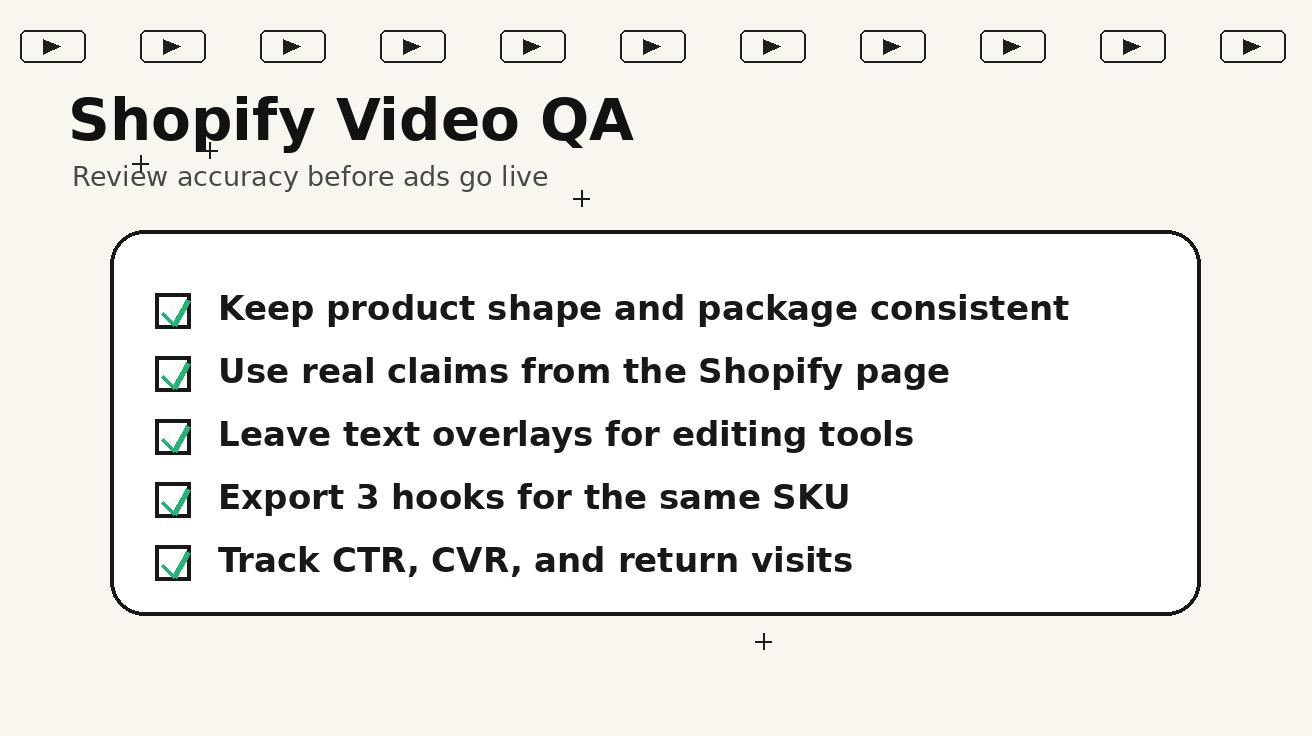
Use a four-pass QA process. First, check product fidelity. Does the generated product still match the reference image and Shopify page? Second, check claim safety. Does the clip imply a result, certification, discount, review, or feature that is not approved? Third, check format. Does the video work in the intended aspect ratio and placement? Fourth, check performance usefulness. Does the clip answer a shopper question or create a clear reason to click?
This QA process should be documented. If the output fails, save the reason. Common failure reasons include changed label, wrong color, extra accessories, unclear product category, first frame too slow, fake text, unsupported claim, or weak CTA frame. These notes help improve the next prompt and build a brand-specific Veo 3 playbook.
Do not skip QA because the clip looks impressive. A polished but inaccurate video is worse than a simple product photo. Shopify creative should help customers understand the real product, not create a fantasy version that the store cannot ship.
How to combine Veo 3 with real assets
Veo 3 works best when it starts from real product assets. Use the best product photo as the reference, but also keep real pack shots, lifestyle photos, and size references nearby during review. If the output is promising but slightly wrong, adjust the prompt rather than accepting the error. Add more explicit constraints: “do not change the cap shape,” “keep the label centered,” “show only one item in the box,” or “no additional accessories.”
For final production, combine Veo 3 footage with normal editing tools. Add captions, pricing, disclaimers, subtitles, logos, and CTAs outside the generated scene. This gives the team more control and makes compliance review easier. It also allows one approved Veo 3 clip to support several variations with different copy.
A good workflow is: generate motion in Veo 3, review accuracy, trim the best seconds, add approved copy, export for placement, and record performance. Over time, the team will learn which prompt patterns produce the most accurate outputs for each product category.
Measuring performance
Veo 3 product videos should be measured by business usefulness, not only visual quality. For paid social, track thumb-stop rate, click-through rate, cost per landing-page view, add-to-cart rate, conversion rate, and creative fatigue. For product pages, track media engagement, scroll depth, add-to-cart rate, conversion rate, and support questions if available. For retargeting, watch return visits, assisted conversions, and cost per purchase.
Start with small tests. Compare a static product photo against a product-page loop. Compare problem-first, product-first, and result-first hooks for the same SKU. Compare a generic product ad against a specific use-case clip. These tests show whether Veo 3 is helping shoppers understand the product or only adding motion.
If a Veo 3 concept wins, it can become a stronger brief for a real shoot or a more polished edit. That is one of the best ways to use AI video in ecommerce: not as a final answer for every campaign, but as a fast way to discover which angles deserve more investment.
FAQ
Can Veo 3 make Shopify product video ads from store photos?
Yes. Veo 3 can help create product reveals, use-case scenes, paid social hooks, and retargeting clips from strong product references. The prompt should specify product fidelity, camera movement, scene context, and claim boundaries.
What is the safest Veo 3 prompt for Shopify ads?
The safest prompt uses the product image as the exact reference, shows one practical use case, leaves text overlays for editing, and excludes fake reviews, fake discounts, medical claims, competitor logos, celebrity likenesses, and impossible transformations.
Should I add text inside the Veo 3 generation?
Usually no. For Shopify ads, it is safer to generate clean motion and add text overlays later in an editor. This avoids misspelled text, unsupported claims, and hard-to-change copy inside the footage.
Which Shopify placements work best for Veo 3 videos?
Product-page loops, vertical paid social hooks, retargeting reminders, bundle reveals, email animations, and landing-page hero visuals are strong placements. The prompt should change based on the placement and buyer stage.
How do I review Veo 3 product accuracy?
Compare the output against the Shopify page and real product photos. Check shape, color, label placement, package count, texture, dimensions, accessories, and any implied claim. Reject or regenerate clips that change the product or invent unsupported features.
Does Veo 3 replace real product shoots?
No. Real product photography and shoots are still important for flagship campaigns and exact product proof. Veo 3 is best used to create more motion drafts, test hooks faster, and identify which ideas deserve deeper production.
Conclusion
Veo 3 can become a useful Shopify creative system when it is used with discipline. Start with one SKU, one placement, and one shopper question. Use real product photos as references. Write prompts that control the camera, the scene, and the claim boundary. Review every output against the product page before adding copy or launching ads.
The strongest Shopify teams will not use Veo 3 to generate random videos. They will use it to test product-page loops, paid social hooks, retargeting reminders, and landing-page visuals with a clear review process. That creates faster learning without sacrificing product accuracy.
If you are building this workflow, start with Veo 3 text to video for scene-based creative, use Veo 3 image to video when product references matter, and keep your final claims aligned with the Shopify product page before any ad goes live.
<script type="application/ld+json"> { "@context":"https://schema.org", "@type":"FAQPage", "mainEntity":[ {"@type":"Question","name":"Can Veo 3 make Shopify product video ads from store photos?","acceptedAnswer":{"@type":"Answer","text":"Yes. Veo 3 can help create product reveals, use-case scenes, paid social hooks, and retargeting clips from strong product references when prompts define product fidelity, camera movement, and claim boundaries."}}, {"@type":"Question","name":"What is the safest Veo 3 prompt for Shopify ads?","acceptedAnswer":{"@type":"Answer","text":"Use the product image as the exact reference, show one practical use case, leave text overlays for editing, and exclude fake reviews, fake discounts, medical claims, competitor logos, celebrity likenesses, and impossible transformations."}}, {"@type":"Question","name":"Should I add text inside the Veo 3 generation?","acceptedAnswer":{"@type":"Answer","text":"Usually no. It is safer to generate clean motion and add approved text overlays later in an editor so copy can be changed and checked before publishing."}}, {"@type":"Question","name":"Which Shopify placements work best for Veo 3 videos?","acceptedAnswer":{"@type":"Answer","text":"Product-page loops, vertical paid social hooks, retargeting reminders, bundle reveals, email animations, and landing-page hero visuals are strong placements when prompts match the buyer stage."}}, {"@type":"Question","name":"How do I review Veo 3 product accuracy?","acceptedAnswer":{"@type":"Answer","text":"Compare the output against the Shopify page and real product photos. Check shape, color, label placement, package count, texture, dimensions, accessories, and any implied claim."}}, {"@type":"Question","name":"Does Veo 3 replace real product shoots?","acceptedAnswer":{"@type":"Answer","text":"No. Real shoots remain important for flagship campaigns and exact product proof. Veo 3 is best for motion drafts, hook testing, and creative iteration."}} ] } </script>
Related Articles
Continue with more blog posts in the same locale.

How to Make Sports Highlight Videos with Veo 3 AI (2026)
Create stunning sports highlight videos with Veo 3 AI. Generate dynamic action shots, slow-motion sequences, and dramatic replays using AI prompts.
Read article
How to Make a Short Film with Veo 3 AI (2026 Guide)
Learn how to create professional short films using Veo 3 AI. Step-by-step guide with prompts, workflow tips, and cinematic techniques.
Read article
How to Make Documentary Videos with Veo 3 AI (2026 Guide)
Create compelling documentary videos with Veo 3 AI. Learn prompting techniques, narrative structure, realistic footage generation, and post-production tips.
Read article