
YouTube 1000 Subscribers: A Practical Growth Guide
Hit YouTube 1000 subscribers with the real ad gates, a 12-month upload plan, titles that convert, and Shorts rules that protect watch time.
Veo3 AI · 14 min read · Oct 29, 2026
Most growth posts treat YouTube 1000 subscribers as the moment a channel starts paying you. Publish until the counter ticks over, flip on ads, and call it a business. That advice is half a rule sold as the whole rule.
The subscriber count is the audience-size half of full advertising eligibility. It is not a paycheck. A channel can sit on that number for months and still earn nothing from ads, because the second half of the test is sustained viewing, and a reviewer still has to approve the channel. For people testing AI video models, the gap is easy to miss. One clip can pull a burst of views while almost nobody comes back for the next one.
Treat the milestone as a gate you plan toward, one path at a time, and decide what a returning viewer can buy before ads are even available.
Table of Contents
- What 1000 Subscribers Unlocks on YouTube
- Plan, Publish and Measure Toward 1000 Subscribers
- Titles Thumbnails and Search Packaging
- Retention Shorts and Cross Promotion
- Choose an Offer Before You Wait for Ads
<a id="what-1000-subscribers-unlocks-on-youtube"></a>
What 1000 Subscribers Unlocks on YouTube
Read the gates before you celebrate the count. YouTube splits early fan features from full advertising, and the two activity routes inside the full tier do not add together.
| Tier | Subscribers | Extra requirement | Window | What unlocks |
|---|---|---|---|---|
| Expanded fan funding and shopping | 500 | 3 valid public uploads plus 3,000 watch hours or 3 million Shorts views | Uploads and Shorts views in 90 days; watch hours in 12 months | Selected fan-funding and shopping features in eligible countries |
| Full ads and YouTube Premium | 1,000 | 4,000 valid public long-form watch hours | Previous 12 months | Ad revenue sharing and YouTube Premium, after review |
| Full ads via Shorts | 1,000 | 10 million valid public Shorts views | Previous 90 days | Same full ad and Premium tier; Shorts Feed watch hours still do not fill the 4,000-hour route |
YouTube's expanded Partner Program page lets creators apply with 500 subscribers, three valid public uploads in the preceding 90 days, and either 3,000 qualified public watch hours in the past 12 months or 3 million qualified public Shorts views in the past 90 days. That tier can open selected fan-funding and shopping features in eligible countries. Revenue sharing from advertisements and YouTube Premium stays on the higher tier.
YouTube's Partner Program eligibility guide pairs 1,000 subscribers with one of two engagement tests: 4,000 qualified public watch hours from long-form videos during the preceding 12 months, or 10 million qualified public Shorts views within the preceding 90 days. Pick one. They are alternatives, not a combined total. The same guide states that watch hours from Shorts viewed in the Shorts Feed do not count toward the 4,000-hour requirement. The Shorts route averages about 111,111 qualified views per day across 90 days. The long-form route averages roughly 333 qualified watch hours per month.
<a id="checks-that-still-block-approval"></a>
Checks that still block approval
Clearing the numbers does not approve the channel by itself. Before you treat the count as monetization, confirm each of these:
- Policy compliance: The channel has to meet YouTube's monetization policies, not only the public counters.
- Regional availability: The Partner Program is not offered the same way in every country.
- Two-step verification: The Google account needs it turned on.
- No active Community Guidelines strikes: An open strike can stop the application.
- A linked AdSense for YouTube account: Revenue has nowhere to go without it.
Practical rule: 1,000 subscribers is an entry gate. Watch time or Shorts views are the proof that people actually stayed.
A Shorts-only library cannot fill the long-form hour gate, because Shorts Feed watch time is excluded from that route. If your clips are already strong, use them as trailers into an 8 to 12 minute walkthrough, and use AI editing for standout YouTube videos when the long cut needs tighter pacing than a raw generation gives you. Then choose one path and track that rolling window in YouTube Analytics. Lifetime totals will flatter you. The rolling 12 months, or the rolling 90 days, are what the application reads.
<a id="plan-publish-and-measure-toward-1000-subscribers"></a>
Plan, Publish and Measure Toward 1000 Subscribers
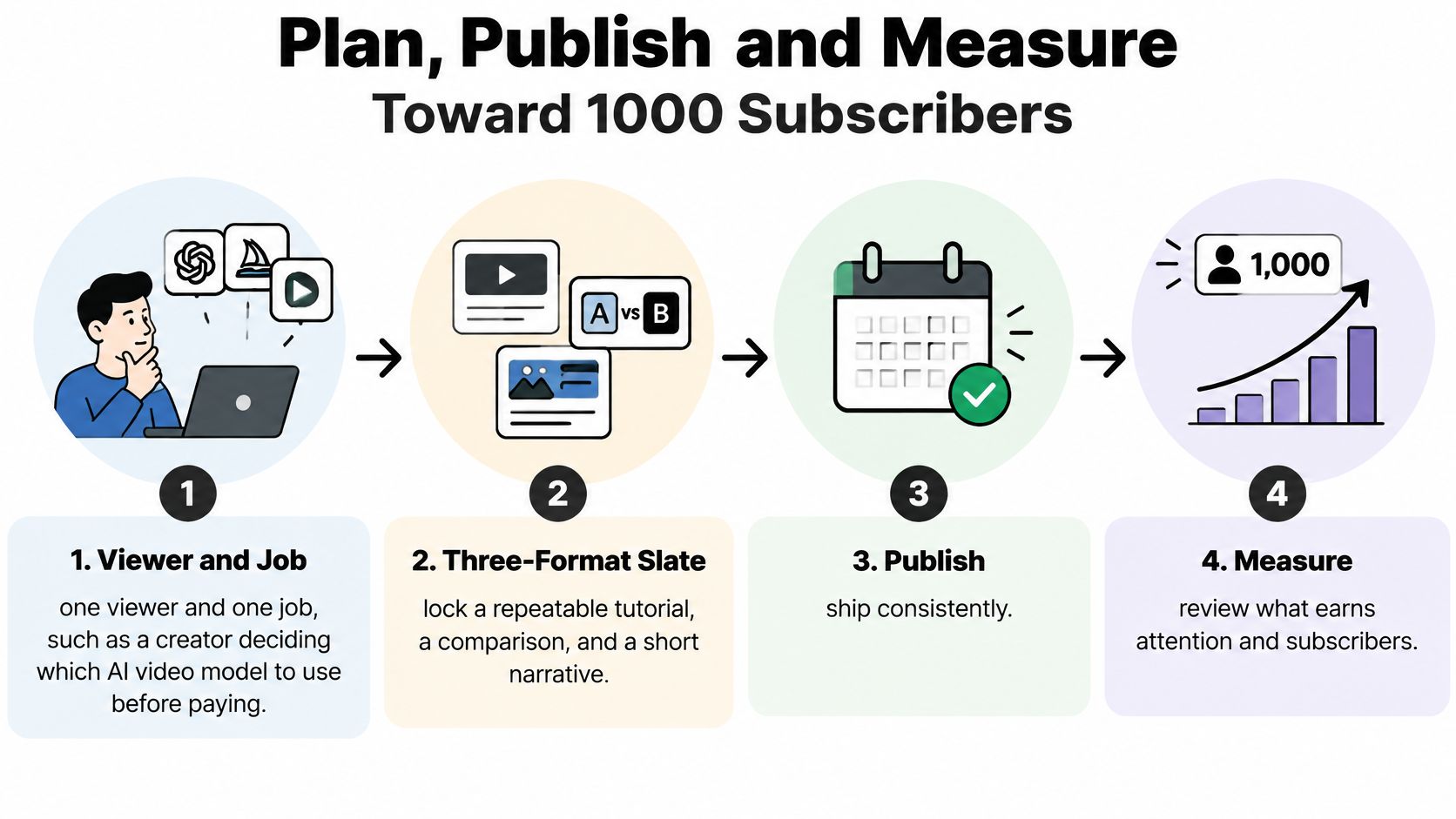
Name one viewer and one job before you upload anything else. Say the viewer is a creator deciding which AI video model to pay for. The job is a clear recommendation after a real test, not a tour of every new model name.
Lock a three-format slate and add nothing else until one format converts:
- A repeatable tutorial. One workflow, start to finish, such as turning a still product photo into a vertical ad.
- A comparison. Two models, one prompt, a verdict the viewer can use before spending money.
- A short narrative or behind-the-prompt series. Show the failed take, the prompt change, and the clip that finally worked.
For each video, write three lines on a card. The search phrase someone would type. The promise you will show in the first 15 seconds. One spoken reason to subscribe near the end, tied to the next video in that same job. If the reason is only "subscribe for more," you have not given them a job to return for.
Make the long-form piece 8 to 12 minutes when the walkthrough needs the steps on screen. Cut one 15 to 30 second tease from the same idea, and do not invent a second topic for that tease. Publish on two fixed weekdays you can protect, and reply to early comments within a day so the first viewers see a person, not a drop box.
<a id="a-12-month-publishing-experiment"></a>
A 12-month publishing experiment
Run one niche for about a year at a weekly count you can finish. A vidIQ channel study looked at channels still under 1,000 subscribers and reported what share later reached the milestone after adding videos within approximately 360 days. Read it as correlation. The study does not control quality, topic stability, or why people subscribed.
| Videos added | Share that reached 1,000 | How to read it |
|---|---|---|
| 0 | 0.20% | Almost no movement without new public videos |
| 1 to 11 | 1.86% | A handful of uploads barely changes the odds |
| 12 to 51 | 8.65% | A steady year of publishing is where gains show up |
| 52 or more | 30.77% | Highest share, still not proof that volume alone causes the result |
0.20% reached the milestone when the video count stayed unchanged, 1.86% after adding 1 to 11 videos, 8.65% after 12 to 51, and 30.77% after 52 or more. Do not treat 52 uploads as a machine that produces a 30.77% chance. Channels that upload more may also pick a stabler topic and a clearer viewer. Volume without that focus just fills a library nobody asked for.
<a id="the-monthly-keep-fix-or-stop-review"></a>
The monthly keep, fix, or stop review
Define subscriber conversion as subscribers gained divided by views. Split it by format, by traffic source, and by new versus returning viewers. Compare formats on subscribers per 1,000 views so a viral Short does not drown a quiet tutorial that converts.
- Keep the format with the best subscribers per 1,000 views, and make the next month's slots look like it.
- Fix the format that gets views but almost no subscribers. The packaging or the ending is usually the leak, not the topic.
- Stop the format with neither views nor subscribers. Do not "give it one more month" out of attachment.
Three traps waste the year. Counting inactive or deleted channels in someone else's success story. Swapping niches every month because a different model is trending. Chasing views without a spoken reason to subscribe.
If a new viewer cannot say what the next upload helps them do, the niche is still too wide.
That stranger test is the close of every monthly review. If the answer is "AI videos," narrow it to the job. Model choice before a purchase is narrow enough to measure. "Cool clips" is not.
<a id="titles-thumbnails-and-search-packaging"></a>
Titles Thumbnails and Search Packaging
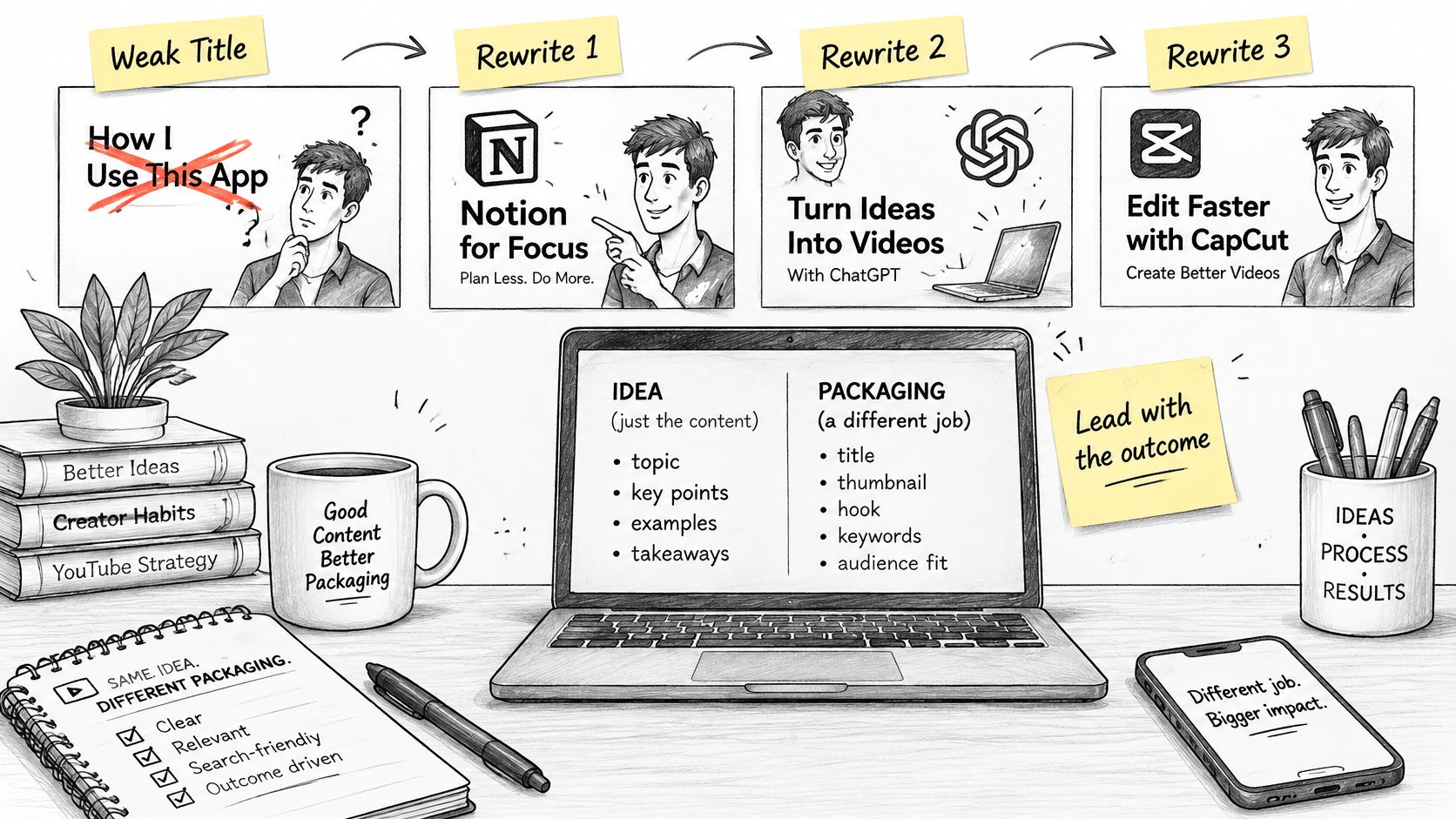
Packaging is a separate job from the idea. A strong test can still die under a title that could belong to any channel.
Start with a weak title and rewrite it three ways. The original: "This AI video is insane."
Vague hype keeps the same problem: "You won't believe this AI clip." Nobody can search for it, and it promises shock instead of a result.
A number with no promise: "3 AI video models tested." The digit looks specific. It still does not say what the viewer walks away able to decide.
A specific result: "Same prompt, two models: which ad clip is usable." The tool or model can sit in the title when that is what the searcher typed. Stay under about 60 characters, and lead with the outcome.
<a id="thumbnail-and-description"></a>
Thumbnail and description
The thumbnail gets one subject, one label of three or four words, and a face or a clear object large enough to read on a phone. Do not paste the full title onto the image. If the title already says "same prompt, two models," the label can be "Usable or not."
For search, put the main phrase in the first two lines of the description, in normal sentences. Add chapters that match the sections you speak about, so a viewer can jump to the verdict. Choose tags only for real variants of the topic, such as the model names you compared, not a pile of unrelated trends.
YouTube analytics insights from Taja AI are useful here when you are checking whether the title and the first lines match the phrases that already bring viewers, instead of guessing from the view count alone.
The first 30 seconds must show the result. No logo sting, no channel trailer, no "hey guys, welcome back." Play the usable clip, name the two models, then start the test. Ask for the subscribe only after a useful beat, such as the moment you show which model failed the product label. Then point at the next video that continues the same job.
A click without a delivered promise trains the recommendation system to stop sending that viewer.
Before you hit publish, spend five minutes on five items only. Title under about 60 characters with the outcome first. Thumbnail with one subject and a short label. First description line restating the promise. Chapters that match the spoken sections. One subscribe sentence tied to the next video.
A short walkthrough of that packaging habit is worth watching once, then copying into your own checklist.
<iframe width="100%" style="aspect-ratio: 16 / 9;" src="https://www.youtube.com/embed/jZCupmAOMAE" frameborder="0" allow="autoplay; encrypted-media" allowfullscreen></iframe>
<a id="retention-shorts-and-cross-promotion"></a>
Retention Shorts and Cross Promotion
Design the session, not a pile of isolated uploads. Long-form and Shorts do different jobs, and mixing those jobs is how channels stall just short of eligibility.
<a id="long-form-session-design"></a>
Long-form session design
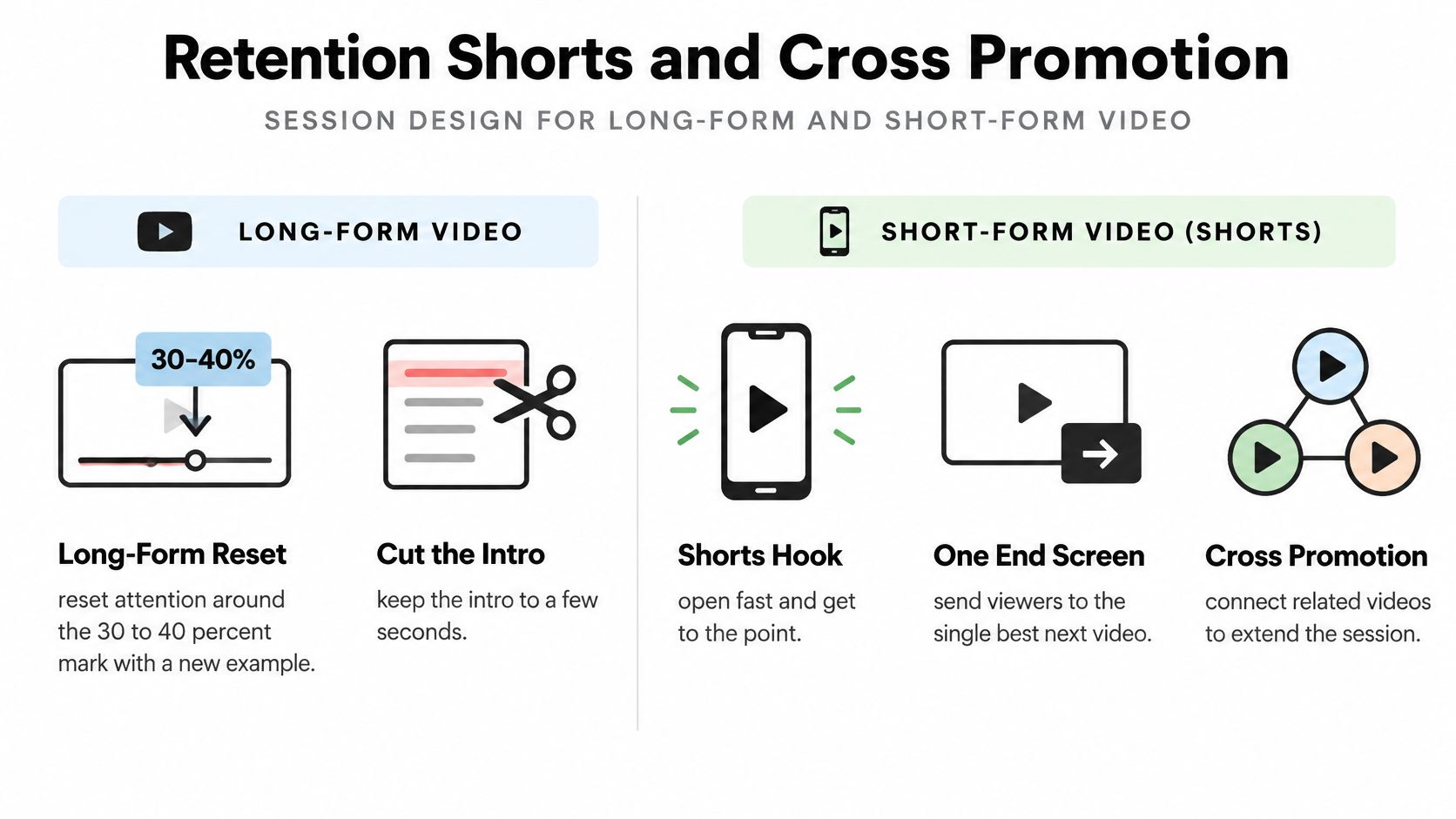
Reset attention around the 30 to 40 percent mark with a new example. If the first half compared two models on a product shot, the reset can be the same prompt on a talking presenter, not a recap of what you already showed. Cut any intro longer than a few seconds. The open is the result, then the path.
Use one end screen, aimed at the single best next video. A playlist dump gives the viewer five choices and no reason to pick. Cards should appear only when the spoken line names that video. If you did not say it, do not float it.
Community posts and a collab belong in the same niche. A huge unrelated channel sends people who do not want your next tutorial. A creator who also tests tools before paying will.
<a id="shorts-as-trailers-not-as-the-library"></a>
Shorts as trailers, not as the library
A Short works as a trailer. One idea, a result in the first second, and a pinned comment or a spoken line that points at the long-form version. That is discovery. It is not a substitute for the long-form hour counter.
A Short can win subscribers and still add nothing to the long-form hour counter.
Do not build the whole library as Shorts and then expect Shorts Feed watch time to satisfy the long-form gate. It will not. A Shorts-first channel that wants ads has to win the separate Shorts-view route instead. That is a reach bet, not a slow watch-time bet. Most small channels are not set up to win a pure reach bet in a short window, so the safer build is long videos that accumulate hours, with Shorts that only introduce them.
Cross-post the same short cut to other short-form apps only after the YouTube version is live. Keep the subscribe reason identical, including the words in the caption, so you can compare traffic instead of comparing three different offers.
Each week, ship two long videos aimed at hours and subscribers, and two Shorts that only tease those videos. If a Short starts to outperform as a standalone topic, note it. Do not let it replace the long cut that the hour path depends on.
<a id="choose-an-offer-before-you-wait-for-ads"></a>
Choose an Offer Before You Wait for Ads
YouTube 1,000 subscribers validates that a specific viewer will return. It does not mean ad revenue will matter. Approval can still leave you with a thin check, while a tight audience can already support an email list, a prompt or template download, affiliate links, or a small sponsor test.
YouTube's fan-funding eligibility page shows why the timing splits. Some fan-funding and shopping features can start at 500 subscribers plus the lower upload and watch-time or Shorts-view requirements. Full ad and Premium revenue still waits on 1,000 subscribers plus the higher watch-time or Shorts-view threshold. Geography, policy compliance, and audience behavior still sit between you and any of that money. Do not pause the channel for a review the counters are not ready for.
Track the offer next to average returning viewers, not the subscriber count alone. Useful counts for an AI-video channel are email sign-ups, qualified leads, prompt or template downloads, and affiliate conversions. A marketer would often rather sponsor 300 people who are about to pay for a model than 3,000 people who watched a random clip.
If you already know a workflow well enough to teach it, turn existing expertise into digital products and sell the template before you wait on ads. A one-page prompt pack matched to the comparison series is enough. Our longer note on how to monetize social media walks through offers that do not depend on the Partner Program.
<a id="one-production-step-for-next-month"></a>
One production step for next month
Ship the long-form comparison that already converts. Then cut trailers from the same demo. Veo 3.1 is a practical model for those demo clips when you need a short, finished look rather than a rough screen recording. We generate videos up to 8 seconds on all plans, which fits a trailer, and we grant commercial usage rights for videos generated on all subscription plans, so a sponsor test can use the same clip.
Use the Veo 3 AI video generator when you want the YouTube walkthrough and the short-form cuts in one workflow. The tools cover YouTube videos and TikTok and Reels, so the 8-second trailer can go out as a Short, a Reel, and a TikTok after the long video is live. Plan limits sit on the pricing page. Pick the plan from the generation limits listed there, not from a guess in a caption.
The decision is small and specific. Pick the long-form hour path or the Shorts-view path, and do not run both as if they fill the same counter. Keep the format with the best subscribers per 1,000 views. Attach one offer a returning viewer can take this month, before ads are large enough to notice.
Veo3 AI turns a text prompt or a still into short clips you can use as YouTube trailers, Shorts, Reels, and TikTok cuts while you build toward 1,000 subscribers on the path you chose. The same workflow covers the long-form demo you teach and the 8-second tease that points back to it, with commercial rights on subscription plans. Visit Veo3 AI and generate the next comparison clip before you outline another week of uploads.
Related Articles
Continue with more blog posts in the same locale.
Add a Moustache to a Photo the Right Way
Add a moustache to a photo with AI, a phone app, or layers. Match the method to the face, blend the hair, and export a still worth sharing.
Read article
Crane Shot Film Explained: What It Is and How It Works
Crane shot film explained: how camera cranes work, their payload limits, famous examples, and how to recreate a crane move with AI video tools.
Read article
Text to Video Generator Compared: Models, Quality, Costs
Compare any text to video generator on quality tests, clip length, languages, credit costs and licensing, with a quick pick for each creator type.
Read article