
Veo 3 SaaS Demo Video Generator 2026: Product Tours and Feature Launch Clips
Use Veo 3 for SaaS product tours, feature launch clips, onboarding previews, and B2B demo videos without losing product accuracy.
Emma Chen · 22 min read · May 8, 2026
<script type="application/ld+json"> {"@context":"https://schema.org","@type":"FAQPage","mainEntity":[{"@type":"Question","name":"Can Veo 3 create SaaS demo videos from product screenshots?","acceptedAnswer":{"@type":"Answer","text":"Yes. Veo 3 can help turn approved product screenshots, interface mockups, and structured prompts into short SaaS demo clips. Use it for marketing explainers, launch teasers, onboarding previews, and sales enablement visuals, then keep exact click-by-click training in screen recordings."}},{"@type":"Question","name":"What is the best use case for a Veo 3 SaaS demo video?","acceptedAnswer":{"@type":"Answer","text":"The strongest use cases are short product tours, feature launch clips, landing page hero loops, sales deck explainers, onboarding previews, and paid social variants that need to communicate one software benefit quickly without inventing product behavior."}},{"@type":"Question","name":"How long should a SaaS demo video be in 2026?","acceptedAnswer":{"@type":"Answer","text":"Most SaaS demo clips work best between 10 and 30 seconds. Use 10 to 15 seconds for hero loops and social teasers, 20 to 30 seconds for launch clips, and longer edited sequences only when the buyer needs a workflow explanation."}},{"@type":"Question","name":"How do I keep SaaS UI accurate in Veo 3 outputs?","acceptedAnswer":{"@type":"Answer","text":"Start with approved screenshots, lock the visible interface, ask for one action per clip, avoid asking the model to generate precise text, add final labels in an editor, and review every paused frame for fake metrics, distorted UI, broken buttons, or misleading claims."}},{"@type":"Question","name":"Should SaaS teams replace screen recordings with Veo 3?","acceptedAnswer":{"@type":"Answer","text":"No. Screen recordings are still better for exact training, support articles, and compliance-sensitive walkthroughs. Veo 3 is better for polished marketing motion around the product story: launch moments, problem-solution narratives, benefit-led product tours, and lightweight demo assets."}},{"@type":"Question","name":"What should be included in a SaaS demo video brief for Veo 3?","acceptedAnswer":{"@type":"Answer","text":"Include the target viewer, product stage, core feature, approved UI assets, one business benefit, timing plan, motion style, brand constraints, claims that are allowed, claims that are forbidden, and the final channel where the video will be used."}}]} </script>
Veo 3 SaaS Demo Video Generator 2026: Product Tours and Feature Launch Clips
A strong SaaS demo video does not simply show a dashboard. It helps a buyer understand why a product exists, what changed for the user, and what the viewer should do next. That is why the best use of a Veo 3 SaaS demo video workflow is not to create a fake app or a generic software animation. The goal is to turn approved product screens, feature notes, customer pain points, and launch positioning into a clear visual story that feels polished enough for marketing while staying honest enough for sales, onboarding, and product-led growth.
This matters because SaaS teams now need more video than traditional production can comfortably deliver. A launch may need a landing page hero loop, a Product Hunt teaser, three LinkedIn cuts, a short sales deck clip, an onboarding preview, an internal enablement video, and paid social variants for different buyer roles. Waiting for one perfect studio video often slows the campaign. Publishing low-quality screen recordings can make a good product feel unfinished. Veo 3 gives teams a middle path: use AI video generation to create controlled motion around the product story, then apply editorial review before anything reaches customers.
This guide focuses on B2B SaaS product tours, feature launch clips, onboarding previews, and demo workflows. It intentionally avoids ecommerce product ads, physical product showcases, and generic creator content. If you need broader production systems, pair this article with our guide to Veo automation workflows. If you need prompt patterns for screen-based clips, read the companion tutorial on Veo 3 UI walkthrough prompts. Here, the priority is SaaS storytelling: how to make a software value proposition visible in a few seconds without distorting the product.
What a Veo 3 SaaS demo video should actually do
A SaaS demo video has one job: reduce uncertainty. The viewer may be a founder comparing tools, a VP of sales looking for pipeline visibility, an operations leader trying to automate repetitive work, a product marketer planning a feature launch, or a customer success manager explaining a new workflow. They do not need a cinematic tour of every menu item. They need to see the product solve one meaningful problem.
That is the first strategic difference between SaaS demo video and general AI video generation. A generic prompt often starts with style: futuristic dashboard, glowing interface, fast camera movement, dramatic music. A useful SaaS prompt starts with the buyer’s question. What is confusing today? What is slow today? What risk does the product remove? What moment should the viewer remember after the clip ends? Once that is clear, Veo 3 can help visualize the transition from old workflow to new workflow.
For example, a customer data platform may not need a video that says “powerful analytics dashboard.” It needs a clip that shows fragmented customer signals becoming one account timeline. A project management SaaS may not need another animated kanban board. It needs a launch clip where a scattered team moves from unclear priorities to a clean release plan. A security product may need a short demo where a risky permission change is flagged before it becomes an incident. These clips are product tours, but they are also business stories.
A good Veo 3 SaaS demo video usually includes four layers:
| Layer | Purpose | Example |
|---|---|---|
| Viewer context | Shows who the product is for | RevOps manager reviewing pipeline hygiene |
| Product moment | Shows one interface or workflow | Risk score updates after data sync |
| Benefit proof | Connects motion to business value | Fewer manual checks before forecast review |
| CTA frame | Guides the next action | Watch the full demo, try the template, book a walkthrough |
The mistake is trying to include the whole product. Most buyers cannot retain six features from a 20-second clip. Instead, choose one scene that makes a feature easy to remember. Veo 3 is strongest when it gives that scene motion, pacing, and context.
Why SaaS teams are using Veo 3 for product tours in 2026
SaaS marketing has shifted toward constant proof. Buyers want to see the product earlier. Sales teams want short clips they can send before a call. Founders want launch assets before the final homepage refresh is complete. Product teams want onboarding previews that do not require a full video crew. Customer success teams want simple clips that explain what changed after an update. This creates a constant demand for product video.
Traditional product video still has a place. A flagship launch film, customer story, or fully produced explainer may be worth a larger budget. But many SaaS teams also need lightweight, repeatable video for smaller moments: a new integration, a reporting view, a permissions update, a mobile flow, a workflow template, a pricing-page explainer, or a feature comparison. These assets need to be good enough to ship, not expensive enough to wait six weeks.
Veo 3 helps because it can support the parts of the process that usually create friction. It can add motion to a static screen. It can make a dashboard feel more understandable by showing the moment before and after an action. It can create contextual scenes around a product screen, such as a product manager reviewing a launch board or a support lead checking a customer health timeline. It can help a team test several narrative angles before committing to final edits.
The important word is “support.” Veo 3 should not be treated as a replacement for product accuracy. The interface, claims, pricing, permissions, integrations, and customer outcomes still need human review. AI video generation is useful when it speeds up the visual layer while the team keeps control of the message.
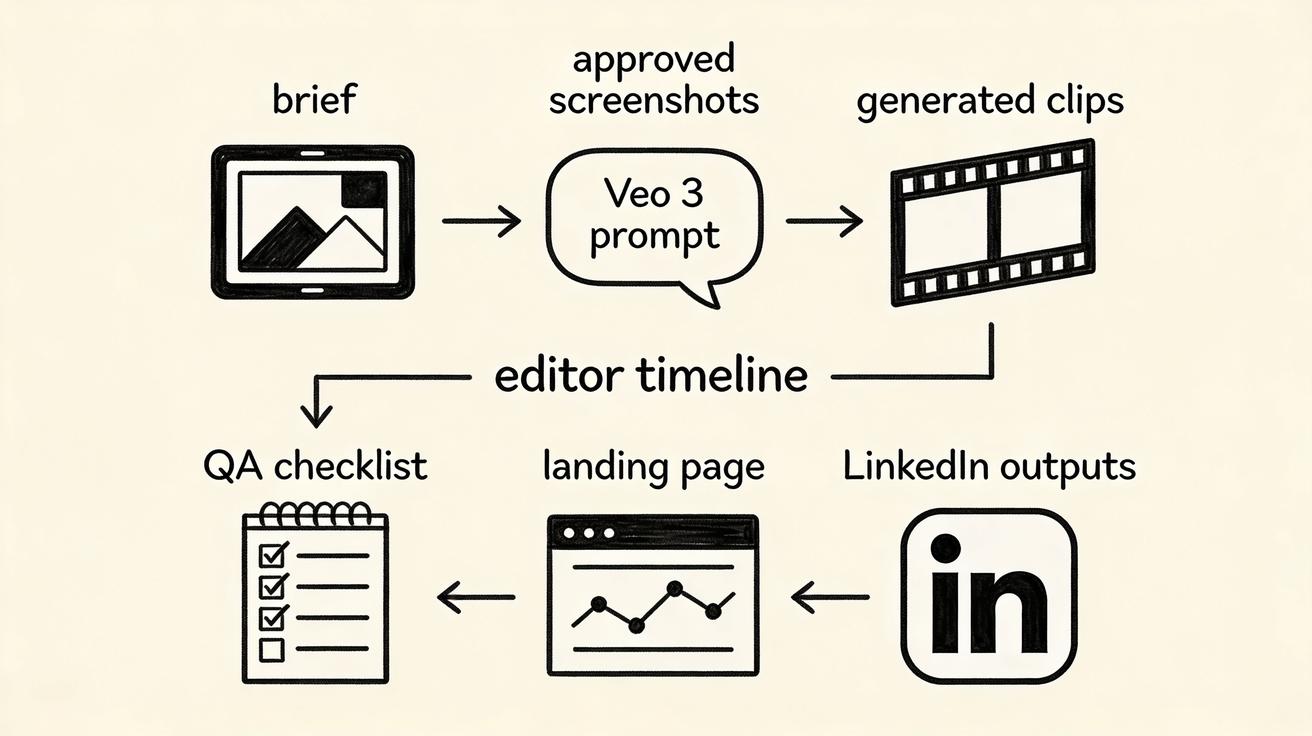
For SaaS teams, the best results come from a system rather than one-off prompting. Build a brief, define approved assets, create prompt templates, review outputs, edit captions, publish channel-specific versions, and track performance. That is how a Veo 3 SaaS demo video becomes part of product-led growth instead of a random creative experiment.
The best SaaS demo video formats for Veo 3
Different SaaS moments need different video formats. A founder announcing a new product does not need the same clip as a customer success team introducing a new dashboard. Before writing a prompt, choose the format.
1. Landing page hero loop
A hero loop should make the product category clear in seconds. It does not need narration or a full interface walkthrough. It needs a calm visual that supports the headline. For Veo 3, this is often an image-to-video workflow using an approved product screen or a simplified mockup. The prompt should preserve the UI, add subtle depth, and show one benefit-led motion: data flowing into a dashboard, a task moving from blocked to complete, or a report becoming easier to read.
Keep hero loops quiet. Avoid frantic camera movement, flashing charts, and fake numbers. A landing page visitor is still deciding whether the product is relevant. The video should help the page feel credible, not distract from the copy.
2. Feature launch clip
A feature launch clip is more specific. It should answer: what changed, who benefits, and why now? This is where Veo 3 can help turn a changelog item into a memorable story. Instead of showing a static screenshot of a new export button, show the workflow before the feature, the moment the feature appears, and the cleaner outcome.
A strong 20-second structure is:
- Problem frame: the old workflow is slow, fragmented, or hard to explain.
- Feature reveal: the new feature appears in the product context.
- Benefit frame: the user reaches a cleaner outcome.
- CTA: “Explore the new workflow” or “Watch the full demo.”
This structure works for analytics filters, AI agents, dashboard views, integrations, collaboration features, security controls, and onboarding improvements.
3. Sales deck demo clip
Sales teams often need short proof assets before the full live demo. A Veo 3 clip can help a rep introduce one use case inside a deck or follow-up email. The goal is not to replace the account executive. It is to help the buyer remember the product between meetings.
For sales clips, use buyer-specific language carefully. Do not invent customer logos, ROI numbers, or performance claims. Use generic but relevant context: “weekly forecast review,” “support queue triage,” “SOC alert review,” “candidate pipeline summary,” or “finance close checklist.” The clip should make the workflow easier to visualize without pretending to be a real customer implementation.
4. Onboarding preview
Onboarding videos need accuracy, but they do not always need exact click-by-click instruction. A short Veo 3 onboarding preview can help users understand what will happen in the next step: connect a data source, invite teammates, choose a template, review recommendations, or publish a workflow. Use real screen recordings for precise documentation. Use Veo 3 for motivation and orientation.
This distinction protects trust. A customer who needs help completing a task should not be forced to interpret generated UI motion. But a customer who is anxious about starting can benefit from a quick preview that makes the product feel simple.
5. Product-led growth teaser
PLG teams often need short clips for in-app announcements, lifecycle emails, and social posts. These clips should be narrow. A 12-second teaser might show a new AI summary card, a cleaner report builder, or a faster approval flow. The best PLG teaser tells the user, “This is worth clicking because it will save you time right now.”
A useful pattern is: user pain, product action, visible payoff. Keep it concrete. Avoid abstract words like “streamline,” “revolutionize,” and “unlock” unless the clip shows exactly what changed.
A practical brief template for Veo 3 SaaS demo videos
The prompt is only as good as the brief. If the brief is vague, the output may look impressive but fail the business goal. Before generating, fill in a short production brief.
Campaign goal: What should this clip help accomplish? Examples: increase feature adoption, explain a launch, support sales follow-up, improve landing page engagement, or reduce onboarding uncertainty.
Target viewer: Who is watching? Be specific: product marketer, sales leader, customer success manager, IT admin, founder, agency operator, or existing user.
One product moment: What exact moment should the clip show? Do not write “show the platform.” Write “show a campaign brief turning into three approved video variants” or “show a support manager opening an account health timeline.”
Approved assets: List screenshots, mockups, brand colors, product language, and any interface elements that must be preserved.
Allowed claims: State only claims that marketing and product teams approve. If a number is not verified, do not include it. If a feature is beta-only, say so in the final edit or avoid the claim.
Forbidden details: Block fake customer data, fake logos, fake revenue charts, distorted UI text, invented integrations, unrealistic automation, and product behavior that does not exist.
Timing plan: Decide whether the clip is 10, 15, 20, or 30 seconds. Give the model a simple sequence.
Final channel: LinkedIn, landing page, Product Hunt, sales deck, onboarding email, in-app modal, or paid social. The channel changes the pacing and composition.
This brief can be reused across launches. The more repeatable it becomes, the faster your team can produce safe video without restarting strategy every time.
Prompt patterns that work for SaaS product tours
A Veo 3 SaaS prompt should describe the business scene, the interface constraint, the motion, and the safety rules. Below are reusable patterns you can adapt.
Prompt pattern: landing page hero
Create a clean B2B SaaS product demo video for a landing page hero. The scene shows an approved analytics dashboard on a laptop screen. Preserve the layout and visible UI exactly. Add subtle camera movement and gentle motion that shows fragmented data becoming one clear account timeline. Professional SaaS marketing style, calm lighting, no fake logos, no invented metrics, no unreadable text, no unrealistic interface behavior. End on a stable frame suitable for a headline overlay.
Use this when the landing page already has strong copy and the video simply needs to make the product feel alive.
Prompt pattern: feature launch
Create a 20-second feature launch clip for a B2B SaaS product. The viewer is a product operations manager preparing a release. Show the old workflow as scattered notes and status updates, then reveal the approved product screen where the new launch checklist organizes owners, tasks, and risk flags. Preserve UI structure, avoid fake customer names, keep text minimal and readable, and end with a clean CTA-safe frame. Motion should be clear, not flashy.
Use this when the team needs a launch asset for LinkedIn, email, and the blog.
Prompt pattern: onboarding preview
Create a short onboarding preview for a SaaS setup flow. Show a new user connecting an approved data source, choosing a template, and arriving at a simple dashboard summary. Keep the interface accurate and do not invent integrations. Use calm motion, clear sequence, and a friendly product-led growth tone. The video should reduce anxiety before the user clicks “Get started.”
Use this for lifecycle emails, in-app education, and support handoff.
Prompt pattern: sales enablement
Create a sales deck demo clip for a B2B SaaS workflow. Show a revenue leader reviewing a forecast risk dashboard before a pipeline meeting. Preserve the approved dashboard layout, avoid specific company names, avoid unverified ROI numbers, and focus on the moment a risk flag becomes an action plan. End with a clean frame that can sit beside a sales slide headline.
Use this when sales needs proof without running a live demo in every touchpoint.
These prompts should be adapted to your real product. Replace the generic role, workflow, and benefit with your actual positioning. The safest prompt is usually the one that explains what not to change.
Where Veo 3 fits in the SaaS launch workflow
A launch workflow has many moving parts: positioning, screenshots, docs, homepage modules, emails, sales enablement, social posts, paid creative, and customer education. Veo 3 is most useful when it is introduced after positioning is clear but before final video assets are locked.
Start with the launch message. What is the feature? Which segment cares? Which pain point does it solve? What proof can you show? Then collect approved UI assets. Clean screenshots matter more than dramatic prompts. Remove private customer data. Use realistic sample states. Make sure the screen demonstrates the actual feature, not a concept the product cannot support.
Next, generate exploration clips. Create several versions around the same brief: one hero loop, one feature reveal, one onboarding preview, and one sales clip. Review them with product marketing and product management. Choose the version that best communicates the message, not the version that looks most cinematic.
After that, edit for channel. Add captions, CTA, brand-safe overlays, and final copy in a normal editor. This is where many teams improve quality. Do not rely on the AI model to create precise interface text or final legal language. Let Veo 3 create motion; let your team control the words.
Finally, track performance. If the LinkedIn launch clip gets saves but low clicks, the story may be interesting but the CTA may be weak. If a landing page hero loop increases time on page but does not improve conversions, the video may be attractive without clarifying value. Treat each clip as part of an analytics loop, not a decoration.
Accuracy rules for software UI storytelling
SaaS demo video has a trust problem when the UI looks too perfect. Buyers are used to polished mocks that disappear during the real demo. That is why accuracy rules matter.
First, preserve the core interface. If the clip is based on a real screenshot, the generated output should not change navigation labels, pricing, charts, user permissions, or integration names. If the model struggles with text, keep the generated screen simpler and add labels afterward.
Second, avoid fake proof. Do not show “300% growth,” “$2.4M saved,” “SOC 2 approved,” or “99.99% success” unless the claim is real, approved, and appropriate for the context. SaaS buyers may not pause the video to audit every number, but false proof still damages trust.
Third, separate concept visuals from product proof. If the clip is a conceptual launch teaser, label it as a teaser in the surrounding copy. If it is a product demo, review it like a product demo. The viewer should never believe the product does something it cannot do.
Fourth, keep motion functional. Motion should guide attention: highlight the new card, reveal the workflow, move from problem to solution, or help the viewer understand sequence. Random zooms, floating panels, and dramatic transitions can make software feel less credible.
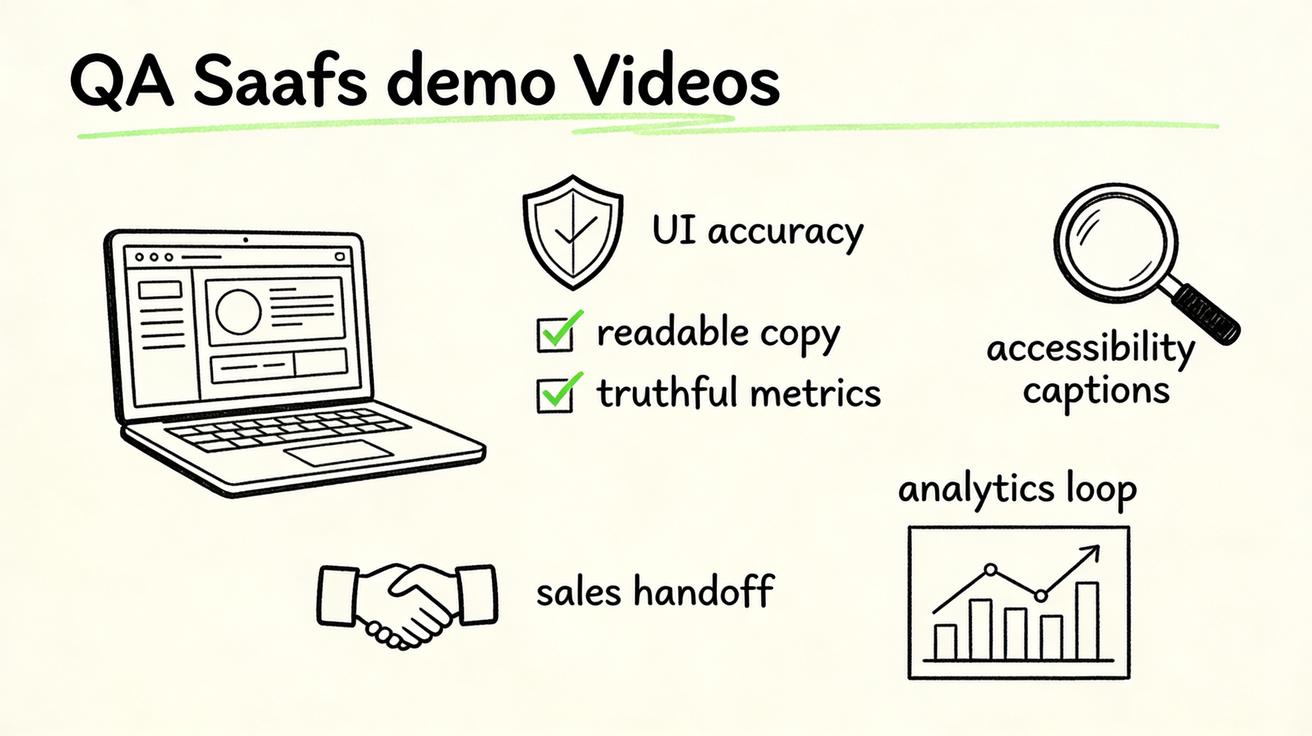
Fifth, review paused frames. A video can feel fine at full speed while individual frames contain distorted buttons, unreadable labels, or impossible charts. Pause at the beginning, middle, and end. If a frame would embarrass the product team in a sales call, do not publish it.
How to measure a SaaS demo video after publishing
A Veo 3 SaaS demo video should be judged by business usefulness, not only by visual quality. The right metrics depend on channel.
For landing pages, track scroll depth, time near the hero section, click-through to signup or demo, and conversion rate by traffic source. If the video increases engagement but not conversion, test a clearer first frame or a stronger headline alignment.
For feature launches, track announcement clicks, activation of the new feature, demo requests, email replies, and sales team usage. A launch clip is successful when it helps people understand the feature faster, not just when it gets views.
For LinkedIn and social, track saves, comments from the target audience, profile clicks, and downstream site sessions. Views alone can be misleading. A broad audience may watch a beautiful interface animation while the actual buyer ignores it.
For onboarding, track completion rate, support tickets, time to first value, and user actions after the video. If users still get stuck, the video may be too aspirational and not practical enough.
For sales enablement, ask reps whether the clip helps open conversations, clarify use cases, or revive stalled deals. Qualitative feedback matters because a short demo clip may influence pipeline without producing a clean attribution signal.
The best SaaS teams build a small library of video learnings. Which product scenes increased demo requests? Which benefits caused confusion? Which clip length worked for LinkedIn? Which screenshots looked most trustworthy? Over time, this library becomes more valuable than any single prompt.
Common mistakes to avoid
The first mistake is making the product too generic. If the clip could represent any SaaS company, it will not help your positioning. Use role-specific context, workflow-specific scenes, and feature-specific outcomes.
The second mistake is asking Veo 3 to generate too much UI text. AI video models can create plausible interface visuals, but precise product copy is still safer in post-production. Use the model for motion and atmosphere. Use editing tools for final text.
The third mistake is treating launch clips like ads. A SaaS feature launch should feel useful, not merely promotional. Show what changed and why it matters. Avoid empty hype.
The fourth mistake is ignoring sales and customer success. Product marketing may own the launch, but reps and CSMs know which objections buyers repeat. Ask them which scene would make a prospect say, “I understand.”
The fifth mistake is publishing without a QA owner. Someone should verify product accuracy, brand consistency, claims, accessibility, and channel fit. AI video can speed production, but it should not remove accountability.
Recommended production workflow
Here is a practical workflow for one Veo 3 SaaS demo video:
- Choose one use case and one buyer.
- Write the message in one sentence.
- Select approved screenshots or mockups.
- Remove private data and risky claims.
- Write a timing plan with three or four beats.
- Generate two to four Veo 3 variations.
- Review for product accuracy and visual clarity.
- Edit captions, CTA, and brand overlays outside the model.
- Export channel-specific versions.
- Track performance and save learnings for the next launch.
This workflow keeps the team fast without turning AI generation into a guessing game. It also makes reuse easier. A landing page hero clip can become a LinkedIn teaser. A sales deck clip can become an email GIF. A feature launch video can become the opening scene of a longer webinar. The same product story can travel across the funnel when the source asset is structured well.
If you are building a larger content system, connect this process with your text-to-video and image-to-video workflows. Text prompts are useful for concept scenes, while image-based prompts are safer when UI accuracy matters.
Final take: use Veo 3 for clarity, not decoration
The best Veo 3 SaaS demo video is not the most futuristic one. It is the clip that helps the right buyer understand the product faster. It shows one workflow, one pain point, one product moment, and one benefit. It respects the actual interface. It avoids fake proof. It gives sales, marketing, and customer success a useful asset they can reuse.
In 2026, SaaS teams that win with AI video will not be the teams that publish the flashiest generated dashboards. They will be the teams that build a repeatable system for software storytelling: clear briefs, approved assets, prompt patterns, QA gates, channel edits, and performance review. Veo 3 can make that system faster and more flexible. Human product judgment keeps it trustworthy.
FAQ
Can Veo 3 create SaaS demo videos from product screenshots?
Yes. Veo 3 can help turn approved product screenshots, interface mockups, and structured prompts into short SaaS demo clips. Use it for marketing explainers, launch teasers, onboarding previews, and sales enablement visuals, then keep exact click-by-click training in screen recordings.
What is the best use case for a Veo 3 SaaS demo video?
The strongest use cases are short product tours, feature launch clips, landing page hero loops, sales deck explainers, onboarding previews, and paid social variants that need to communicate one software benefit quickly without inventing product behavior.
How long should a SaaS demo video be in 2026?
Most SaaS demo clips work best between 10 and 30 seconds. Use 10 to 15 seconds for hero loops and social teasers, 20 to 30 seconds for launch clips, and longer edited sequences only when the buyer needs a workflow explanation.
How do I keep SaaS UI accurate in Veo 3 outputs?
Start with approved screenshots, lock the visible interface, ask for one action per clip, avoid asking the model to generate precise text, add final labels in an editor, and review every paused frame for fake metrics, distorted UI, broken buttons, or misleading claims.
Should SaaS teams replace screen recordings with Veo 3?
No. Screen recordings are still better for exact training, support articles, and compliance-sensitive walkthroughs. Veo 3 is better for polished marketing motion around the product story: launch moments, problem-solution narratives, benefit-led product tours, and lightweight demo assets.
What should be included in a SaaS demo video brief for Veo 3?
Include the target viewer, product stage, core feature, approved UI assets, one business benefit, timing plan, motion style, brand constraints, claims that are allowed, claims that are forbidden, and the final channel where the video will be used.
Related Articles
Continue with more blog posts in the same locale.

Veo 3 Talking Head Video: How to Create AI Presenter Videos (2026)
Create AI presenter videos with Veo 3: character prompts, lip sync, platform formats, brand spokesperson, social persona, and training video host — with ready-to-use templates.
Read article
Veo 3 Drone Shot Prompts: How to Create Aerial Camera Moves (2026)
Veo 3 drone shot prompts: aerial camera vocabulary, pull-back reveal, orbit, tracking shots, environment examples for real estate, travel, sports, and documentary.
Read article
Veo 3 for E-Commerce: AI-Generated Product Videos That Convert (2026)
Learn how to use Veo 3 for e-commerce product video: I2V packshot prompts, platform specs, category playbooks for fashion, food, cosmetics, and home goods, plus QA checklists.
Read article