
Best Time to Upload Video on YouTube: A Data-Driven Guide
Discover the best time to upload video on YouTube. Learn how to read analytics, run timing experiments, and schedule uploads for maximum reach.
Veo3 AI · 15 min read · Sep 16, 2026
Most advice about the best time to upload video on YouTube starts with the wrong question. Creators keep asking for a magic hour, then get buried in charts that disagree with one another, because advantage isn't a mythical global peak. It's publishing early enough for YouTube to process, index, and test the video before your viewers arrive in force.
That shift matters more now because timing has become more audience-specific, not less. A creator with a U.S. subscriber base, a global audience, or a niche B2B channel won't all win from the same schedule, even if the video is strong. If you care about discoverability beyond search, this is also where improve AI visibility with YouTube tips becomes useful, because the same timing discipline that helps viewers also helps content get surfaced cleanly across discovery systems.
The practical takeaway is simple. Stop chasing a single “best” hour, and start using pre-peak indexing plus your own analytics to find the window that fits your channel.
Why Universal Upload Times Fail
There is no universal best upload time. A neat chart can still produce the wrong schedule for your channel because YouTube audiences differ by region, routine, device, and content format. A long-form channel serving U.S. subscribers has different viewing patterns from a global education channel or a local business channel. Even two channels in the same niche may see different results because their subscribers receive notifications, browse, and return at different times.
Broad timing studies can provide a starting point, but they cannot identify your channel's strongest publishing window. One chart may favor Sunday morning while another favors weekday afternoons. Both may reflect the audiences and formats in their samples without applying to your viewers.
The practical mistake is publishing at the moment your audience reaches its highest activity. Your video may still be processing, receiving its first impressions, and collecting early click and retention signals while demand is already peaking. A better schedule gives the upload a runway, allowing YouTube to prepare and test it before the main viewing surge.
Audience-local scheduling beats borrowed averages
Copying a competitor's “best time” ignores the conditions that made that schedule work. A channel with heavy mobile traffic in one region may peak at a different hour from a channel serving office viewers or weekend learners. Professional audiences may browse before work, students may return after school, and a global subscriber base may spread activity across several time zones.
Use industry charts only to set an initial range. Then compare that range with the “When your viewers are on YouTube” report in YouTube Analytics, along with impressions, click-through rate, average view duration, and early returning viewers. Those signals show whether a scheduled release is meeting real audience demand, rather than merely matching a published average.
Practical rule: Start with broad timing evidence, then let your viewers' local activity determine the final slot.
A channel serving three time zones may need a compromise window rather than one region's ideal hour. A local channel can schedule closer to its audience's evening routine. The right choice also depends on how much preparation the video needs before viewers arrive, including processing, packaging, and the first recommendation tests.
Timing is one input in distribution, not a substitute for a strong topic, title, thumbnail, and opening. Creators studying how videos go viral with video strategy should treat timing as a way to improve the launch conditions, not as a guarantee of reach. The same discipline can support creators who want to improve AI visibility with YouTube tips, because clear publishing and audience signals help content remain easier to discover.
What universal charts miss
Universal charts usually flatten differences in subscriber strength, notification response, geography, and format. They also rarely show whether a channel needs a longer runway before its main audience becomes active. Short-form viewers, long-form viewers, search-driven viewers, and returning subscribers can respond to the same release time in different ways.
Set a starting schedule from broad evidence, then test channel-specific alternatives rather than treating one average as a rule. Compare the same content type across consistent windows, record the early performance, and keep the window that produces stronger qualified viewing. The strongest schedule matches audience habits while giving YouTube enough time to process and evaluate the upload.
Understanding the YouTube Indexing Window
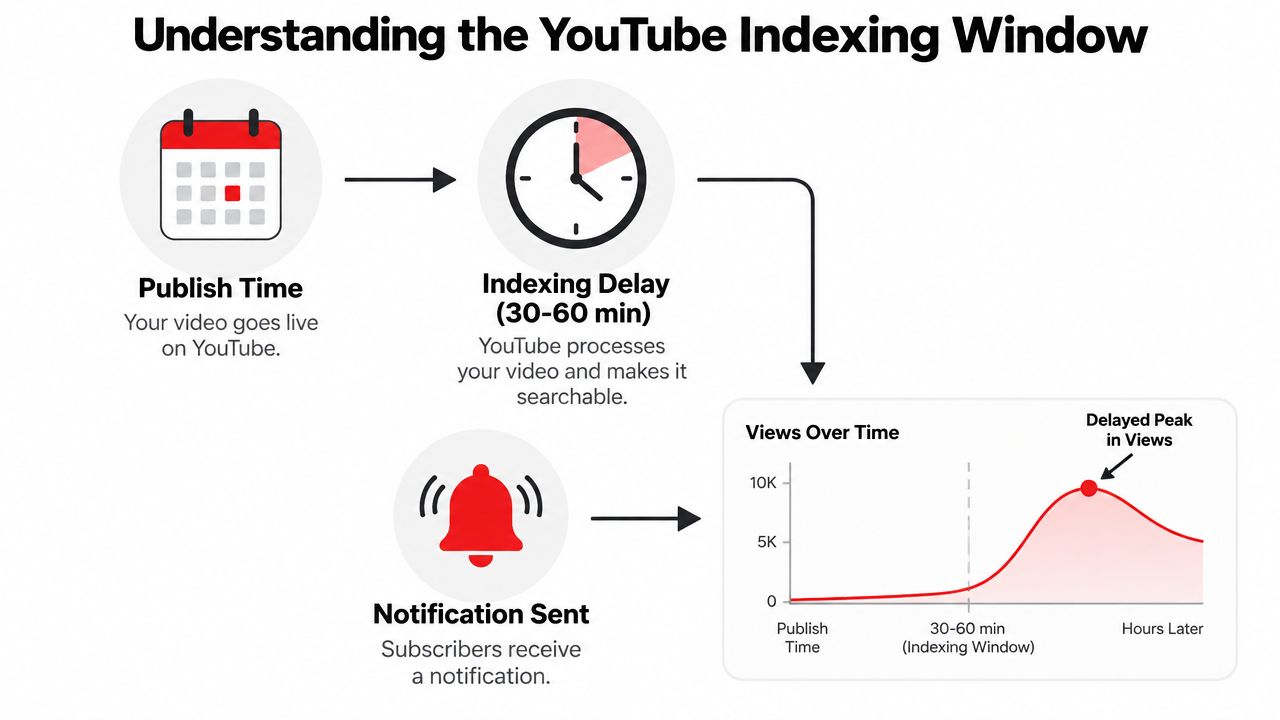
YouTube timing works best when you stop treating upload time and peak viewing time as the same thing. They're related, but they are not identical. After publication, the platform still needs time to process the file, generate metadata, send notifications where relevant, and test how early viewers respond before it decides how broadly to push the video.
Why publishing at the peak is often too late
If your audience peaks at 7 p.m. and you publish at 7 p.m., part of the window is already gone. The upload is still processing, getting indexed, and being evaluated while viewers are active. By the time the video is ready to gather broad momentum, many people have moved on to other content.
Experienced creators usually upload a few hours early for that reason. The buffer gives YouTube time to run its first tests before the audience is fully present, so early impressions and clicks can accumulate before the main browsing rush. In practical terms, that can be the difference between entering the feed cold and entering it with momentum.
A major 2026 study covering more than 2 million videos found that weekday uploads between 12 p.m. and 3 p.m. earned 2 to 3 times the early views of early-morning uploads, especially for channels with established subscribers who could be notified immediately when the video went live. That pattern points to the core mechanic. Upload timing is not just about the hour your viewers are active, it is about timing the notification and recommendation window before they are active. The study's timing model is summarized in YouTube post scheduling.
The runway matters more than the clock
Give the video runway. That runway includes processing time, indexing time, and the first click-through test from subscribers or returning viewers. If the title, thumbnail, and topic are strong, those early signals can build before peak attention starts.
Upload early enough that the platform can learn from the first viewers before the main audience arrives.
That is the distinction. Upload time is an operational choice. Peak viewing time is an audience habit. The best upload strategy sits before the habit, not inside it.
A practical scheduling benchmark from the retrieved sources also recommends publishing 2 to 4 hours before peak rather than at peak, because the algorithm needs time to work with the video before the audience shows up. Another benchmark source places weekday afternoons, especially 2 to 4 p.m. local time, as a strong general window for long-form content. The logic is the same. The platform needs a chance to test the video before your viewers flood in, which is why best times to post on YouTube is useful as a practical reference point.
Finding Your Audience Peak Activity
You don't have to guess when your viewers are active. YouTube Studio already shows it. The key is to read the data as a scheduling tool, not as a vanity chart. What you want is the point where your audience activity rises enough to support an upload that was published earlier in the day.
Where to look in YouTube Studio
Open YouTube Studio, go to Analytics, then switch to the Audience tab. Find the report labeled “When your viewers are on YouTube.” The heat map shows when your viewers are most active, and the darker blocks usually mark the hours that matter most for your channel.
Use that report to find the true peak, then subtract the indexing runway discussed above. If your strongest block is 6 p.m., a 3 p.m. or 4 p.m. upload often gives the platform enough room to start testing the video before the larger audience arrives. That's the point of the report, not to upload exactly at the darkest hour, but to find the hour you should precede.
How to turn the heat map into a schedule
Start with the day that shows the deepest activity. Then look one to three hours before that peak as your first test window. If your channel spans multiple regions, choose the time zone of your largest or most commercially important audience segment first, then adapt from there.
Use this simple decision flow:
- Find the darkest hour: This is your viewer peak, not your upload target.
- Move earlier by a few hours: Give indexing and early engagement room to work.
- Pick one consistent baseline: Don't rotate randomly between days until you have enough data.
- Watch the first wave: Track whether early viewers respond fast enough to justify the slot.
If your channel is new and the report says there isn't enough data, start with an industry baseline and hold it steady long enough to learn something. That's better than changing time slots every upload and confusing your own read on performance.
What newer channels should do first
For newer channels, use a default window until the analytics become reliable. A channel with no audience history can't yet tell you its own best time, so the first job is to establish repeatable behavior. Once you've published consistently for a few weeks, the heat map becomes more useful because it reflects actual viewers rather than guesses.
The test is simple. Baseline first, then refine. If you're using more than one content type, keep the analysis separate for each format, because long-form viewers and short-form viewers rarely behave the same way. That's where you stop copying general advice and start reading your own channel correctly.
Running a Two-Week Timing Experiment
Analytics tell you what has happened. They don't guarantee what will happen if you change the schedule. That's why a two-week timing experiment is the cleanest way to validate your upload window without guessing or overfitting to one good post.
Build the test around two real windows
Choose two distinct upload windows that both make sense for your audience. Keep the gap meaningful. If you always post at 2 p.m., test 2 p.m. against 5 p.m., not 2 p.m. against 2:30 p.m. The difference needs to be large enough to reveal behavior, but not so large that you're comparing unrelated audience patterns.
Hold the rest of the video as steady as possible. That means the same thumbnail style, similar title structure, the same format, and no major shift in topic complexity. If you change everything at once, you won't know whether the time, the packaging, or the subject caused the result.
Measure the right signals
The cleanest metrics are the ones that show early momentum.
- First-24-hour views tell you whether the upload slot gave the video enough early exposure.
- Click-through rate shows whether the title and thumbnail were picked up by the right viewers at the right time.
- Watch time and average view duration reveal whether the timing attracted the right audience, not just any audience.
One cited benchmark in the retrieved sources says 2 to 4 p.m. audience-time uploads produced 22% higher first-24-hour views than random timing, which is a useful directional reminder that timing can matter quickly. Treat that as a benchmark, not a promise, then compare your own results against it through consistent testing. The underlying approach is discussed in the analytics guide on timing tests and channel growth.
Don't declare a winner after one upload. One strong or weak video can distort the result.
A simple two-week structure
Week one should establish baseline behavior. Publish one video in each of the two windows, ideally on comparable content types. Week two repeats the pattern so you can see whether the earlier result holds up.
After the second week, compare the average performance of each window, not just the single best video. If one slot consistently produces better early traction and stable retention, that's your working upload time. If the result is mixed, keep testing, but don't let the schedule drift every day.
The biggest mistake is changing too many variables at once. Keep the experiment narrow, and you'll learn something. Keep it broad, and you'll just collect noise.
Default Upload Windows by Content Format
Format affects timing. A long-form tutorial, a documentary-style video, and a short clip each pull viewers into different habits, so the best default is a format-specific starting point you can test against your own analytics.
Long-form video needs runway
Long-form videos usually benefit from earlier publishing, especially in the morning or early afternoon. Analysts at Buffer's timing report found stronger long-form performance in the 8 to 11 a.m. range, with Sunday at 10 a.m. standing out, while RecurPost's 2026 timing study found weekday uploads between 12 p.m. and 3 p.m. produced stronger early views than early-morning posts. Those results point in the same direction for one practical reason, long-form uploads need time to process, index, and collect the first signals before the audience peak arrives.
The safer default is to publish before the peak, not inside it. A midday upload often gives YouTube more room to index the video before subscribers start clicking through, which matters if your audience is already trained to respond quickly to notifications.
Shorts play by a different rhythm
Shorts follow a faster, more mobile pattern. The retrieved guidance for Veo3 AI's Shorts workflow points to peak-hour scheduling in the target time zone, typically 12 p.m. to 3 p.m. and 7 p.m. to 10 p.m., which fits lunch breaks and evening scroll sessions. Treat that as a starting cadence for short-form, then check whether your viewers respond in those windows.
Shorts can sit closer to the peak than long-form content, but the audience still has to be awake and active in the right time zone. If your core viewers scroll at lunch or after work, the upload should already be live when that window opens.
Baseline upload windows by format
| Content Format | Best Days | Optimal Upload Window | Target Audience Behavior |
|---|---|---|---|
| Long-form videos | Sunday, Monday, Tuesday | Morning to early afternoon, often before peak viewing | Viewers need time for indexing, notifications, and early testing |
| Shorts | Weekdays and weekends, depending on topic | Midday and evening in the target time zone | Mobile browsing, quick sessions, and repeat scrolling |
| Educational or tutorial content | Weekdays, especially early in the week | Before the audience's main browsing period | Users want to learn before the day fills up |
| Lifestyle or entertainment content | Weekend mornings and earlier evening windows | Ahead of longer leisure sessions | Viewers have more uninterrupted time |
For creators building a short-form plan, timing should follow format behavior, not copied habits from long-form uploads. A separate Shorts content strategy needs its own schedule because viewers treat short clips as a different kind of session.
The baseline is only a starting point. Once a format has enough history, your own channel data should override any generic chart.
Scheduling and Measurement Best Practices
Good timing falls apart when execution is sloppy. Time zones get ignored, uploads go live at inconsistent hours, and creators change schedules so often that their analytics never stabilize. The fix is a repeatable workflow that respects both the algorithm's runway and the audience's attention pattern.
Build the schedule around your audience, not your convenience
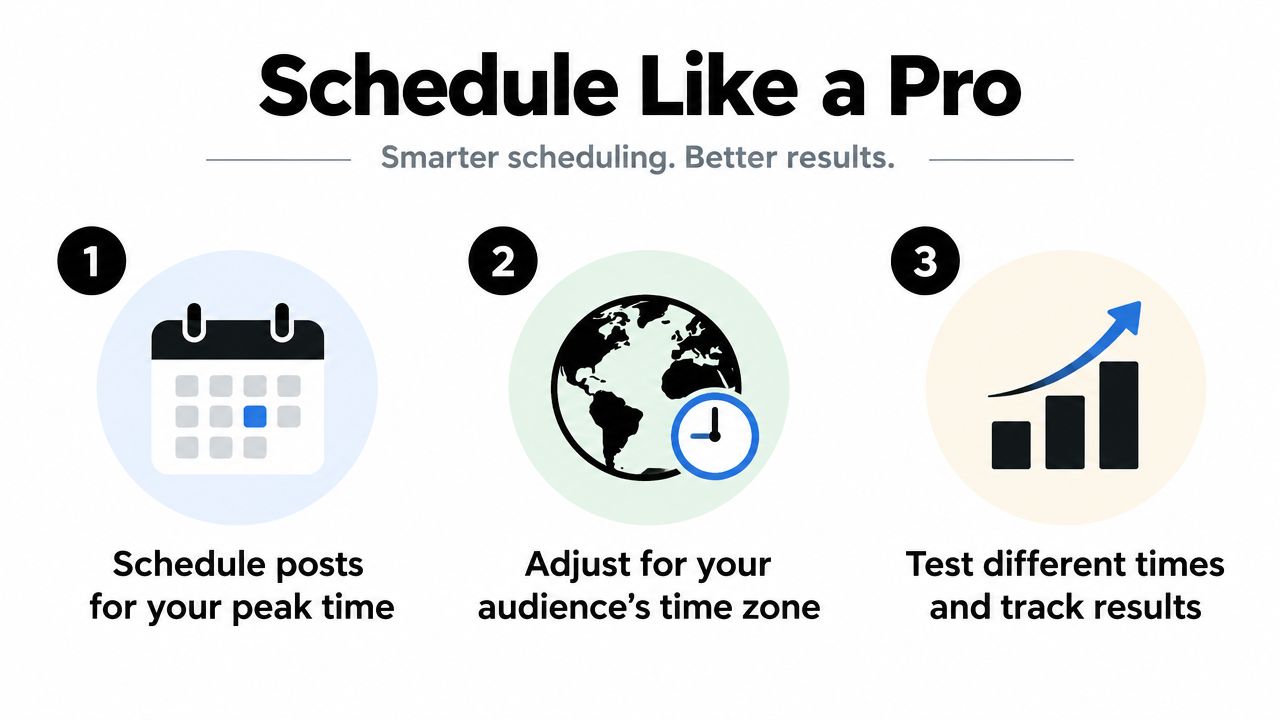
Use YouTube's native scheduler so the video goes live in the right window even when you're busy. If your audience spans time zones, schedule to the zone that contains your core viewers, not your personal working hours. That sounds basic, but it's where many channels lose visibility for no good reason.
Consistency matters because it trains returning viewers. If a subscriber expects new uploads in a certain block, and your publishing time jumps around, you weaken the habit loop that helps a channel get early traction.
Avoid notification fatigue and timing clutter
Uploading too close to your previous video can blur the performance read and reduce the value of the next notification. A channel that posts without rhythm can make subscribers ignore the alert because every upload feels urgent. Space the releases in a way that gives each video room to breathe.
If you need a broader operational model, the scheduling principles in this optimal YouTube upload schedule guide are a useful reference point, especially when you're deciding whether your audience responds better to earlier or later publication blocks. The point isn't to copy someone else's calendar. It's to keep your own workflow stable enough to measure.
Use a repeatable upload-day checklist
- Check the local peak window: Confirm the audience's active period in YouTube Studio.
- Schedule early: Publish before the peak so indexing has runway.
- Match the format to the slot: Long-form and Shorts shouldn't share the same assumptions.
- Track the first 24 hours: Compare early views, CTR, and watch time.
- Review and adjust: Keep the winner, then test the next variable.
If you're building a broader content engine, tie timing into the rest of your content system so uploads support the full funnel instead of living in isolation. A practical video content marketing strategy helps here because timing, packaging, and distribution work better when they're planned together.
The simplest summary is this. Pick a baseline, publish before peak, measure the early response, and only then refine the schedule. That workflow is boring, but it's the part that compounds.
If you want a faster way to turn your ideas into video assets that fit a disciplined upload schedule, Veo3 AI can help you generate videos from text or images without juggling multiple tools. It's a practical option for creators and marketers who need content ready on a consistent publishing rhythm, especially when timing and speed matter more than guesswork.
Related Articles
Continue with more blog posts in the same locale.

Whip Pan Shot Guide: How to Shoot and Recreate One with AI
Learn what a whip pan shot is, how to film it with the right shutter settings, edit it into a seamless cut, and recreate it with AI video prompts.
Read article
First Persons Point of View: How to Film It
Learn first persons point of view for film and AI video, including lenses, movement, audience fit, and comfort.
Read article
YouTube 1000 Subscribers: A Practical Growth Guide
Hit YouTube 1000 subscribers with the real ad gates, a 12-month upload plan, titles that convert, and Shorts rules that protect watch time.
Read article